---
title: CREATE an External Collection
description: This topic describes how you use the CREATE statement
to create a collection so that you can query OLAP data on an external data
source.
pubDate: 2026-08-17T09:53:44.266Z
antora:
editUrl: https://github.com/couchbaselabs/docs-columnar/edit/main/modules/sqlpp/pages/5_ddl_external.adoc
xref: xref:analytics:sqlpp:5_ddl_external.adoc[]
---
[Consult the llms.txt file for a full list of contents](/llms.txt)
[View original HTML](/analytics/sqlpp/5_ddl_external.html)
# CREATE an External Collection
> This topic describes how you use the `CREATE` statement to create a collection so that you can query OLAP data on an external data source.
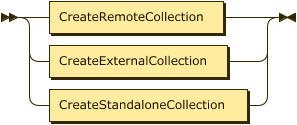
To create a link to an external data source, you use the Capella Analytics UI. See [Set Up an External Data Source](../sources/manage-external.md).
> [!NOTE]
> To be able to read or write data to or from external cloud storage, you need to configure your connection and permissions. For more information, see [AWS](../sources/required-permissions-aws.md), [GCS](../sources/required-permissions-gcs.md), and [Azure](../sources/required-permissions-azure.md).
## [](#syntax)Syntax
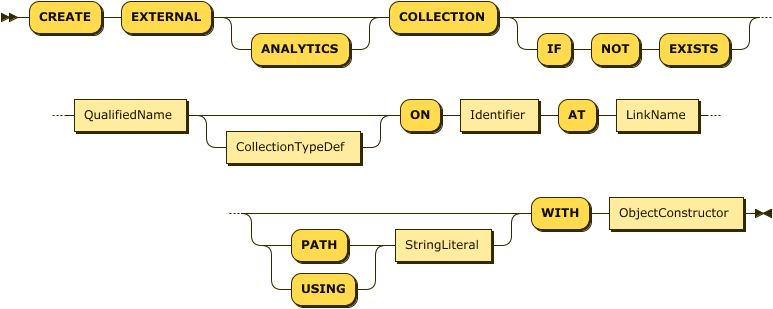
**CreateExternalCollection EBNF**
```EBNF
CreateExternalCollection ::= "CREATE" "EXTERNAL" "ANALYTICS"? "COLLECTION" ("IF" "NOT" "EXISTS")?
QualifiedName
CollectionTypeDef?
"ON" Identifier
"AT" LinkName
( ( 'PATH' | 'USING' ) StringLiteral )?
"WITH" ObjectConstructor
```
**CreateExternalCollection Diagram**
> [!NOTE]
> You must include the keyword `EXTERNAL` when creating this type of collection.
**Show QualifiedName Diagram**

QualifiedName
**Show CollectionTypeDef Diagram**
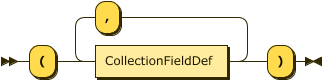
CollectionTypeDef
**Show CollectionFieldDef Diagram**
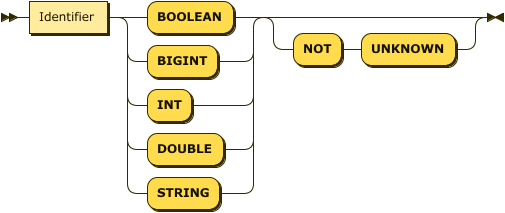
CollectionFieldDef
## [](#examples)Examples
The following examples create external Capella Analytics collections for data stored in cloud object stores.
> [!TIP]
> Use backtick characters (``` `` ```) to delimit identifiers that include the `-` [operator](2%5Fexpr.md#Operator%5Fexpressions) symbol.
```SQL++
CREATE EXTERNAL COLLECTION music.myPlaylist.countrySongs
ON `data-music`
AT musicLink
PATH "music/myPlaylist/countrySongs"
WITH {"format": "json"};
```
**Show another example**
```SQL++
CREATE EXTERNAL COLLECTION music.myPlaylist.rockSongs
ON `data-music`
AT musicLink
PATH "music/myPlaylist/rockSongs"
WITH {"format": "json"};
```
## [](#arguments)Arguments
ON
The **`ON`** clause identifies the bucket or container name on the external data source, such as an Amazon S3 bucket, a Google Cloud Storage (GCS) bucket, or an Azure Blob Storage container. Supply only the name of the bucket or container, not a URL.
AT
The **`AT`** clause specifies the name of the link that contains credentials for the cloud object stores. The specified link must have the type of cloud object store.
PATH
The **`PATH`**, or `USING`, clause is a string that specifies the location of the data files relative to the bucket name provided by the `ON` clause. Do not supply a filename as part of the path.
For example, the path can contain one or more cloud object stores prefixes delimited by slashes `/`, such as:
`PATH "music/myPlaylist/rockSongs"`
For your query to include files located at the bucket, or top, level of the storage organization, you supply an empty path:
`PATH ""`
External collections use the provided PATH to query the files in the specified location in the external object store. You can use the PATH to point to a desired subset of data only, leading to better performance as Capella Analytics does not query any files outside the provided PATH. For information about using dynamic prefixes in the path, which give you the ability to specify the exact prefix name in the WHERE clauses of your queries, see [Design a Location Path](../sources/dynamic-prefixes.md) and [Optimize Performance of External Analytics Collections in Couchbase](https://www.couchbase.com/blog/optimize-performance-of-external-analytics-collections-in-couchbase/).
To specify particular filenames in the path to query, you can supply either an `include` or an `exclude` parameter in the `WITH` clause.
WITH
The **`WITH`** clause enables you to specify parameters for the collection. Its `ObjectConstructor` represents an object containing key-value pairs, one for each parameter. You can define the following parameters.
| Name | Description | Schema |
| ----------------------------- | --------------------------------------------------------------------------------------------------------------------------------------------------------------------------------------------------------------------------------------------------------------------------------------------------------------------------------------------------------------------------------------------------------------------------------------------------------------------------------------------------------------------------------------------------------------------------------------------------------------------------------------------------------------------------------------------- | ----------------------------------- |
| **format** Required | Specifies the format of the external data. Accepts one of the following string values: json — [JSON Lines](http://jsonlines.org) csv — [Comma-separated values](https://tools.ietf.org/html/rfc4180) tsv — [Tab-separated values](https://www.iana.org/assignments/media-types/text/tab-separated-values) parquet — [Apache Parquet](https://parquet.apache.org) avro — [Apache Avro](https://avro.apache.org) For files that have a format of CSV or TSV, you also supply a list of field names and data types in the CollectionTypeDef, described below. For information about the mapping that Capella Analytics performs for Avro and Parquet data types, see [Data Type Mapping](#avro). | enum: json, csv, tsv, parquet, avro |
| **table format**Required | An external dataset pointing to a Deltalake Table. This enables you to create external datasets based on Delta Lake tables. "table-format": "delta" | Parquet |
| **decimal-to-double**Optional | Delta DECIMAL values are converted to doubles, with the possibility of precision loss. The flag decimal-to-double must be set upon creating the dataset. | Boolean |
| **timestamp-to-long**Optional | By default, Delta timestamps are converted to long. Set this flag to false to parse them as datetime. | Boolean |
| **date-to-int**Optional | By default, Delta date are converted to int. Set this flag to false to parse them as date. | Boolean |
| **timezone**Optional | The timezone flag adjusts temporal types (e.g., DATETIME) stored in UTC within Delta table to a specified local timezone (e.g., PST). | String |
| **header** Required | Only used if the **format** is CSV or TSV. When true, skip the first row of the file. | Boolean |
| escape | Specifies the character used to escape the QUOTE and carriage return value. **Default**: same as the QUOTE value (the quote character is displayed twice if it appears in the data) | String |
| quote | A character used to enclose strings. **Default**: " **Value**: NONE, ', " | String |
| **redact-warnings** Optional | Only used if the **format** is CSV or TSV. When true, redact sensitive information—such as the filename—from warning messages. **Default** : false | Boolean |
| **null** Optional | Only used if the **format** is CSV or TSV. The string used in the external collection to represent a null value. Use a backslash \\ to escape special characters: see [Literals](2%5Fexpr.md#Literals). See the NOT UNKNOWN flag in the CollectionTypeDef definition that follows. **Example** : "\\\\N" | string |
| **exclude** Optional | Applies only if the **include** parameter is not present. The names of the files in the specified path to exclude from querying. The supplied value can include a prefix, or subdirectory, of the location specified by the PATH clause. Capella Analytics queries any files that **do not** match the specification. You can use the following wildcard characters, in common with the **include** parameter: \* — Matches anything ? — Matches any single character \[ _sequence_ \] — Matches any characters in _sequence_ \[! _sequence_ \] — Matches any characters not in _sequence_ **Example** : "\*.?sv" | string, or array of strings |
| **include** Optional | Applies only if the **exclude** parameter is not present. The names of the files in the specified path to include in queries. The supplied value can include a prefix, or subdirectory, of the location specified by the PATH clause. Capella Analytics queries only files that **match** the specification. You can use the same wildcard characters as for the **exclude** parameter. **Example** : \["\*2018\*.json", "\*2019\*.json"\] | string, or array of strings |
CollectionTypeDef
You use the **`CollectionTypeDef`** if the files in the external data store have a format of CSV or TSV. It consists of a comma-separated list of field definitions and their desired field types. These definitions guide the transformation of each CSV or TSV record into a JSON object. Each field definition consists of:
* The name to assign to the field.
* The data type of the field. This can be any of the [primitive data types](10%5Fdata%5Ftype.md#PrimitiveTypes), where `INT` is an alias for `BIGINT`. If the field does not contain a value of this data type, Capella Analytics ignores the record and issues a warning.
* Optionally, the `NOT UNKNOWN` flag. When this flag is present, if this field is `missing` or `null`, Capella Analytics ignores the record.
Data in JSON, CSV, or TSV format can be in compressed gzip files, with the extension `.gz` or `.gzip`.
For more information about external collections, see [Set Up an External Data Source](../sources/manage-external.md).
## [](#avro)Data Type Mapping: Parquet and Avro
For files that have a format of Parquet or Avro, Capella Analytics maps data types as follows:
| Parquet/Avro Data Type | Capella Analytics Data Type |
| ---------------------- | -------------------------------------------------------------------------- |
| INT | INT |
| LONG | INT |
| FLOAT | DOUBLE |
| DOUBLE | DOUBLE |
| BYTES | BINARY |
| STRING | STRING |
| BOOLEAN | BOOLEAN |
| NULL | NULL |
| Union (nullable)\* | NULL/ANY |
| Record | OBJECT |
| Array | ARRAY |
| MAP | ARRAY of OBJECT in the form \[{"key": , "value": }, …\] |
\*Avro only