---
title: Build and Run
description: Build and run a starter app to validate your install of Couchbase Lite on Java
pubDate: 2026-08-17T09:53:44.266Z
antora:
editUrl: https://github.com/couchbase/docs-couchbase-lite/edit/release/3.0/modules/java/pages/gs-build.adoc
xref: xref:3.0@couchbase-lite:java:gs-build.adoc[]
---
[Consult the llms.txt file for a full list of contents](/llms.txt)
[View original HTML](/couchbase-lite/3.0/java/gs-build.html)
# Build and Run
> Description — _Build and run a starter app to validate your install of Couchbase Lite on Java_
> _Abstract — This content provides sample code and instructions that enable you to test your Couchbase Lite for java installation._
> Related Content — [Install](gs-install.md) | [Prerequisites](gs-prereqs.md) | [Build and Run](gs-build.md) |
## [](#build-a-getting-started-app)Build a Getting Started App
This section explains how to validate your configured build environment by building a starter app that uses many of _Couchbase Lite_ on Java's more common features.
The GettingStarted app demonstrates how to use _Couchbase Lite_ on Java. Console and Web App versions are available.
Development-type Scenarios
* Console App
* Web App
* About the Starter App
> [!TIP]
> Ensure you added the Couchbase Lite dependency to your `build.gradle` file
Create, build and run a new project using the following `GettingStarted.java` code:
```java
CouchbaseLite.init();
(1)
// Create a database
System.out.println("Starting DB");
DatabaseConfiguration cfg = new DatabaseConfiguration();
Database database = null;
try {
database = new Database( "mydb", cfg);
} catch (CouchbaseLiteException e) {
e.printStackTrace();
}
(2)
// Create a new document (i.e. a record) in the database.
MutableDocument mutableDoc =
new MutableDocument().setString("version", "2.0")
.setString("type", "SDK");
(3)
// Save it to the database.
try {
database.save(mutableDoc);
} catch (CouchbaseLiteException e) {
e.printStackTrace();
}
(4)
// Retrieve and update a document.
mutableDoc =
database.getDocument(mutableDoc.getId())
.toMutable()
.setString("language", "Kotlin");
try {
database.save(mutableDoc);
} catch (CouchbaseLiteException e) {
e.printStackTrace();
}
(5)
// Retrieve immutable document and log the document ID
// generated by the database and some document properties
Document document = database.getDocument(mutableDoc.getId());
System.out.println( String.format("Document ID :: %s", document.getId()));
System.out.println( String.format("Learning :: %s:", document.getString("language")));
(6)
// Create a query to fetch documents of type SDK.
Query listQuery = QueryBuilder.select(SelectResult.all())
.from(DataSource.database(database))
.where(Expression.property("type").equalTo(Expression.string("SDK")));
try {
for (Result result : listQuery.execute().allResults()) {
for ( String k : result.getDictionary(0).getKeys()) {
System.out.println( k + " = " + result.getDictionary(0).getString(k));
}
// String.format("Number of rows :: %n",
// rs.size()));
}
} catch (CouchbaseLiteException e) {
e.printStackTrace();
}
// (7)
// OPTIONAL -- if you have Sync Gateway Installed you can try replication too
// Create a replicator to push and pull changes to and from the cloud.
// Be sure to hold a reference somewhere to prevent the Replicator from being GCed
// BasicAuthenticator basAuth = new BasicAuthenticator("sync-gateway", "password".toCharArray());
//ReplicatorConfiguration replConfig =
// new ReplicatorConfiguration(database,
// URLEndpoint( URI("ws://localhost:4984/getting-started-db")),
// ReplicatorType.PUSH_AND_PULL,
// basAuth);
//
//Replicator replicator = new Replicator(replConfig);
// Listen to replicator change events.
// Version using Kotlin Flows to follow shortly ...
//replicator.addChangeListener(new ReplicatorChangeListener() {
// @Override
// public void changed(@NonNull ReplicatorChange change) {
// if (change.getStatus().getError() != null) {
// System.out.println( "Error code :: ${err.code}");
// }
// }
// });
// Start replication.
// replicator.start();
}
}
```
| **1** | Create a database |
| ----- | ---------------------------------------------------------------------------- |
| **2** | Create a mutable document |
| **3** | Save document to database |
| **4** | Retrieve the document as mutable and change the language to Java and save it |
| **5** | Retrieve document as immutable and log it ID |
| **6** | Query the database output count and id to log |
| **7** | Optionally, initiate a replication |
On running the app, you should see the document ID and property printed to the console together with a query result showing the number of rows in the database.
This shows the document was successfully persisted to the database.
See [\[About the Getting Started App\]](#About the Getting Started App) for more on the app itself
This section explains how to set-up a build project to create _Couchbase Lite_ on Java web apps using gradle and Intellij IDEA.
**Steps**
1. Create a new project folder and add a `build.gradle` file containing the following:
```groovy
```
2. Within Intellij IDEA, open the new project folder
If you don't have auto-import enabled, then accept the **Import from Gradle** prompt that appears at the bottom right of the screen.
3. Create a Java class _GettingStarted_ using this code:
```java
//@WebServlet( value = "/GettingStarted")
//public class GettingStartedWebApp extends javax.servlet.http.HttpServlet {
public class GettingStartedWebApp {
private static final String DB_DIR = "/usr/local/var/tomcat/data"; (1)
private static final String DB_NAME = "getting-started";
/* Credentials declared this way purely for expediency in this demo - use OAUTH in production code */
private static final String DB_USER = "sync_gateway";
private static final String DB_PASS = "password";
// private static final String SYNC_GATEWAY_URL = "ws://127.0.0.1:4984/db" + DB_NAME;
private static final String SYNC_GATEWAY_URL = "ws://127.0.0.1:4984/getting-started"; (2)
private static final String NEWLINETAG = "
";
private String MYRESULTS;
private int NUMROWS;
private Random RANDOM = new Random();
protected void doGet(javax.servlet.http.HttpServletRequest request, javax.servlet.http.HttpServletResponse
response) throws javax.servlet.ServletException, IOException {
outputMessage("Servlet started :: doGet Invoked");
doPost(request, response);
}
protected void doPost(javax.servlet.http.HttpServletRequest request, javax.servlet.http.HttpServletResponse
response) throws javax.servlet.ServletException, IOException {
NUMROWS = 0;
MYRESULTS = "";
outputMessage("Servlet started :: doPost Invoked");
String url = "/showDbItems.jsp";
try {
MYRESULTS = testCouchbaseLite();
} catch (CouchbaseLiteException | URISyntaxException | InterruptedException e) {
e.printStackTrace();
} finally {
outputMessage(String.format("CouchbaseLite Test Ended :: There are %d rows in DB", NUMROWS));
}
request.setAttribute("myRowCount", NUMROWS);
request.setAttribute("myResults", MYRESULTS);
getServletContext()
.getRequestDispatcher(url)
.forward(request, response);
outputMessage("Servlet Ended :: doPost Exits");
}
public String testCouchbaseLite() throws CouchbaseLiteException, URISyntaxException, InterruptedException, ServletException {
int randPtr = RANDOM.nextInt(5) + 1;
long syncTotal = 0;
Double randVn = RANDOM.nextDouble() + 1;
List listLangs = new ArrayList(Arrays.asList("Java", "Swift", "C#.Net", "Objective-C", "C++", "Cobol"));
List listTypes = new ArrayList(Arrays.asList("SDK", "API", "Framework", "Methodology", "Language", "IDE"));
String Prop_Id = "id";
String Prop_Language = "language";
String Prop_Type = "type";
String Prop_Version = "version";
String searchStringType = "SDK";
// Get and configure database
// Note initialisation of CouchbaseLite is done in ServletContextListener
outputMessage("== Opening DB and doing initial sync");
Database database = DatabaseManager.manager().getDatabase(DB_NAME,DB_DIR,DB_PASS);
// Initial DB sync prior to local updates
syncTotal = DatabaseManager.manager().runOneShotReplication(database, SYNC_GATEWAY_URL, DB_USER, DB_PASS);
outputMessage(String.format("Inital number of rows synchronised = %d", syncTotal));
// Create a new document (i.e. a record) in the database.
outputMessage("== Adding a record");
MutableDocument mutableDoc = new MutableDocument()
.setDouble(Prop_Version, randVn)
.setString(Prop_Type, listTypes.get(RANDOM.nextInt(listTypes.size() - 1)));
// Save it to the database.
try {
database.save(mutableDoc);
} catch (CouchbaseLiteException e) {
throw new ServletException("Error saving a document", e);
}
// Update a document.
outputMessage("== Updating added record");
mutableDoc = database.getDocument(mutableDoc.getId()).toMutable();
mutableDoc.setString(Prop_Language, listLangs.get(RANDOM.nextInt(listLangs.size() - 1)));
// Save it to the database.
try {
database.save(mutableDoc);
} catch (CouchbaseLiteException e) {
throw new ServletException("Error saving a document", e);
}
outputMessage("== Retrieving record by id");
Document newDoc = database.getDocument(mutableDoc.getId());
// Show the document ID (generated by the database) and properties
outputMessage("Document ID :: " + newDoc.getId());
outputMessage("Learning " + newDoc.getString(Prop_Language));
// Create a query to fetch documents of type SDK.
outputMessage("== Executing Query 1");
Query query = QueryBuilder.select(SelectResult.all())
.from(DataSource.database(database))
.where(Expression.property(Prop_Type).equalTo(Expression.string(searchStringType)));
try{
ResultSet result = query.execute();
outputMessage(String.format("Query returned %d rows of type %s", result.allResults().size(), searchStringType));
} catch (CouchbaseLiteException e) {
e.printStackTrace();
}
// Create a query to fetch all documents.
outputMessage("== Executing Query 2");
Query queryAll = QueryBuilder.select(SelectResult.expression(Meta.id),
SelectResult.property(Prop_Language),
SelectResult.property(Prop_Version),
SelectResult.property(Prop_Type))
.from(DataSource.database(database));
try {
for (Result thisDoc : queryAll.execute()) {
NUMROWS++;
outputMessage(String.format("%d ... Id: %s is learning: %s version: %.2f type is %s",
NUMROWS,
thisDoc.getString(Prop_Id),
thisDoc.getString(Prop_Language),
thisDoc.getDouble(Prop_Version),
thisDoc.getString(Prop_Type)));
}
} catch (CouchbaseLiteException e) {
e.printStackTrace();
}
outputMessage(String.format("Total rows returned by query = %d", NUMROWS));
// Do final single-shot replication to incorporate changed NumRows
outputMessage("== Doing final single-shot sync");
syncTotal = DatabaseManager.manager().runOneShotReplication(database, SYNC_GATEWAY_URL, DB_USER, DB_PASS);
outputMessage(String.format("Total rows synchronised = %d", syncTotal));
database.close();
return MYRESULTS;
}
public void outputMessage(String msg) {
String thisMsg = "Null message";
if (msg.length() > 0) {
thisMsg = msg;
}
System.out.println(msg);
MYRESULTS = MYRESULTS + msg + NEWLINETAG;
}
}
```
| **1** | It is advisable to set a specific directory path for the database. |
| ----- | ------------------------------------------------------------------------------------------------------------------------ |
| **2** | The app will start a replicator pointing to ws://localhost:4984/db, where db is the name of your _Sync Gateway_ database |
4. Create a Java class _Listener_ using this code:
```java
// import javax.servlet.ServletContextEvent;
// import javax.servlet.ServletContextListener;
// import javax.servlet.annotation.WebListener;
//
// @WebListener
// public class Application implements ServletContextListener {
public class GsWebApp_Listener {
@Override
public void contextInitialized(ServletContextEvent event) {
DatabaseManager.manager().init();
}
}
```
5. Create a Java class _Database Manager_ using this code:
```java
//import com.couchbase.lite.*;
//import java.net.URI;
//import java.net.URISyntaxException;
public class DatabaseManager {
private static DatabaseManager instance;
private Database database;
public static synchronized DatabaseManager manager() {
if (instance == null) {
instance = new DatabaseManager();
}
return instance;
}
public synchronized void init() {
CouchbaseLite.init(); (1)
}
public synchronized Database getDatabase(String parDbname, String parDbDir, String parDbPass) {
if (database == null) {
try {
DatabaseConfiguration config = new DatabaseConfiguration();
config.setDirectory(parDbDir); (2)
config.setEncryptionKey(new EncryptionKey(parDb_PASS)); (3)
database = new Database(parDbname, config);
}
catch (CouchbaseLiteException e) {
throw new IllegalStateException("Cannot create database", e);
}
}
return database;
}
public synchronized long runOneShotReplication( Database parDb, String parURL, String parName, String parPassword) throws InterruptedException {
long syncTotal = 0;
// Set replicator endpoint
URI sgURI = null;
try {
sgURI = new URI(parURL);
} catch (URISyntaxException e) {
e.printStackTrace();
}
URLEndpoint targetEndpoint = new URLEndpoint(sgURI);
// Configure replication
System.out.println("== Synchronising DB :: Configuring replicator");
ReplicatorConfiguration replConfig = new ReplicatorConfiguration(parDb, targetEndpoint);
replConfig.setReplicatorType(ReplicatorConfiguration.ReplicatorType.PUSH_AND_PULL);
replConfig.setContinuous(false); // make this a single-shot replication cf. a continuous replication
// Add authentication.
// outputMessage("== Synchronising DB :: Setting authenticator");
replConfig.setAuthenticator(new BasicAuthenticator(parName, parPassword));
// Create replicator (be sure to hold a reference somewhere that will prevent the Replicator from being GCed)
// outputMessage("== Synchronising DB :: Creating replicator");
Replicator replicator = new Replicator(replConfig);
// Listen to replicator change events.
// System.out.println("== Synchronising DB :: Adding listener");
replicator.addChangeListener(change -> {
if (change.getStatus().getError() != null) {
System.err.println("Error code :: " + change.getStatus().getError().getCode());
}
});
// Start replication.
// outputMessage("== Synchronising DB :: Starting");
replicator.start();
// Check status of replication and wait till it is completed
while ((replicator.getStatus().getActivityLevel() != Replicator.ActivityLevel.STOPPED) && (replicator.getStatus().getActivityLevel() != Replicator.ActivityLevel.IDLE)) {
Thread.sleep(1000);
}
syncTotal = replicator.getStatus().getProgress().getTotal();
replicator.stop();
// outputMessage("== Synchronising DB :: Completed ");
return replicator.getStatus().getProgress().getTotal();
}
}
```
| **1** | This is the only API that differs from the Java (android) version. It accepts no parameters and should be called once only |
| ----- | -------------------------------------------------------------------------------------------------------------------------- |
| **2** | It is advisable to set a specific directory path for the database. |
| **3** | You can optionally AES-256 encrypt the database by providing a key |
6. Create an `index.html` file in `src/main/web app` with the following content:
```html
```
7. Create a `showDbItems.jsp` file in `src/main/web app` with the following content:
```html
```
8. Build, deploy and run the app using `tomcatRun`
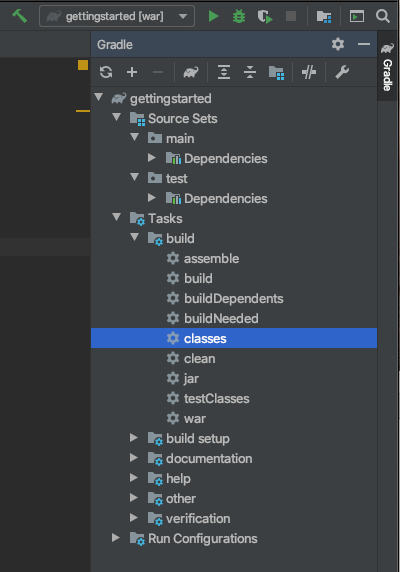
1. Point your browser to: `localhost:8080/gettingstarted`
This opens the browser at your index.html page.
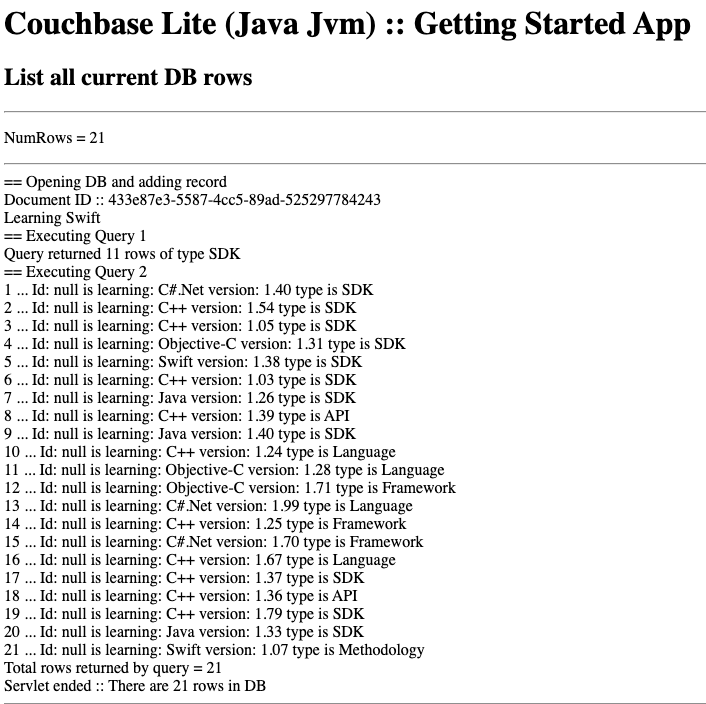
2. Select the **here** link
This launches the servlet and displays the results in `showdDbItems.jsp`. They are also added to the _catalina.out_ log file.
The GettingStarted app will:
* Create a database
The app creates its database in the `/getting-started.cblite2` directory relative to its root location when run (See: [Finding a Database File](database.md#lbl-find-db-loc)).
> [!TIP]
> Explicitly state your required database location when creating your database (see: [Finding a Database File](database.md#lbl-find-db-loc) for how to do this)
* Add content to the DB
* Run a simple query counting the DB rows
* Start a one-shot, bi-directional replication using _Sync Gateway_ and _Couchbase Server_
* Produce a simple report on the db Contents
> [!NOTE]
> Before starting your app ensure you have started both your _Couchbase Server_ and _Sync Gateway_ instances.