---
title: CREATE FUNCTION
description: The CREATE FUNCTION statement enables you to create a
user-defined function.
pubDate: 2026-08-17T09:53:44.266Z
antora:
editUrl: https://github.com/couchbaselabs/docs-devex/edit/release/7.2/modules/n1ql/pages/n1ql-language-reference/createfunction.adoc
xref: xref:7.2@server:n1ql:n1ql-language-reference/createfunction.adoc[]
---
[Consult the llms.txt file for a full list of contents](/llms.txt)
[View original HTML](/server/7.2/n1ql/n1ql-language-reference/createfunction.html)
# CREATE FUNCTION
> The `CREATE FUNCTION` statement enables you to create a user-defined function.
## [](#purpose)Purpose
There are two types of user-defined function:
* _Inline functions_ are defined using SQL++ expressions, including subqueries. They enable you to name and reuse complex or repetitive expressions, including subqueries, in order to simplify your queries.
* _External functions_ are defined using an external language. They enable you to create functions that may be difficult or impossible to define using built-in SQL++ expressions. The only supported language is JavaScript.
### [](#context)Global Functions and Scoped Functions
You can create user-defined functions at two different levels of the SQL++ [logical hierarchy](../n1ql-intro/sysinfo.md#logical-hierarchy).
* A _global function_ is created within a namespace, at the same level as the buckets within the namespace. When you call a global function, any partial keyspace references within the function definition are resolved against the function's namespace, regardless of the current [query context](../n1ql-intro/queriesandresults.md#query-context).
For example, when you call a global function `default:global()` which contains the keyspace reference `` `travel-sample` ``, the keyspace reference is always resolved within the context of the function to the `` default:`travel-sample` `` bucket.
* A _scoped function_ is created within a scope, at the same level as the collections within the scope. When you call a scoped function, any partial keyspace references within the function definition are resolved against the function's scope, regardless of the current [query context](../n1ql-intro/queriesandresults.md#query-context).
For example, when you call a scoped function `` default:`travel-sample`.inventory.scope() `` which contains the keyspace reference `route`, the keyspace reference is always resolved within the context of the function to `` default:`travel-sample`.inventory.route ``.
When you create a user-defined function, the current query context determines whether it is created as a global function or a scoped function. If you want to create a user-defined function outside of the current query context, you must include the full path to the function when you specify the function name.
Similarly, when you call a user-defined function, the current query context determines the path to the function. If you want to call a user-defined function outside of the current query context, you must include the full path to the function when you specify the function name.
Finally, it is important to note that a global function is _not_ the same as a scoped function stored in the default scope in a bucket.
### [](#external-libraries)External Libraries
External functions are stored in _libraries_. Like user-defined functions, these libraries may also be scoped or global. This enables you to keep the code for external functions separate where required.
Code which is stored in a _scoped library_ is private to users of that scope, and is not visible or available to users of another scope. Code which is stored in a _global library_ is available to users of all scopes.
A global library may have the same name as a scoped library, and scoped libraries may have the same name as each other. For example, you may have a global `math` library, and a `math` library in each scope.
## [](#rbac-privileges)RBAC Privileges
To manage global internal functions, you must have the **Manage Global Functions** role. To manage scoped internal functions, you must have the **Manage Scope Functions** role, with permissions on the specified bucket and scope.
To manage global external functions, you must have the **Manage Global External Functions** role. To manage scoped external functions, you must have the **Manage Scope External Functions** role, with permissions on the specified bucket and scope.
Users with the **Manage Scope External Functions** role also have read-only access to any global external library.
To execute global internal functions, you must have the **Execute Global Functions** role. To execute scoped internal functions, you must have the **Execute Scope Functions** role, with permissions on the specified bucket and scope.
To execute global external functions, you must have the **Execute Global External Functions** role. To execute scoped external functions, you must have the **Execute Scope External Functions** role, with permissions on the specified bucket and scope.
For more details about user roles, see [Authorization](../../learn/security/authorization-overview.md).
## [](#syntax)Syntax
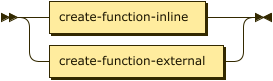
The `CREATE FUNCTION` statement takes a different syntax depending on the type of function you are creating. Refer to [Inline Functions](#create-function-inline) or [External Functions](#create-function-external) below.
```ebnf
create-function ::= create-function-inline | create-function-external
```
### [](#create-function-inline)Inline Functions
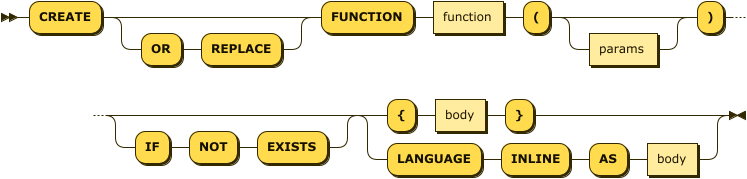
There are two alternative syntaxes for defining an inline function: a syntax with braces `{}` and a syntax using the `LANGUAGE` keyword. The two syntaxes are synonymous.
```ebnf
create-function-inline ::= 'CREATE' ( 'OR' 'REPLACE' )? 'FUNCTION' function '(' params? ')'
( 'IF' 'NOT' 'EXISTS' )?
( '{' body '}' | 'LANGUAGE' 'INLINE' 'AS' body )
```
function
(Required) Refer to [Function Name](#inline-name) below.
params
(Optional) Refer to [Function Parameters](#inline-parameter) below.
body
(Required) Refer to [Function Body](#inline-expression) below.
#### [](#inline-name)Function Name
```ebnf
function ::= ( namespace ':' ( bucket '.' scope '.' )? )? identifier
```

The function name specifies the name of the function to create. It is recommended to use an unqualified identifier for the function name, such as `func1` or `` `func-1` ``. In this case, the function is created as a global function or a scoped function, depending on the current query context.
To create a global function in a particular namespace, the function name must be a qualified identifier with a namespace, such as `default:func1`. Similarly, to create a scoped function in a particular scope, the function name must be a qualified identifier with the full path to a scope, such as `` default:`travel-sample`.inventory.func1 ``.
If the function name is an unqualified identifier, it may not be the same as a reserved keyword. A function name with a specified namespace or scope may have the same name as a reserved keyword.
#### [](#inline-parameter)Function Parameters
```ebnf
params ::= identifier ( "," identifier )* | "..."
```
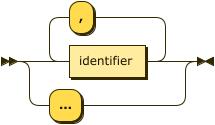
\[Optional\] The function parameter list specifies parameters for the function. If you specify named parameters for the function, then you must call the function with exactly the same number of arguments at execution time. If you specify no parameters, then you must call the function with no arguments. To create a variadic function, that is, a function which you can call with any number of arguments or none, specify `...` as the only parameter.
#### [](#inline-expression)Function Body
The function body defines the function. You can use any valid SQL++ expression. If you specified named parameters for the function, you can use these in the expression to represent arguments passed to the function at execution time. If you specified that the function is variadic, any arguments passed to the function at execution time are held in an array named `args`.
> [!NOTE]
> * If the expression contains a parameter that has the same name as a field in the document, it will always refer to the parameter. To distinguish between the field and the parameter, prefix the field with the keyspace name, for example `landmark.activity`. To avoid this ambiguity, you should use unique parameter names that do not clash with document field names, such as `vActivity`.
> * Functions may return only one value, of any valid SQL++ type. For inline functions, the result and type of the function are the result and type of the expression. If you need to return multiple values, construct an array.
#### [](#inline-replace)OR REPLACE / IF NOT EXISTS
The optional `OR REPLACE` clause enables you to redefine a user-defined function if it already exists, whereas the optional `IF NOT EXISTS` clause enables the statement to complete successfully without replacing the function.
When a function with the same name already exists within the same context: \[[1](#%5Ffootnotedef%5F1 "View footnote.")\]
* If the `OR REPLACE` clause is present, the existing function is replaced.
* If the `IF NOT EXISTS` clause is present, the statement does nothing and completes without error.
* If neither of these two clauses is present, an error is generated.
> [!NOTE]
> These clauses are exclusive. If the statement contains both the `OR REPLACE` clause and the `IF NOT EXISTS` clause, an error is generated.
### [](#create-function-external)External Functions
```ebnf
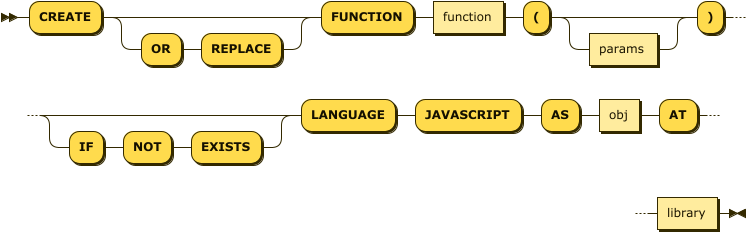
create-function-external ::= 'CREATE' ( 'OR' 'REPLACE' )? 'FUNCTION' function '(' params? ')'
( 'IF' 'NOT' 'EXISTS' )?
'LANGUAGE' 'JAVASCRIPT' 'AS' obj 'AT' library
```
function
(Required) Refer to [Function Name](#external-name) below.
params
(Optional) Refer to [Function Parameters](#external-parameter) below.
obj
(Required) Refer to [External Object](#external-object) below.
library
(Required) Refer to [External Library](#external-library) below.
#### [](#external-name)Function Name
```ebnf
function ::= ( namespace ':' ( bucket '.' scope '.' )? )? identifier
```

The function name specifies the name of the function to create. It is recommended to use an unqualified identifier for the function name, such as `func1` or `` `func-1` ``. In this case, the function is created as a global function or a scoped function, depending on the current query context.
To create a global function in a particular namespace, the function name must be a qualified identifier with a namespace, such as `default:func1`. Similarly, to create a scoped function in a particular scope, the function name must be a qualified identifier with the full path to a scope, such as `` default:`travel-sample`.inventory.func1 ``.
If the function name is an unqualified identifier, it may not be the same as a reserved keyword. A function name with a specified namespace or scope may have the same name as a reserved keyword.
#### [](#external-parameter)Function Parameters
```ebnf
params ::= identifier ( "," identifier )* | "..."
```

\[Optional\] The function parameter list specifies parameters for the function. If you specify named parameters for the function, then you must call the function with exactly the same number of arguments at execution time. If you specify no parameters, then you must call the function with no arguments. To create a variadic function, that is, a function which you can call with any number of arguments or none, specify `...` as the only parameter.
#### [](#external-object)External Object
The name of the JavaScript function that you want to use for the user-defined function. This parameter is a string and must be wrapped in quotes. External functions in SQL++ _only_ support plain JavaScript, without any of the [added language features](../../eventing/eventing-language-constructs.md#added-lang-features) supported by functions in the Eventing Service.
#### [](#external-library)External Library
The name of the JavaScript library that contains the function you want to use. This parameter is a string and must be wrapped in quotes. You must create the JavaScript library and the JavaScript function using the SQL++ Functions REST API. For details, refer to [Functions REST API](../n1ql-rest-api/functions.md).
The name of a scoped external library must include the bucket name, the scope name, and the library name, separated by slashes. For example, to refer to a scoped library called `my-library` located in the `inventory` scope within the `travel-sample` bucket, you would specify the library name as `travel-sample/inventory/my-library`.
#### [](#external-replace)OR REPLACE / IF NOT EXISTS
The optional `OR REPLACE` clause enables you to redefine a user-defined function if it already exists, whereas the optional `IF NOT EXISTS` clause enables the statement to complete successfully without replacing the function.
When a function with the same name already exists within the same context: \[[1](#%5Ffootnotedef%5F1 "View footnote.")\]
* If the `OR REPLACE` clause is present, the existing function is replaced.
* If the `IF NOT EXISTS` clause is present, the statement does nothing and completes without error.
* If neither of these two clauses is present, an error is generated.
> [!NOTE]
> These clauses are exclusive. If the statement contains both the `OR REPLACE` clause and the `IF NOT EXISTS` clause, an error is generated.
## [](#examples)Examples
For simplicity, none of these examples implement any data validation or error checking. If necessary, you can use [conditional operators](conditionalops.md) to check the parameters of a user-defined function, and the [ABORT()](metafun.md#abort) function to generate an error if something is wrong.
Example 1\. Inline function with the LANGUAGE syntax
This statement creates a function called `celsius`, which converts Fahrenheit to Celsius. The function is variadic.
For purposes of illustration, this expression converts just the first argument supplied at execution time, which is stored in the first member in the `args` array. A more realistic variadic function would make use of all the supplied arguments.
```sqlpp
CREATE FUNCTION celsius(...) LANGUAGE INLINE AS (args[0] - 32) * 5/9;
```
Test
```sqlpp
EXECUTE FUNCTION celsius(100);
```
Result
```json
[
37.77777777777778
]
```
Example 2\. Inline function with the braces syntax
This statement creates a function called `fahrenheit`, which converts Celsius to Fahrenheit. The function is variadic.
For purposes of illustration, this expression converts just the first argument supplied at execution time, which is stored in the first member in the `args` array. A more realistic variadic function would make use of all the supplied arguments.
```sqlpp
CREATE FUNCTION fahrenheit(...) { (args[0] * 9/5) + 32 };
```
Test
```sqlpp
EXECUTE FUNCTION fahrenheit(100, "ignore this");
```
Result
```json
[
212
]
```
As the function is variadic, you can use any number of arguments when you call the function. Arguments which are not used by the function expression are ignored.
Example 3\. Inline function with named parameters
The following statement creates a function called `lstr`, which returns the specified number of characters from the left of a string. The expression expects two named arguments: `vString`, which is the string to work with, and `vLen`, which is the number of characters to return.
```sqlpp
CREATE FUNCTION lstr(vString, vLen) LANGUAGE INLINE AS SUBSTR(vString, 0, vLen);
```
Test
```sqlpp
EXECUTE FUNCTION lstr("Couchbase", 5, "ignore this");
```
Result
```json
[
{
"code": 10104,
"msg": "Incorrect number of arguments supplied to function lstr - cause: lstr"
}
]
```
As the arguments were specified by the function definition, you must use the same number of arguments when you call the function. If you supply the wrong number of arguments, an error is generated.
Example 4\. Inline function with named parameters
The following statement creates a function called `rstr`, which returns the specified number of characters from the right of a string. The expression expects two named arguments: `vString`, which is the string to work with, and `vLen`, which is the number of characters to return.
```sqlpp
CREATE FUNCTION rstr(vString, vLen) { SUBSTR(vString, LENGTH(vString) - vLen, vLen) };
```
Test
```sqlpp
EXECUTE FUNCTION rstr("Couchbase", 4);
```
Result
```json
[
"base"
]
```
Example 5\. Inline function with subquery
The following statement creates a function called `locations`, which selects name and address information from all documents with the specified activity in the `landmark` keyspace.
```sqlpp
CREATE FUNCTION locations(vActivity) { (
SELECT id, name, address, city
FROM landmark
WHERE activity = vActivity) };
```
Test
```sqlpp
EXECUTE FUNCTION locations("see");
```
Result
```json
[
[
{
"address": "Prince Arthur Road, ME4 4UG",
"city": "Gillingham",
"id": 10019,
"name": "Royal Engineers Museum"
},
{
"address": "84 rue Claude Monet",
"city": "Giverny",
"id": 10061,
"name": "Monet's House"
},
...
```
Example 6\. Replace a function
This statement creates a function which returns the mathematical constant φ. The function takes no arguments.
```sqlpp
CREATE FUNCTION phi() { 2 * SIN(RADIANS(54)) };
```
Test
```sqlpp
EXECUTE FUNCTION phi();
```
Result
```json
[
1.618033988749895
]
```
The following statement redefines the function so that it calculates φ using a different method.
Replace
```sqlpp
CREATE OR REPLACE FUNCTION phi() { (1 + SQRT(5)) / 2 };
```
Test
```sqlpp
EXECUTE FUNCTION phi();
```
Result
```json
[
1.618033988749895
]
```
Example 7\. External functions
The following command registers two JavaScript functions called `encodeGeoHash` and `calculateAdjacent` in a library called `geohash-js`. \[[2](#%5Ffootnotedef%5F2 "View footnote.")\]
* The function `encodeGeoHash` takes two arguments, a latitude and a longitude, and returns the 12-character [geohash](https://en.wikipedia.org/wiki/Geohash) for the specified location.
* The function `calculateAdjacent` takes two arguments, a geohash and a direction — `"top"`, `"bottom"`, `"left"`, or `"right"` — and returns the geohash of the location next to the original geohash in the specified direction.
```sh
curl -v -X POST \
http://localhost:8093/evaluator/v1/libraries/geohash-js \
-u Administrator:password \
-H 'content-type: application/json' \
-d 'function encodeGeoHash(latitude, longitude) {
var BITS = [16, 8, 4, 2, 1];
var BASE32 = "0123456789bcdefghjkmnpqrstuvwxyz";
var is_even = 1;
var i = 0, mid;
var lat = []; var lon = [];
var bit = 0;
var ch = 0;
var precision = 12;
var geohash = "";
lat[0] = -90.0; lat[1] = 90.0;
lon[0] = -180.0; lon[1] = 180.0;
while (geohash.length < precision) {
if (is_even) {
mid = (lon[0] + lon[1]) / 2;
if (longitude > mid) {
ch |= BITS[bit];
lon[0] = mid;
} else
lon[1] = mid;
} else {
mid = (lat[0] + lat[1]) / 2;
if (latitude > mid) {
ch |= BITS[bit];
lat[0] = mid;
} else
lat[1] = mid;
}
is_even = !is_even;
if (bit < 4)
bit++;
else {
geohash += BASE32[ch];
bit = 0;
ch = 0;
}
}
return geohash;
}
function calculateAdjacent(srcHash, dir) {
var BITS = [16, 8, 4, 2, 1];
var BASE32 = "0123456789bcdefghjkmnpqrstuvwxyz";
var NEIGHBORS = { right : { even : "bc01fg45238967deuvhjyznpkmstqrwx" },
left : { even : "238967debc01fg45kmstqrwxuvhjyznp" },
top : { even : "p0r21436x8zb9dcf5h7kjnmqesgutwvy" },
bottom : { even : "14365h7k9dcfesgujnmqp0r2twvyx8zb" } };
var BORDERS = { right : { even : "bcfguvyz" },
left : { even : "0145hjnp" },
top : { even : "prxz" },
bottom : { even : "028b" } };
NEIGHBORS.bottom.odd = NEIGHBORS.left.even;
NEIGHBORS.top.odd = NEIGHBORS.right.even;
NEIGHBORS.left.odd = NEIGHBORS.bottom.even;
NEIGHBORS.right.odd = NEIGHBORS.top.even;
BORDERS.bottom.odd = BORDERS.left.even;
BORDERS.top.odd = BORDERS.right.even;
BORDERS.left.odd = BORDERS.bottom.even;
BORDERS.right.odd = BORDERS.top.even;
srcHash = srcHash.toLowerCase();
var lastChr = srcHash.charAt(srcHash.length - 1);
var type = (srcHash.length % 2) ? "odd" : "even";
var base = srcHash.substring(0, srcHash.length - 1);
if (BORDERS[dir][type].indexOf(lastChr) != -1)
base = calculateAdjacent(base, dir);
return base + BASE32[NEIGHBORS[dir][type].indexOf(lastChr)];
}'
```
The following statements create two functions:
1. A function called `geohash`, which calls the JavaScript `encodeGeoHash` function from the `geohash-js` library;
2. A function called `adjacent`, which calls the JavaScript `calculateAdjacent` function from the `geohash-js` library.
```sqlpp
CREATE FUNCTION geohash(lat, lon)
LANGUAGE JAVASCRIPT AS "encodeGeoHash" AT "geohash-js";
CREATE FUNCTION adjacent(src, dir)
LANGUAGE JAVASCRIPT AS "calculateAdjacent" AT "geohash-js";
```
Test `geohash`
```sqlpp
EXECUTE FUNCTION geohash(53.353744, -2.27495);
```
Result
```json
[
"gcqrs0z2jfdr"
]
```
To view the geohash on a map, go to and follow one of the links provided. At the specified latitude, the geohash represents an area of approximately 11 𐄂 19 millimeters.
Test `adjacent`
```sqlpp
EXECUTE FUNCTION adjacent(geohash(53.353744, -2.27495), "top");
```
Result
```json
[
"gcqrs0z2jff2"
]
```
To view the geohash on a map, go to and follow one of the links provided. At this level of precision, the geohash should appear to be in almost exactly the same location as the previous one.
## [](#related-links)Related Links
* To manage external libraries of user-defined functions, refer to [Functions REST API](../n1ql-rest-api/functions.md).
* To execute user-defined functions, refer to [EXECUTE FUNCTION](execfunction.md).
* To include user-defined functions in an expression, refer to [User-Defined Functions](userfun.md).
* To view user-defined functions, refer to [Monitor Queries](../../manage/monitor/monitoring-n1ql-query.md#sys-functions).
* To drop user-defined functions, refer to [DROP FUNCTION](dropfunction.md).
---
[1](#%5Ffootnoteref%5F1). That is, you are creating a global function, and a function with the same name already exists within the same namespace; or, you are creating a scoped function, and a function with the same name already exists within the same scope.
[2](#%5Ffootnoteref%5F2). Credit: