---
title: XDCR with Scopes and Collections
description: When XDCR is established between a source bucket and a target
bucket, data can be either implicitly or explicitly mapped
between collections.
pubDate: 2026-08-17T09:53:44.266Z
antora:
editUrl: https://github.com/couchbase/docs-server/edit/release/7.6/modules/learn/pages/clusters-and-availability/xdcr-with-scopes-and-collections.adoc
xref: xref:7.6@server:learn:clusters-and-availability/xdcr-with-scopes-and-collections.adoc[]
---
[Consult the llms.txt file for a full list of contents](/llms.txt)
[View original HTML](/server/7.6/learn/clusters-and-availability/xdcr-with-scopes-and-collections.html)
# XDCR with Scopes and Collections
> When XDCR is established between a source bucket and a target bucket, data can be either _implicitly_ or _explicitly_ mapped between _collections_.
## [](#understanding-xdcr-collections-mapping)Understanding XDCR Collections-Mapping
XDCR allows only a single replication to be established between a specific source bucket and a specific target bucket. However, within the replication, documents can be _mapped_ between different source and target _collections_. (An overview of scopes and collections is provided in [Scopes and Collections](../data/scopes-and-collections.md).)
A _mapping_ is a link, established by XDCR, between a _keyspace_ within the source bucket and a keyspace within the target bucket. A _keyspace_ indicates the scope and collection, within the source or target bucket, within which exists data to be replicated. Each keyspace is represented as the name of the scope, followed by the name of the collection, separated by a period. For example, if a bucket contains a scope named `HotelScope`, and this scope contains collections named `USHotelCollection` and `UKHotelCollection`, then `HotelCollection.USHotelCollection` and `HotelCollection.UKHotelCollection` are both valid keyspaces, specifying different collections within the same scope.
Between a keyspace on the source cluster and a keyspace on the target cluster, two kinds of collections-mapping are supported, which are _implicit_ and _explicit_:
* _Implicit_ mapping occurs whenever the source and target buckets contain an identical keyspace: XDCR between each pair of identical keyspaces is initiated automatically, as soon as replication starts between the source and target buckets.
* _Explicit_ mapping is administrator-determined, and allows replication to occur between keyspaces that are not identical. The correct pairings of keyspaces on source and target must therefore be specified by the administrator.
These forms of mapping are further described below.
## [](#implicit-mapping)Implicit Mapping
Implicit mapping occurs whenever the source and target buckets contain an identical keyspace: replication of documents between these keyspaces occurs automatically, as soon as XDCR between the source and target buckets is commenced. This can be illustrated as follows:
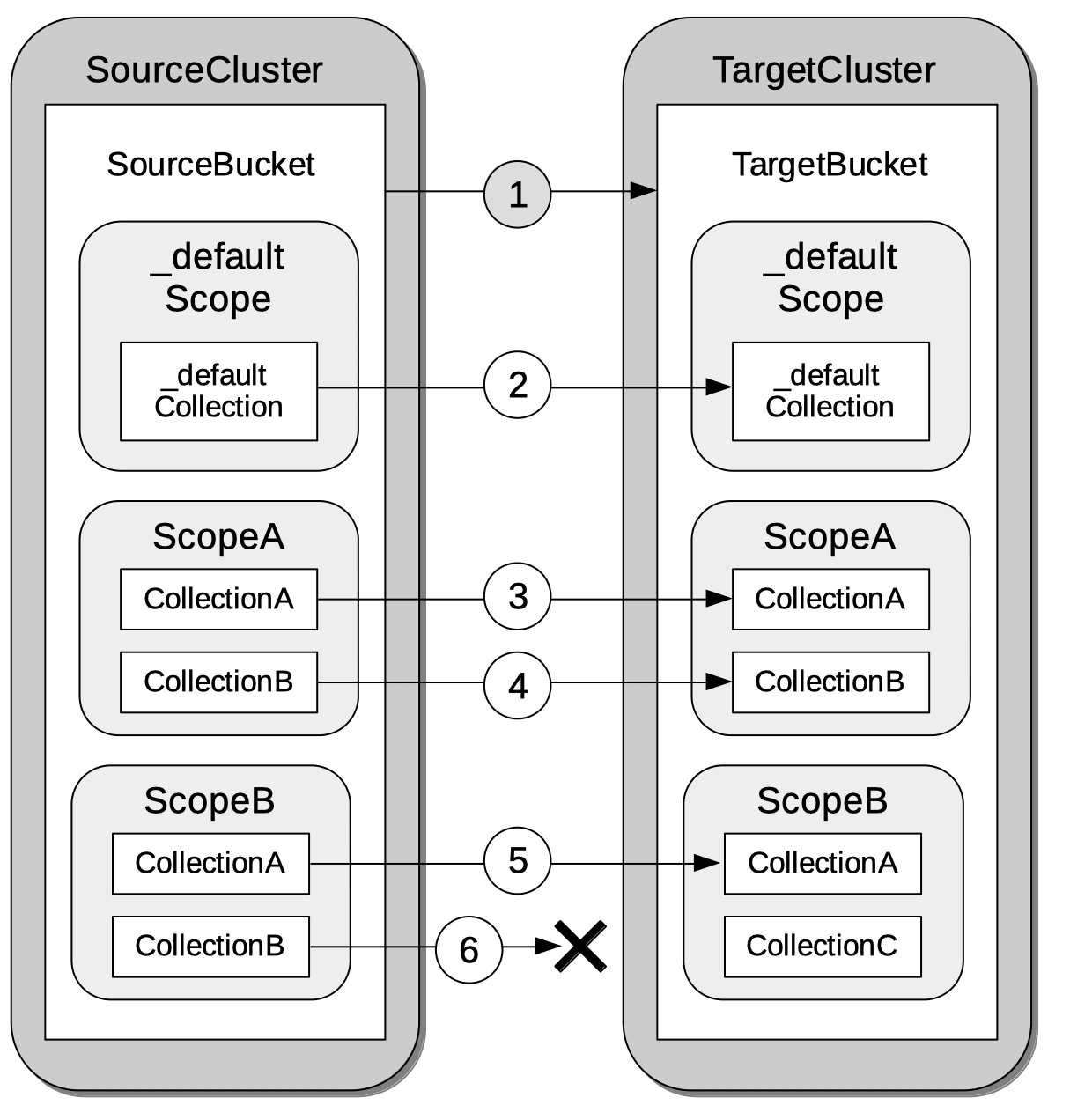
The annotations are as follows:
1. The administrator must explicitly specify a target and a source bucket, between which replication is to occur. The buckets are typically on different clusters, in different data centers: however, they may also be on different clusters in the same data center, or even on the same cluster.
2. Every bucket contains a default scope and collection, whose keyspace is `_default._default`. Implicit replication always occurs, therefore, between the default collection on the source bucket and the default collection on the target bucket.
3. In this example, the source bucket contains a scope named `ScopeA`, within which a collection named `CollectionA` exists. The target bucket also contains `CollectionA` within `ScopeA`. Therefore, since source and target buckets contain the identical keyspace, `ScopeA.CollectionA`, implicit replication occurs automatically between `ScopeA.CollectionA` on the source, and `ScopeA.CollectionA` on the target.
(Note that XDCR does not automatically create scopes or collections. Therefore, for an implicit mapping to be achieved, identical keyspaces must be created by the administrator.)
4. Within `ScopeA` in the source bucket, a collection named `CollectionB` exists. The target bucket also contains `CollectionB` within `ScopeA`. Therefore, since source and target buckets contain the identical keyspace, `ScopeA.CollectionB`, implicit replication occurs automatically between `ScopeA.CollectionB` on the source, and `ScopeA.CollectionB` on the target.
5. The source bucket contains a scope named `ScopeB`, within which a collection named `CollectionA` exists. The target bucket also contains `CollectionA`, within `ScopeB`. Therefore, since source and target buckets contain the identical keyspace, `ScopeB.CollectionA`, implicit replication occurs automatically between `ScopeB.CollectionA` on the source, and `ScopeB.CollectionA` on the target.
6. Within `ScopeB` in the source bucket, a collection named `CollectionB` exists. However, although the target bucket contains a scope named `ScopeB`, this does _not_ contain a collection named `CollectionB`: instead, it contains a collection named `CollectionC`. Therefore, since `ScopeB.CollectionB` is a keyspace unique to the source, no implicit mapping is established with the target, and no replication is automatically initiated.
Note, however, if an identical keyspace is _subsequently_ established within the target bucket, this is eventually detected by XDCR, by means of a periodic check. At this point, a _backfill pipeline_ is automatically created, and is maintained for a temporary period; for the purpose of replicating any dropped data: this is described below, in [Target-Collection Removal and Addition](#target-collection-removal-and-addition).
For the practical steps required to set up implicit mappings, see [Replicate Data Between Collections Implicitly, with the UI](../../manage/manage-xdcr/replicate-using-scopes-and-collections.md#replicate-data-between-collections-implicitly-with-the-ui).
## [](#explicit-mapping)Explicit Mapping
_Explicit_ mapping is administrator-specified, and allows replication to occur between keyspaces that are not identically named. An explicit mapping can be specified either between scopes, or between collections:
* _An explicit mapping between scopes_ ensures that an _implicit_ mapping occurs between identically named collections within those scopes. For example, if on the source, `ScopeA` contains `CollectionA`, and on the target, `ScopeB` contains `CollectionA`, an explicit mapping between `ScopeA` on the source and `ScopeB` on the target automatically produces an implicit mapping between the two collections named `CollectionA`. (Note, however, that this implicit mapping between the collections only occurs if no _explicit_ mapping of any of the collections is specified.)
Note that once an explicit mapping between scopes has been established, implicit mapping will occur between identically named collections that are _subsequently created_ within those scopes. (Note also that this only occurs when the explicit mapping is indeed between the scopes themselves: it does not occur when the explicit mapping is between individual collections within the scopes.)
An explicit mapping between scopes produces no implicit mapping between dissimilarly named collections. For example, if on the source, `ScopeA` contains `CollectionA`, and on the target, `ScopeB` contains `CollectionB`, an explicit mapping between `ScopeA` on the source and `ScopeB` on the target produces no implicit mapping between `CollectionA` and `CollectionB`.
* _An explicit mapping between collections_ allows a collection on the source to be mapped to a dissimilarly named collection on the target. Such collections may reside within dissimilarly named scopes. For example, an explicit mapping might be specified between `ScopeA.CollectionX` on the source, and `ScopeB.CollectionY` on the target.
Explicit mapping can be illustrated as follows:
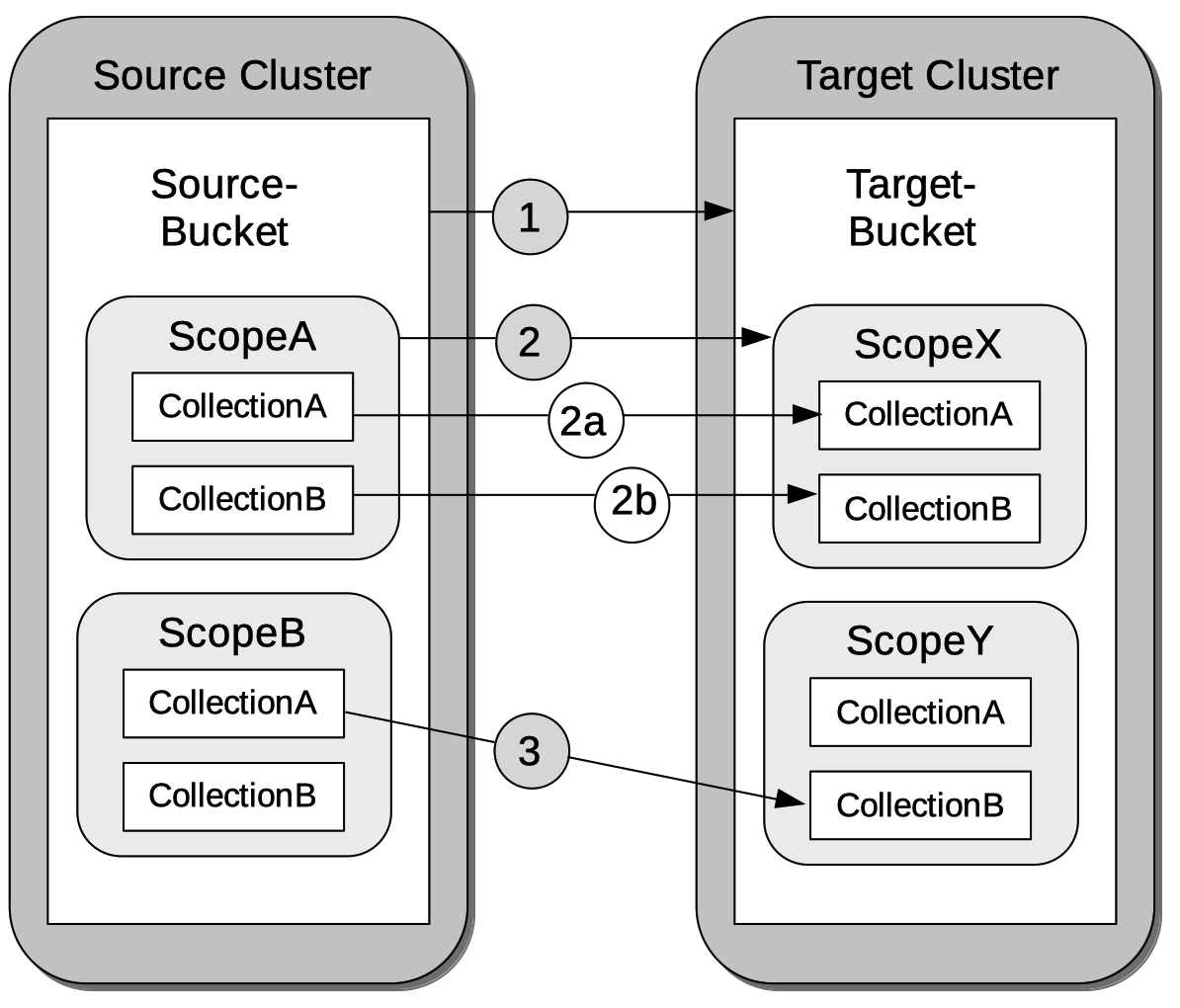
The annotations are as follows:
1. The administrator must explicitly specify a target and a source bucket, between which replication is to occur.
2. In this example, the source bucket contains the scope `ScopeA`, and the target bucket contains the scope `ScopeX`. When the administrator specifies an explicit mapping between `ScopeA` and `ScopeB`, an implicit mapping occurs between any identically named collections within the source and target buckets. Therefore, `ScopeA.CollectionA` is mapped implicitly to `ScopeX.CollectionA` (2a); and `ScopeA.CollectionB` is mapped implicitly to `ScopeX.CollectionB` (2b).
3. In this example, the source bucket contains the scope `ScopeB`, and the target bucket contains the scope `ScopeY`. Each scope contains two collections, named `CollectionA` and `CollectionB`/ An explicit mapping between `ScopeB` and `ScopeY` would therefore produce an implicit mapping between `ScopeB.CollectionA` and `ScopeY.CollectionA`; and between `ScopeB.CollectionB` and `ScopeY.CollectionB`. However, as an alternative to an explicit mapping between `ScopeB` and `ScopeY`, an _explicit_ mapping might be achieved between any collection in `ScopeB` and any collection in `ScopeY`: for example, between `ScopeB.CollectionA` and `ScopeY.CollectionB`, as shown in the diagram.
For the practical steps required to set up explicit mappings, see [Replicate Data Between Collections Explicitly, with the UI](../../manage/manage-xdcr/replicate-using-scopes-and-collections.md#replicate-data-between-collections-explicitly-with-the-ui). For the _rules_ whereby explicit mappings must be expressed, see [Rules for Explicit Mappings](#rules-for-explicit-mappings), immediately below.
## [](#rules-for-explicit-mappings)Rules for Explicit Mappings
Explicit mappings are established by means of _rules_. Each rule _affirms_ or _denies_ that replication should occur between a source scope or collection and a target scope and collection. When multiple rules are specified in the establishing of a single replication, the rules are applied with a fixed order of priority. This order is represented in the table below: a rule with a lower priority-number takes higher priority.
| Priority | Rule | Description | Syntax |
| -------- | ---------------------------------------------------- | ---------------------------------------------------------------------------------------------------------------------------------------- | ----------------------------------------------------------------------- |
| 0 | _scope.collection_ to _scope.collection_ affirmation | Maps a single source _scope.collection_ to a single target _scope.collection_, and affirms that replication should proceed between them. | {"source\_scope.source\_collection":"target\_scope.target\_collection"} |
| 1 | _scope.collection_ denial | Specifies that a single source _scope.collection_ should not be replicated. | {"source\_scope.source\_collection":null} |
| 2 | _scope_ to _scope_ affirmation | Maps a single source _scope_ to a single target _scope_, and affirms that replication should proceed between them. | {"source\_scope":"target\_scope"} |
| 3 | _scope_ denial | Specifies that a single source _scope_ should not be replicated. | {"source":null} |
Additional information on each of these rules is provided below.
### [](#priority-0)Priority 0
A single, unique collection under a single unique scope on the source is mapped to a single, unique collection under a single unique scope on the target, and is affirmed for replication. For example, the expression `{"inventory.airport":"MyInventory.MyAirport"}` affirms that the collection `airport`, within the source-scope `inventory`, should be replicated to the collection `MyAirport`, within the target-scope `MyInventory`.
A source collection is not permitted to be mapped (by means of multiple rules) to multiple target collections. For example, the expression `{"inventory.airport":"MyInventory.MyAirport","inventory.airport":"MyInventory.airport"}` generates an error.
Multiple source collections are not permitted to be mapped (by means of multiples rules) to a single target collection. For example, the expression `{"inventory.airport":"MyInventory.MyAirport","inventory.MyAirport":"MyInventory.MyAirport"}` generates an error.
If there exists a Priority 3 rule that expressly denies replication from the source scope specified in the Priority 0 rule, the Priority 0 rule takes precedence, and replication is thereby affirmed. For example, the expression `{"inventory":null,"inventory.airport":"MyInventory.airport"}` denies replication of any collection within the source-scope `inventory`; with the exception of the collection `airport`, which is replicated to the identically named collection within the target-scope `MyInventory`.
If a Priority 0 rule explicitly affirms that a collection be replicated to a destination other than that implicitly affirmed by a simultaneous Priority 2 rule, the Priority 0 rule takes precedence. For example, the expression `{"inventory":"MyInventory","inventory.airport":"MyInventory.MyAirport"}` specifies that all collections within the source-scope `inventory` be implicitly mapped to their equivalents in the target-scope `MyInventory`; with the exception of the collection `airport`, which is replicated instead to the collection `MyAiport`. (Thus, if the collection `airport` does exist within the target-scope `MyInventory`, it receives no replication.)
Note that a Priority 0 rule cannot be expressed so as to conflict with a Priority 1 rule, since this would require a statement of two mappings from the same collection, which is not permitted. For example, the expression `{"inventory.airport":null, "inventory.airport":"MyInventory.airport"}` generates an error.
Note also that a Priority 0 rule cannot be expressed simultaneously with a Priority 2 rule that entails an implicit mapping between the same collections. For example, given the existence of the collection `airport` in both the source-collection `inventory` and the target-collection `MyInventory`, the expression `{"inventory":"MyInventory","inventory.airport"."MyInventory:airport"}` generates an error.
### [](#priority-1)Priority 1
A single, unique collection under a single unique scope on the source is prohibited from being replicated. For example, the expression `{"inventory.airport":null}` prohibits replication from the collection `airport`, which resides in the source-scope `inventory`.
If there exists a Priority 2 role that affirms replication from a source scope to a target scope, replication occurs between all implicitly mapped collections; unless the source collection in one or more of the implicit mappings is explicitly prohibited from being replicated, by means of a Priority 1 rule. For example, the expression `{"inventory":"MyInventory","inventory.airport":null}` specifies that all collections within the source-scope `inventory` can be implicitly mapped to their equivalents in the target scope `MyInventory`; with the exception of the collection `airport`, from which replication is denied.
Note that a Priority 0 rule cannot be expressed to conflict with a Priority 1 rule, since this would require a statement of two mappings from the same collection, which is not permitted. For example, the expression `{"inventory.airport":null, "inventory.airport":"MyInventory.airport"}` generates an error.
Note also that a Priority 1 rule cannot be expressed simultaneously with a Priority 3 rule that denies replication from the same scope that is referred to by the Priority 1 rule. For example, the expression `{"inventory":null,"inventory.airport":null}` generates an error.
### [](#priority-2)Priority 2
A single, unique scope on the source is mapped to a single, unique scope on the target. Replication occurs between each collection in the source scope that can be implicitly mapped to an identically named collection in the target scope. For example, the expression `{"inventory":"MyInventory"}` affirms that every collection within the source-scope `inventory` should be replicated to its equivalent in the target-scope `MyInventory`.
If a Priority 0 rule explicitly affirms that a collection should be replicated to a destination other than that implicitly affirmed by a simultaneous Priority 2 rule, the Priority 0 rule takes precedence. For example, the expression `{"inventory":"MyInventory","inventory.airport":"MyInventory.MyAirport"}` affirms that all collections within the source-scope `inventory` are to be replicated to their implicitly-mapped equivalents in the target scope `MyInventory`; with the exception of the collection `airport`, which is to be replicated instead to the collection `MyAiport`. (Thus, if the collection `airport` does exist within the target-scope `MyInventory`, it receives no replication.)
If a Priority 1 rule explicitly denies replication from a collection within the scope specified by a simultaneous Priority 2 rule, the Priority 1 rule takes precedence for that collection. For example, the expression `{"inventory":"MyInventory","inventory.airport":null}` affirms that all collections within the source-scope `inventory` can be replicated to their implicitly-mapped equivalents in the target scope `MyInventory`; with the exception of the collection `airport`, from which replication is denied.
Note that a Priority 2 rule cannot be expressed to conflict with a Priority 3 rule, since this would require a statement of two scope-level mappings from the same scope, which is not permitted. For example, the expression `{"inventory":null, "inventory":"MyInventory"}` generates an error.
Note also that a Priority 0 rule cannot be expressed simultaneously with a Priority 2 rule that entails an implicit mapping between the same collections. For example, given the existence of the collection `airport` in both the source-collection `inventory` and the target-collection `MyInventory`, the expression `{"inventory":"MyInventory","inventory.airport"."MyInventory:airport"}` generates an error.
### [](#priority-3)Priority 3
A single, unique scope on the source is prohibited from being replicated. For example, the expression `{"inventory":null}` denies replication from the source-scope `inventory`.
If there exists a Priority 0 rule that expressly affirms replication from a source collection that resides within the same source scope that is prohibited by a Priority 3 rule, the Priority 0 rule takes precedence, and replication from that source collection is thereby affirmed. For example, the expression `{"inventory":null,"inventory.airport":"MyInventory.airport"}` denies replication to all collections within the source-scope `inventory`; with the exception of the collection `airport`, which is affirmed for replication to its equivalent in the target-scope `MyInventory`.
Note that a Priority 2 rule cannot be expressed to conflict with a Priority 3 rule, since this would require a statement of two scope-level mappings from the same scope, which is not permitted. For example, the expression `{"inventory":null, "inventory":"MyInventory"}` generates an error.
Note also that a Priority 1 rule cannot be expressed when its specified collection is already denied by a Priority 3 rule. For example, the expression `{"inventory":null,"inventory.airport":null}` generates an error.
## [](#scopes-collections-and-filtering)Scopes, Collections, and Filtering
[XDCR Advanced Filtering](xdcr-filtering.md) can be applied to all implicit and explicit mappings. However, only one filter can be applied to any given replication. Therefore, once a filter has been defined, it applies equally to all mappings for the replication.
## [](#target-collection-removal-and-addition)Target-Collection Removal and Addition
The conditions under which a document is replicated from a source bucket to a target bucket are explained in [XDCR Process](xdcr-overview.md#xdcr-process). These include the existence of a valid collection-to-collection mapping, which may be any of the following:
* The _implicit_ mapping that always exists between the `_default` collections of the source and target buckets.
* The _implicit_ mapping that is automatically recognized between other identical keyspaces within the source and target buckets.
* An _explicit_ mapping that has been previously configured by the administrator; and which correctly corresponds to an existing pair of non-identical keyspaces on the source and target buckets.
If no such mapping exists for a given document, of if the mapping has been excluded from the replication by the explicit definition of a rule, the document is not replicated. (For an explanation of explicit-mapping _rules_, see [Rules for Explicit Mappings](#rules-for-explicit-mappings), below).
XDCR continuously monitors the target bucket for the addition or removal of collections. The monitoring period is one minute, and is adjustable. Where collection-removal on the target bucket invalidates a mapping, documents previously eligible for replication are no longer so; and are therefore, on examination, dropped from memory by XDCR, and are not replicated.
Where collection-addition occurs on the target bucket such that a new _implicit_ mapping is created, but occurs _after_ replication between the source and target bucket has been commenced, the following occur:
* XDCR checks the target keyspaces every minute, by default: when a check is performed, any new collections that have been added to the target are detected. (Note, therefore, that it may indeed take XDCR up to 60 seconds to detect a newly created collection on the target: detection is _not_ instantaneous.)
* On detection of a new collection on the target, XDCR creates a _backfill pipeline_, which replicates to the target collection all documents from the source collection that were previously dropped by XDCR, due to the previous lack of an implicit mapping. The documents to be considered candidates for this replication are determined based on the _source sequence number_ that XDCR was handling at the point the new implicit mapping was recognized: documents whose sequence number is lower than this are re-examined.
* The standard XDCR pipeline continues to operate, replicating ongoing mutations to the new target collection.
Backfill pipelines are always started with _Low_ priority, to minimize the performance degradation of main-pipeline activity. (See [XDCR Priority](xdcr-overview.md#xdcr-priority), for information.) Once a backfill pipeline has finished replicating the missing data, its process is terminated, and the main pipeline continues. Note that the creation, activation, and removal of a backfill pipeline are entirely automated, and are invisible to the administrator (except for occasional instances of recently created documents arriving at the target bucket prior to earlier mutations).
### [](#source-collection-removal)Source-Collection Removal
If a source collection has a mapped target collection, and replication from the source collection is ongoing; if the source collection is removed, this is detected by XDCR as soon as XDCR tries to send a mutation.
The detection of source-collection removal, therefore, does not depend on the 60-second interval required for the detection of target-collection removal; and is likely to occur much more quickly.
## [](#performing-replication-with-scopes-and-collections)Performing Replication with Scopes and Collections
The practical, administrative steps required for performing replication as described above are provided in [Replicate Using Scopes and Collections](../../manage/manage-xdcr/replicate-using-scopes-and-collections.md).
## [](#migration)Migration
When a pre-7.0 version of Couchbase Server is upgraded to 7.0 or later, all documents that resided in a pre-7.0 bucket appear in the upgraded bucket's _default collection_, within its _default scope_. See [Scopes and Collections](../data/scopes-and-collections.md), for information.
Following upgrade, data within the default collection can be _migrated_ to administrator-defined collections, within new target buckets, potentially on the same cluster. For each new collection, a replication to the appropriate target bucket can be defined, and a filter applied, ensuring that only the appropriate subset of documents is replicated. The mapping between the documents currently in the default collection on the source and the new collection on the target is therefore _explicitly_ specified by the administrator.
Migration, which is only available in Couchbase Server Enterprise Edition, can be illustrated by the following diagram:
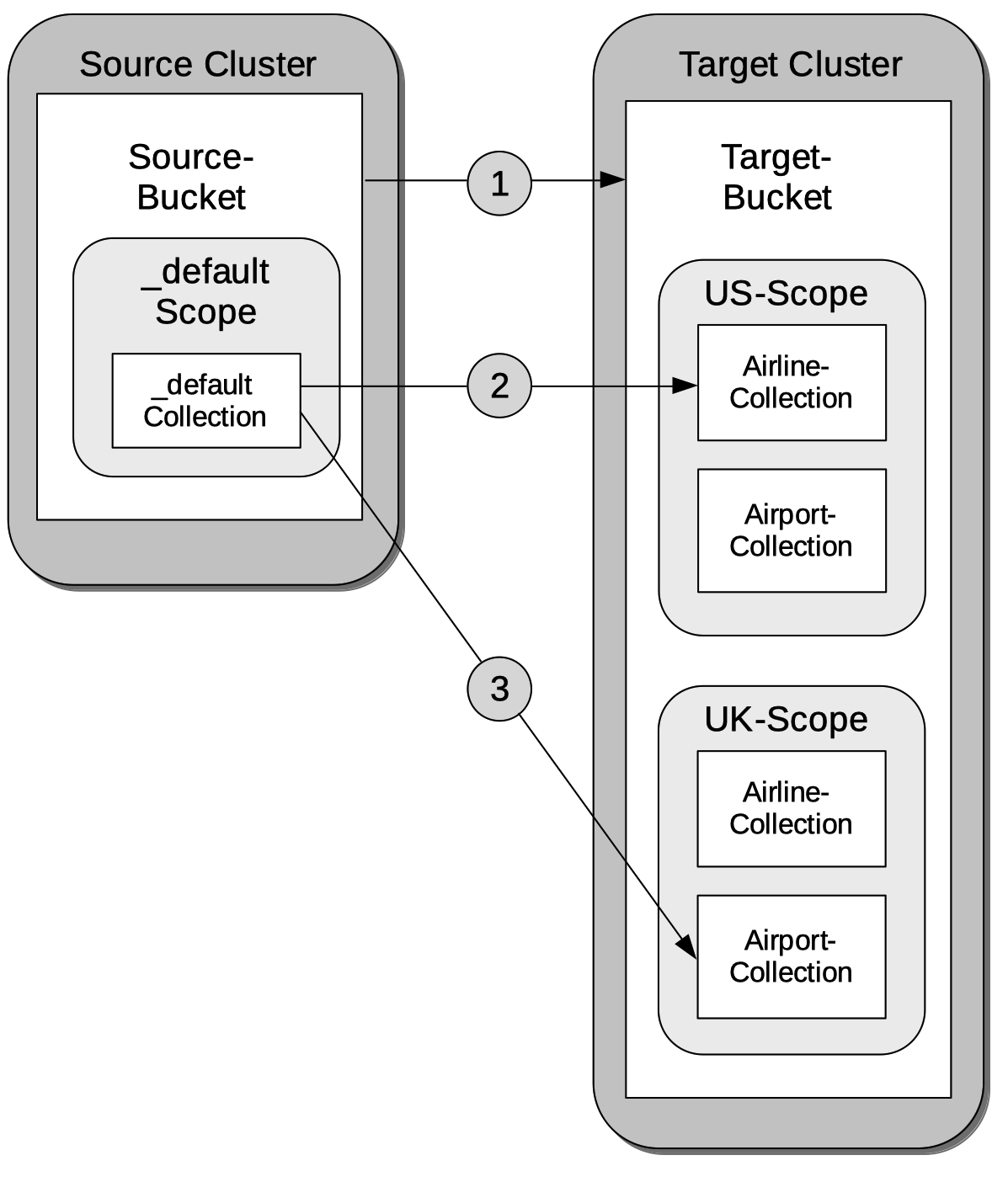
The annotations are as follows:
1. The administrator must explicitly specify a target and a source bucket, between which replication is to occur.
2. The administrator must explicitly specify a target scope and collection, within the target bucket. Here, the target scope is `US-Scope`, within which resides the target collection, `Airline-Collection`. The depicted goal is to migrate all documents that correspond to US airlines to the target collection: therefore, the administrator must specify a filter such as the following: `type == "airline" && country == "United States"`. Thus, every document whose `type` is `"airline"`, and whose `country` is `"United States"` is migrated.
3. Similarly, to migrate all documents that correspond to UK airports to the target collection `Airport-Collection`, within the scope `UK-Scope`, a filter such as the following is required: `type == "airport" && country == United Kingdom"`.
For the practical steps, see [Migrate Data to a Collection, with the UI](../../manage/manage-xdcr/replicate-using-scopes-and-collections.md#migrate-data-to-a-collection-with-the-ui).
### [](#rules-for-migration)Rules for Migration
Each XDCR Migration is performed according to an administrator-specified rule. The rule must be expressed as a key-value pair:
* If _all_ the documents in the `_default` collection of the source bucket are to be migrated to the specified target collection, the keyspace `_default._default` must be the key, and the destination keyspace must be the value. For example, the rule `{_default._default: California.SanFrancisco}` specifies that all documents in the `_default` collection of the source bucket should be migrated to the `SanFrancisco` collection, within the `California` scope, on the target bucket.
* If only a subset of document in the `_default` collection of the source bucket are to be migrated to the specified target collection, the regular expression that is to be used as the _filter_ for the migration must be expressed as the key, and the destination keyspace as the value. For example, the rule `{"city=\"San Francisco\"":"California.SanFrancisco"}` specifies that only documents whose value for `city` is `"San Francisco"` should be migrated; and should be migrated to the `SanFrancisco` collection, within the `California` scope, on the target bucket.
Note that for a given replication, only _one_ migration-rule can be used to migrate data from the `_default` collection on the source. If a second migration-rule, specifying a different target collection, attempts to migrate data from the same `_default` collection as does the first migration-rule, an error is generated. (This is the case regardless of whether a filter expression is specified for the second migration-rule.)
## [](#xdcr-scopes-and-collections-and-pre-7)XDCR, Scopes and Collections, and Pre-7.0 Server-Versions
Replications can be defined to proceed from specified scopes and collections only after the source cluster has been completely upgraded to at least Couchbase Server Version 7.0.
During the upgrade of a pre-7.0 _online_ source cluster (see [Upgrade an Online Cluster](../../install/upgrade-cluster-online.md)), any previously commenced replications (that is, replications commenced when the source cluster consisted entirely of nodes running a pre-7.0 version of Couchbase Server) continue. Note that during such an upgrade, if the upgrade is to Version 7.0 (and no higher), while the replications proceed, statistics for the source cluster may be inaccurate, log messages may show innocuous errors (such as `StatsMgr: error from getting high seqno`), and system activity may be marginally higher than usual.
Following an upgrade from a pre-7.0 version to a version that is 7.0 or higher, each pre-existing replication continues, and is recognized as proceeding from the `_default` scope and collection of its source bucket. From this point, replications from administrator-defined scopes and collections can only be created when the target cluster is in each case running at least Version 7.0\. If the target cluster is running a pre-7.0 version, replications can only be created from the `_default` scope and collection of their source-bucket. Note that if such replications are indeed created, should a source bucket's `_default` collection be deleted, any corresponding replication is automatically paused, and an error message is duly provided in the **Logs** area of Couchbase Web Console.