---
title: Authentication Domains
description: "To access Couchbase Server, users must be authenticated: this can
occur in either the local or the external authentication
domain."
pubDate: 2026-08-17T09:53:44.266Z
antora:
editUrl: https://github.com/couchbase/docs-server/edit/release/7.6/modules/learn/pages/security/authentication-domains.adoc
xref: xref:7.6@server:learn:security/authentication-domains.adoc[]
---
[Consult the llms.txt file for a full list of contents](/llms.txt)
[View original HTML](/server/7.6/learn/security/authentication-domains.html)
# Authentication Domains
> To access Couchbase Server, users must be authenticated: this can occur in either the _local_ or the _external_ authentication domain.
## [](#introduction-to-externally-based-authentication)Understanding Authentication Domains
Couchbase Server authenticates each user by means of one of two _authentication domains_. The domains are:
* _Local_: Contains users defined locally. This includes:
* The _Full Administrator_ for Couchbase Server.
* _Locally Defined Users_, which are explicitly created by a Couchbase Server administrator; and each feature a username and password unique within the Local domain.
* _Internal Components_ within Couchbase Server that support core functionality (for example, indexing, searching, and replicating), and run with full administrative privileges.
* _Generated Users_, which are created by Couchbase Server as part of the upgrade process from pre-5.0 to 5.0 and post-5.0 versions; each in correspondence with a legacy bucket. Each Generated User is assigned a _username_ that is identical to the bucket-name; and either a _password_ that is identical to the bucket's pre-5.0 password, or _no password_, if the bucket did not feature a password. Generated Users are created to ensure that legacy applications can continue to access legacy buckets after upgrade to 5.0 or post-5.0, with the same username-password combination being used for authentication.
Note that from release 7.6, Couchbase Server no longer supports SQL++ operations on buckets without password specification.
* _External_: Contains either or both of the following:
* Users that are explicitly registered on Couchbase Server as _external_; as supported either by _LDAP_, _Security Assertion Markup Language (SAML)_, or _PAM_. Usernames and passwords are defined and stored remotely; with the usernames also stored on Couchbase Server. Note that external usernames do not clash with local usernames.
* Users that aren't defined or registered on Couchbase Server can be defined externally in either an LDAP server or a SAML provider. For these external users to authenticate, Couchbase Server must have either _Native LDAP Support_ with _LDAP Group Support_ or _SAML Support_ enabled.
For LDAP-based users, if one or more of their LDAP Groups has been _mapped_ to a corresponding Couchbase-Server user-group, the user can be authenticated on the LDAP server, and then be granted the roles assigned to each of the user-groups to which a mapping has been made.
Similarly, Administrators can map Couchbase groups and roles to SAML attributes. When users authenticate using a SAML IdP, Couchbase Server grants them the groups and roles in defined in these SAML attributes.
When a user attempts to authenticate, Couchbase Server always looks up their credentials in the same order: which is _Local_ first, and _External_ second.
### [](#introduction-to-ldap-based-authentication)LDAP-Based Authentication
LDAP-based authentication must be set up in one of the following ways;
* _Native LDAP Support_. For Couchbase Server Enterprise Edition 6.5+, this is the recommended way of setting up LDAP for external authentication. It provides support for encrypted communication, and for LDAP groups.
* _LDAP Support Based on saslauthd_. `saslauthd` is maintained for support of legacy LDAP authentication, as established on pre-6.5 versions of Couchbase Server. (Note that `saslauthd` also provides support of legacy PAM-based authentication.) Migration to _Native LDAP_ is recommended, so that _LDAP Group Support_ becomes available.
Note that _either_ Native LDAP Support _or_ `saslauthd` must be selected for the cluster. The two cannot be used simultaneously.
## [](#native-ldap-support)Native LDAP Support
Native LDAP Support is available only for the Enterprise Edition of Couchbase Server. Note that it can only be used when _all_ nodes in the cluster have been upgraded to a version equal to or later than Couchbase Server Enterprise Edition 6.5.
Couchbase Server is designed to interoperate with _OpenLDAP_ software, which can be downloaded from the [openldap.org](http://www.openldap.org/) website. Couchbase Server also supports _Active Directory_.
### [](#ldap-benefits)Native LDAP Benefits
Authenticating with Native LDAP provides the benefits of:
* Centralized identity and security-policy management, on the LDAP server.
* LDAP groups, which are recognized by Couchbase Server. These provide simplified user-administration, allowing Couchbase Server-privileges to be assigned by group, rather than just by user. See [LDAP Groups](#introduction-to-ldap-groups), below.
* Cross-platform support. Native LDAP authentication can be used for clusters running on any Couchbase-Server supported operating system. (This contrasts with `saslauthd`, which runs only on Linux.)
Couchbase Server allows Native LDAP to be configured by means of the [UI](../../manage/manage-security/configure-ldap.md#configure-ldap-with-the-ui); or by means of the [setting-ldap](../../cli/cbcli/couchbase-cli-setting-ldap.md) CLI command.
### [](#introduction-to-ldap-groups)LDAP Groups
LDAP allows users to be members of _LDAP Groups_. When a user authenticates with LDAP, a list of the user's LDAP groups is returned to Couchbase Server. If an LDAP group has previously been _mapped_ to a Couchbase-Server group, the user inherits the roles assigned to the Couchbase-Server group. Note that LDAP Groups thus allow users _not_ registered on Couchbase Server — even as _external_ — to be authorized.
### [](#native-ldap-auth-sequence)Native LDAP Authentication and Authorization Sequence
In cases where the specified username does not match against the list of locally defined users, if _Native LDAP Support_ has been configured, Couchbase Server attempts to authenticate and authorize the user by means of LDAP. First, the _authentication_ sequence is performed:
1. If _LDAP User Authentication_ has been enabled, Couchbase Server calculates an LDAP _Distinguished Name_ (DN) for the user, whereby the user can be authenticated on the LDAP server. This makes use of the user-specified password and a _template_ or _query_, which has been preconfigured: for examples of how to configure templates and queries, see [User Authentication Enablement](../../manage/manage-security/configure-ldap.md#enable-ldap-user-authentication).
2. Couchbase Server contacts the LDAP server, and attempts to authenticate the user, using the DN that has been calculated, and the user-specified password.
3. Couchbase Server receives confirmation from the LDAP server either that authentication has succeeded (meaning that the user exists, and has submitted the correct password), or that it has failed. If authentication has failed, the authentication-process is thereby concluded, the user is _not_ granted access to Couchbase Server, and no further action is taken.
If authentication has succeeded, the authentication-process is thereby concluded; and Couchbase Server next proceeds to determine whether and in what ways the user is _authorized_ on Couchbase Server.
1. Couchbase Server checks whether an _external_ user, with the specified username, has previously been added to Couchbase Server. If such an external user is located, Couchbase Server determines which roles have been assigned to the user: first, it checks for roles that have been _directly_ assigned to the user; and secondly, it checks for roles assigned to the user by means of _group membership_. (For information on granting roles to users directly and by means of groups, see [Manage Users, Groups, and Roles](../../manage/manage-security/manage-users-and-roles.md).) The user is granted the privileges that correspond to each of their assigned roles.
2. If _LDAP Group Support_ has been enabled, Couchbase Server again contacts the LDAP server: this time, in order to retrieve a list of the LDAP groups of which the user is a member. Note that this step is performed irrespective of whether the user has been determined to be an _external_ user on Couchbase Server. See [Group Authorization Enablement](../../manage/manage-security/configure-ldap.md#group-authorization-enablement), for detailed information on configuring LDAP Group Support.
3. Couchbase Server determines whether one or more of the user's LDAP groups have been _mapped_ to existing Couchbase-Server user-groups. Wherever a mapping exists, the user is granted (in addition to whatever privileges they may have already been granted as an _external_ user) the privileges that correspond to all roles assigned to the Couchbase-Server user-group. (For information on mapping LDAP groups to Couchbase-Server user-groups, see [Map LDAP Groups to Couchbase-Server Roles](../../manage/manage-security/configure-ldap.md#map-ldap-groups-to-couchbase-server-roles).)
If any granted privilege supports the user's intended action, the action is permitted; otherwise, the action is prohibited.
For detailed, step-by-step accounts of how to configure these procedures, see [Configure LDAP](../../manage/manage-security/configure-ldap.md).
### [](#ldap-users-and-applications)LDAP: Users and Applications
LDAP provides a convenient way of managing authentication and authorization for human users. However, LDAP may be less appropriate for the authentication and authorization of _application identities_. This is because:
* Couchbase Server must access the LDAP server for initial authentication; thereby adding a potentially undesirable latency to the application's establishment of a full connection with Couchbase Server.
* If the LDAP server is unavailable, the application cannot be authenticated or authorized. In such circumstances, Couchbase Server, even though it may itself still be available, cannot grant data-access to the application.
Therefore, to avoid both latency and risk of unavailability, applications should authenticate and authorize with Couchbase Server _locally_.
## [](#saslauthd-and-pam)saslauthd, LDAP, and PAM
`saslauthd` is maintained for support of legacy LDAP and PAM-based authentication, as established on pre-6.5 versions of Couchbase Server. Migration to _Native LDAP_ is recommended, so that _LDAP Group Support_ becomes available. The overall migration procedure is provided as part of the `saslauthd` documentation, in [Migrating from saslauthd to Native LDAP](../../manage/manage-security/configure-saslauthd.md#migrating-from-saslauthd-to-native-ldap).
### [](#using-saslauthd)saslauthd and LDAP
LDAP authentication based on `saslauthd` is only available for the Enterprise Edition of Couchbase Server, and only on the Linux platform. It provides the benefits of centralized identity and security-policy management, and of simplified compliance. It does not support LDAP groups.
For LDAP authentication, _Native LDAP_ , rather than `saslauthd`, is recommended for Couchbase Server Enterprise Edition 6.5+.
For details on configuring `saslauthd` to support external authentication by LDAP, see [Configure saslauthd](../../manage/manage-security/configure-saslauthd.md).
### [](#introduction-to-pam-based-authentication)saslauthd and PAM
_Pluggable Authentication Modules_ (PAM) provide an authentication framework that allows multiple, low-level authentication schemes to be used by a single API. The _Enterprise Edition_ of Couchbase Server, running on Linux, supports administrator-authentication through PAM's _Linux password-module_.
Used with the _Enterprise Edition_ of Couchbase Server, the PAM _Linux password-module_ provides:
* _External authentication_: Administrator-accounts defined on Linux systems, in the `/etc/shadow` directory, can be accessed for authentication-purposes by Couchbase Server.
* _Password policy-management_: Linux password-management can be used across different Couchbase Server-nodes; to synchronize, maintain, and expire administrator-passwords.
Note that use of the PAM Linux password-module requires all cluster-nodes to be Linux-based, running the Enterprise Edition of Couchbase Server, version 4.6 or above. Additionally, the `saslauthd` library version must be 2.1.x or above.
For details on configuring `saslauthd` to support external authentication by PAM, see [Configure saslauthd](../../manage/manage-security/configure-saslauthd.md).
## [](#saml-authentication)SAML Authentication
SAML is a standard that defines how services communicate about user authentication. When an Administrator enables SAML authentication in Couchbase Server, a button appears on the Couchbase Server Web Console login page.
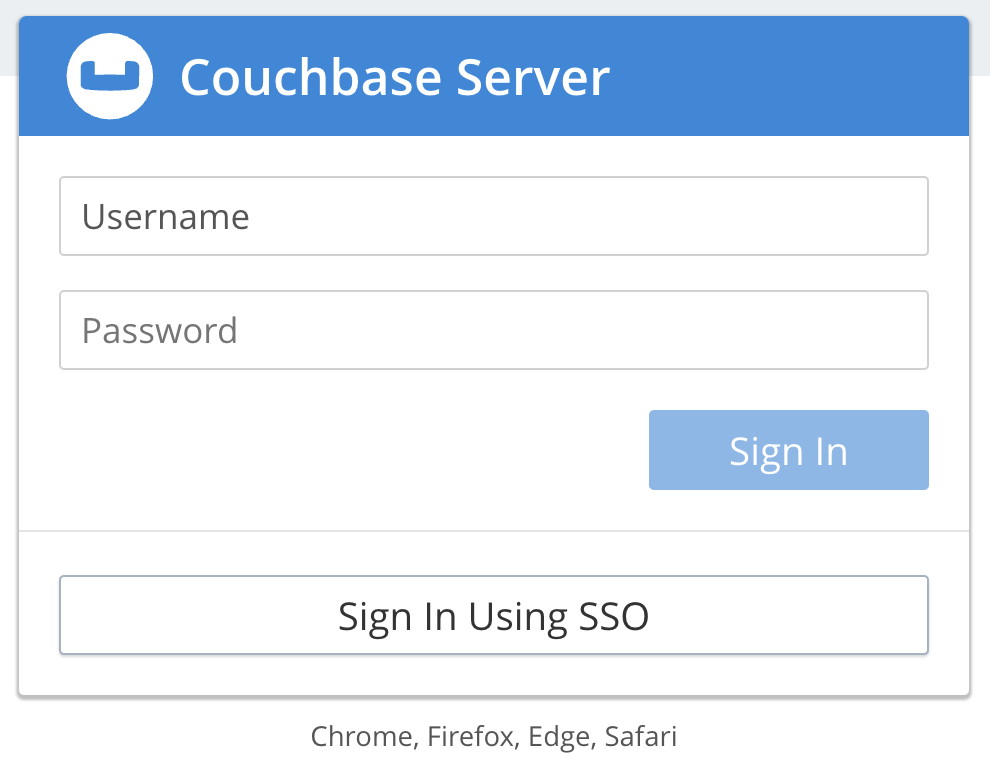
This button sends users to an _Identity Provider_ (IdP)'s site to authenticate. If the user authenticates with the IdP, the IdP sends the user back to Couchbase Server with an message containing their authentication information. Couchbase Server then logs the user into the Web Console. Users can only use SAML authentication to log into the Couchbase Web Console. They cannot authenticate for the command line, REST API, or SDK using SAML.
SAML authentication offers these features:
* _Single Sign On_ (SSO) lets users avoid repeated username and password prompts for every service they sign in to. Instead, the user authenticates once with the IdP when first connecting to a service. This initial authentication starts a session for the user with the IdP. While the session is active, when the user connects to a service that uses the IdP, it authenticates them without prompting for a username and password. SSO also means users have fewer usernames and passwords to memorize.
* Most IdPs implement _Two-Factor Authentication_ (2FA). 2FA increases security by requiring users to prove their identity with more than just a username and password. For example, 2FA can require users to enter a number sent to them via a mobile text message or from an authentication app on their mobile phone.
* SAML lets administrators centralize user authentication by defining users once in the IdP, instead of having to create an account for each service. They can assign the users privileges for any service that uses the IdP for authentication. When an administrator removes a user's privileges, services automatically end the user's active sessions.
### [](#mapping-of-groups-and-roles-with-saml-authentication)Mapping of Groups and Roles With SAML Authentication
When a user authenticates with an IdP, the IdP sends the user back to Couchbase Server with a SAML-formatted message containing their authentication information. Included within this message are attributes defined for the user by the IdP. You can choose to map two of these attributes to define the Couchbase Server groups and roles for user.
If you map attributes for the user's groups and roles, you can manage Web Console users entirely within the IdP. In this case, you do not need to create Web Console users in Couchbase Server's external authentication domain.
Couchbase Server combines the following settings to determine a SAML-authenticated user's roles:
* If the authenticated user matches a Couchbase user account defined in the external authentication domain, Couchbase Server grants the authenticated user the account's roles and groups.
* If you mapped a SAML attribute to Couchbase groups, then Couchbase Server grants the authenticated user the roles assigned to the groups listed in the attribute.
* If you mapped a SAML attribute to Couchbase roles, then Couchbase Server grants the authenticated user the roles listed in the attribute.
Enabling SAML authentication does not prevent users who have accounts defined in the local authentication domain from logging in. They can log into the Web Console using their username and password as usual. In addition, you can enable both SAML authentication and LDAP authentication. However, users may become confused if you do not synchronize user names and passwords between the LDAP server and the IdP.