---
title: Recover Data with XDCR
description: In the event of data-loss, the cbrecovery tool can
be used to restore data. The tool accesses remotely replicated buckets,
previously created with XDCR, and copies appropriate subsets of their data
back onto the original source-cluster.
pubDate: 2026-08-17T09:53:44.266Z
antora:
editUrl: https://github.com/couchbase/docs-server/edit/release/7.6/modules/manage/pages/manage-xdcr/recover-data-with-xdcr.adoc
xref: xref:7.6@server:manage:manage-xdcr/recover-data-with-xdcr.adoc[]
---
[Consult the llms.txt file for a full list of contents](/llms.txt)
[View original HTML](/server/7.6/manage/manage-xdcr/recover-data-with-xdcr.html)
# Recover Data with XDCR
> In the event of data-loss, the **cbrecovery** tool can be used to restore data. The tool accesses remotely replicated buckets, previously created with XDCR, and copies appropriate subsets of their data back onto the original source-cluster.
## [](#understanding-xdcr-based-data-recovery)Understanding XDCR-Based Data Recovery
Couchbase Server allows one or more replicas to be created for each vBucket on the cluster. This helps to ensure continued data-availability, in the event of node-failure.
However, if multiple nodes within a single cluster fail simultaneously, one or more active vBuckets and all their replicas may be affected; meaning that lost data cannot be recovered locally.
In such cases, provided that a bucket affected by such failure has already been established as a source bucket for XDCR, the lost data may be retrieved from the bucket defined on the remote cluster as the corresponding replication-target. This retrieval is achieved from the command-line, by means of the Couchbase [cbrecovery](../../cli/cbtools/cbrecovery.md) tool.
## [](#recover-lost-data)Recover Lost Data
The illustration below shows a three-node cluster, named `10.142.180.101`.
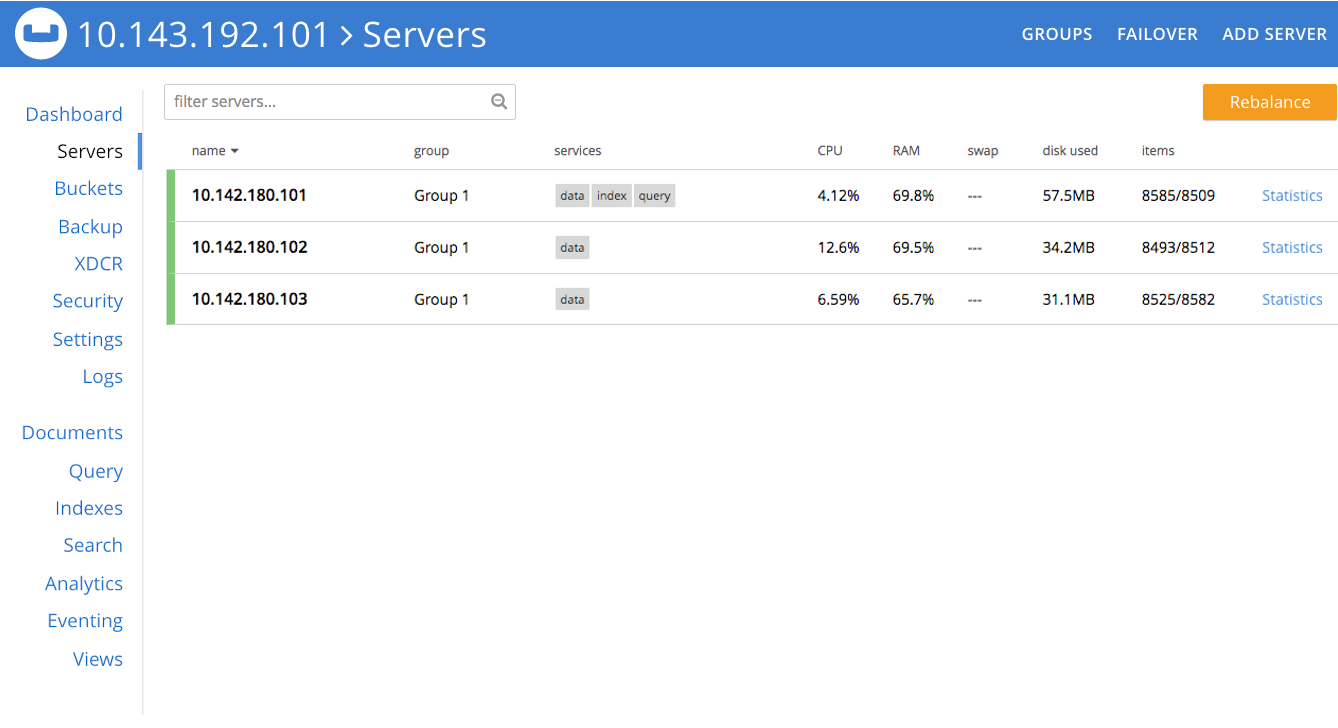
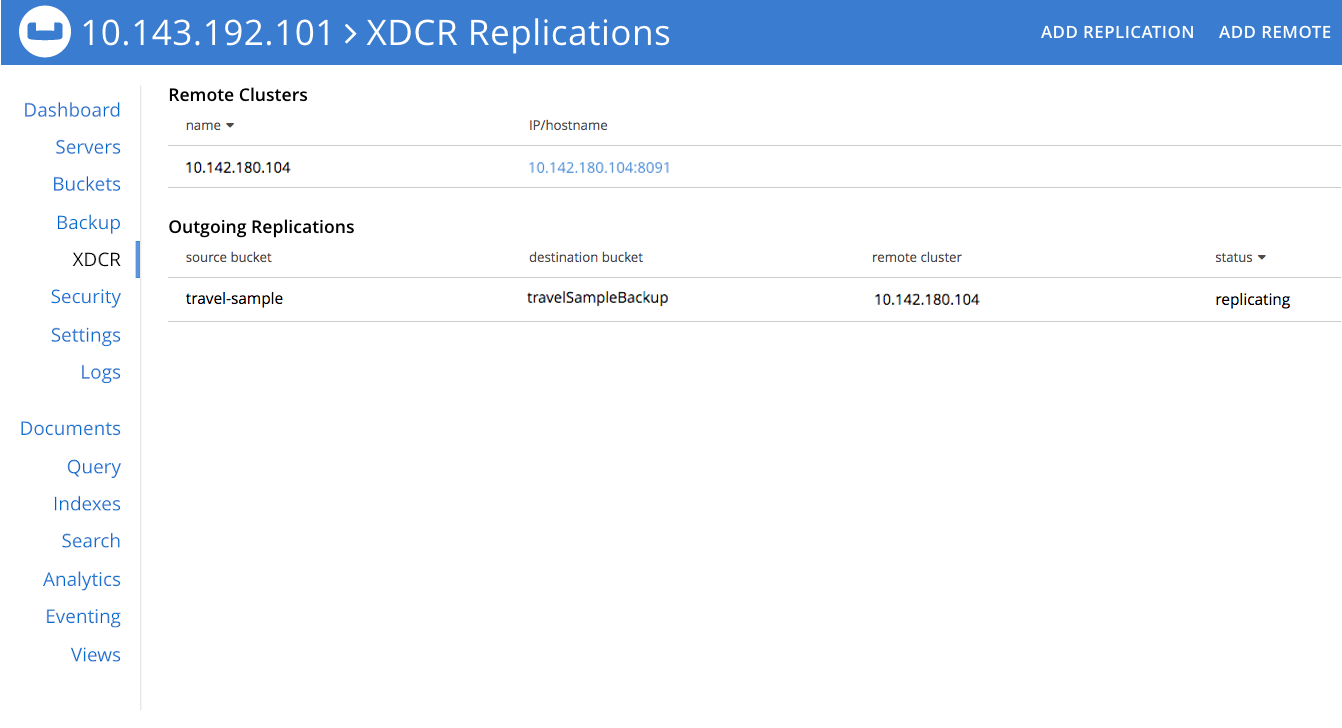
The sample bucket `travel-sample` has been established across this cluster, with one replica specified. An XDCR reference to a remote cluster, named `10.142.180.104`, has also been established; and a replication started, such that `travel-sample` is being replicated to the bucket `travelSampleBackup`, on the remote cluster.
If two of the three nodes in the local cluster become unavailable, the **Server** screen for the local cluster provides corresponding notifications:
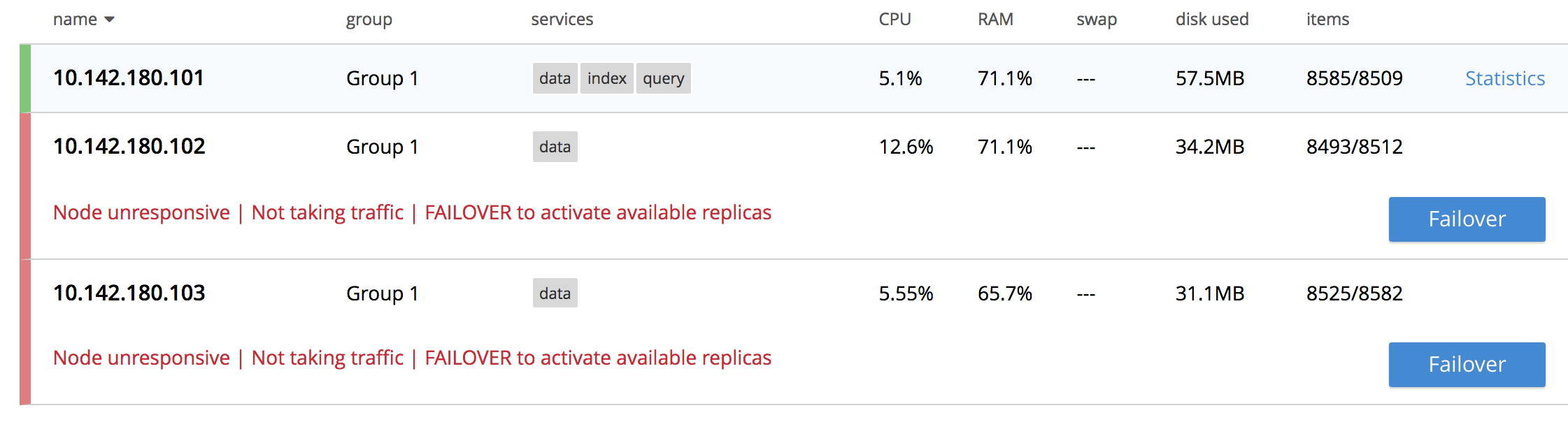
Since `travel-sample` was established with one replica, the permanent unavailability of two nodes out of three means data-loss from the local cluster. To begin the XDCR-based recovery-process, proceed as follows. (Note that the following steps assume knowledge of [Hard Failover of Multiple Nodes](../manage-nodes/failover-hard.md#hard-failover-of-multiple-nodes).)
1. If the unavailable nodes and their data absolutely cannot be retrieved, fail them both over. In order to fail over multiple nodes, left-click on the **FAILOVER** button, at the upper right of the screen:

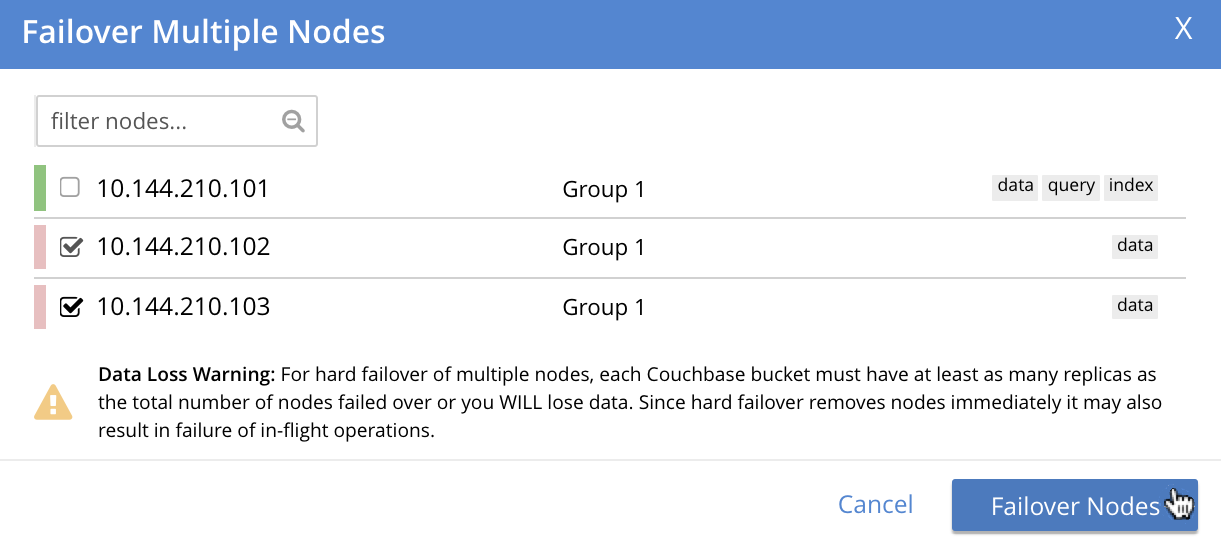
This brings up the **Failover Multiple Nodes** dialog, which appears as follows:
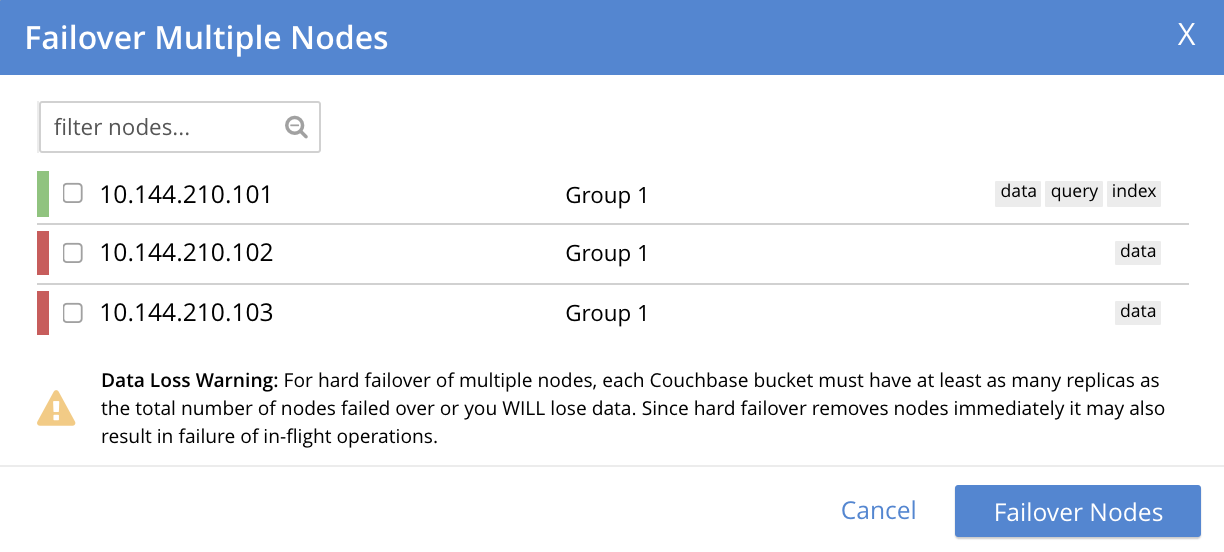
Check the checkboxes to the left of the two nodes that are to be failed over, and then left-click on the **Failover Nodes** button, at the lower-right of the dialog:
This brings up a warning notification concerning **Unsafe Mode**:
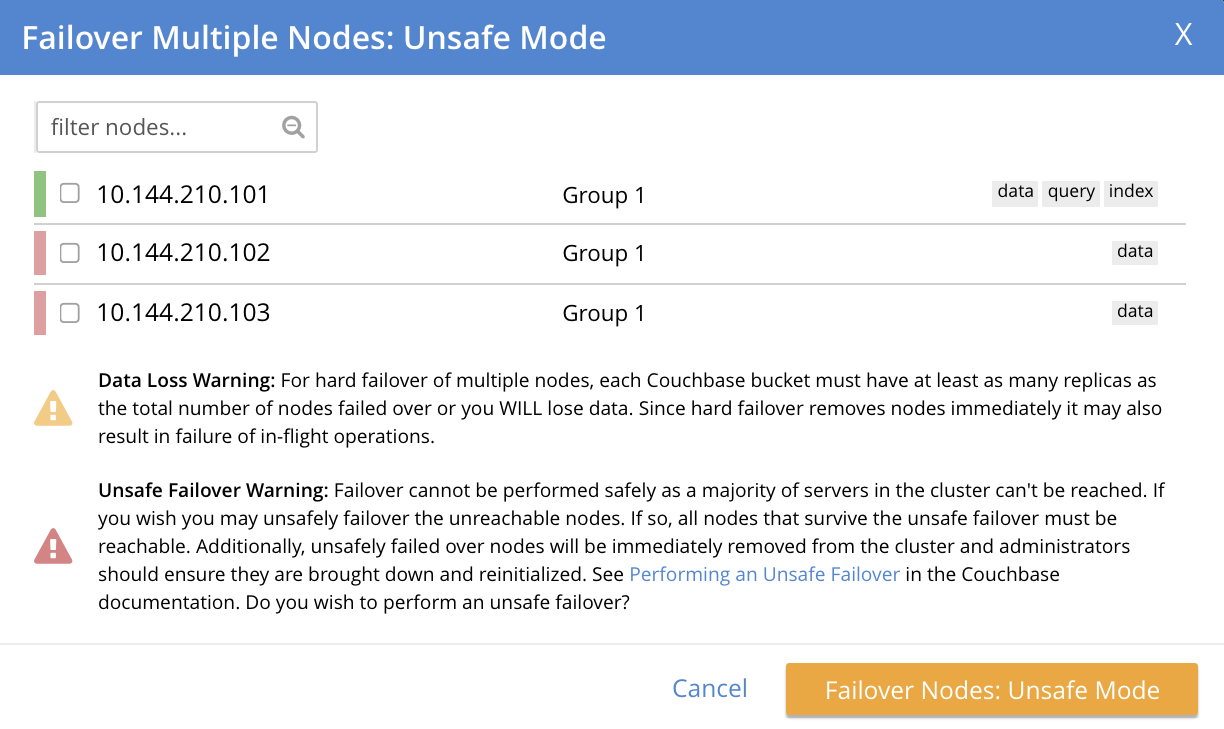
A detailed explanation of this warning is provided in [Hard Failover of Multiple Nodes](../manage-nodes/failover-hard.md#hard-failover-of-multiple-nodes). Essentially, the warning indicates that because of majority of the cluster's nodes will now be failed over, data will be lost.
To continue with the hard failover, check (once again) the checkboxes for the nodes that are to be failed over, and then left-click on the **Failover Nodes: Unsafe Mode** button, at the lower-right of the dialog. The unsafe failover now proceeds. Subsequently, the cluster has been reduced to a single node:

2. Before attempting to recover the lost data, restore capacity to the local cluster, as appropriate. The illustration below shows the two nodes that were previously lost, cleansed of all data, powered up, and in the process of being re-added into the cluster:
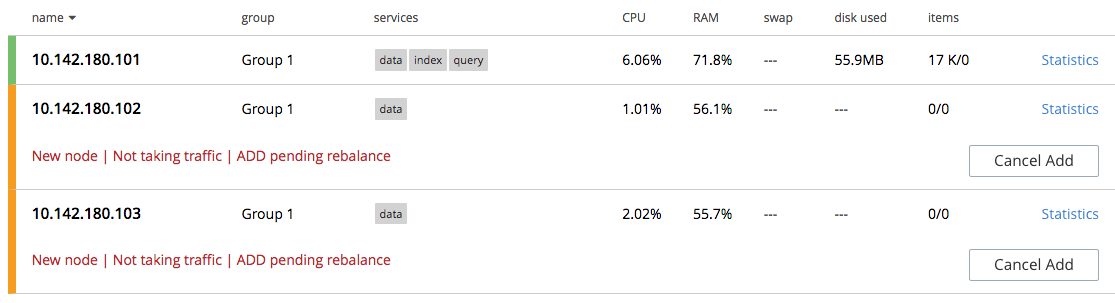
See [Add a Node and Rebalance](#manage:manage-nodes/add-a-node-and-rebalance.adoc), for information on adding nodes.
_Do not_ at this point rebalance the cluster: the rebalance operation affects local vBucket data, and thereby prevents recovery of lost data from the remote cluster. Rebalance will be performed _after_ the lost data has been recovered.
3. Use the **cbrecovery** tool to restore data to the bucket `travel-sample`, from the bucket established on the remote cluster, `travelSampleBackup`.
```bourne
$ cbrecovery http://10.142.180.104:8091 http://10.142.180.101:8091 \
-b travelSampleBackup \
-B travel-sample \
-u Administrator \
-p password \
-U Administrator \
-P password \
-v
```
For information on all parameter-options, see [cbrecovery](../../cli/cbtools/cbrecovery.md). Used, as shown here, with the _verbose_ option, the command provides extensive console output. The initial portion appears as follows:
```bourne
Missing vbuckets to be recovered:[{"node": "ns_1@10.142.180.102", "vbuckets": [171, 172,
173, 174, 175, 176, 177, 178, 179, 180, 181, 182, 183, 184, 185, 186, 187, 188, 189, 190,
191, 192, 193, 194, 195, 196, 197, 198, 199, 200, 201, 202, 203, 204, 205, 206, 207, 208,
209, 210, 211, 212, 213, 214, 215, 216, 217, 218, 219, 220, 221, 222, 223, 224, 225, 226,
227, 228, 229, 230, 231, 232, 233, 234, 235, 236, 237, 238, 239, 240, 241, 242, 243, 244,
245, 246, 247, 248, 249, 250, 251, 252, 253, 254, 255, 256, 257, 258, 259, 260, 261, 262,
263, 264, 265, 266, 267, 268, 269, 270, 271, 272, 273, 274, 275, 276, 277, 278, 279, 280,
281, 282, 283, 284, 285, 286, 287, 288, 289, 290, 291, 292, 293, 294, 295, 296, 297, 298,
299, 300, 301, 302, 303, 304, 305, 306, 307, 308, 309, 310, 311, 312, 313, 314, 315, 316,
317, 318, 319, 320, 321, 322, 323, 324, 325, 326, 327, 328, 329, 330, 331, 332, 333, 334,
335, 336, 337, 338, 339, 340, 342, 343, 344, 345, 346, 347, 348, 349, 350, 351, 352, 353,
354, 355, 356, 357, 358, 359, 360, 361, 362, 363, 364, 365, 366, 367, 368, 369, 370, 371,
372, 373, 374, 375, 376, 377, 378, 379, 380, 381, 382, 383, 384, 385, 386, 387, 388, 389,
390, 391, 392, 393, 394, 395, 396, 397, 398, 399, 400, 401, 402, 403, 404, 405, 406, 407,
408, 409, 410, 411, 412, 413, 414, 415, 416, 417, 418, 419, 420, 421, 422, 423, 424, 425,
426, 427, 428, 429, 430, 431, 432, 433, 434, 435, 436, 437, 438, 439, 440, 441, 442, 443,
444, 445, 446, 447, 448, 449, 450, 451, 452, 453, 454, 455, 456, 457, 458, 459, 460, 461,
462, 463, 464, 465, 466, 467, 468, 469, 470, 471, 472, 473, 474, 475, 476, 477, 478, 479,
480, 481, 482, 483, 484, 485, 486, 487, 488, 489, 490, 491, 492, 493, 494, 495, 496, 497,
498, 499, 500, 501, 502, 503, 504, 505, 506, 507, 508, 509, 510, 511]}]
2018-08-13 12:28:07,898: mt cbrecovery...
2018-08-13 12:28:07,898: mt source : http://10.142.180.104:8091
2018-08-13 12:28:07,898: mt sink : http://10.142.180.101:8091
2018-08-13 12:28:07,898: mt opts : {'username': '', 'username_destination':
'Administrator', 'verbose': 1, 'extra': {'max_retry': 10.0, 'rehash': 0.0,
'dcp_consumer_queue_length': 1000.0, 'data_only': 1.0, 'uncompress': 0.0,
'nmv_retry': 1.0, 'conflict_resolve': 0.0, 'cbb_max_mb': 100000.0, 'report': 5.0,
'mcd_compatible': 1.0, 'try_xwm': 1.0, 'backoff_cap': 10.0, 'batch_max_bytes': 400000.0,
'report_full': 2000.0, 'flow_control': 1.0, 'batch_max_size': 1000.0, 'seqno': 0.0,
'design_doc_only': 0.0, 'allow_recovery_vb_remap': 1.0, 'recv_min_bytes': 4096.0},
'collection': None, 'ssl': False, 'threads': 4, 'key': None, 'password': '',
'id': None, 'silent': False, 'dry_run': False, 'password_destination': 'password',
'bucket_destination': 'travel-sample', 'vbucket_list': '{"ns_1@10.142.180.102": [171]}',
'separator': '::', 'bucket_source': 'travelSampleBackup'}
2018-08-13 12:28:07,939: mt Starting new HTTP connection (1): 10.142.180.104
2018-08-13 12:28:07,992: mt Starting new HTTP connection (1): 10.142.180.101
2018-08-13 12:28:08,010: mt bucket: travelSampleBackup
2018-08-13 12:28:08,229: w0 source : http://10.142.180.104:8091(travelSampleBackup@10.142.180.104:8091)
2018-08-13 12:28:08,229: w0 sink : http://10.142.180.101:8091(travelSampleBackup@10.142.180.104:8091)
2018-08-13 12:28:08,229: w0 : total | last | per sec
2018-08-13 12:28:08,229: w0 batch : 1 | 1 | 4.6
2018-08-13 12:28:08,230: w0 byte : 21650 | 21650 | 99915.5
2018-08-13 12:28:08,230: w0 msg : 23 | 23 | 106.1
[ ] 0.1% (23/estimated 17018 msgs)
bucket: travelSampleBackup, msgs transferred...
: total | last | per sec
batch : 1 | 1 | 3.3
byte : 21650 | 21650 | 71898.7
msg : 23 | 23 | 76.4
transfer data only. bucket design docs and index meta will be skipped.
done
```
When **cbrecovery** has concluded, a message similar to the following is displayed on the console:
```bourne
Recovery : Total | Per sec
batch : 340 | 1.8
byte : 9708874 | 51930.7
msg : 8509 | 45.5
340 vbuckets recovered with elapsed time 186.96 seconds
```
4. To conclude the data-recovery process, rebalance the nodes on the local cluster, by left-clicking the **Rebalance** button.

The previously lost data has now been entirely restored to the source cluster.