---
title: Verify a Sync Gateway Install
description: Configure and verify your Sync Gateway installation;
securely sync enterprise data from cloud to edge!
pubDate: 2026-08-17T09:53:44.266Z
antora:
editUrl: https://github.com/couchbase/docs-sync-gateway/edit/release/3.0/modules/ROOT/pages/get-started-verify-install.adoc
xref: xref:3.0@sync-gateway::get-started-verify-install.adoc[]
---
[Consult the llms.txt file for a full list of contents](/llms.txt)
[View original HTML](/sync-gateway/3.0/get-started-verify-install.html)
# Verify a Sync Gateway Install
> Configure and verify your _Sync Gateway_ installation; securely sync enterprise data from cloud to edge!
> This is **Step 4** in the _Start Here!_ topic group. Here we will verify that you can connect your _sync gateway_ to a _Couchbase Server_ and synchronize changes whether made in Couchbase Server or through sync gateway's REST API.
Related _Start Here!_ topics: [Introduction](introduction.md) | [Prepare](get-started-prepare.md) | [Install](get-started-install.md)
> [!NOTE]
> Preparatory Steps
>
> Ensure you have read, and acted-upon, the information and steps in [Prepare](get-started-prepare.md) and [Install](get-started-install.md)
These instructions are for local or server based deployments. If you are using a container such as Docker, see this [blog post on using Docker with Couchbase Mobile](https://blog.couchbase.com/using-docker-with-couchbase-mobile/) for additional details.
Steps in Getting Started
[Introduction](introduction.md)| [Prepare](get-started-prepare.md)| [Install](get-started-install.md)| **Verify**
## [](#introduction)Introduction
In this final step of the Getting Started topic we will look to link your _Sync Gateway_ to a _Couchbase Server_ bucket and verify that sync is taking place by executing a CRUD cycle. You will need to edit the configuration file used in the [Install](get-started-install.md) step to point to a bucket on your Couchbase Server — see [Bootstrap Sync Gateway](#lbl-config).
On completion of this topic you will have a working sync gateway instance that you know syncs with a Couchbase Server. You will have successfully completed installation and can now build on this with confidence.
## [](#lbl-config)Bootstrap Sync Gateway
To configure sync gateway to connect to a Couchbase Server:
1. Ensure your sync gateway service is stopped/unloaded
2. Edit the configuration file you used in [Install](get-started-install.md) and replace the contents with those shown in [Example 1](#sample-cfg).
The configuration points to your Couchbase Server cluster, which we will use to verify that you can synchronize changes made through the sync gateway API with those made through Couchbase Server.
3. Ensure you start Couchbase Server
4. Restart/Load your sync gateway to pick-up the changed configuration
Example 1\. Simple Sync Gateway Bootstrap Config
```json
{
"bootstrap": {
"server": "couchbases://localhost", (1)
"username": "sync_gateway", (2)
"password": "password",
"server_tls_skip_verify": true, (3)
"use_tls_server": true (4)
},
"logging": { (5)
"console": {
"enabled": true,
"log_level": "info",
"log_keys": ["*"]
}
}
}
```
About the Configuration Properties:
| **1** | Here we point to the Couchbase Server cluster using secure connection. Server ships with self signed certs that work out of the box, as long as server\_tls\_skip\_verify is set, as it is below. |
| ----- | ------------------------------------------------------------------------------------------------------------------------------------------------------------------------------------------------------------------- |
| **2** | Here we provide the credentials for the RBAC user that you created on the Couchbase Server Admin Console — see [Configure Server for Sync Gateway](get-started-prepare.md#configure-server) |
| **3** | Here we opt to ignore CA Cert verification of the certificate presented by the server; allowing for example use of self-signed certificate. The connection is unverified but encrypted. |
| **4** | Optionally, you can choose to run without TLS, by setting this value false. In that case you should also use the plaintext URI couchbase://localhost to connect. |
| **5** | Define your logging requirements:Here we set general diagnostic console logs on. If you're having issues then refer to [Logging](logging.md) for how to tune diagnostics to provide additional troubleshooting help |
Start Sync Gateway
Run the following in a terminal:
```bash
bin/sync_gateway - sgwconfig.json (1)
```
| **1** | Optionally provide any CLI flags you require to use |
| ----- | --------------------------------------------------- |
## [](#connect-to-sync-gateway)Connect to Sync Gateway
> [!TIP]
> You can use [Console Logs](logging.md#lbl-console-logs) to aid diagnosis of connection issues
1. With sync gateway and Couchbase Server started, point your browser to the sync gateway url, typically on port 4984, but this can be changed — see: [REST API Access](rest-api-access.md).
So, for example:
```bash
http://localhost:4984
```
2. Check that you receive a response similar to this:
```bash
{"couchdb":"Welcome","vendor":{"name":"Couchbase Sync Gateway","version":"3.0"},"version":"Couchbase sync gateway/{version-full}(376;e2e7d42) EE"}
```
If there are issues then check the [Console Logs](logging.md#lbl-console-logs) for more information. Where necessary you can redirect console output to a file — see: [Redirect Console Logs](logging.md#lbl-log-redirect).
> [!TIP]
> If sync gateway is behind a load balancer then check the websockets configuration — see [Load Balancer](load-balancer.md).
## [](#add-a-database-configuration)Add a Database Configuration
We can now use the Admin REST API to add a database to our sync gateway cluster.
> [!NOTE]
> The `curl` commands on this page requires basic authentication using the `api_admin` Couchbase Server RBAC user's credentials we created in Step 2 of [Create RBAC users](get-started-prepare.md#step-2create-rbac-user). You can create the digest by taking a Base64 of `username:password`. For example:
>
> ```console
> DIGEST=`echo -n sync_gateway:password | base64`
> echo $DIGEST
> # c3luY19nYXRld2F5OnBhc3N3b3Jk
>
> curl --header "Authorization: Basic $DIGEST" ...
> ```
The `curl` command shown in [Example 2](#ex-add-sgw-db) below a `traveldb` database pointing to the Couchbase Server's `travel-sample` bucket.
Example 2\. Add a Sync Gateway Database
```bash
curl --location --request PUT 'http://127.0.0.1:4985/traveldb/' \(1)
--header "Authorization: Basic $DIGEST" \
--header 'Content-Type: application/json' \
--data-raw '{
"bucket": "travel-sample", (2)
"num_index_replicas": 0 (3)
}'
```
| **1** | Here we specify the name of the sync gateway database — traveldb |
| ----- | -------------------------------------------------------------------------------------------------------------------------------------------------------------------- |
| **2** | Now we point traveldb at the Couchbase Server bucket travel-sample, which we created in [Configure Server for Sync Gateway](get-started-prepare.md#configure-server) |
| **3** | Set to zero for this example database |
## [](#add-a-sync-gateway-user)Add a Sync Gateway User
We can now create a sync gateway user and role to allow secure access during replication on this sync gateway cluster.
### [](#add-a-role)Add a role
The `curl` command shown in [Example 3](#ex-add-role) requires basic authentication using the `api_admin` Couchbase Server RBAC user's credentials we created in Step 2 of [Create RBAC users](get-started-prepare.md#step-2create-rbac-user). It adds a role called `stdrole`.
Example 3\. Add a Sync Gateway Role
```bash
curl --location --request PUT 'http://127.0.0.1:4985/traveldb/_role/stdrole' \(1)
--header "Authorization: Basic $DIGEST" \
--header 'Content-Type: application/json' \
--data-raw '{
"name": "stdrole",
"admin_channels": ["newrolechannel"] (2)
}'
```
| **1** | Here we identify the name of the sync gateway database — traveldbThe action, \_role andThe role's name stdrole |
| ----- | ------------------------------------------------------------------------------------------------------------------------------- |
| **2** | Now we identify the channels accessible to users assigned this role; these will be used by the Sync Function to control access. |
### [](#add-the-user)Add the user
The `curl` command shown in [Example 4](#ex-add-user) requires basic authentication using the `api_admin` Couchbase Server RBAC user's credentials we created in Step 2 of [Create RBAC users](get-started-prepare.md#step-2create-rbac-user). It adds a user called `sgwuser1`.
Example 4\. Add a Sync Gateway User
```bash
curl --location -g --request POST 'http://localhost:4985/traveldb/_user/' \(1)
--header 'Content-Type: application/json' \
--header "Authorization: Basic $DIGEST" \(2)
--data-raw '{
"name": "sgwuser1", (3)
"password": "passwordstring",
"admin_roles": ["stdrole"], (4)
"admin_channels": ["public"] (5)
}'
```
| **1** | Here we identify the name of the sync gateway database — traveldb and the required object, \_user |
| ----- | ----------------------------------------------------------------------------------------------------------------------------------------------------------------------- |
| **2** | The user/password credential represented in the _Authorization_ header relate to the Sync Gateway admin user |
| **3** | Here we give the credentials of the user we want to create. So, the user's name sgwuser1 and required password. If we omit the password a random password is generated. |
| **4** | Now we identify any roles accessible to this user; it will inherit any channels associated with the role(s). |
| **5** | Now we identify any channels accessible to this user, in addition to those inherited from the role; these will be used by the Sync Function to control access. |
## [](#verify-the-crud-cycle)Verify the CRUD Cycle
Here we will use CURL and sync gateway's REST API to
1. [Create a New Document:](#lbl-crud-crt) Use the API to add a document and check the document on Couchbase Server
2. [Get a Document Using the API:](#lbl-crud-get) Read the document back from Couchbase Server using the sync gateway API
3. [Update a Document using API:](#lbl-crud-upd) Update the newly created document and observe the changes in Couchbase Server
4. [Sync a Couchbase Server Change](#lbl-crud-upd-svr) Update the document in Couchase Server and check the change in sync gateway
5. [Delete a Document Using API](#lbl-crud-del) Delete our document and check its state on Couchbase Server and sync gateway.
Remember to use the credentials of the Couchbase Server RBAC user for authentication.
### [](#lbl-crud-crt)Create a New Document:
Within a terminal use CURL to issue the following POST request, which adds a new document to the Couchbase Server bucket `get-started-bucket` by way of the sync gateway database `get-started-bucket` we configured in [Bootstrap Sync Gateway](#lbl-config)
Request
```console
DIGEST=`echo -n sgwuser1:password | base64`
curl --location --request PUT 'http://localhost:4984/traveldb/hotel_88801' \
--header "Authorization: Basic $DIGEST" \
--header 'Content-Type: application/json' \
--data-raw '{
"_id": "hotel_88801",
"id": "88801",
"type": "hotel",
"name": "Verify-Install Topic",
"address": "The Shambles",
"city": "Manchester",
"country": "United Kingdom"
}'
```
Response
```bash
{"id":"hotel_88801",
"ok":true,
"rev":"1-f28b5cc13a38892f4f85913d4e654270"}
```
Check
View the document in Couchbase Server Admin Console to verify it syncs from sync gateway database.
1. Within the Admin Console, select **Buckets** and hit the **Documents** button to open the _Document Editor_ tab.
2. Within the _Document Editor_ tab:
1. Enter `travel-sample` as _Bucket_
2. Leave _Scope_ and _Collection_ as `_default`
3. Enter `id="88801"` as _N1QL WHERE_ query
4. Enter
You will see the response shown in [Figure 1](#img-cbs-view). The document should include any changes made through sync gateway, including the initial create.
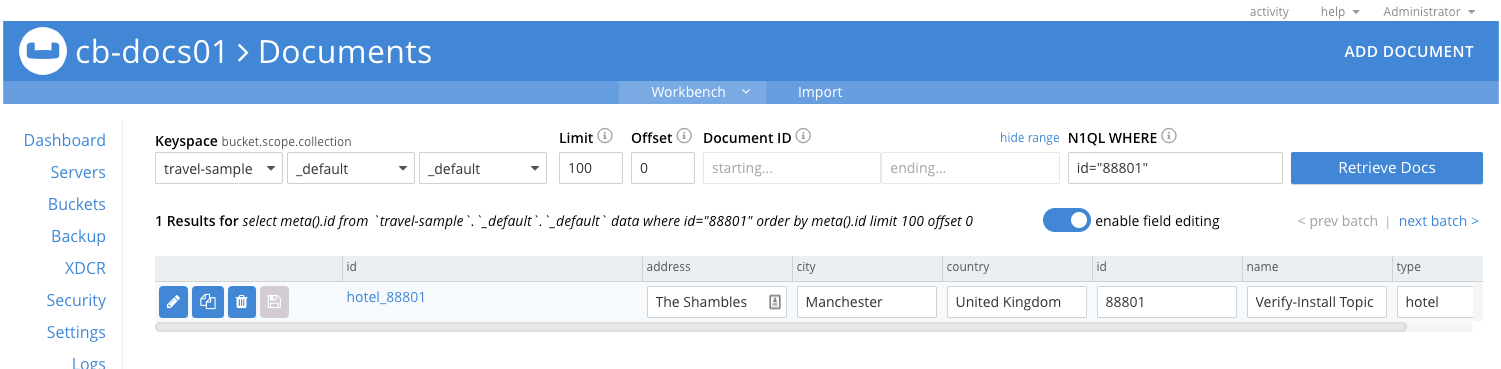
Figure 1\. Couchbase Server Document Editor
### [](#lbl-crud-get)Get a Document Using the API:
Request
```bash
curl --location --request GET 'http://localhost:4984/traveldb/hotel_88801' \
--header "Authorization: Basic $DIGEST"
```
Response
```bash
{
"_id": "hotel_88801",
"_rev": "1-f28b5cc13a38892f4f85913d4e654270",
"address": "The Shambles",
"city": "Manchester",
"country": "United Kingdom",
"id": "88801",
"name": "Verify-Install Topic",
"type": "hotel"
}
```
### [](#lbl-crud-upd)Update a Document using API:
Request
```bash
curl --location -g \
--request PUT 'http://localhost:4984/traveldb/hotel_88801?new_edits=true&rev=1-f28b5cc13a38892f4f85913d4e654270' \(1)
--header 'Accept: application/json' \
--header 'Content-Type: application/json' \
--data-raw '{
"_id": "hotel_88801",
"id": "88801",
"type": "hotel",
"name": "Verify-Install Topic Updated", (2)
"address": "The Shambles",
"city": "Manchester",
"country": "United Kingdom",
"email": "enquiries@hotel_88801.internet" (3)
}'
```
| **1** | This revision is the one returned by the response to the initial POST request — see: [Response to Add Document Request](#lbl-crud-add-resp) |
| ----- | ------------------------------------------------------------------------------------------------------------------------------------------- |
| **2** | Here we change the text of the _name_ field. |
| **3** | Here we add an _email_ field. |
Response
```bash
{
"id": "hotel_88801",
"ok": true,
"rev": "2-249366b198e81f203d7ae9eb54376210" (1)
}
```
| **1** | Here the "ok":true indicates success, whilst the revision shows it is the second change to this document. |
| ----- | --------------------------------------------------------------------------------------------------------- |
Check
[Check Document on Couchbase Server](#lbl-check-cbs). Does the document contain the changed _data_ value?
### [](#lbl-crud-upd-svr)Sync a Couchbase Server Change
This will show that changes made using Couchbase Server are replicated to sync gateway.
1. Within the Couchbase Server Document Editor
1. Retrieve `88801` if it is not currently displayed
Use `meta().id="hotel_88801"` as query
2. Edit the _email_ value to contain `reception@hotel_88801.internet`
3. Edit the _name_ value to contain `Verify-Install Topic-Updated-In-Server`
4. **Save** the change.
2. In your terminal, use the API to get the document again — see [Get a Document Using the API:](#lbl-crud-get)
You should see the change you made in Couchbase Server reflected in the response. For example:
```bash
{"_id":"hotel_88801","_rev":"3-cc2e758ef63b0daf5b01b2baf98c72b6", (1)
"address":"The Shambles","city":"Manchester","country":"United Kingdom","email":"reception@hotel_88801.internet","id":"88801","name":"Verify-Install Topic-Updated-In-Server","type":"hotel"}
```
| **1** | Note that the revision sequence is now 3, up from the 2 returned in our [Response to Update Document Request](#lbl-crud-upd-resp)Note that the _email_ and _name_ fields now contains both the change made in sync gateway and the amendment made in Couchbase Server ("reception") |
| ----- | ----------------------------------------------------------------------------------------------------------------------------------------------------------------------------------------------------------------------------------------------------------------------------------- |
### [](#lbl-crud-del)Delete a Document Using API
Request
```bash
curl --location -g --request DELETE 'http://localhost:4984/traveldb/hotel_88801?rev=3-cc2e758ef63b0daf5b01b2baf98c72b6' (1)
```
| **1** | Note that we provide the revision ID of the latest revision (3), as returned in the response to the last GET request. |
| ----- | --------------------------------------------------------------------------------------------------------------------- |
Response
You should see the following response:
```bash
{
"id": "hotel_88801",
"ok": true,
"rev": "4-03f1ba127340e8c50c31a36279298e60" (1)
}
```
| **1** | The delete counts as the fourth change/revision. "ok":true indicates the delete was successful. |
| ----- | ----------------------------------------------------------------------------------------------- |
Check
* [Check Document on Couchbase Server](#lbl-check-cbs) and you should now see "No Results"
* Use the API to get the document — see: [Get a Document Using the API:](#lbl-crud-get). Assuming the delete worked you should see the following response:
```bash
{"error":"not_found","reason":"deleted"}%
```
## [](#ways-to-verify-sync)Ways to Verify Sync
To verify that document changes have been replicated, you can:
* Monitor the sync gateway revision number returned by the database endpoint ([GET /{db}/](rest-api.md#/database/get%5F%5Fdb%5F%5F)). The revision number increments for every change that happens on the sync gateway database.
* Query a document by ID on the sync gateway REST API as shown in [Check Document on Couchbase Server](#lbl-check-cbs). Use ([GET /{db}/{id}](rest-api.md#/document/get%5F%5Fdb%5F%5F%5Fdoc%5F)) — see: [REST API Access](rest-api-access.md) for more.
* Query a document from the Query Workbench on the Couchbase Server Console.
Next Steps
Now you know sync gateway is deployed and operational. So, you can explore more complex scenarios with confidence.
Maybe you want to learn more about sync gateway's [Bootstrap Configuration](configuration-schema-bootstrap.md) or how to [Sync with Couchbase Server](sync-with-couchbase-server.md). Or perhaps you want to explore how to:
* Implement access controls for users and data — see: [Users](users.md), [Roles](roles.md) and the [Sync Function](sync-function.md) that ties it all together.
* Implement secure connectivity using TLS/SSL, which is described in [User Authentication](authentication-users.md) and [TLS Certificate Authentication](authentication-certs.md)
* Build more complex syncs, such as those that sync with:
* Other sync gateway nodes, for which see [Inter Sync Gateway Sync - Overview](sync-inter-syncgateway-overview.md)
* Apps on mobile devices using Couchbase Lite — see [Sync Using App](sync-using-app.md)
---
#####
## [](#related-content)Related Content
###### [](#-2)
Getting Started
* [Prepare](get-started-prepare.md)
* [Install](get-started-install.md)
* [Verify](#)
###### [](#-3)
Product Information
* [Release Notes](release-notes.md)
* [Compatibility Matrix](compatibility.md)
* [Supported OS](supported-environments.md)
###### [](#-4)
Community
[Mobile Forum](https://forums.couchbase.com/c/mobile/14) | [Blog](https://blog.couchbase.com/) | [Blog (Mobile)](https://blog.couchbase.com/category/couchbase-mobile/?ref=blog-menu) | [Tutorials](https://docs.couchbase.com/tutorials/)