---
title: XDCR — Server Compatibility
description: How Sync Gateway works with Couchbase Server's Cross Data
Center Replication (XDCR).
pubDate: 2026-08-17T09:53:44.266Z
antora:
editUrl: https://github.com/couchbase/docs-sync-gateway/edit/release/3.1/modules/ROOT/pages/server-compatibility-xdcr.adoc
xref: xref:3.1@sync-gateway::server-compatibility-xdcr.adoc[]
---
[Consult the llms.txt file for a full list of contents](/llms.txt)
[View original HTML](/sync-gateway/3.1/server-compatibility-xdcr.html)
# XDCR — Server Compatibility
> How Sync Gateway works with Couchbase Server's _Cross Data Center Replication_ (_XDCR_).
> Sync Gateway is specifically designed for mobile synchronization, but there are use-cases where it can usefully be used alongside XDCR to provide a comprehensive solution.
_Related topics_: **XDCR** | [Eventing](server-compatibility-eventing.md) | [Transactions](server-compatibility-transactions.md) | [Collections](server-compatibility-collections.md)
_Other Topics_: [Compatibility Matrix](compatibility.md)
## [](#introduction)Introduction
Couchbase Server provides the backing data store for Sync Gateway.
> [!TIP]
> See: [Compatibility Matrix](compatibility.md) for version compatibility information.
Both _Couchbase Mobile_ and [Couchbase Server Cross Data Center Replication](../../server/current/learn/clusters-and-availability/xdcr-overview.md) (XDCR) provide for efficient and secure replication of data, albeit using different replication technologies.
Here we provide details on how XDCR feature relates to the Couchbase Mobile ecosystem.
## [](#lbl-isgr)Inter Sync Gateway Replication
If you need to sync mobile clusters, you should use Inter-Sync Gateway replication — see: [Inter Sync Gateway Sync - Overview](sync-inter-syncgateway-overview.md). It was designed to keep mobile clusters in different data centers in sync. The ideal use-case being the need to replicate edge clusters containing active Sync Gateway nodes between geographically separate cloud-based Sync Gateway deployments. A typical architecture for this use case is shown in [Figure 1](#icr-active-mobile).
Inter-Sync Gateway replication provides bi-directional read/write replications that ensure:
* Cluster specific security is observed; by invoking the appropriate Sync Function.
* The integrity of security history is maintained. Historical access rules are held and maintained in the Sync Gateway metadata. This history is necessary to consistently handle the revocation of access grants.
* A consistent Revision Id is used across all clusters, allowing clients to identify a revision regardless of the cluster it is on.
* Cluster-specific \_sync documents are not replicated to other mobile clusters
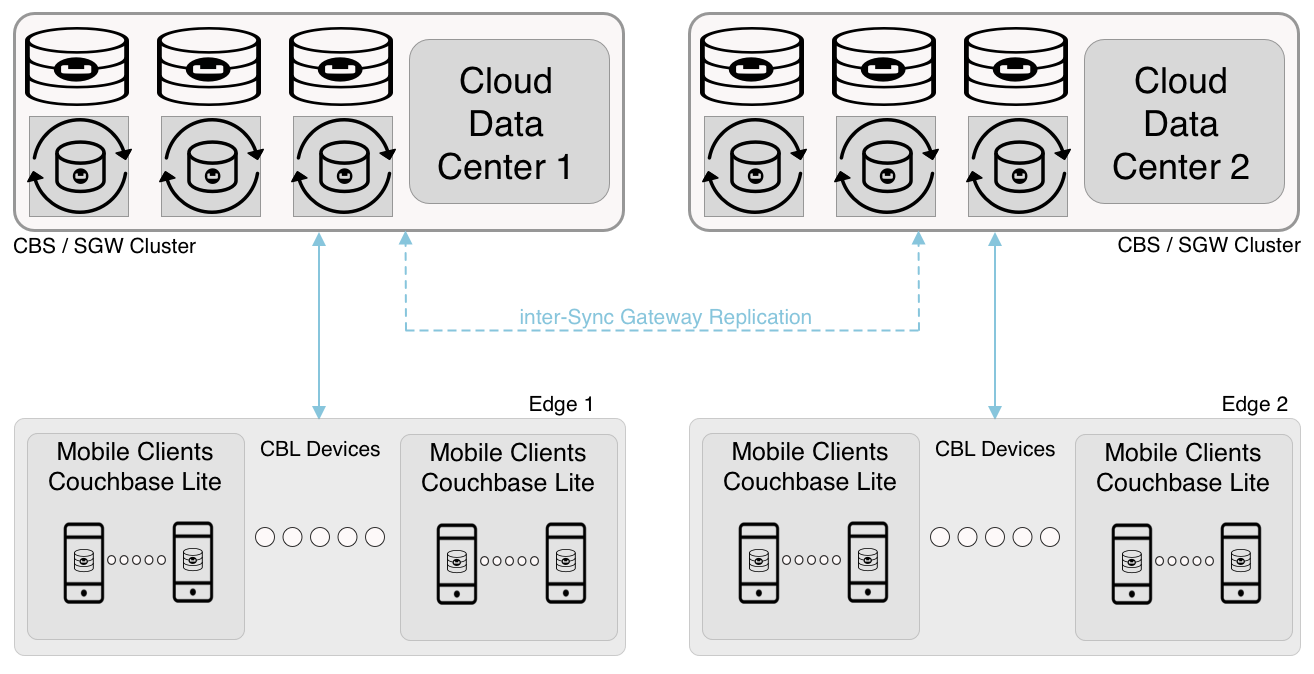
Figure 1\. Active-to-active mobile synchronization
## [](#lbl-xdcr)Cross Data Center Replication (XDCR)
Like inter-Sync Gateway Replication, Couchbase Server's Cross Data Center Replication ([XDCR](../../server/current/manage/manage-xdcr/xdcr-management-overview.md)) can be used to replicate between Couchbase Mobile clusters. XDCR replicates all of Sync Gateway's metadata (\_sync xattr) along with associated documents.
Your default preference for the replication of Couchbase Mobile changes should always be to use inter-Sync Gateway replication.
XDCR can be useful though in use-cases where the entire dataset from a source bucket is replicated to a target bucket. This could include categories such as active standby, disaster recovery, data migration and _lift-and-shift_ cases in hybrid cloud.
In all these categories you should run XDCR in unidirectional mode, deploying Sync Gateway only at one end of the XDCR-replicated bucket (source, or target) — see: [Example 1](#ex-xdcr-data-repl).
Example 1\. XDCR Replication
In this example XDCR deployment:
* XDCR is run unidirectionally. It pushes data from the primary data center to the secondary data centers, where it is pulled by Sync Gateway for downstream clients.
* Sync Gateway, although deployed at both ends of the XDCR replication, crucially is in **read-only** mode at the target end.
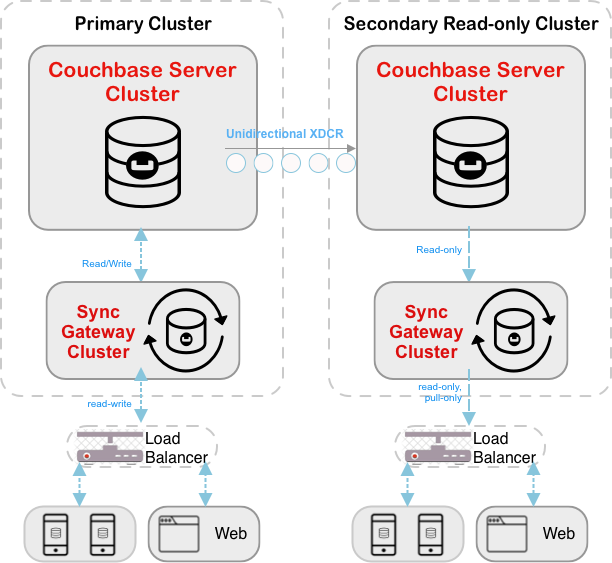
Figure 2\. XDCR Replication
## [](#lbl-prov-drc)Disaster Recovery Scenario
In a Disaster Recovery scenario XDCR serves an important role in setting-up target mobile clusters.
Here XDCR supports Disaster Recovery and Data Migration. Even though Sync Gateway is the operational replicator of choice for mobile data, it is only ever deployed at one end of the unidirectional XDCR replication.
### [](#clusters-in-same-region)Clusters in Same Region
This model caters for situations where the Active and Disaster Recovery clusters are in the same region or data center — see: [Figure 3](#fig-dr-same-regn). It includes an optional optimization step, which will ensure that there is no downtime during the activation stage.
Set Up
To set up and maintain a disaster recovery cluster:
1. \[_Optional step — for optimization_\] Connect Sync Gateway to the Disaster Recovery cluster just long enough to create indexes. Having everything reindexed lowers switching costs.
If you skip this test, you will incur latency when Sync Gateway is switched to the Disaster Recovery cluster and Sync Gateway rebuilds its indexes.
2. Connect Sync Gateway to your Primary cluster.
3. Initiate the **unidirectional** XDCR from the Primary cluster to the Disaster Recovery cluster.
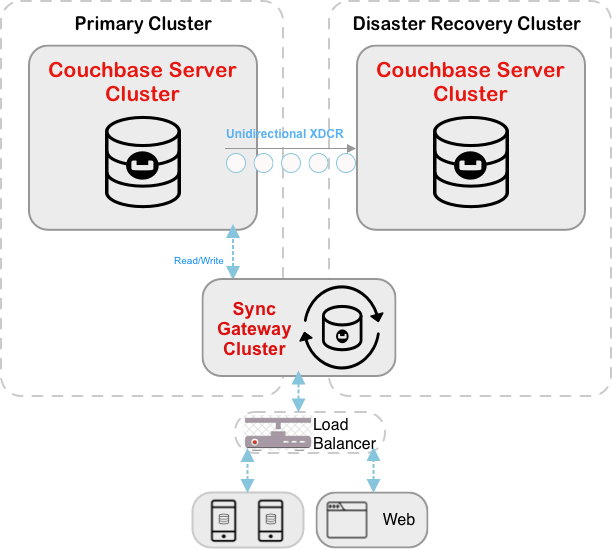
Figure 3\. DR Cluster Setup (Clusters in Same Regions)
Activation
When you are ready to switch to Disaster Recovery operations:
1. Stop the replication (XDCR) from the Primary cluster to Disaster Recovery cluster.
2. **When XDCR is stopped:** Switch the Load Balancer to point to the Sync Gateway on the Disaster Recovery cluster. This maintains the deployment of Sync Gateway at only one end of the XDCR replication.
3. Promote the Disaster Recovery cluster to Primary and the **old** Primary to Disaster Recovery.
4. Flush all replicated buckets in the Primary cluster; as a precaution against any spurious writes coming into the Primary cluster that had not been replicated when XDCR was stopped.
5. Reverse the XDCR to replicate from the newly promoted Primary to the old Primary to set up a new Backup.
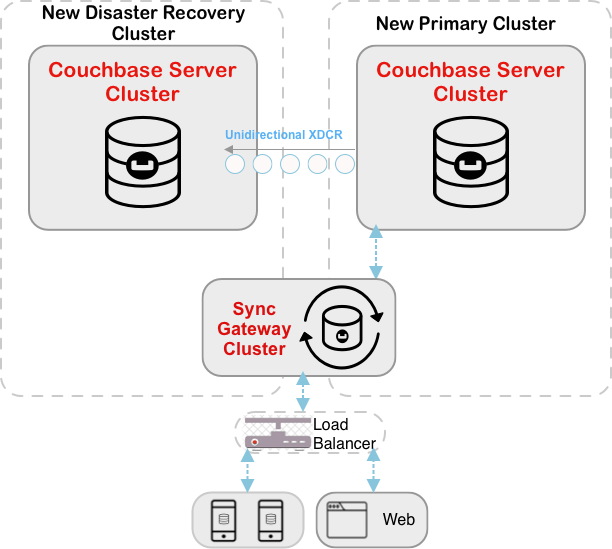
Figure 4\. DR Cluster In-recovery (Clusters in Same Regions)
### [](#clusters-in-different-regions)Clusters in Different Regions
This model caters for situations where the Active and Disaster Recovery clusters are in different regions or data centers. Although the model has a separate Sync Gateway cluster attached to the Disaster Recovery cluster, it maintains the deployment of Sync Gateway at only one end of the XDCR replication. The optional optimization step will ensure that there is no downtime during the activation stage.
Set Up
To set up and maintain a disaster recovery cluster - see: [Figure 5](#fig-dr-diff-regn-setup):
1. \[_Optional step — for optimization_\] Turn on _Sync Gateway_ in the Disaster Recovery cluster just long enough to create indexes. Having everything re-indexed lowers switching costs.
If you skip this test, you will incur latency when Sync Gateway is switched to the Disaster Recovery cluster and Sync Gateway rebuilds its indexes.
2. \[_Critical step_\] Turn off **all** the Sync Gateways in the Disaster Recovery cluster.
3. Initiate the **unidirectional** XDCR from the Primary cluster to the Disaster Recovery cluster.
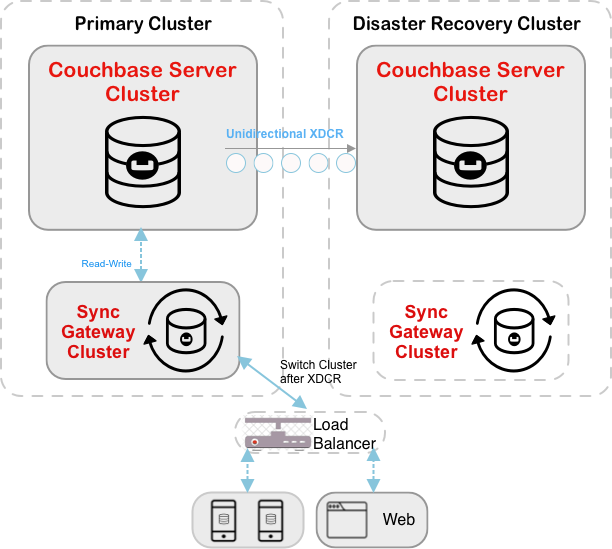
Figure 5\. DR Cluster Setup (Clusters in Different Regions)
Activation
When you are ready to switch to Disaster Recovery operations — see: [Figure 6](#fig-dr-diff-regn-in-recovery):
1. Stop Sync Gateway on the Primary cluster
2. Stop the replication (XDCR) from the Primary cluster to the Disaster Recovery cluster.
3. Ensure that any and all Load Balancer(s) are updated to direct all traffic to the new Sync Gateway cluster(s).
4. Turn on the Sync Gateway cluster(s) in the Disaster Recovery cluster.
5. Promote the Disaster Recovery cluster to be the **new** Primary cluster, and make the **old** Primary cluster the **new** Disaster Recovery cluster
6. Flush all replicated buckets in the Primary cluster; as a precaution against any spurious writes coming into the Primary cluster that had not been replicated when XDCR was stopped.
7. Reverse the original XDCR to replicate from the newly promoted Primary to the old Primary, to set up a new Backup.
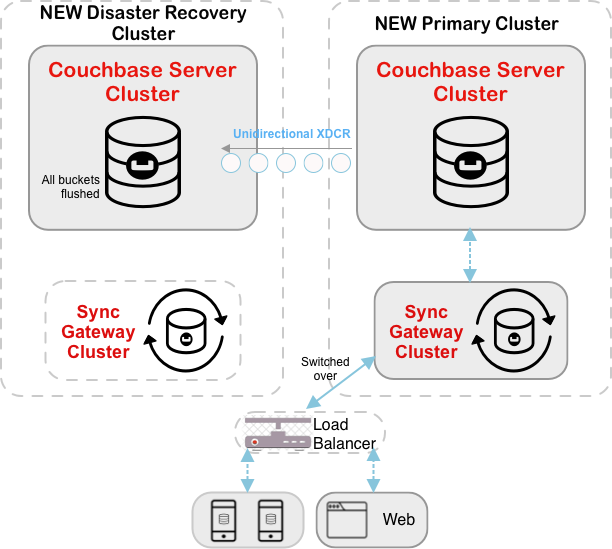
Figure 6\. DR In-Recovery (clusters in different regions)
---
#####
## [](#related-content)Related Content
###### [](#-2)
Learn more …
* [Sync Function](#sync-function-overview.adoc)
* [Import filter](import-processing.md)
* [Access Control](configuration-schema-access-control.md)
* [Add/Update Sync Function](#rest-api-admin.html#/Access%5FControl/update%5Fsync%5Ffunction)
* [Sync Function Overview](#sync-function-overview.adoc)
###### [](#-3)
Reference material …
* [Public REST API](rest-api.md)
* [Admin REST API](rest-api-admin.md)
* [Metrics REST API](rest-api-metrics.md)
###### [](#-4)
Community
[Mobile Forum](https://forums.couchbase.com/c/mobile/14) | [Blog](https://blog.couchbase.com/) | [Blog (Mobile)](https://blog.couchbase.com/category/couchbase-mobile/?ref=blog-menu) | [Tutorials](https://docs.couchbase.com/tutorials/)
Sync Function Blogs
* [Using roles in sync functions](https://blog.couchbase.com/augment-your-sync-function-with-roles-in-couchbase-sync-gateway/)
* [Tutorial: Getting Started with Data Synchronization using Couchbase Mobile for Offline-First Apps](https://blog.couchbase.com/data-synchronization-offline-first-apps-couchbase/)
* [Sync Function (category)](https://blog.couchbase.com/tag/sync-function/)