About Prompts and Prompt Engineering
- concept
Learn how prompts, context, and orchestration work together in agentic apps.
Why Prompts?
In an agentic app, the Large Language Model (LLM) is the reasoning engine. The LLM does not automatically know what to do but instead relies on the prompt it receives. The prompt is the input that tells the LLM:
-
What role it’s playing.
-
What tools it can use.
-
What the user wants.
-
What context is relevant right now.
-
What rules or guardrails it must follow.
Understanding prompts and how they evolve during a workflow helps take away some of the mystery of agentic apps.
What Goes Into a Prompt?
A prompt is more than just the user’s request. It’s a structured input assembled by the orchestration layer and contains multiple things.
| Component | Description | Example |
|---|---|---|
User input |
The goal or request from the user. |
Plan me a trip to Rome. |
System role / persona |
Instructions about how the LLM should behave. |
You’re a helpful travel assistant. |
Context |
Memory, retrieved knowledge, or current state. |
User prefers budget airlines, vegetarian meals. |
Tools |
What the LLM can call or interact with. |
You can use the Flights API and Hotels API. |
Guardrails |
Rules and constraints that the LLM must follow. |
Never book without confirmation. Stay under $1500 budget. |
Intermediate results |
Outputs from previous steps in the workflow. |
Here are the available flights. |
This combination is what allows the LLM to reason, plan, and act.
Context and Context Engineering
Context is everything the LLM needs to make a good decision. It comes in 2 main forms:
-
Short-term context: The current conversation or workflow state.
-
Long-term context: The stored preferences, history, or knowledge retrieved from a database.
Context engineering is the practice of deciding what to include in the prompt and how to structure it. Too little context, and the LLM makes poor decisions. With too much context, the prompt becomes slow or confusing. The size of the prompt is also limited by the context size of the LLM.
The Couchbase AI Data Plane can help you manage your prompts using the Agent Catalog and the Prompts Hub.
Guardrails
Guardrails are rules that keep the agent safe, reliable, and aligned with user expectations. They’re included in the prompt itself, enforced programmatically by the orchestration layer, or both.
Guardrails protect against:
-
Malicious or unsafe outputs, to prevent harmful, biased, or toxic content generation.
-
Data leakage, to stop accidental exposure of sensitive or private information.
-
Over-permissioning or unsafe actions, to avoid the AI taking risky steps such as deleting files.
-
Prompt injections or jailbreaks, to protect against adversarial input designed to bypass safety rules.
-
Hallucinations and misinformation, to reduce the risk of the model fabricating false or misleading outputs.
-
Regulatory and compliance risks, to make sure outputs stay within legal and ethical boundaries.
For example, a prompt could include the following to add guardrails:
-
Do not share personal data -
Never execute a payment without explicit confirmation -
If uncertain, ask the user before proceeding
Guardrails help make sure the LLM does not go off track whether by accident or through a malicious user.
For more information about guardrails on the AI Data Plane Model Service, see Configure Guardrails and Security.
The Orchestration Layer’s Role
The orchestration layer is responsible for building and updating the prompt as the workflow progresses. It decides:
-
What context to fetch and include.
-
When to call external tools or APIs.
-
How to inject results back into the prompt.
-
When to apply guardrails or safety checks.
How Agentic Apps Differ from Traditional Apps
For experienced developers, you can think of the prompt as an evolution of a state object in a traditional app. Instead of storing values in variables to decribe the app’s state, an evolving prompt tells the LLM what state the app is in.
-
In a traditional app, the structure of the state (variables, objects) and the logic is explicit.
-
In an agentic app, the state is flattened into natural language (the prompt), and the LLM applies reasoning to decide what to do.
For example, if you were designing a travel app, the difference in state management between a traditional and agentic app could look like the following:
state = {
  destination: "Rome",
  budget: 1500,
  flights: [ ... ],
  hotels: [ ... ],
  preferences: { airline: "budget", meals: "vegetarian" }
}

// app logic:
if (state.budget > cheapestFlight + cheapestHotel) {
  suggestItinerary()
}System: You are a helpful travel assistant.
User request: Plan me a 5-day trip to Rome in October, under $1500.
Context: User prefers budget airlines, vegetarian meals.
Flights API results: Airline A $400, Airline B $550.
Hotels API results: Hotel X $100/night, Hotel Y $150/night.|
The AI Data Plane also offers notebooks and sample code hosted on Google Colab and GitHub to get you started with a prebuilt agentic app in your choice of agent framework:
|
Example: Travel Planner App
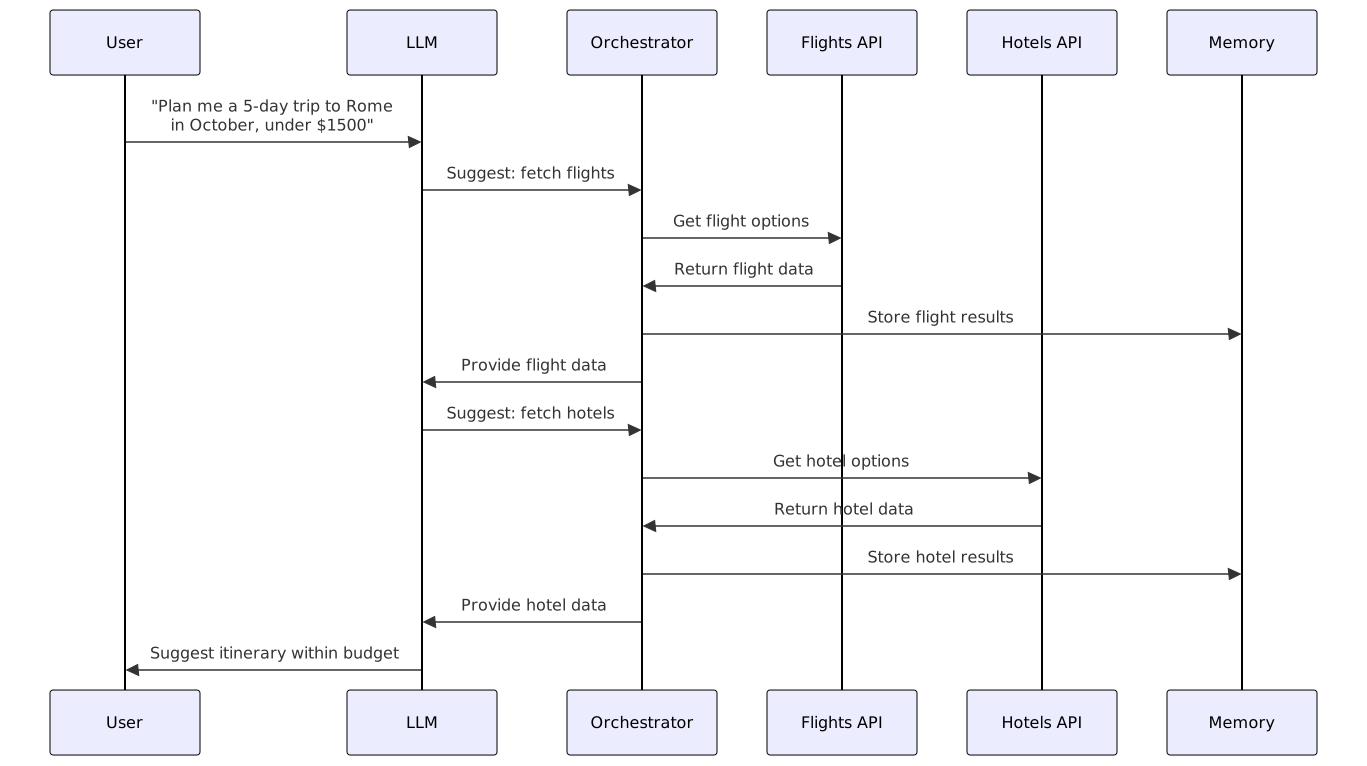
The following is an example of a travel planner app, with a prompt that evolves as it progresses through the app workflow. The example app can take a request from the user, find flights, find hotels, and suggest an itinerary.
Step 1: User Request
User: Plan me a 5-day trip to Rome in October, under $1500.
System: You are a helpful travel assistant.

You can use the Flights API and Hotels API.

Always respect the user's budget and preferences.

Never book without confirmation.

User request: Plan me a 5-day trip to Rome in October, under $1500.
Step 2: Fetch Flights
The LLM suggests checking flights. The orchestrator calls the Flights API and gets results.
System: You are a helpful travel assistant.

You can use the Flights API and Hotels API.

Always respect the user's budget and preferences.

Never book without confirmation.

User request: Plan me a 5-day trip to Rome in October, under $1500.

Context: User prefers budget airlines. Vegetarian meals when available.

Flights API results:


- Airline A: $400 round trip

- Airline B: $550 round trip
Step 3: Fetch Hotels
The LLM suggests checking hotels. The orchestrator calls the Hotels API and gets results.
System: You are a helpful travel assistant.

You can use the Flights API and Hotels API.

Always respect the user's budget and preferences.

Never book without confirmation.

User request: Plan me a 5-day trip to Rome in October, under $1500.

Context: User prefers budget airlines. Vegetarian meals when available.

Flights API results:


- Airline A: $400 round trip

- Airline B: $550 round trip

Hotels API results:


- Hotel X: $100/night

- Hotel Y: $150/night
Step 4: Suggest Itinerary
Now the LLM can reason:
Flight A ($400) + Hotel X ($500) = $900 total, within budget.
It proposes an itinerary.
System: You are a helpful travel assistant.

You can use the Flights API and Hotels API.

Always respect the user's budget and preferences.

Never book without confirmation.

User request: Plan me a 5-day trip to Rome in October, under $1500.

Context: User prefers budget airlines. Vegetarian meals when available.

Flights API results:


- Airline A: $400 round trip

- Airline B: $550 round trip

Hotels API results:


- Hotel X: $100/night

- Hotel Y: $150/night

Proposed plan:


- Flight A ($400)

- Hotel X ($500 for 5 nights)

- Total: $900