Agent Memory for Persistent Memory Storage
- concept
Couchbase Agent Memory provides a unified, persistent memory layer for agentic applications to maintain context across user sessions.
Couchbase Agent Memory stores conversation history, extracted facts, and vector embeddings so that agents can recall relevant past context across sessions. You access it through the Agent Memory Python SDK or its REST API.
Without persistent memory, agents rely on in-context memory that disappears when the context window fills up, or they operate as stateless agents with no memory at all. Agent Memory solves this by acting as the persistence layer between your agent framework and its long-term memory store. You do not need to build custom session tables, summarization flows, or retrieval logic.
Agent Memory integrates with any agent framework, including LangGraph, CrewAI, LlamaIndex, and Strands Agents. Agent Memory uses Couchbase Capella or Couchbase Server Enterprise Edition as its underlying data store.
Agent Memory manages the storage and retrieval of memories for an agent. Agent Memory does not provide:
-
Reasoning logic for using memories.
-
Support for non-textual content.
-
Model hosting. For more information about how to host a model through Capella, see Deploy Models with the AI Data Plane Model Service.
-
Real-time streaming of memory changes.
-
Memory sharing across users of your application. You can share memory across agents within the same application using annotation-based access control.
Use Cases
The following examples show how Agent Memory can power domain-specific AI agents.
- Personalized retail assistant
-
A retail agent stores a shopper’s persistent style preferences and sizing as long-term facts with no expiry. The agent stores seasonal browsing interactions with a TTL so they decay automatically after a few months. When the shopper returns, the agent retrieves relevant preferences across all sessions to personalize recommendations without manual context management.
- DevOps and SRE copilot
-
A DevOps agent stores persistent infrastructure facts, like service topology and configuration, with incident logs that carry a short TTL and expire once an incident is resolved. When generating a debug script, the agent retrieves architecture context from all sessions while temporary noise from resolved incidents has already faded.
- Financial fraud investigator
-
A fraud analysis agent stores flagged transaction patterns with a TTL set to match compliance retention requirements. When a new suspicious transaction arrives, the agent uses time-range filtering to restrict its semantic search to a specific historical window, such as a prior holiday season, to surface only relevant precedents.
Key Capabilities
Agent Memory deploys as a stateless Docker container on your own server. It connects to an existing Capella or Couchbase Server Enterprise Edition cluster. You can scale your Agent Memory server as needed and manage its configuration and settings through an environment file.
You can retrieve and store memories on your Agent Memory deployment through the Agent Memory Python SDK or its REST API.
Once your server is running, Swagger UI is available at /docs and ReDoc at /redoc, with no additional setup, to view documentation for the Agent Memory REST API.
See the Agent Memory API Reference for the full endpoint reference.
|
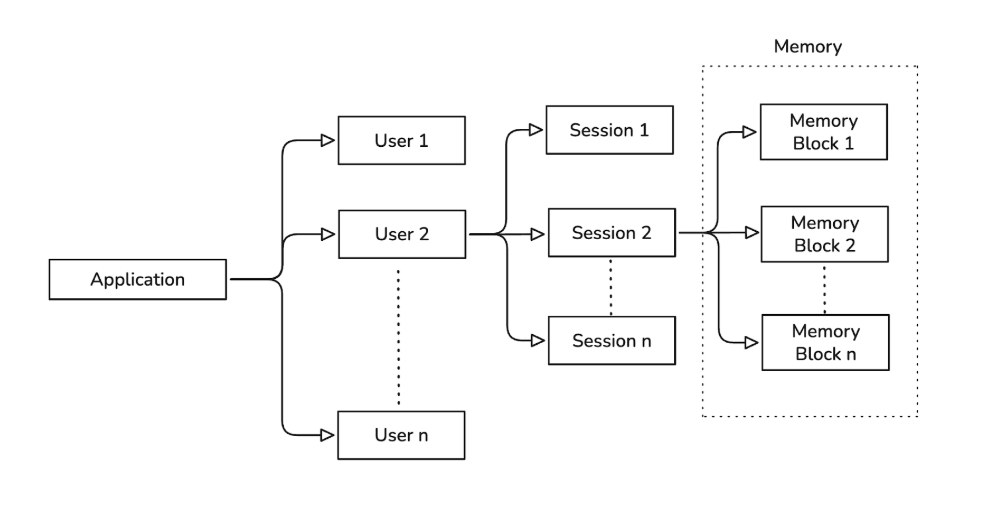
Agent Memory organizes memory using a hierarchy of users, sessions, and memory blocks.
User
In Agent Memory, a user is what interacts with your AI agent. Each user has a unique identifier that you generate. Agent Memory uses your user identifiers to isolate memory data and implement access control.
Each user can have multiple sessions.
Session
A session represents an individual run or interaction between a user and your application. Sessions organize memory blocks for a specific user.
A session can be active or ended:
-
Active sessions can receive new memory blocks.
-
Ended sessions can no longer receive new memory blocks and are permanently closed. You cannot reopen an ended session or modify memory blocks in it. Existing blocks remain readable and searchable.
You can control the status of a user’s session through your agent application logic. Sessions persist in the Couchbase cluster you connect to Agent Memory. If your application restarts or disconnects, you can retrieve an existing session and continue adding memories.
Memory Block
A memory block is the basic unit of storage in Agent Memory. It captures information from a session.
This information can be any important topics or information from a session that you want to store for later recall.
Each memory block belongs to a specific session and contains:
-
The original chat message or fact.
-
A vector embedding for semantic search.
-
An LLM-generated summary.
Vector embeddings for semantic search and LLM-generated summaries require that you have an embedding model and LLM available for your Agent Memory instance. -
A timestamp for conflict resolution.
You can use the vector embeddings for a memory block to retrieve relevant memories later, using a semantic search. Memory block timestamps help with conflict resolution and let you filter memories later by a time range.
Memory Types
Agent Memory unifies different memory types into a single retrieval system.
- Conversational Memory
-
Short-term memory scoped to 1 session. It captures the flow of the current conversation to maintain dialog continuity.
- Profile Memory
-
Long-term memory that spans multiple sessions. It stores facts and preferences extracted from user conversations to personalize future responses.
- Semantic Memory
-
Long-term memory that stores knowledge and facts. Agents retrieve this information for factual grounding.
Memory Management
Agent Memory provides APIs to manage memory lifecycle, resolve conflicts, and track access.
Memory Decay
You can set memory to decay over time to keep the agent’s working context relevant. Agent Memory uses time to live (TTL) settings to automatically remove old memory blocks. TTL values follow a hierarchy with the most specific value taking precedence:
-
Memory block: pass the
memory_block_ttlSDK parameter toadd_memory()orupdate_memory()to override both the session and global values. -
Session: pass the
memory_blocks_ttlSDK parameter when creating a session to override the global default. -
Global: the
AGENTMEMORY_MEMORY_BLOCK_TTLenvironment variable sets the default applied to all memory blocks.
For more information, see Manage TTL.
Conflict Resolution
When an agent retrieves contradictory memories, it uses the timestamp on each memory block to determine the most recent information.
Traceability
You can track all memory operations to audit agent behavior and debug issues. Agent Memory records memory read and write operations in structured logs. These logs include user and session identifiers.
Agent Memory includes an embedded Prometheus instance that exposes operational metrics, including extraction queue depth, failure counts, and token throughput. For more information, see Prometheus Metrics.
Security and Access Control
You can configure Agent Memory to use OIDC/OAuth2 for access control.
You must provide a valid Bearer token in the Authorization header of all API requests.
Agent Memory requires tokens signed with the RS256 algorithm.
Agent Memory isolates data at the user and session level. One user cannot access the memory space of another user. You can share memories across different agents within your application using annotation-based access control.