User Roles and Privileges
Learn how to manage user access through Enterprise Analytics' role-based security system with predefined roles and granular privileges.
Enterprise Analytics uses Role-Based Access Control (RBAC) to secure your data and operations. Use predefined roles for quick setup or assign specific privileges to create custom access patterns that match your organization’s security requirements.
Enterprise Analytics provides predefined roles and privileges to manage user access control effectively.
RBAC metadata for Enterprise Analytics is stored in the Metadata.Role, Metadata.AssignedRole, and Metadata.Privilege collections.
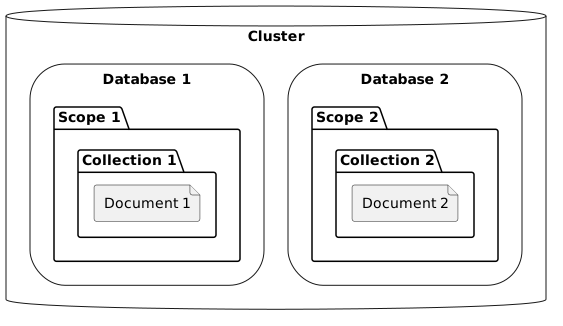
Privileges can be applied at different levels to control access granularity:
-
Database Level
-
Scope Level
-
Collection Level
Available Roles
Enterprise Analytics provides predefined roles categorized into administrative and non-administrative types to streamline user access management. Choose administrative roles for cluster management tasks or non-administrative roles for standard data access and operations.
Administrative Roles
The following administrative roles are available in Enterprise Analytics:
| Role | Capabilities |
|---|---|
Full Admin |
Can manage all cluster features (including security). |
Read-Only Admin |
Can view all cluster statistics. |
Security Admin |
Can view all cluster statistics, manage certificates, and manage security related settings. |
Local User Admin |
Can view all cluster statistics and manage local user roles, but not grant Full Admin or Security Admin roles to other users or itself. |
Local User Admin |
Can view all cluster statistics and manage local user roles, but not grant Full Admin or Security Admin roles to other users or itself. |
External User Admin |
Can view all cluster statistics and manage external user roles, but not grant Full Admin or Security Admin roles to other users or itself. |
Cluster Admin |
Can manage all cluster features except security and users. |
External Stats Reader |
Access to /metrics endpoint for Prometheus integration. |
Enterprise Analytics Admin |
Can access Enterprise Analytics service administrative APIs (i.e. <host>:8095/api/v1/*). |
Non-Administrative Roles
The following non-administrative roles are available in Enterprise Analytics:
| Role | Capabilities |
|---|---|
Enterprise Analytics Access |
Provides access to Enterprise Analytics metadata required to use the service. |
Target Object Privileges
| Target Object | Privileges |
|---|---|
Database |
create, drop |
Scope |
create, drop |
Collection |
select, insert, upsert, delete, analyze, create, drop |
View |
select, create, drop |
Index |
create, drop |
Function |
execute, create, drop |
Link |
connect, disconnect, copy to, copy from, create, drop, alter, describe |
Role |
create, drop |
Synonym |
create, drop |
Users Function
The users() function is a SQL++ built-in function that returns a list the cluster’s current users.
Example:
If a user named user1 has been created and granted the analytics_access role, you can retrieve user information using the users() function as follows:
select * from `users()` u;
The output:
[
  {
    "u": {
      "id": "user1",
      "domain": "local",
      "roles": [
        {
          "role": "analytics_access",
          "origins": [
            {
              "type": "user"
            }
          ]
        }
      ],
      "groups": [],
      "external_groups": [],
      "name": "",
      "uuid": "1b480a02-68d9-4fff-96bd-d87fd5ea5a1f",
      "password_change_date": "2025-08-06T21:32:11+05:30",
      "locked": false,
      "temporary_password": false
    }
  }
]