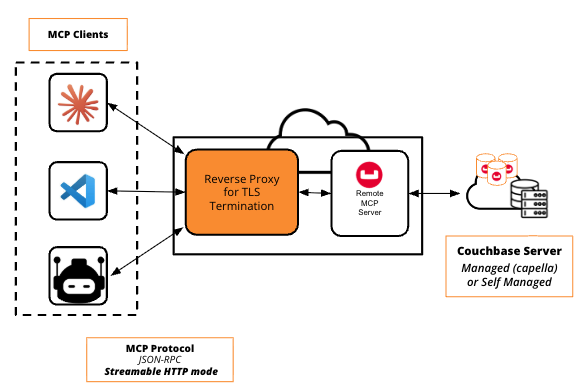
Streamable HTTP Transport Mode
Run the Couchbase MCP Server in Streamable HTTP transport mode to allow multiple clients to connect over HTTP.
Run the server in Streamable HTTP transport mode to allow multiple clients to connect to the same server instance via HTTP.
| When the server is exposed over HTTP, any client that can reach the endpoint can call its tools. To secure it, see OAuth. |
| The server serves plain HTTP and does not terminate TLS. For any non-local or production deployment, run it behind a reverse proxy that terminates TLS so traffic is encrypted in transit. See Securing the Endpoint with TLS. |
-
uvx
-
Docker
Start the server:
uvx couchbase-mcp-server \
  --connection-string='couchbases://your-connection-string' \
  --username='your-username' \
  --password='your-password' \
  --read-only-mode=true \
  --transport=http
The server will be available at http://localhost:8000/mcp by default.
MCP client configuration:
{
  "mcpServers": {
    "couchbase-http": {
      "url": "http://localhost:8000/mcp"
    }
  }
}
Set CB_MCP_PORT or --port to use a different port.
Set CB_MCP_HOST=0.0.0.0 or --host=0.0.0.0 to allow external connections.
Run the MCP server as an independent container:
docker run --rm -i \
  -e CB_CONNECTION_STRING='<couchbase_connection_string>' \
  -e CB_USERNAME='<database_user>' \
  -e CB_PASSWORD='<database_password>' \
  -e CB_MCP_TRANSPORT='http' \
  -e CB_MCP_READ_ONLY_MODE='true' \
  -e CB_MCP_HOST=0.0.0.0 \
  -e CB_MCP_PORT=9001 \
  -p 9001:9001 \
  couchbase/mcp-server
Setting CB_MCP_HOST=0.0.0.0 exposes the MCP server to anyone who can reach the container.
For production use cases, make sure you configure Docker networking to secure it.
|
You can specify the container’s networking with --network=<your_network>.
The default is bridge.
See Docker network drivers.
|
MCP client configuration:
{
  "mcpServers": {
    "couchbase-http": {
      "url": "http://localhost:9001/mcp"
    }
  }
}
Securing the Endpoint with TLS
The server serves plain HTTP and does not terminate TLS itself.
Over plain HTTP, all request and response data travels unencrypted and can be intercepted — including OAuth bearer tokens in the Authorization header when OAuth is enabled.
For any non-local or production deployment, run the server behind a reverse proxy that terminates TLS (for example nginx) and forwards traffic to the server’s HTTP port.
Clients then connect to the proxy’s https:// URL.