Import Process
Sync Gateway replication keeps distributed database changes in sync
This content explaina how Sync Gateway synchronizes document changes made through Couchbase SDKs and N1QL queries.
Related Sync topics: Configuration Properties | Admin REST API
Introduction
The import process is a key part of mobile convergence. It is the means by which Sync Gateway becomes aware of non-Sync Gateway data changes and obtains the mobile metadata it requires to replicate changes.
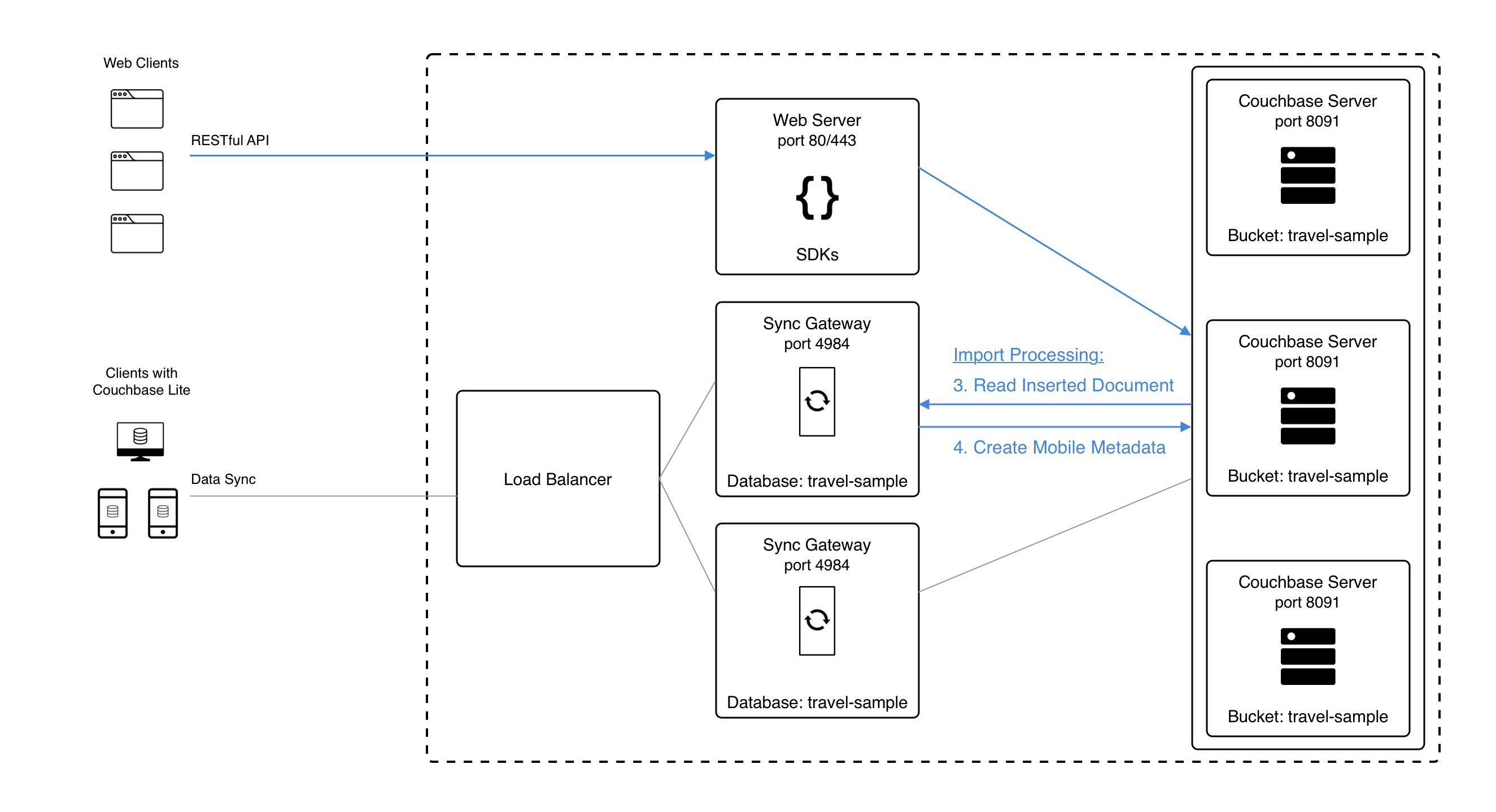
Any non-Sync Gateway change is eligible for import. The document is first run through the Sync Function to compute read security and routing, with the following differences:
-
The import is processed with an admin user context in the Sync Function, similar to writes made through the Sync Gateway Admin API. This means that
requireAccess,requireUserandrequireRolecalls in the Sync Function are treated as no-ops. -
During import,
oldDocisnilwhen the Sync Function is executed.
You can specify a filter function using the import_filter property, which will only import specific documents.
| Use the Import+ log key to troubleshoot import processing issues in the logs. |
Configuration
Note that import_docs only takes effect if the enabled_shared_bucket_access is set to true.
- ENTERPRISE EDITION
-
The
import_docsparameter defaults totrue, implying that, by default, all nodes in a cluster participate in import processing. To exclude a node, set"import_docs": false. - COMMUNITY EDITION
-
The
import_docsparameter defaults to false and must be explicitly set totrue.
The following table describes the key behavior differences between Community Edition and Enterprise Edition when import_docs is enabled, disabled or not set at all.
enabled_shared_bucket_access |
import_docs |
Behavior (EE) | Behavior (CE) |
|---|---|---|---|
true |
not set |
Assumes |
Assumes |
true |
false |
Node omitted from import processing (supported for workload isolation) |
Node omitted from import processing |
true |
true |
Node participates in import processing, and is assigned import partitions. |
Node performs import processing for all server mutations. |
false |
not set |
import docs is false by default |
import docs is false by default |
false |
true |
import docs property ignored, warning logged |
import docs property ignored, warning logged |
false |
false |
Import docs is false |
Import docs is false |
High Availability
In Enterprise Edition, import processing work is sharded across all Sync Gateway nodes with import enabled. This implies that if one of the nodes fail, the failed shard is automatically picked up by the remaining nodes in the cluster. This way, you get High Availability of import processing.
In Community Edition, there is no sharding of import across the nodes participating in the import processing. Each import node processes all server mutations.
Workload Isolation
As described in the table above, if import_docs is set to false, the node will not be participating in the import process.
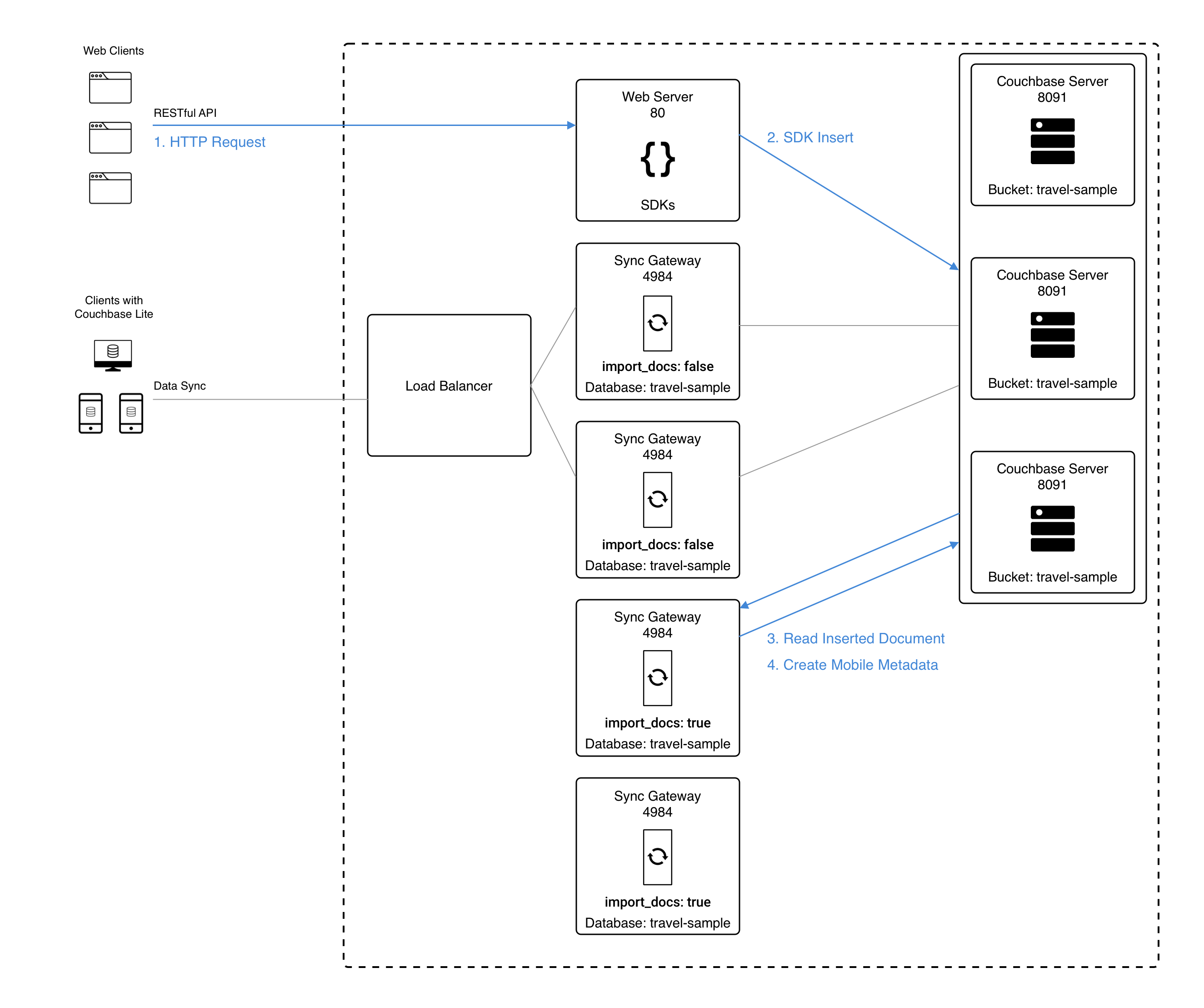
This configuration is specifically recommended for workload isolation: to isolate import nodes from the client-facing nodes.
Workload isolation may be preferable in deployments with high write throughput.
The following diagram shows an example architecture of two Sync Gateway nodes handling the incoming client connections (import_docs: false) and two nodes sharing the import processing (import_docs: true).
Reference
The reference to the configuration properties can be found below.
-
$dbname.enable_shared_bucket_access to enable convergence for a given database.
-
$dbname.import_docs to give a particular Sync Gateway node the role of importing the documents.
-
$dbname.import_filter to select which document(s) to make aware to mobile clients.