Aggregate Functions
- Capella Operational
- reference
Aggregate functions take multiple values from documents, perform calculations, and return a single value as the result. The function names are case insensitive.
You can only use aggregate functions in SELECT, LETTING, HAVING, and ORDER BY clauses.
When using an aggregate function in a query, the query operates as an aggregate query.
In Couchbase Capella, you can use aggregate functions as window functions by specifying a window definition using the OVER Clause.
In Couchbase Server 7.0 and later, window functions (and aggregate functions used as window functions) may specify their own inline window definitions, or they may refer to a named window defined by the WINDOW clause elsewhere in the query. By defining a named window with the WINDOW clause, you can reuse the window definition across several functions in the query, potentially making the query easier to write and maintain.
Syntax
This section describes the generic syntax of aggregate functions. For details of individual aggregate functions, see the sections that follow.
aggregate-function ::= aggregate-function-name '(' ( aggregate-quantifier? expr |
                       ( path '.' )? '*' ) ')' filter-clause? over-clause?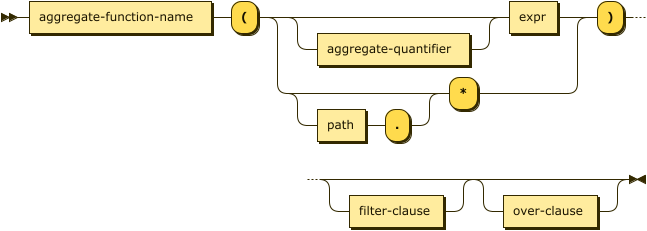
| aggregate-quantifier | |
| filter-clause | |
| over-clause |
Arguments
Aggregate functions take a single expression as an argument, which is used to compute the aggregate function.
The COUNT function can instead take a wildcard (*) or a path with a wildcard (path.*) as its argument.
Aggregate Quantifier
aggregate-quantifier ::= 'ALL' | 'DISTINCT'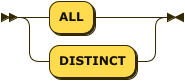
An aggregate quantifier determines whether the function aggregates all values in a group or only distinct values. You can use the quantifiers only with aggregate functions.
ALL-
Includes all values in the computation.
DISTINCT-
Includes only distinct values in the computation.
These quantifiers are optional and the default value is ALL.
FILTER Clause
filter-clause ::= 'FILTER' '(' 'WHERE' cond ')'
The FILTER clause enables you to specify which values are included in the aggregate. This clause is available for aggregate functions, and aggregate functions used as window functions. (It is not permitted for dedicated window functions.)
The FILTER clause is useful when a query contains several aggregate functions, each of which requires a different condition.
- cond
-
[Required] Conditional expression. Values for which the condition resolves to TRUE are included in the aggregation.
The conditional expression is subject to the same rules as the conditional expression in the query WHERE clause, and the same rules as aggregation operands. It may not contain a subquery, a window function, or an outer reference.
| If the query block contains an aggregate function which uses the FILTER clause, the aggregation is not pushed down to the indexer. Refer to indexes:groupby-aggregate-performance.adoc#filter-clause for more details. |
OVER Clause
over-clause ::= 'OVER' ( '(' window-definition ')' | window-ref )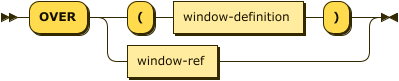
The OVER clause introduces the window specification for the function. There are two ways of specifying the window.
-
An inline window definition specifies the window directly within the function call. It is delimited by parentheses
()and has exactly the same syntax as the window definition in a WINDOW clause. For further details, refer to Window Definition. -
A window reference is an identifier which refers to a named window. The named window must be defined by a WINDOW clause in the same query block as the function call. For further details, refer to WINDOW Clause.
ARRAY_AGG( [ ALL | DISTINCT ] expression)
Description
Returns an array of non-MISSING values from an expression.
You can use the ALL or DISTINCT quantifier to specify which values to include in the calculation.
For more information, see Aggregate Quantifier.
The function ignores MISSING values, but includes NULL values.
Arguments
See Syntax.
Return Value
The function returns 1 of the following:
-
An array of non-MISSING values.
-
NULLif all values areMISSING.
Examples
SELECT ARRAY_AGG(input) AS agg_all
FROM [1, 2, 2, 3, "abc", MISSING, NULL]
AS input;[
{
"agg_all": [
null,
1,
2,
2,
3,
"abc"
]
}
]SELECT ARRAY_AGG(DISTINCT input) AS agg_distinct
FROM [1, 2, 2, 3, "abc", MISSING, NULL]
AS input;[
{
"agg_distinct": [
null,
1,
2,
3,
"abc"
]
}
]AVG( [ ALL | DISTINCT ] expression)
This function has a synonym MEAN().
Description
Returns the arithmetic mean (average) of all numeric values in an expression.
You can use the ALL or DISTINCT quantifier to specify which values to include in the calculation.
For more information, see Aggregate Quantifier.
Arguments
See Syntax.
Return Value
The function returns 1 of the following:
-
A number that represents the mean.
-
NULLif all values are non-numeric,MISSING, orNULL.
Examples
SELECT AVG(input) AS avg_all
FROM [1, 1, 2, 2, 3, MISSING, NULL, "abc"]
AS input;[
{
"avg_all": 1.8
}
]SELECT AVG(DISTINCT input) AS avg_distinct
FROM [1, 1, 2, 2, 3, MISSING, NULL, "abc"]
AS input;[
{
"avg_distinct": 2
}
]In this example, the average is (1 + 2 + 3) / 3 = 2.
COUNT(*)
Description
Returns the total count of all rows in an aggregated group. [1]
The * wildcard indicates that the function should count all rows, including those with NULL and MISSING values.
| To get the count of only non-NULL and non-MISSING values in a group, use COUNT(expression). |
COUNT( [ ALL | DISTINCT ] expression)
Description
Returns the count of all non-NULL and non-MISSING values in an expression. [1]
You can use the ALL or DISTINCT quantifier to specify which values to include in the calculation.
For more information, see Aggregate Quantifier.
To get the count of all rows, including those with NULL and MISSING values, use COUNT(*).
|
Return Value
The function returns 1 of the following:
-
A number that represents the count.
-
0if all values areMISSINGorNULL.
Examples
SELECT COUNT(input) AS count_all
FROM [1, 1, 2, 2, 3, MISSING, NULL, "abc"]
AS input;[
{
"count_all": 6
}
]SELECT COUNT(DISTINCT input) AS count_distinct
FROM [1, 1, 2, 2, 3, MISSING, NULL, "abc"]
AS input;[
{
"count_distinct": 4
}
]COUNTN( [ ALL | DISTINCT ] expression )
Description
Returns the count of numeric values in an expression. [1]
You can use the ALL or DISTINCT quantifier to specify which values to include in the calculation.
For more information, see Aggregate Quantifier.
Arguments
See Syntax.
Return Value
The function returns 1 of the following:
-
A number that represents the count.
-
0if there are no numeric values.
Examples
SELECT COUNTN(input) AS count_all
FROM [ 1, 1, 2, 2, 3, "abc", MISSING, NULL]
AS input;[
{
"count_all": 5
}
]SELECT COUNTN(DISTINCT input) AS count_distinct
FROM [ 1, 1, 2, 2, 3, "abc", MISSING, NULL]
AS input;[
{
"count_distinct": 3
}
]MAX( [ ALL | DISTINCT ] expression)
Description
Returns the maximum value in an expression.
The function ignores MISSING and NULL values.
When comparing values of different data types, the function uses SQL++ collation rules to determine precedence.
The ALL and DISTINCT quantifiers do not affect the result of this function.
The maximum value remains the same whether or not duplicates are included.
|
Arguments
See Syntax.
Return Value
The function returns 1 of the following:
-
The maximum value in the group.
-
NULLif all values are eitherMISSINGorNULL.
Examples
SELECT MAX(input) AS max_value_num
FROM [1, 3, 2, 3, MISSING, NULL]
AS input;[
{
"max_value_num": 3
}
]SELECT MAX(input) AS max_value_all
FROM [1, 2, 3, "airline", "2025-12-01T00:00:00Z", NULL]
AS input;[
{
"max_value_all": "airline"
}
]The function returns airline because strings have a higher precedence than numbers and dates.
SELECT MAX(input) AS max_value_string
FROM ["United", "Delta", "American", "Southwest"]
AS input;[
{
"max_value_string": "United"
}
]When comparing string values, the function uses alphabetical order to determine the maximum value.
MEAN( [ ALL | DISTINCT ] expression)
Synonym of AVG().
MEDIAN( [ ALL | DISTINCT ] expression)
Description
Returns the median of all numeric values in an expression.
You can use the ALL or DISTINCT quantifier to specify which values to include in the calculation.
For more information, see Aggregate Quantifier.
Arguments
See Syntax.
Return Value
The function returns 1 of the following:
-
A number that represents the median value.
-
A number that represents the mean of the 2 median values if the number of numeric values is even.
-
NULLif there are no numeric values in the group.
Examples
SELECT MEDIAN(input) AS median_value
FROM [1, 2, 3, 3, 4, MISSING, NULL, "abc"]
AS input;[
{
"median_value": 3
}
]In this example, the median is the middle value 3.
SELECT MEDIAN(input) AS median_value
FROM [1, 2, 3, 3, 4, 4, MISSING, NULL, "abc"]
AS input;[
{
"median_value": 3
}
]In this example, the median is the mean of the 2 middle values (3 and 3), which is 3.
SELECT MEDIAN(DISTINCT input) AS median_value
FROM [1, 2, 3, 3, 4, 4, MISSING, NULL, "abc"]
AS input;[
{
"median_value": 2.5
}
]In this example, the number of distinct numeric values is even.
Therefore, the median is the mean of the 2 middle values (2 and 3), which is 2.5.
MIN( [ ALL | DISTINCT ] expression)
Description
Returns the minimum value in an expression.
The function ignores MISSING and NULL values.
When comparing values of different data types, the function uses SQL++ collation rules to determine precedence.
The ALL and DISTINCT quantifiers do not affect the result of this function.
The minimum value remains the same whether or not duplicates are included.
|
Arguments
See Syntax.
Return Value
The function returns 1 of the following:
-
The minimum value in the group.
-
NULLif all values are eitherMISSINGorNULL.
Examples
SELECT MIN(input) AS min_value_num
FROM [3, 1, 2, 1, MISSING, NULL]
AS input;[
{
"min_value_num": 1
}
]SELECT MIN(input) AS min_value_all
FROM [1, 2, 3, "airline", "2025-12-01T00:00:00Z", NULL]
AS input;[
{
"min_value_all": 1
}
]The function returns 1 because numbers have a lower precedence than strings and dates.
SELECT MIN(input) AS min_value_string
FROM ["United", "Delta", "American", "Southwest"]
AS input;[
{
"min_value_string": "American"
}
]When comparing string values, the function uses alphabetical order to determine the minimum value.
STDDEV( [ ALL | DISTINCT ] expression)
Description
Returns the corrected sample standard deviation of all numeric values in an expression.
You can use the ALL or DISTINCT quantifier to specify which values to include in the calculation.
For more information, see Aggregate Quantifier.
This function is similar to STDDEV_SAMP().
However, it returns 0 if there is only 1 matching value, while STDDEV_SAMP() returns NULL in such cases.
|
Arguments
See Syntax.
Return Value
The function returns 1 of the following:
-
A number that represents the corrected sample standard deviation.
-
0if the group contains only 1 numeric value. -
NULLif there are no numeric values in the group.
Examples
SELECT STDDEV(input) AS std_deviation_all
FROM [1, 2, 3, 4, 4, MISSING, NULL, "abc"]
AS input;[
{
"std_deviation_all": 1.3038404810405297
}
]SELECT STDDEV(DISTINCT input) AS std_deviation_distinct
FROM [1, 2, 2, 3, 4, 4, MISSING, NULL, "abc"]
AS input;[
{
"std_deviation_distinct": 1.2909944487358056
}
]SELECT STDDEV(input) AS std_deviation_single
FROM [3, NULL, "abc"]
AS input;[
{
"std_deviation_single": 0
}
]STDDEV_POP( [ ALL | DISTINCT ] expression)
Description
Returns the population standard deviation of all numeric values in an expression.
You can use the ALL or DISTINCT quantifier to specify which values to include in the calculation.
For more information, see Aggregate Quantifier.
Arguments
See Syntax.
Return Value
The function returns 1 of the following:
-
A number that represents the population standard deviation.
-
0if the group contains only 1 numeric value. -
NULLif there are no numeric values in the group.
Examples
SELECT STDDEV_POP(input) AS pop_deviation_all
FROM [1, 2, 3, 4, 4, MISSING, NULL, "abc"]
AS input;[
{
"pop_deviation_all": 1.16619037896906
}
]SELECT STDDEV_POP(DISTINCT input) AS pop_deviation_distinct
FROM [1, 2, 2, 3, 4, 4, MISSING, NULL, "abc"]
AS input;[
{
"pop_deviation_distinct": 1.118033988749895
}
]STDDEV_SAMP( [ ALL | DISTINCT ] expression)
Description
Returns the corrected sample standard deviation of all numeric values in an expression.
You can use the ALL or DISTINCT quantifier to specify which values to include in the calculation.
For more information, see Aggregate Quantifier.
Arguments
See Syntax.
Return Value
The function returns 1 of the following:
-
A number that represents the sample standard deviation.
-
NULLif there are fewer than 2 numeric values in the group.
Example
SELECT STDDEV_SAMP(input) AS std_deviation_all
FROM [1, 2, 3, 4, 4, MISSING, NULL, "abc"]
AS input;[
{
"std_deviation_all": 1.3038404810405297
}
]SELECT STDDEV_SAMP(DISTINCT input) AS std_deviation_distinct
FROM [1, 2, 2, 3, 4, 4, MISSING, NULL, "abc"]
AS input;[
{
"std_deviation_distinct": 1.2909944487358056
}
]SELECT STDDEV_SAMP(input) AS std_dev_sample
FROM [3, NULL, "abc"]
AS input;[
{
"std_dev_sample": null
}
]SUM( [ ALL | DISTINCT ] expression)
Description
Returns the arithmetic sum of all number values in an expression.
You can use the ALL or DISTINCT quantifier to specify which values to include in the calculation.
For more information, see Aggregate Quantifier.
Arguments
See Syntax.
Return Value
The function returns 1 of the following:
-
A number that represents the sum.
-
NULLif there are no numeric values in the group.
Examples
SELECT SUM(input) AS sum_all
FROM [1, 2, 3, 4, 4, MISSING, NULL, "abc"]
AS input;[
{
"sum_all": 14
}
]SELECT SUM(DISTINCT input) AS sum_distinct
FROM [1, 2, 3, 4, 4, MISSING, NULL, "abc"]
AS input;[
{
"sum_distinct": 10
}
]VARIANCE( [ ALL | DISTINCT ] expression)
Description
Returns the unbiased sample variance (the square of the corrected sample standard deviation) of all numeric values in an expression.
You can use the ALL or DISTINCT quantifier to specify which values to include in the calculation.
For more information, see Aggregate Quantifier.
This function is similar to VARIANCE_SAMP().
However, it returns 0 if there is only 1 matching value, while VARIANCE_SAMP() returns NULL in such cases.
|
Arguments
See Syntax.
Return Value
The function returns 1 of the following:
-
A number that represents the unbiased sample variance.
-
0if the group contains only 1 numeric value. -
NULLif there are no numeric values in the group.
Examples
SELECT VARIANCE(input) AS variance_all
FROM [1, 2, 3, 4, 4, MISSING, NULL, "abc"]
AS input;[
{
"variance_all": 1.7
}
]SELECT VARIANCE(DISTINCT input) AS variance_distinct
FROM [1, 2, 3, 4, 4, MISSING, NULL, "abc"]
AS input;[
{
"variance_distinct": 1.6666666666666667
}
]SELECT VARIANCE(input) AS variance_single
FROM [3, NULL, "abc"]
AS input;[
{
"variance_single": 0
}
]VARIANCE_POP( [ ALL | DISTINCT ] expression)
This function has a synonym VAR_POP().
Description
Returns the population variance (the square of the population standard deviation) of all numeric values in an expression.
You can use the ALL or DISTINCT quantifier to specify which values to include in the calculation.
For more information, see Aggregate Quantifier.
Arguments
See Syntax.
Return Value
The function returns 1 of the following:
-
A number that represents the population variance.
-
NULLif there are no numeric values in the group.
Examples
SELECT VARIANCE_POP(input) AS pop_variance_all
FROM [1, 2, 3, 4, 4, MISSING, NULL, "abc"]
AS input;[
{
"pop_variance_all": 1.3599999999999999
}
]SELECT VARIANCE_POP(DISTINCT input) AS pop_variance_distinct
FROM [1, 2, 3, 4, 4, MISSING, NULL, "abc"]
AS input;[
{
"pop_variance_distinct": 1.25
}
]SELECT VARIANCE_POP(input) AS pop_variance_single
FROM [3, NULL, "abc"]
AS input;[
{
"pop_variance_single": null
}
]VARIANCE_SAMP( [ ALL | DISTINCT ] expression)
This function has a synonym VAR_SAMP().
Description
Returns the unbiased sample variance (the square of the corrected sample standard deviation) of all numeric values in an expression.
You can use the ALL or DISTINCT quantifier to specify which values to include in the calculation.
For more information, see Aggregate Quantifier.
This function is similar to VARIANCE().
However, it returns NULL if there is only 1 matching value, while VARIANCE() returns 0 in such cases.
|
Arguments
See Syntax.
Return Value
The function returns 1 of the following:
-
A number that represents the sample variance.
-
NULLif there is fewer than 2 numeric values in the group.
Examples
SELECT VARIANCE_SAMP(input) AS variance_all
FROM [1, 2, 3, 4, 4, MISSING, NULL, "abc"]
AS input;[
{
"variance_all": 1.7
}
]SELECT VARIANCE_SAMP(DISTINCT input) AS variance_distinct
FROM [1, 2, 3, 4, 4, MISSING, NULL, "abc"]
AS input;[
{
"variance_distinct": 1.6666666666666667
}
]SELECT VARIANCE_SAMP(input) AS variance_single
FROM [3, NULL, "abc"]
AS input;[
{
"variance_single": null
}
]VAR_POP( [ ALL | DISTINCT ] expression)
Synonym of VARIANCE_POP().
VAR_SAMP( [ ALL | DISTINCT ] expression)
Synonym of VARIANCE_SAMP().
Formulas
Formula for calculating the corrected sample standard deviation:
Formula for calculating the population standard deviation:
Related Links
-
GROUP BY Clause for GROUP BY, LETTING, and HAVING clauses.
-
WINDOW Clause for WINDOW clauses.
-
Window Functions for window functions.