DELETE
- Capella Operational
- reference
DELETE immediately removes the specified document from your keyspace.
Prerequisites
To execute this statement, your client must have necessary privileges on the target keyspace.
The required privileges depend on your cluster access credential type and whether the statement includes a RETURNING clause.
| Credential Type | Privilege for DELETE | Privilege for RETURNING |
|---|---|---|
Basic |
|
|
Advanced |
|
Syntax
delete ::= 'DELETE' hint-comment? 'FROM' target-keyspace use-clause? where-clause?
            limit-clause? offset-clause? returning-clause?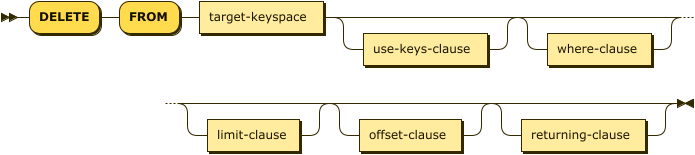
| hint-comment | |
| target-keyspace | |
| use-clause | |
| where-clause | |
| limit-clause | |
| offset-clause | |
| returning-clause |
Optimizer Hints
Couchbase Server 8.0
You can supply hints to the optimizer within a specially formatted hint comment. For more information, see Optimizer Hints.
| DELETE statements support only index hints. Other hints, such as join hints and ORDERED hints, are not supported. For an example of using an optimizer hint, see Example 7. |
Delete Target
target-keyspace ::= keyspace-ref ( 'AS'? alias )?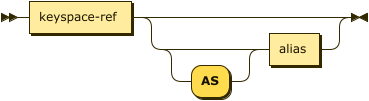
Specifies the data source from which to delete the document.
| keyspace-ref | |
| alias |
Keyspace Reference
keyspace-ref ::= keyspace-path | keyspace-partial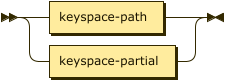
keyspace-path ::= ( namespace ':' )? bucket ( '.' scope '.' collection )?
keyspace-partial ::= collection
Keyspace reference for the delete target. For more details, refer to Keyspace Reference.
AS Alias
Assigns another name to the keyspace reference. For details, refer to AS Clause.
Assigning an alias to the keyspace reference is optional.
If you assign an alias to the keyspace reference, the AS keyword may be omitted.
USE Clause
You can use a USE clause to provide hints for the delete target.
The clause supports the following hints:
-
USE KEYS: Specifies the keys of the data items to delete. -
USE INDEX: Specifies the index to use for the delete operation.
For more information, see USE Clause.
You cannot specify a hint for the same keyspace using both the USE clause and an optimizer hint.
If you do this, the USE clause and the optimizer hint are both marked as erroneous and ignored by the optimizer.
|
WHERE Clause
where-clause ::= 'WHERE' cond
Specifies the condition that needs to be met for data to be deleted. Optional.
LIMIT Clause
limit-clause ::= 'LIMIT' expr
Specifies the greatest number of objects that can be deleted. This clause must have a non-negative integer as its upper bound. Optional.
OFFSET Clause
offset-clause ::= 'OFFSET' expr
Like the OFFSET clause for a SELECT query, you can include an OFFSET clause in a DELETE statement to specify a number of objects to skip before beginning the deletion. This option can be useful for parallelizing a large delete operation.
You can include the OFFSET clause either before or after the optional LIMIT clause. The position has no effect on the result.
The expression for this clause must be a non-negative integer. Optional.
RETURNING Clause
returning-clause ::= 'RETURNING' (result-expr (',' result-expr)* |
                    ('RAW' | 'ELEMENT' | 'VALUE') expr)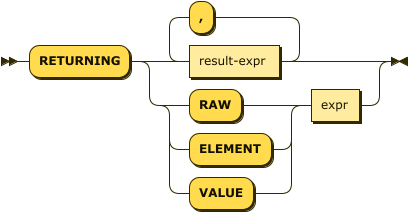
Specifies the information to be returned by the operation as a query result. For more details, refer to RETURNING Clause.
Examples
To try the examples in this section, set the query context to the inventory scope in the travel sample dataset.
For more information, see Query Context.
Be aware that running the following examples will permanently delete your sample data.
To restore your sample data, remove and reinstall the travel-sample bucket.
Refer to Import Sample Data for details.
|
This example requires the Write / Query Delete privilege on hotel.
DELETE FROM hotel;This example requires the Write / Query Delete privilege on airport and the Read / Query Read privilege on `beer-sample`.
DELETE FROM airport
WHERE city IN (SELECT raw city FROM `beer-sample` WHERE city IS NOT MISSING)
RETURNING airportname;
This example requires Write / Query Delete and Read / Query Read privileges on airport.
DELETE FROM airport
WHERE city IN (SELECT RAW MAX(t.city) FROM airport AS t)
RETURNING airportname;These examples require Write / Query Delete and Read / Query Read privileges on hotel.
DELETE FROM hotel RETURNING *;DELETE FROM hotel
WHERE city = "San Francisco"
RETURNING meta().id;This example deletes the document airline_4444.
DELETE FROM airline k
USE KEYS "airline_4444"
RETURNING k[
{
"k": {
"callsign": "MY-AIR",
"country": "United States",
"iata": "Z1",
"icao": "AQZ",
"name": "80-My Air",
"id": "4444",
"type": "airline"
}
}
]This example deletes the airline with the callsign "AIR-X".
DELETE FROM airline f
WHERE f.callsign = "AIR-X"
RETURNING f.id[
{
"id": "4445"
}
]This example deletes a subset of the airlines with a country of "France'. First, you query to get a list of the airlines in France.
SELECT id FROM airline
WHERE country="France";
There are 21 documents in this collection with country="France".
[
    {
      "id": 1191
    },
    {
      "id": 1203
    },
    {
      "id": 137
    },
    {
      "id": 139
    },
    {
      "id": 13947
    },
    {
      "id": 1523
    },
    {
      "id": 16837
    },
    {
      "id": 1908
    },
    {
      "id": 1909
    },
    {
      "id": 21     (1)
    },
    {
      "id": 225
    },
    {
      "id": 2704
    },
    {
      "id": 2757
    },
    {
      "id": 4299
    },
    {
      "id": 477
    },
    {
      "id": 4965
    },
    {
      "id": 547
    },
    {
      "id": 5479
    },
    {
      "id": 551
    },
    {
      "id": 567    (2)
    },
    {
      "id": 8745
    }
]| 1 | The 10th document’s id. |
| 2 | The 20th document’s id. |
Next, you specify that you want to delete up to 10 documents, after skipping the first 10.
DELETE FROM airline
WHERE country="France"
LIMIT 10 OFFSET 10;

SELECT id FROM airline
WHERE country="France";
Now there are 11 documents in this collection with country="France".
[
    {
      "id": 1191
    },
    {
      "id": 1203
    },
    {
      "id": 137
    },
    {
      "id": 139
    },
    {
      "id": 13947
    },
    {
      "id": 1523
    },
    {
      "id": 16837
    },
    {
      "id": 1908
    },
    {
      "id": 1909
    },
    {
      "id": 21   (1)
    },
    {
      "id": 8745 (2)
    }
]| 1 | Documents with the first 10 ids—the offset—remain in the airline collection. |
| 2 | After deleting 10 documents—the limit—1 more document remains in the collection. |
The following query hints the optimizer to use the index, def_inventory_hotel_city.
DELETE /*+ INDEX (hotel def_inventory_hotel_city) */
FROM `hotel`
WHERE city = "San Francisco";
If you examine the plan for this query, you can see that the query uses the suggested index.
"index": "def_inventory_hotel_city",
"index_id": "c31e7f44f9ff274c",
"keyspace": "hotel",
"namespace": "default",The following query hints the Query Service to use the index, def_inventory_hotel_city.
This is equivalent to Example 7 but uses a USE INDEX clause instead of an optimizer hint.
DELETE FROM `hotel`
USE INDEX (def_inventory_hotel_city)
WHERE city = "San Francisco";
If you examine the plan for this query, you can see that the query uses the suggested index.
"index": "def_inventory_hotel_city",
"index_id": "c31e7f44f9ff274c",
"keyspace": "hotel",
"namespace": "default",