DELETE Statements
- reference
This topic describes how you use DELETE statements to delete objects from a standalone collection.
Syntax
Delete EBNF
Delete ::=  "DELETE" "FROM" QualifiedName
            ("AS" OutputAlias)?
            ("WHERE" Expr)?
Delete Diagram
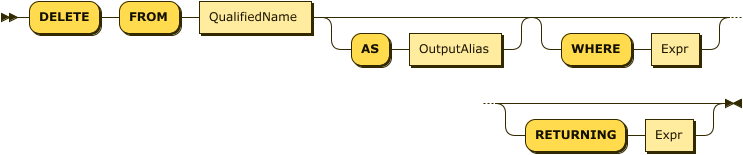
The first QualifiedName must resolve to a standalone collection or synonym.
Examples
This example deletes all orders placed before 2020-07-01 from a standalone collection named Orders:
  DELETE FROM database_name.scope_name.Orders
  WHERE order_date < "2020-07-01";
After you use DELETE, you can run ANALYZE COLLECTION on the collection to update the data sample used by cost-based optimization (CBO).
See Cost-Based Optimizer for Enterprise Analytics Services.
Show additional example
This example deletes orders made by a customer named T. Cody:
  DELETE FROM database_name.scope_name.Orders AS ord
  WHERE ord.custid = (
     SELECT VALUE cust.custid
     FROM Customers AS cust
     WHERE cust.name = "T. Cody"
  )[0];
Arguments
- WHERE
-
The optional
WHEREclause specifies a condition that the objects in the target collection must satisfy for the statement to delete them. It can include uncomplicated predicates as well as other subqueries referring to other existing collections. The default database for theWHEREexpression is the target collection’s database. There’s one variable in scope for theWHEREexpression. If specified,OutputAliasdefines the variable’s name. Otherwise, the variable’s name is the target collection’s name.
Errors encountered during DELETE cancels the action and leaves the target dataset in its pre-DELETE state.