Index Rebalance Use Cases
This page explains a few use cases of different Rebalance operations on Index nodes.
| This is not a comprehensive list of all possible Index rebalance use cases (examples). |
For more information about rebalance operations on Index nodes, see Index Rebalance.
Understanding Index Rebalance with Examples
This section provides examples with explanation about how different rebalance methods, failover and removal operations affect the Index Service.
Swap Rebalance for Index Service
A swap rebalance replaces 1 or more nodes in the cluster with an equal number of new nodes. For the Index Service, a swap rebalance moves the indexes from the nodes being removed to the nodes being added. When only 1 Index Service node participates in the operation, movement generally follows a 1-to-1 pattern. When multiple Index Service nodes are swapped, the planner may distribute indexes across the new nodes rather than maintaining a strict 1-to-1 mapping.
Indexes on nodes that are not part of the swap rebalance process are not moved.
The following examples show how Couchbase Server handles swap rebalance operations for the Index Service.
To understand how swap rebalance works with File-Based Rebalance, see Swap Rebalance (One-for-One Replacement).
Full Swap Rebalance (DCP-based Rebuild) When Shard Affinity is Enabled
Perform a full swap rebalance cycle as follows:
-
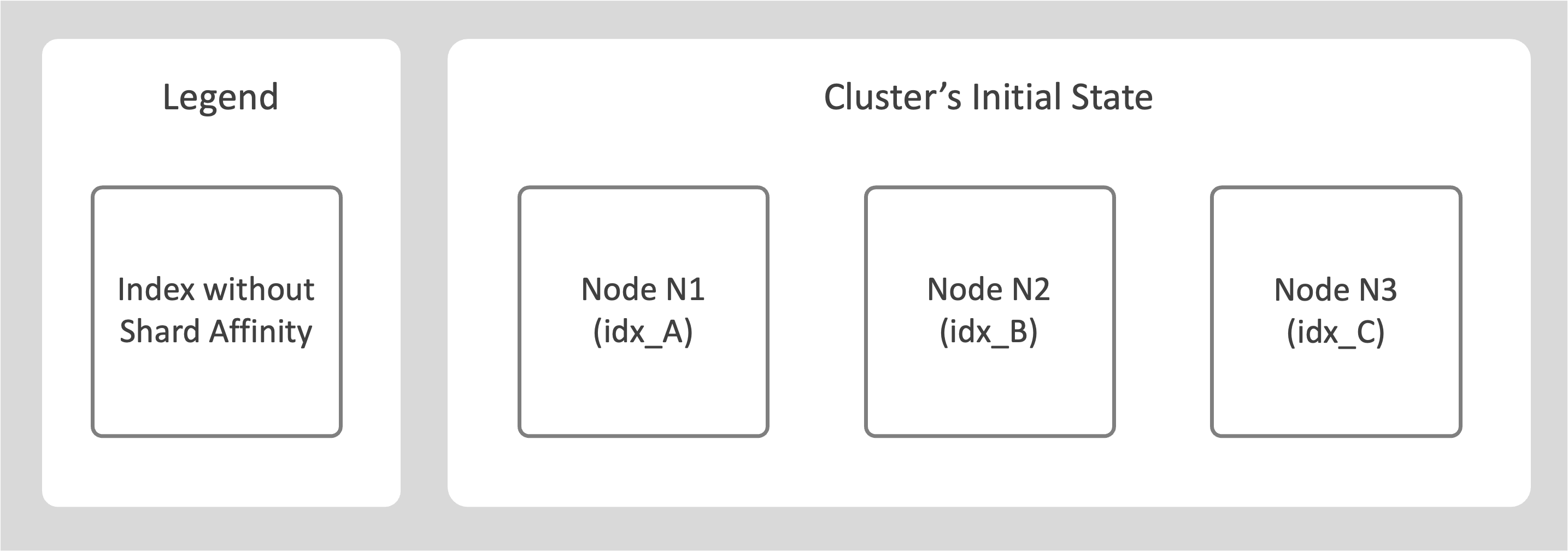
Consider a cluster with 3 nodes N1, N2, and N3.
-
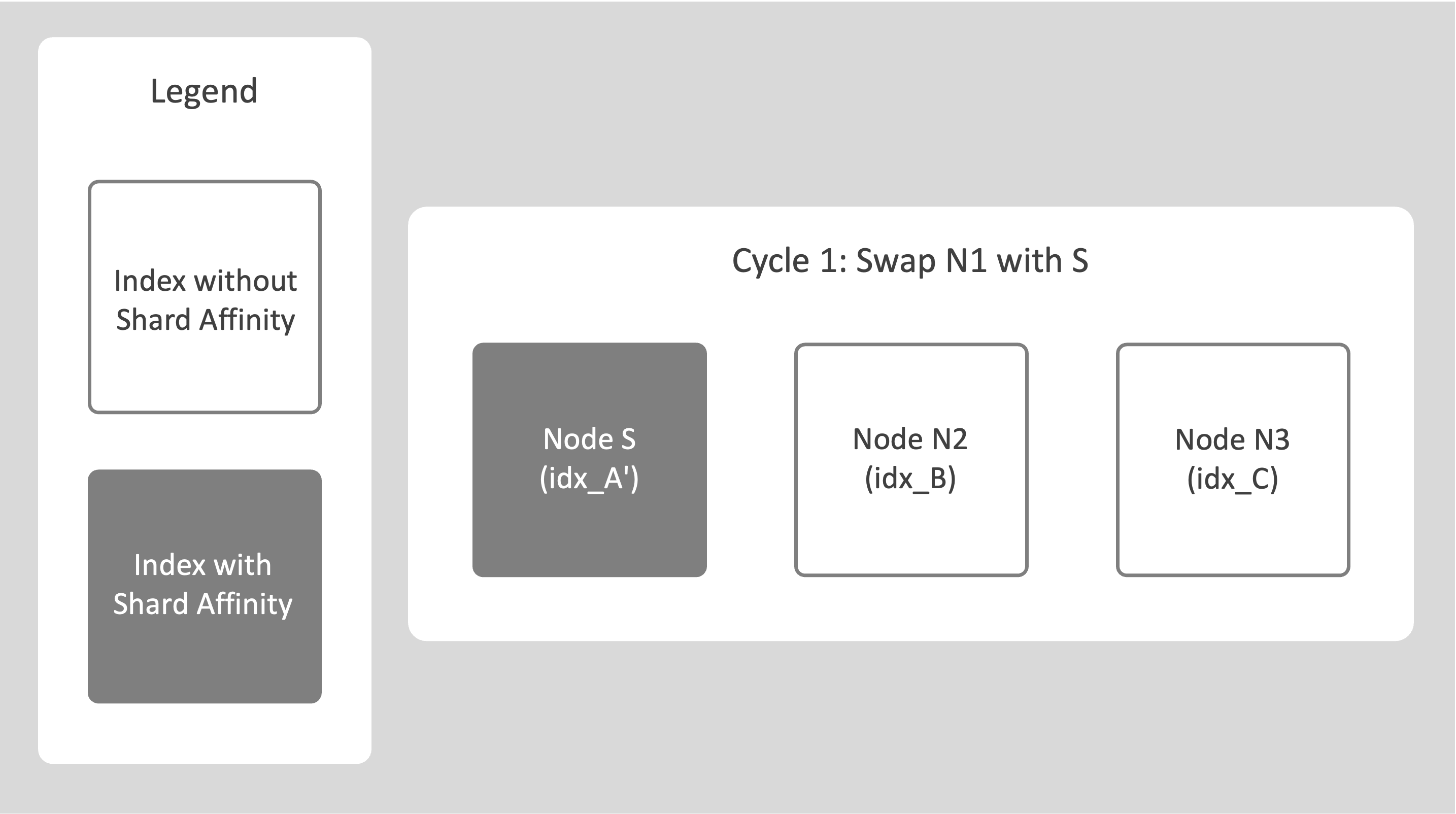
Select a source node (N1), add a new destination node (S), and trigger a rebalance operation.
The system identifies this as swap rebalance.
All indexes from N1 are rebuilt on S using the DCP-based method, which adds the required shard affinity metadata.
-
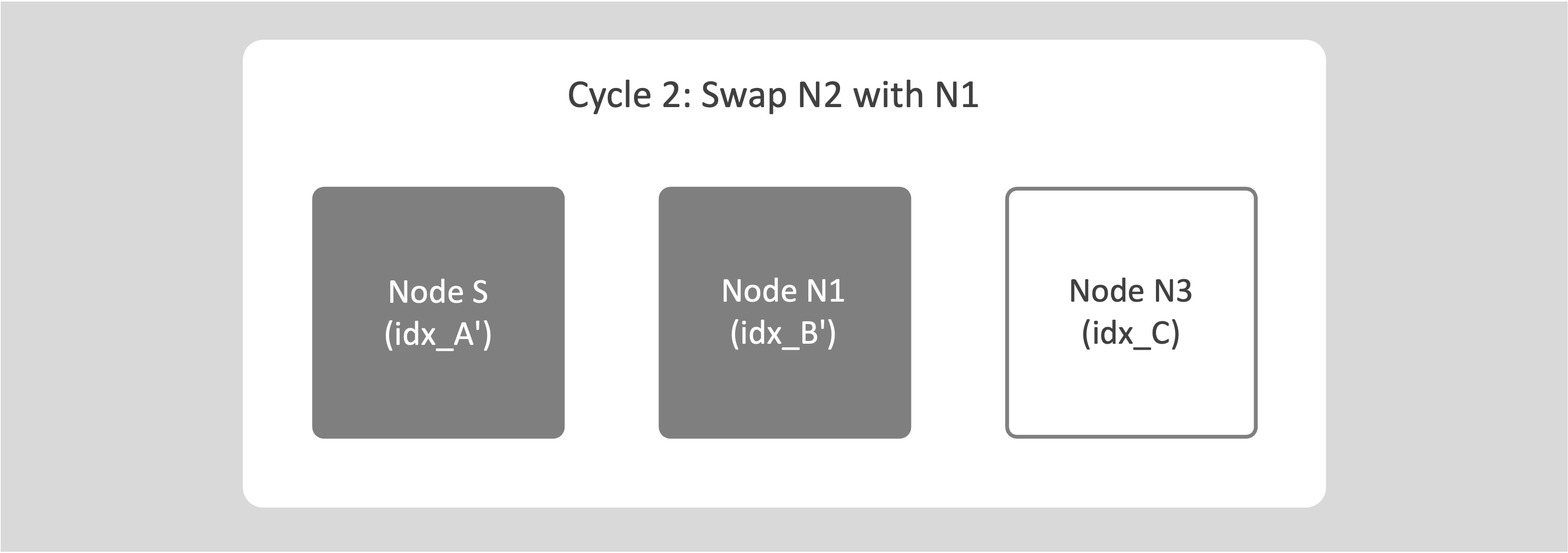
Add N1 back as an empty node and repeat the swap rebalance with the next node (N2).
-
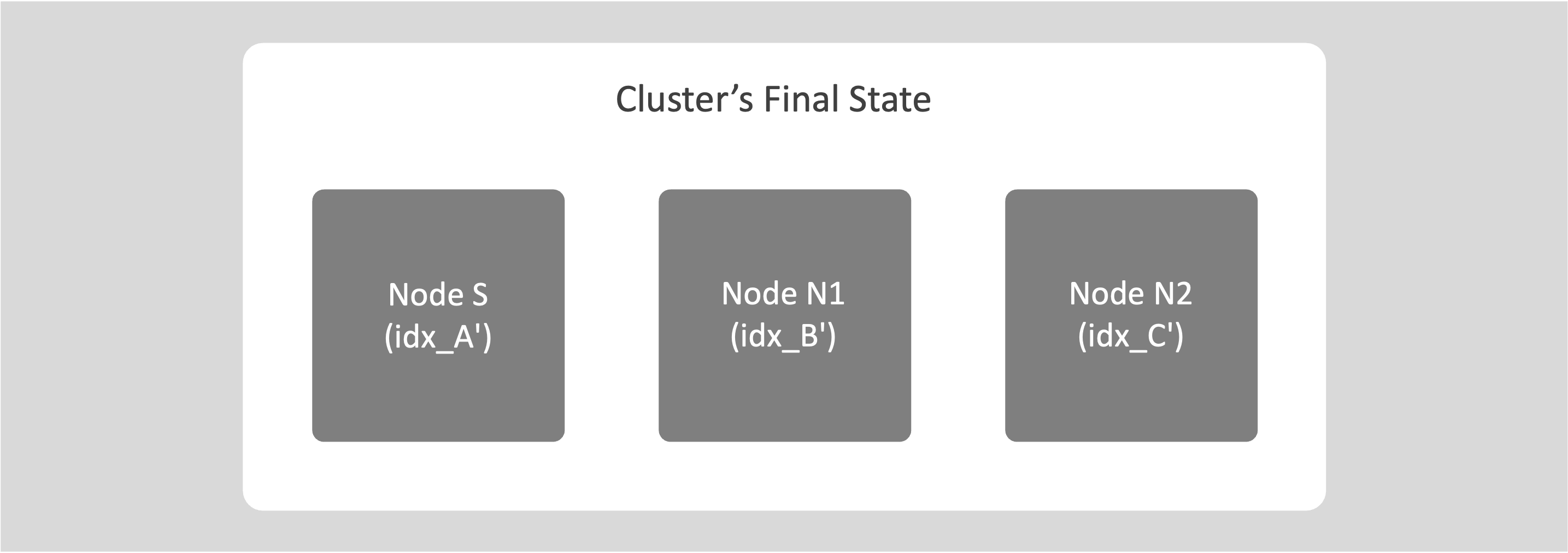
Continue this process for all nodes in the cluster until every index has been moved once.
This operation rewrites the indexes with shard affinity.
After the cycle completes, all indexes have shard affinity, and future index movements use File-Based Rebalance.
For information about replacing only one node with another using swap rebalance, see Swap Rebalance (One-for-One Replacement).
Swap Rebalance without Optimize Index Placement
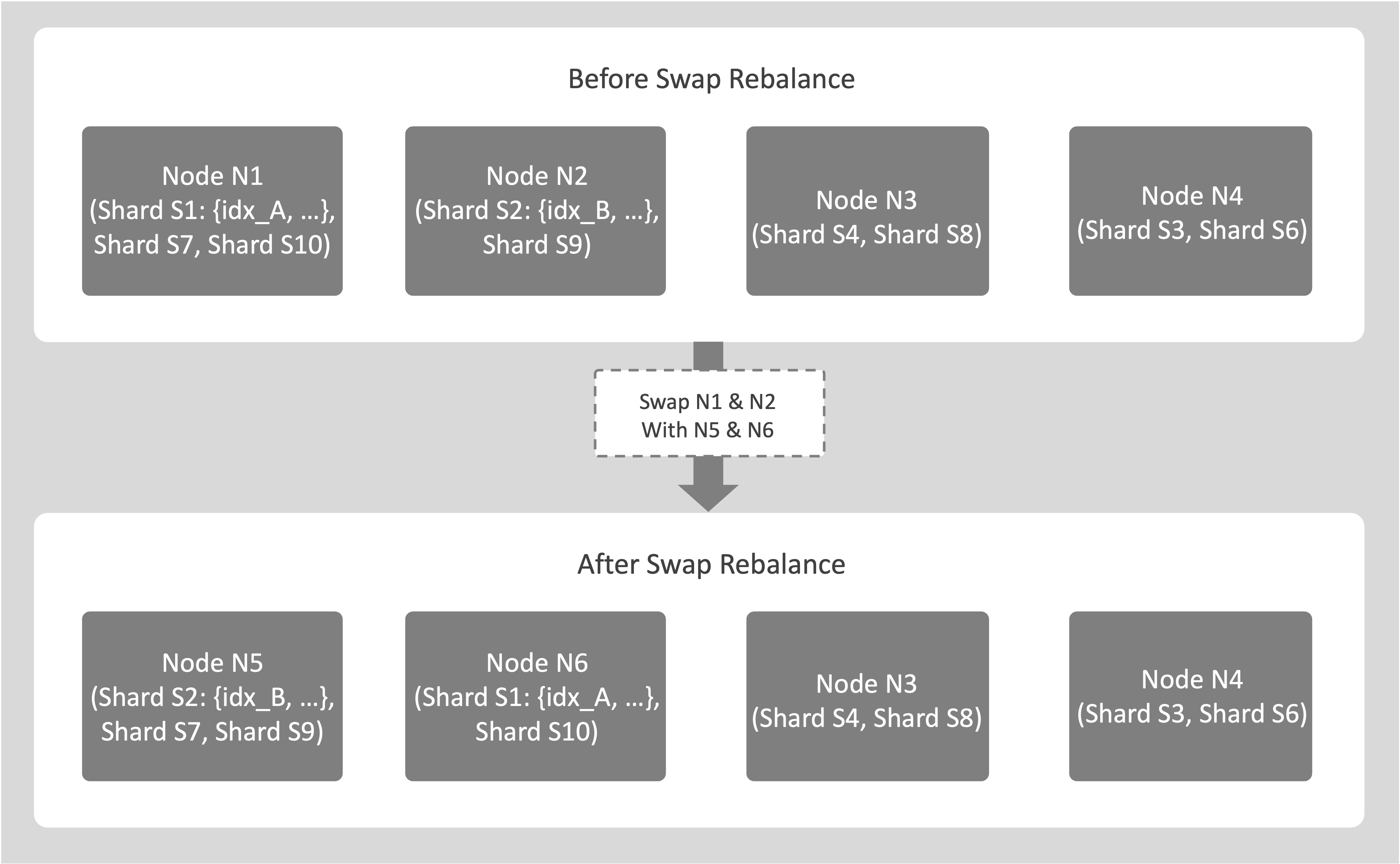
For example, consider a cluster with 4 nodes N1, N2, N3, N4, and Optimize Index Placement disabled. You plan to replace nodes N1 and N2. Add 2 new empty nodes N5 and N6. Then perform a swap rebalance by marking N1 and N2 for removal and adding N5 and N6.
-
Assume the source node N1 hosts shards S1 that includes index idx_A, S7 and S10. Assume node N2 hosts shards S2 that also includes idx_A and S9.
-
If shard affinity is enabled, entire shards move between nodes. During the swap rebalance, the planner initiates index movements for all these shards to the new destination nodes N5 and N6. For example, S1 and S10 may move from N1 to N6, while S7 moves from N1 to N5.
-
If shard affinity is not enabled, index movements aren’t restricted by shard grouping.
-
There’s no one-to-one mapping between source and destination nodes. Indexes or shards can move from any of the source nodes to any of the destination nodes involved in the rebalance.
Nodes N3 and N4 aren’t involved in this index movement.
Restarting a Swap Rebalance on Index Nodes
If a swap rebalance fails or is cancelled, you can start a new rebalance. The planner creates a new rebalance plan based on the current index placements, rather than resuming the previous attempt. Couchbase Server keeps any completed index movements from the earlier run, rolls back partial transfers, and recalculates how indexes move between the nodes being removed and the nodes being added.
What Happens When You Retry a Cancelled or Failed Swap Rebalance on Index Nodes
When you retry a failed or cancelled swap rebalance, Couchbase Server performs the following actions:
-
The previous planning state is discarded; completed movements remain:
When a swap rebalance is cancelled or fails, Couchbase Server discards the planner’s movement plan and scheduling decisions. Index movements that complete successfully remain in place, while any partial or incomplete transfers are rolled back. The planner does not reuse the movement plan from the failed attempt.
-
A new rebalance request triggers a full re-planning cycle:
When you retry the rebalance, the rebalance planner creates a new swap-rebalance plan based on the current index placements. The planner does not reuse or resume any part of the previous plan. It treats this new plan as a fresh rebalance operation. It recalculates all movements between the nodes being removed and the nodes being added based on replica placement, resource balance, shard constraints, and cluster topology.
-
The new plan may move indexes in a different pattern:
Because the planner performs a full recalculation, the retried swap rebalance can produce a different movement pattern compared to the cancelled or failed attempt. Indexes that were moved successfully in the earlier run generally remain on their new nodes, while indexes whose movements were rolled back are scheduled again according to the new plan. As a result, the set of indexes that move, and their destinations, may differ from what you observed in the earlier attempt.
Working of File-Based Rebalance in Common Operations
This section explains the Working of File-Based Rebalance during the following common operations.
Adding Capacity (Scale-Out)
The following procedure shows how File-Based Rebalance works when adding index capacity:
-
When a new index node is added to the cluster and a rebalance is triggered, the system may move indexes to the new node to balance the load.
-
Source nodes remain online and continue supporting Query Service while the index movement occurs in the background.
-
The index files are copied to the destination node, which then catches up on any data changes that occurred during the transfer.
-
After synchronization, the index on the destination node becomes active, and the original index on the source node is removed.
An example of adding index capacity is as follows:
-
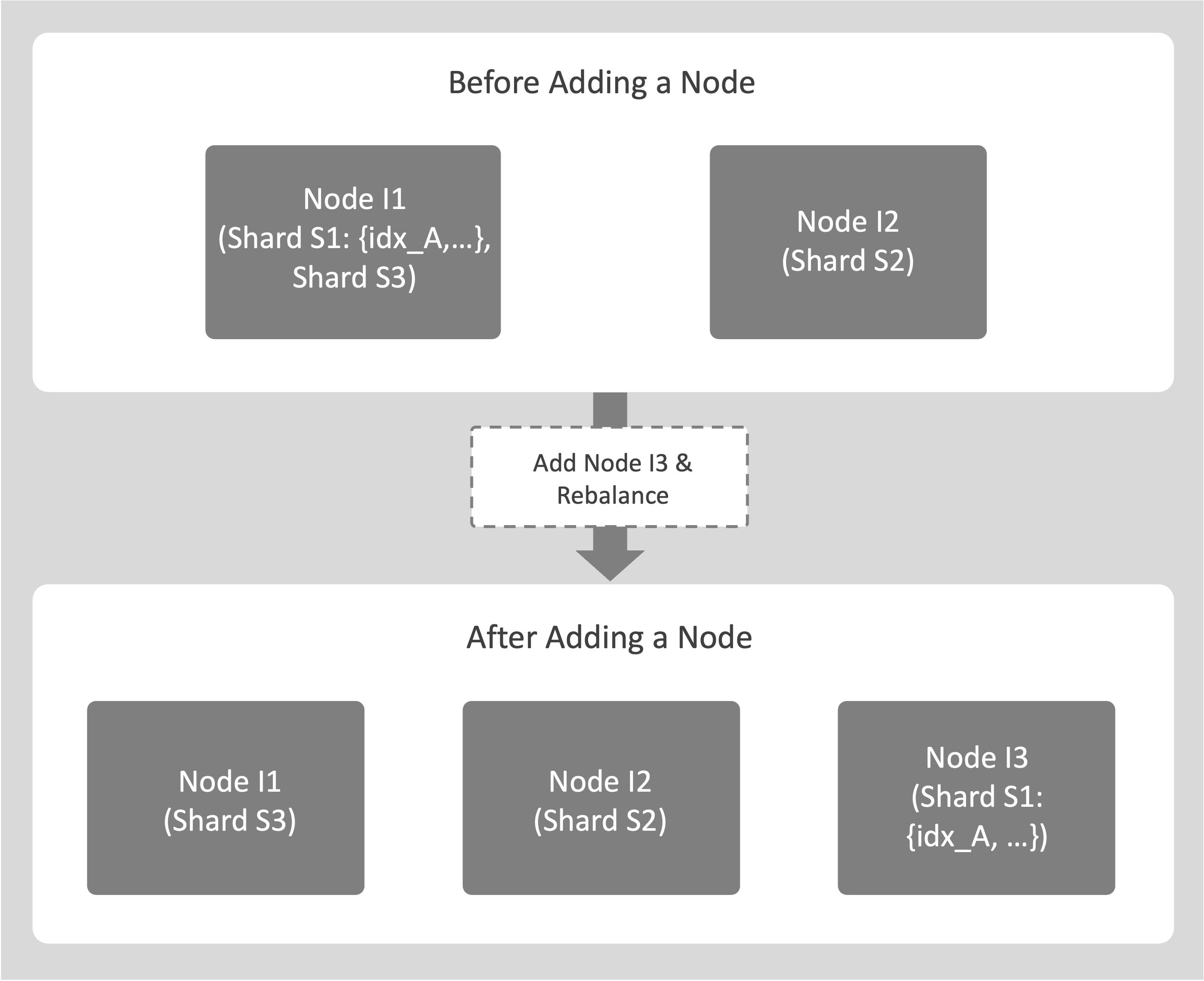
Consider a cluster with 2 index nodes, I1 and I2.
Add a new destination node, I3, and trigger a rebalance.
-
During the rebalance, an index such as idx_A on source node I1 is moved to node I3 by copying its shard file. Other indexes that share the same shard are also moved to node I3 as a part of the same operation.
-
While the copy is in progress, I1 continues to support Query Service for idx_A. After I3 synchronizes and catches up with recent changes, it takes over query processing for idx_A, and the original index on I1 is removed.
Planned Node Removal (Rebalance-Out)
The following procedure shows how File-Based Rebalance works when removing a node:
-
When a node is marked for removal and a rebalance is triggered, the rebalance process moves all indexes from the source node to other nodes in the cluster. Entire shards are transferred as a part of this operation.
-
The process does not interrupt service. Query Service remains available throughout.
-
After synchronization completes and the destination nodes begin serving the indexes, the source node can be safely removed from the cluster.
An example of planned node removal is as follows:
-
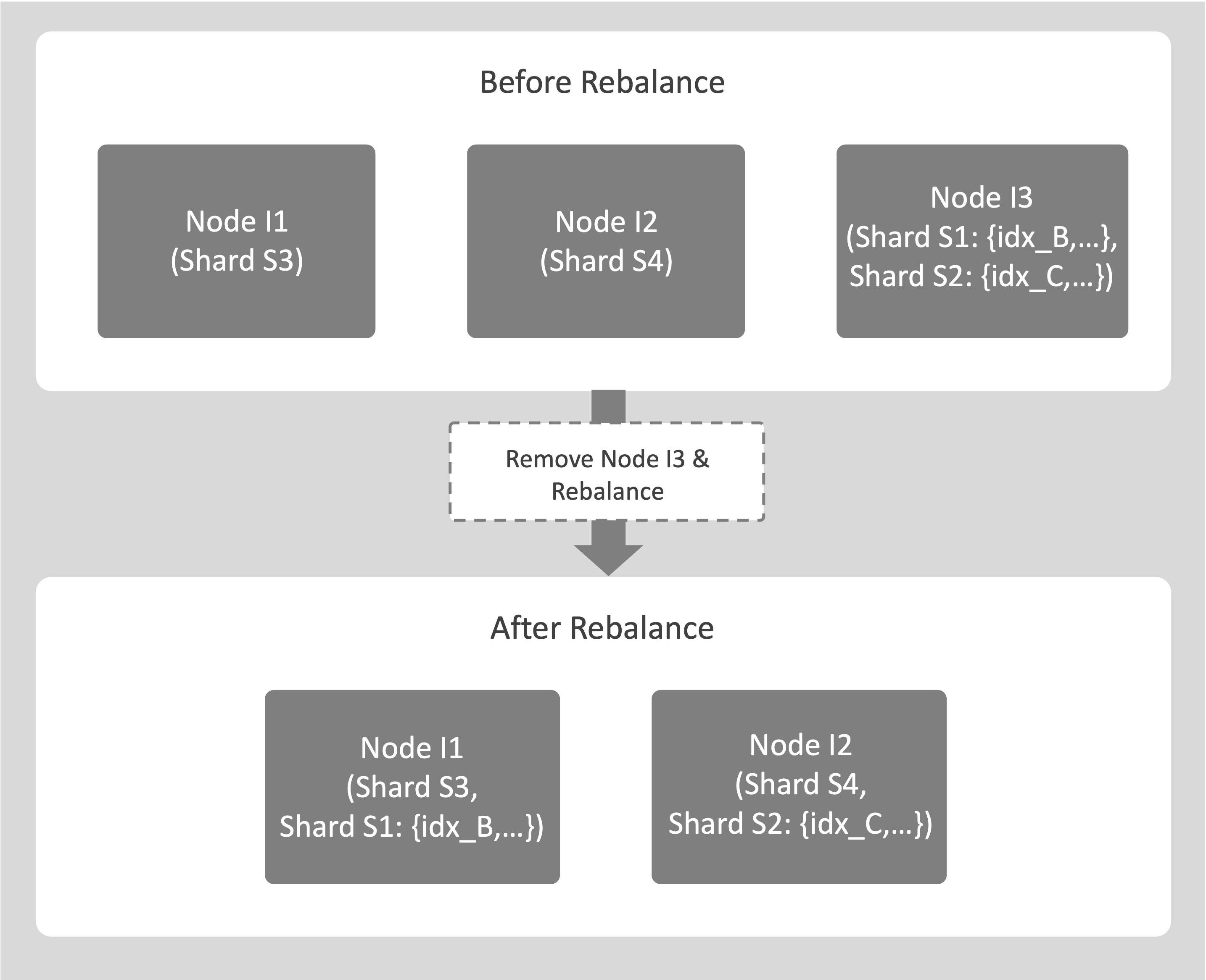
Consider a cluster with 3 index nodes, I1, I2, and I3.
You plan to decommission I3.
-
During rebalance, indexes on the source node I3 are moved to the destination nodes I1 and I2. For example, idx_B on I3 is moved to I1, and idx_C on I3 is moved to I2, along with all indexes that share the same shards.
-
After all index movements are complete, I3 is safely removed from the cluster.
Swap Rebalance (One-for-One Replacement)
The following procedure shows how File-Based Rebalance works when one node is replaced by another:
-
An existing node O is replaced by a new node R.
-
During rebalance, all indexes on the source node O are moved to the destination node R by copying their shard files.
No other index movements occur when Optimize Index Placement is disabled.
-
The source node O continues to support Query Service during the transfer.
-
After the File-Based Rebalance completes and the destination node R catches up with new mutations, it takes over serving the indexes, and the source node O is removed from the cluster.
An example of swap rebalance is as follows:
-
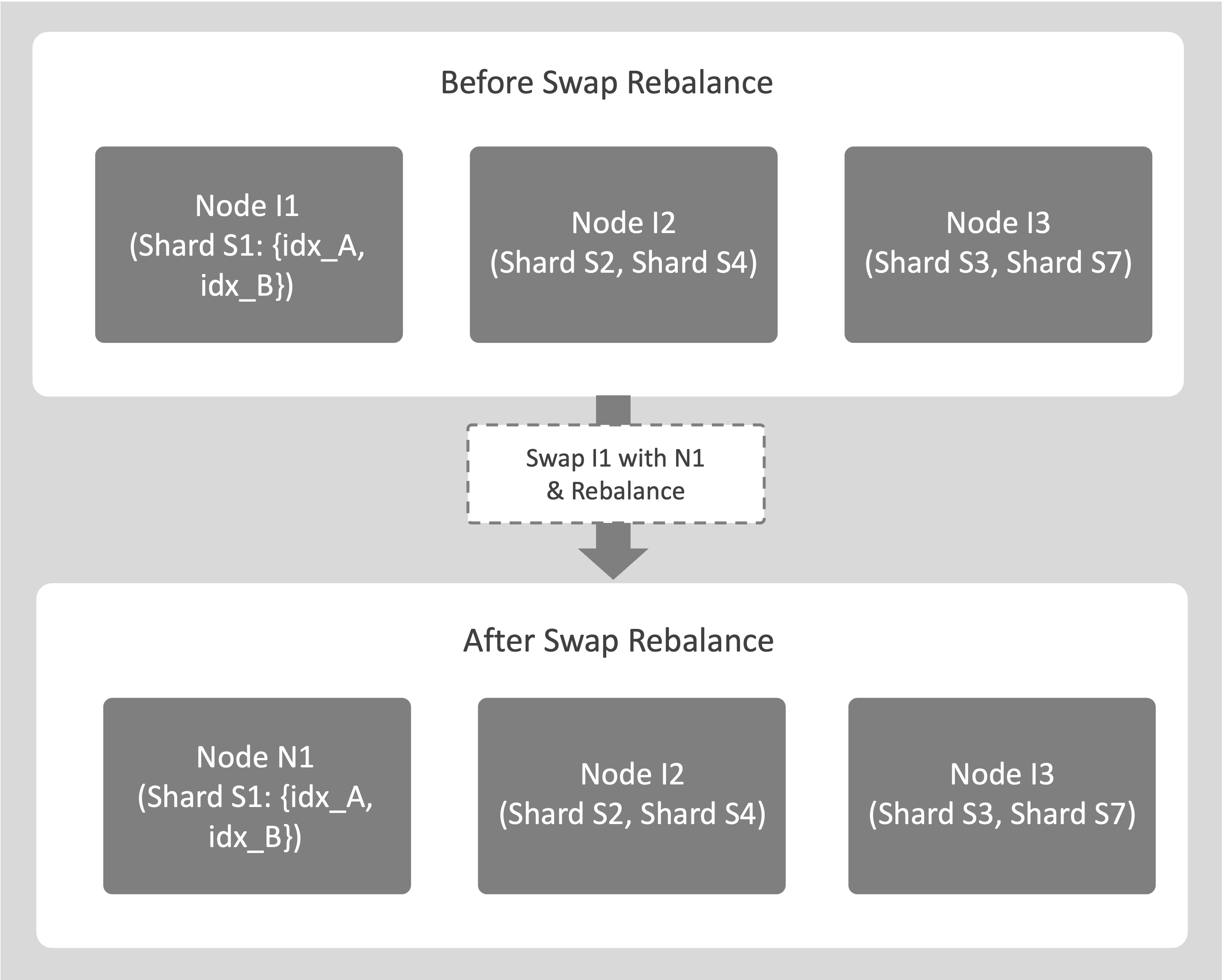
Consider a cluster with nodes I1, I2, and I3, where you plan to replace the source node I1 with a new destination node N1.
-
If I1 hosts indexes idx_A and idx_B, they’re moved to N1 using File-Based Rebalance. During the transfer, I1 continues to support Query Service.
-
After the rebalance completes, N1 becomes fully active, and I1 is removed from the cluster with no downtime.
Failover of Index Service Nodes
The following is how node failover affects the Index Service:
-
If a node becomes unhealthy, ns_server can remove it from the cluster through autofailover, or you can manually fail it over.
-
Indexes on the failed node are unavailable when replicas do not exist on other nodes.
-
The Query Service automatically redirects requests to available replicas.
-
If a rebalance is triggered while the node remains failed over, the system performs a replica repair. When a replica exists, it can be copied using File-Based Rebalance if shard affinity is enabled. If no replica exists, the index is lost.
-
If the failed node recovers before a rebalance occurs, it can be added back to the cluster, and the next rebalance restores its indexes.
The following examples explain how Couchbase Server handles node failover scenarios, both when replicas are available and when they’re not.
Failover With a Replica
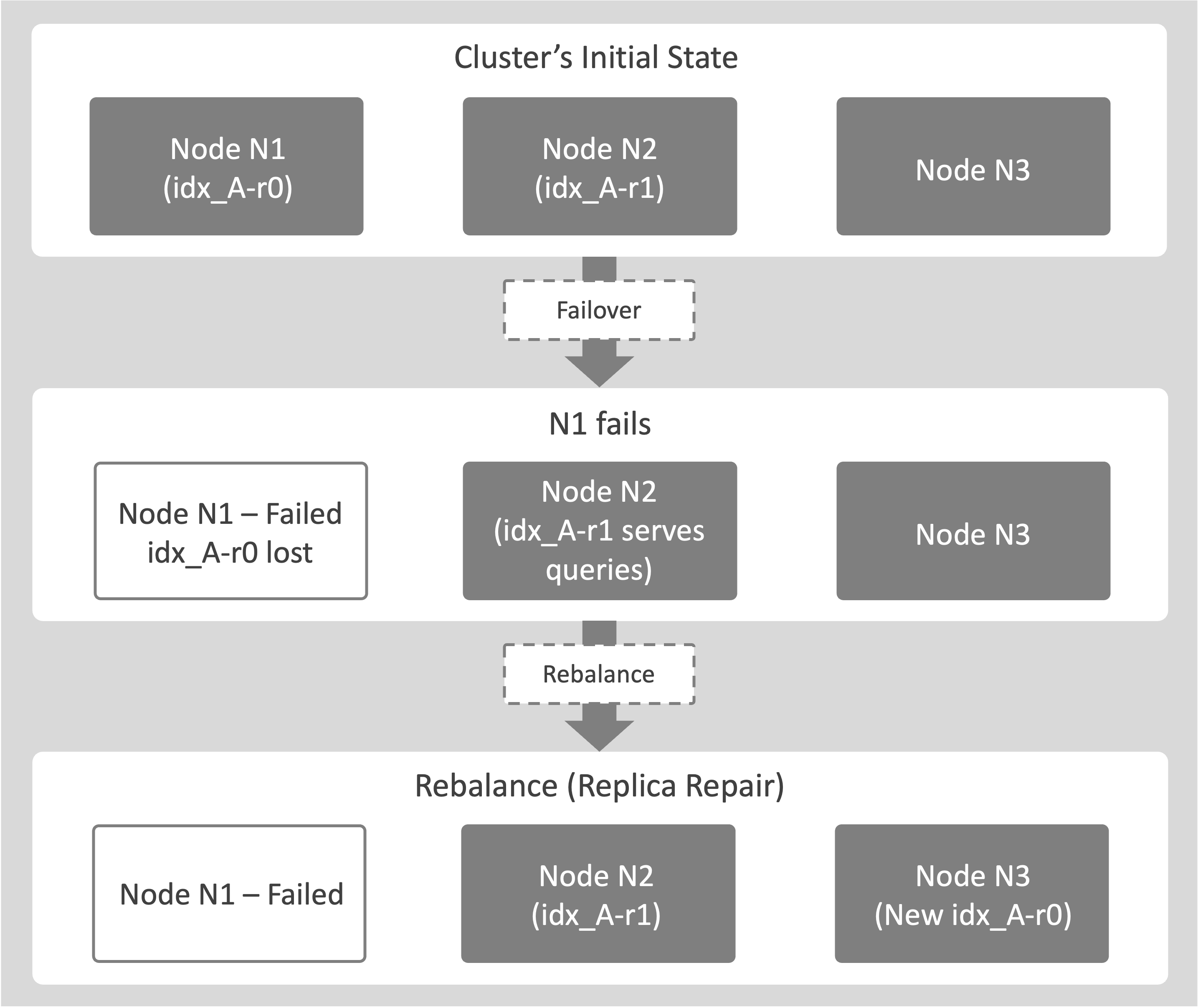
This example shows how Couchbase Server maintains data availability when a node hosting an index fails and a replica is available:
-
Consider a cluster with 2 nodes, N1 and N2. Node N1 hosts idx_A-r0, the primary replica of idx_A.
Node N2 hosts idx_A-r1, a secondary replica of idx_A.
When node N1 crashes, an administrator triggers a failover.
-
idx_A-r0 is marked as lost.
Query Services are automatically redirected to idx_A-r1 on node N2.
-
Afterwards, a rebalance is triggered.
The system creates a new replica, idx_A-r0, on another node (for example, N3) to restore the required replica count. This process is known as replica repair.
| If the Index Service is under memory pressure, for example, due to insufficient sizing, it may skip replica repair during rebalance. Replica repair also does not occur if you have disabled the feature in the settings or if there are not enough available nodes. |
Failover With No Replica (Index Loss)
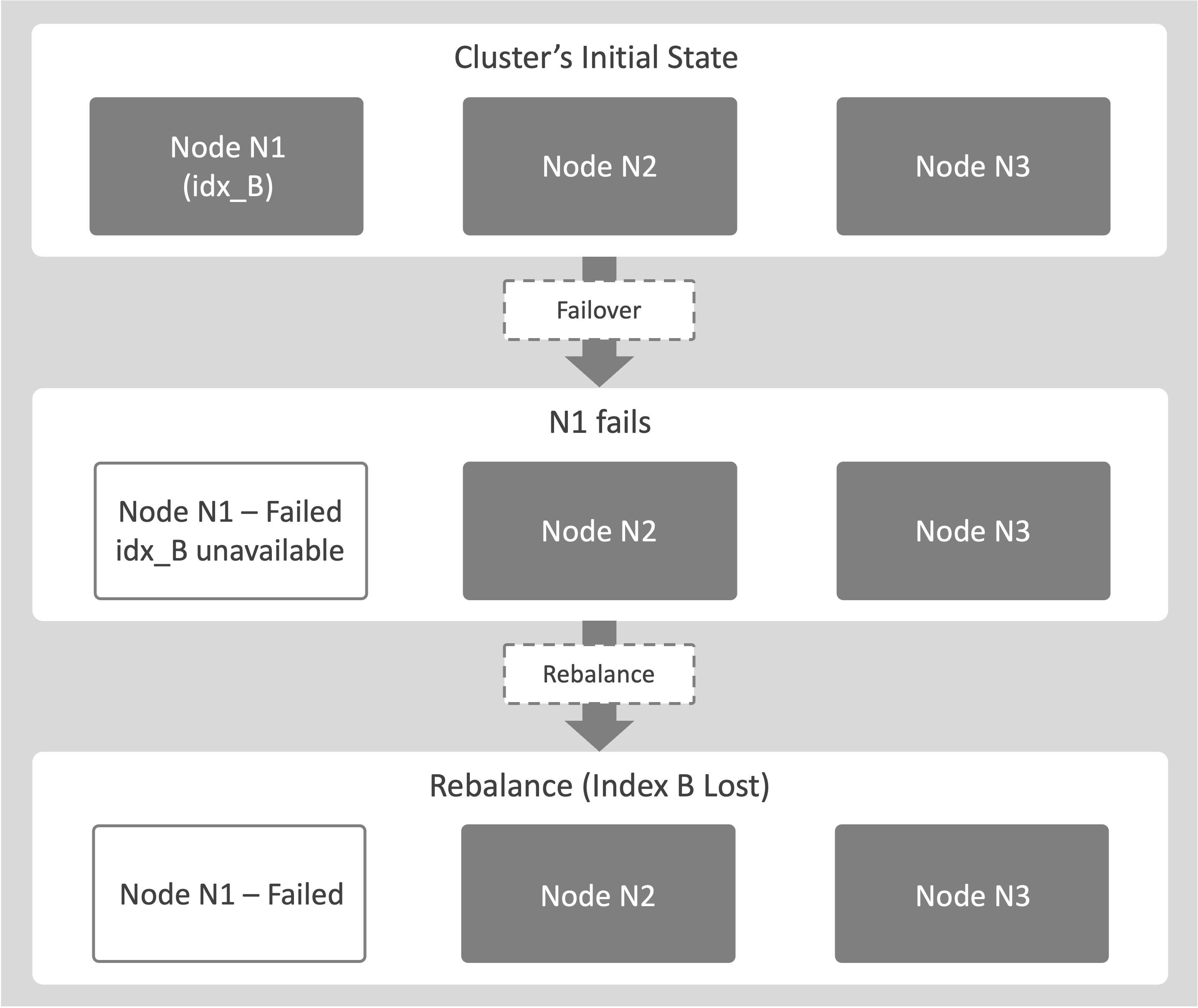
This example shows what happens when a node hosting an index fails and no replica exists to maintain data availability:
-
Consider a cluster with a node, N1. Index idx_B exists only on node N1 (replica count = 0).
Node N1 fails over. When this happens, the system removes N1 from the active cluster topology.
Because idx_B has no replicas on other nodes, it becomes immediately unavailable.
Any Query Services that depend on idx_B return an error, because no valid copy of the index exists in the cluster.
-
If a rebalance runs, the system marks idx_B as lost and removes its definition from the cluster metadata.
Removal of Index Service Nodes
The following is how node removal affects the Index Service:
-
A planned, graceful operation that decommissions a healthy node.
The node is marked for removal, and a rebalance is triggered.
-
Before the source node goes offline, all its indexes move to other destination nodes in the cluster by using File-Based Rebalance, if shard affinity is enabled.
-
The node is removed only after all index movements are complete. This process ensures that ongoing scans on the source node complete before removal, preventing any data loss or service interruption.
The following examples explain how node removal and rebalance operations affect the Index Service, both when replicas are present and when they’re not.
Removal and Rebalance-Out With Replicas
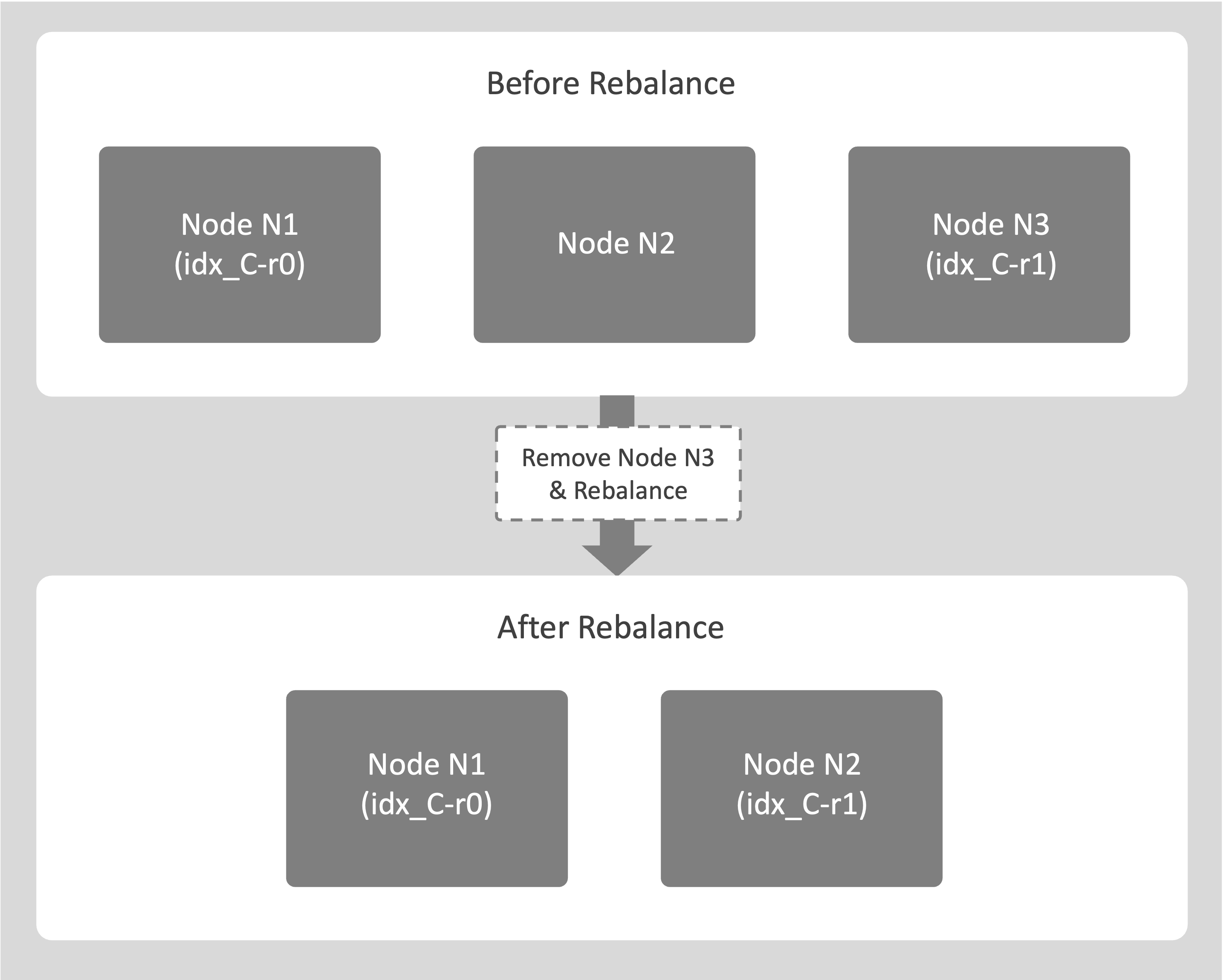
The following example explains removing an Index Service node from a cluster and how the system maintains availability throughout the process.
-
Consider a cluster with 3 nodes N1, N2, and N3. Node N3 hosts the replica idx_C-r1. The node N3 is healthy but needs to be decommissioned.
An administrator marks N3 for removal and starts a rebalance.
Selecting Remove only marks the node for removal. You must start a rebalance for the removal to take effect. -
The system begins moving idx_C-r1 to a destination node, for example, N1.
-
During the transfer, N3 continues to support Query Service for idx_C-r1 to maintain availability.
-
After the transfer completes, N3 is safely removed from the cluster with no service interruption.
Removal and Rebalance-Out Without Replicas
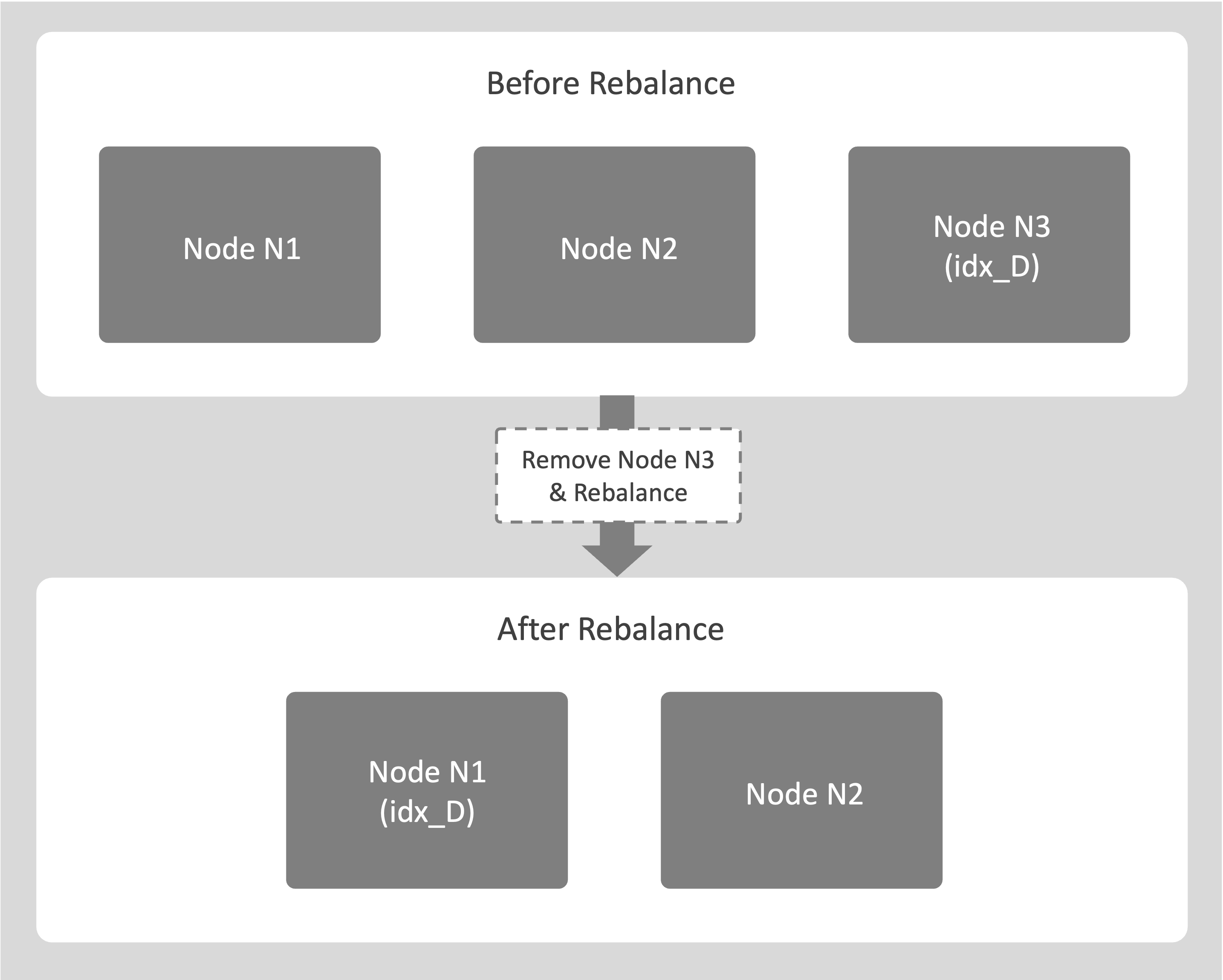
The following example describes the process of removing an Index Service node when the index does not have replicas:
-
Consider a cluster with 3 nodes N1, N2, and N3. Index idx_D exists only on node N3.
An administrator marks N3 for removal and starts a rebalance.
-
The system begins copying idx_D from the source node N3 to a destination node, for example, N1.
-
Node N3 leaves the cluster only after the copy completes and idx_D is fully available on N1.
Query Service that uses idx_D remain online during the entire operation.