Agent Memory for Persistent Memory Storage
- concept
Couchbase Agent Memory provides a unified, persistent memory layer for agentic applications to maintain context across user sessions.
Couchbase Agent Memory stores conversation history, extracted facts, and vector embeddings so that agents can recall relevant past context across sessions. You access it through the Agent Memory Python SDK or its REST API. Agent Memory uses Couchbase Capella or Couchbase Server Enterprise Edition as its underlying data store.
Without persistent memory, agents rely on in-context memory that disappears when the context window fills up, or they operate as stateless agents with no memory at all. Agent Memory solves this by acting as the persistence layer between your agent framework and its long-term memory store. You do not need to build custom session tables, summarization flows, or retrieval logic.
Agent Memory integrates with any agent framework, including LangGraph, CrewAI, LlamaIndex, and Strands Agents. Agent Memory also integrates with Hermes Agent through the Agent Memory Plug-in for Hermes.
Agent Memory manages the storage and retrieval of memories for an agent. Agent Memory does not provide:
-
Reasoning logic for using memories.
-
Support for non-textual content.
-
Model hosting.
For more information about how to host a model through Capella, see Deploy Models with the AI Data Plane Model Service.
-
Real-time streaming of memory changes.
-
Memory sharing across users of your application.
You can share memories across agents within the same application using annotation-based access control.
Deployment Options
Capella can run your Agent Memory server for you as Managed Agent Memory, or you can run it on your own infrastructure as Self-Managed Agent Memory. The following table compares the 2 deployments.
| Managed Agent Memory | Self-Managed Agent Memory | |
|---|---|---|
Who runs the server |
Capella deploys, runs, and upgrades the server. |
You run the server as a stateless Docker container on your own infrastructure. |
Data store |
A Capella operational cluster on AWS, running Couchbase Server 8.0 or later. Each cluster can back 1 Agent Memory server. |
A Capella or Couchbase Server Enterprise Edition cluster. |
Configuration |
You choose settings when you deploy the server in the Capella UI or through the Management API. You cannot change them after deployment. |
You set environment variables, and can change them and restart the server. |
Authentication |
Agent Memory API keys, created in Capella, and an allowed IP address list. |
OpenID Connect (OIDC)/OAuth2 tokens from your identity provider. |
Models |
OpenAI models, through your OpenAI integrations in the AI Data Plane. |
Any OpenAI-compatible embedding model and LLM. |
Monitoring |
A monitoring dashboard and alerts in Capella. |
Prometheus metrics that you collect. |
Get started |
Cluster Mode
Cluster mode runs several Agent Memory nodes that share the ingestion load and take over each other’s work if a node fails.
Managed Agent Memory always runs in cluster mode. You can deploy a server with 1, 3, 5, 7, or 9 nodes. To keep processing memories if a node fails, deploy 3 or more nodes.
Self-Managed Agent Memory runs as a single node by default. You enable cluster mode with environment variables. For more information, see Scale Agent Memory Using Multiple Nodes.
Here’s how Agent Memory’s cluster mode works during the stages of a node’s life:
- When a node starts
-
The node generates a unique node ID and registers itself in the
nodescollection of theagentmemoryscope. Agent Memory creates this collection and its indexes automatically. The node then runs a recovery sweep, a check for dead nodes that it can claim. Its next sweep runs after the dead-node threshold passes. - While a node runs
-
Each memory block records the ID of the node that ingested it or last received an update for it. A node only processes the blocks it owns. The node also sends a regular heartbeat by updating its entry in the
nodescollection. After its first 2 recovery sweeps, the node runs a sweep each time the recovery sweep interval passes. - If a node fails
-
If a node stops sending heartbeats for longer than the dead-node threshold, the other nodes consider it dead. Only 1 node can claim each dead node. The claiming node takes ownership of the dead node’s unfinished blocks and processes them. For more information, see When a Node Fails and Recovers.
When a Node Fails and Recovers
A surviving node takes over a failed node’s unfinished blocks after the failed node passes the dead-node threshold and the next recovery sweep runs. How long this takes depends on the heartbeat interval, dead-node threshold, recovery sweep interval, and own-lineage recovery interval. Each surviving node takes over the blocks of at most 1 failed node per recovery sweep. If more nodes fail than survive, recovery takes additional sweeps, so processing the unfinished blocks of some failed nodes may take longer.
|
Behavior During Recovery
|
On Managed Agent Memory, you cannot change the recovery timing.
On Self-Managed Agent Memory, to change the recovery timing, adjust the heartbeat and threshold variables in cluster mode.
Lower values detect failures faster but add Couchbase traffic and restart briefly paused nodes more often.
Keep AGENTMEMORY_DEAD_NODE_THRESHOLD_SECONDS at 3 times AGENTMEMORY_HEARTBEAT_INTERVAL_SECONDS or more.
For example, if AGENTMEMORY_HEARTBEAT_INTERVAL_SECONDS is 30, set AGENTMEMORY_DEAD_NODE_THRESHOLD_SECONDS to 90 or more.
Rate Limits in Cluster Mode
The requests per minute and tokens per minute limits apply to the whole cluster.
On Managed Agent Memory, you set them in the Advanced settings when you deploy the server.
On Self-Managed Agent Memory, you set them with AGENTMEMORY_MAX_REQUESTS_PER_MINUTE and AGENTMEMORY_MAX_TOKENS_PER_MINUTE.
Each node uses an equal share, based on the number of live nodes, and recalculates its share every 30 seconds.
If ingestion is uneven across nodes, the cluster uses less than the configured limits.
Adding nodes does not increase extraction throughput beyond your model provider’s limits.
On Self-Managed Agent Memory, to change the limits, update them on every node and restart every node.
Other limits, such as the maximum concurrent tasks and the maximum queue size, apply to each node.
Data Model
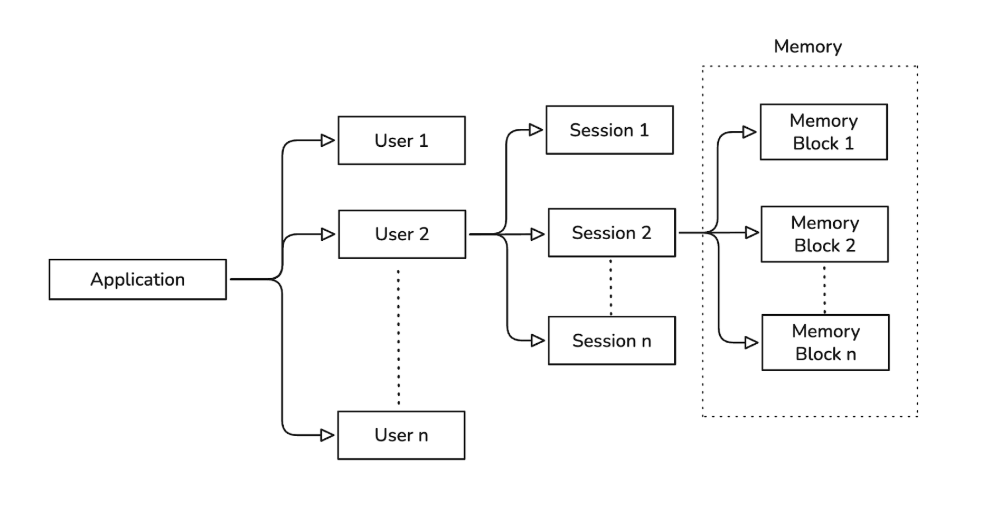
Agent Memory organizes memory using a hierarchy of users, sessions, and memory blocks.
User
In Agent Memory, a user is what interacts with your AI agent. Each user has a unique identifier that you generate. Agent Memory uses your user identifiers to isolate memory data and implement access control.
Each user can have multiple sessions.
Session
A session represents an individual run or interaction between a user and your application. Sessions organize memory blocks for a specific user.
A session can be active or ended:
-
Active sessions can receive new memory blocks.
-
Ended sessions can no longer receive new memory blocks and are permanently closed. You cannot reopen an ended session or modify memory blocks in it. Existing blocks remain readable and searchable.
You can control the status of a user’s session through your agent application logic. Sessions persist in the Couchbase cluster you connect to Agent Memory. If your application restarts or disconnects, you can retrieve an existing session and continue adding memories.
Memory Block
A memory block is the basic unit of storage in Agent Memory. It captures information from a session.
This can be any important topic or fact from a session that you want to store for later recall.
Each memory block belongs to a specific session and contains:
-
The original chat message or fact.
-
A vector embedding for semantic search.
-
An LLM-generated summary.
Vector embeddings for semantic search and LLM-generated summaries require that you have an embedding model and LLM available for your Agent Memory instance. -
A timestamp for conflict resolution.
You can use the vector embeddings for a memory block to retrieve relevant memories later, using a semantic search. Memory block timestamps help with conflict resolution and let you filter memories later by a time range.
Use Cases
The following examples show how Agent Memory can power domain-specific AI agents.
- Personalized retail assistant
-
A retail agent stores a shopper’s persistent style preferences and sizing as long-term facts with no expiry. The agent stores seasonal browsing interactions with a time to live (TTL) so they decay automatically after a few months. When the shopper returns, the agent retrieves relevant preferences across all sessions to personalize recommendations without manual context management.
- DevOps and SRE copilot
-
A DevOps agent stores persistent infrastructure facts, like service topology and configuration, with incident logs that carry a short TTL and expire once an incident is resolved. When generating a debug script, the agent retrieves architecture context from all sessions while temporary noise from resolved incidents has already faded.
- Financial fraud investigator
-
A fraud analysis agent stores flagged transaction patterns with a TTL set to match compliance retention requirements. When a new suspicious transaction arrives, the agent uses time-range filtering to restrict its semantic search to a specific historical window, such as a prior holiday season, to surface only relevant precedents.
Memory Types
Agent Memory unifies different memory types into a single retrieval system.
- Conversational Memory
-
Short-term memory scoped to 1 session. It captures the flow of the current conversation to maintain dialog continuity.
- Profile Memory
-
Long-term memory that spans multiple sessions. It stores facts and preferences extracted from user conversations to personalize future responses.
- Semantic Memory
-
Long-term memory that stores knowledge and facts. Agents retrieve this information for factual grounding.
Memory Management
Agent Memory provides APIs to manage memory lifecycle, resolve conflicts, and track access.
Memory Decay
You can set memory to decay over time to keep the agent’s working context relevant. Agent Memory uses TTL settings to automatically remove old memory blocks. TTL values follow a hierarchy with the most specific value taking precedence:
-
Memory block: pass the
memory_block_ttlSDK parameter toadd_memory()orupdate_memory()to override both the session and global values. -
Session: pass the
memory_blocks_ttlSDK parameter when creating a session to override the global default. -
Global: the server’s default applied to all memory blocks. On Managed Agent Memory, you can set it only when you deploy the server with the Management API. On Self-Managed Agent Memory, the
AGENTMEMORY_MEMORY_BLOCK_TTLenvironment variable sets it.
For more information, see Manage TTL.
Conflict Resolution
When an agent retrieves contradictory memories, it uses the timestamp on each memory block to determine the most recent information.
Traceability
You can track all memory operations to audit agent behavior and debug issues. Agent Memory records memory read and write operations in structured logs. These logs include user and session identifiers.
Agent Memory exposes operational metrics, including extraction queue depth, failure counts, and token throughput. On Managed Agent Memory, view them in Capella. For more information, see Monitor Managed Agent Memory. On Self-Managed Agent Memory, an embedded Prometheus instance exposes them. For more information, see Prometheus Metrics.
Security and Access Control
Authentication
You must provide a valid Bearer token in the Authorization header of all API requests.
- Managed Agent Memory
-
The Bearer token is an Agent Memory API key that you create in Capella. Each API key works with 1 Agent Memory server. The server also accepts requests only from IP addresses on its allowed IP address list. For more information, see Control Access to Managed Agent Memory.
- Self-Managed Agent Memory
-
You can configure Agent Memory to use OIDC/OAuth2 for authentication. The Bearer token is a JWT from your identity provider, signed with the RS256 algorithm. For more information, see Configure Authentication for Self-Managed Agent Memory.
Authorization
Authentication confirms the identity of a caller trying to access Agent Memory, while Authorization controls what an authenticated caller can do. Role-Based Access Control (RBAC) for Agent Memory restricts each operation to a minimum role. Agent Memory recognizes 3 fixed roles:
| Role | Rank | Intended holder |
|---|---|---|
|
1 |
Operators. |
|
2 |
Agent runtimes using the normal memory read/write path. |
|
3 |
Dashboards, analytics, and other read-only integrations. |
A token’s effective rank is the most privileged rank among the roles it carries.
A token that carries ams_admin has full access without also carrying ams_rw or ams_ro.
- Managed Agent Memory
-
Authorization is always on. Each API key carries 1 role, set by the access level you choose when you create the key. The Read access level carries
ams_ro, Write carriesams_rw, and Admin carriesams_admin. For more information, see Control Access to Managed Agent Memory. - Self-Managed Agent Memory
-
By default, Agent Memory authenticates callers but does not authorize them. This means that any valid token can reach every operation, such as deleting a user or downloading logs.
Agent Memory ignores role strings it does not recognize rather than rejecting the token, so your identity provider can carry roles unrelated to Agent Memory on the same token. A token must carry at least 1 recognized role once you enable authorization. A token that carries none of the 3 roles receives
403 Forbiddenon every non-public operation, with a message naming the required role.To enable authorization, you must also enable authentication. If you enable authorization without also enabling authentication, every request carries no roles and every non-public operation returns
403 Forbidden.For more information, see Configure RBAC for Self-Managed Agent Memory.
Data Isolation
Agent Memory isolates data at the user and session level. One user cannot access the memory space of another user. You can share memories across agents within the same application using annotation-based access control.