Databases
Database Concepts
Databases created on Couchbase Lite can share the same hierarchical structure as Capella databases. This makes it easier to sync data between mobile applications and applications built using Capella.
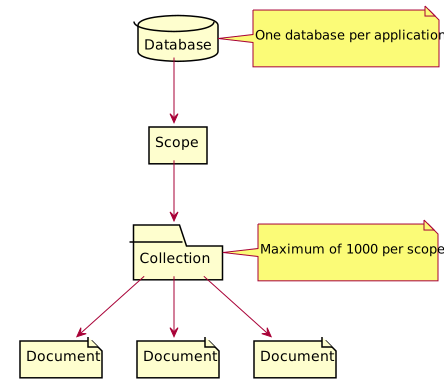
Although the terminology is different, the structure can be mapped to relational database terms:
Table 1. Relational Database → Couchbase
| Relational database | Couchbase |
|---|---|
Database |
Database |
Schema |
Scope |
Table |
Collection |
This structure gives you plenty of choices when it comes to partitioning your data. The most basic structure is to use the single default scope with a single default collection; or you could opt for a structure that allow you to split your collections into logical scopes.
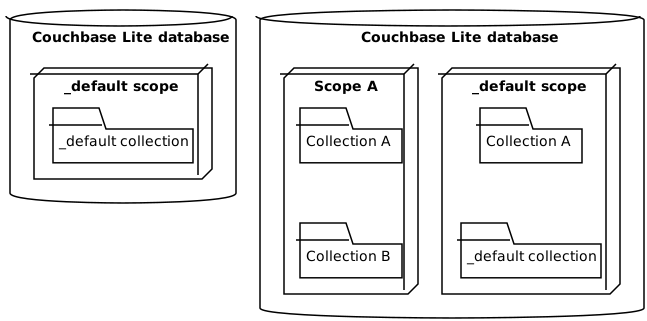
Storing local configuration
You may not need to sync all the data related to a particular application. You can set up a scope that syncs data, and a second scope that doesn’t. One reason for doing this is to store local configuration data (such as the preferred screen orientation or keyboard layout). Since this information only relates to a particular device, there is no need to sync it:
-
local data scope - Contains information pertaining to the device.
-
syncing data scope - Contains information pertaining to the user, which can be synced back to the cloud for use on the web or another device.
Managing Couchbase Lite Databases in React Native
Initializing the Environment
In a React Native application using Couchbase Lite, begin by initializing the React Native Engine. Subsequently, employ a design pattern such as Context/Provider or Service Locator to maintain and access your database instances throughout the application lifecycle.
Example: Initializing React Native Engine and Database Context
import { CblReactNativeEngine } from '@couchbase/couchbase-lite-react-native';

const engine = new CblReactNativeEngine(); // Initialize once, early in your app
This configuration ensures seamless interaction between your React Native app and the underlying native database functionalities, facilitating effective database management.
Create or Open a Database
To create or open a database, use the Database class from the @couchbase/couchbase-lite-react-native package, specifying the database name and optionally, a DatabaseConfiguration for custom settings like the database directory or encryption.
Example 1. Creating/Opening a Database
import { Database, DatabaseConfiguration } from '@couchbase/couchbase-lite-react-native'; //import the packageconst config = new DatabaseConfiguration();
config.setDirectory('path/to/database'); // Optional
const myDatabase = new Database('myDatabaseName', config);
await myDatabase.open();Database Encryption
Couchbase Lite includes the ability to encrypt Couchbase Lite databases. This allows mobile applications to secure data at rest, when it is being stored on the device. The algorithm used to encrypt the database is 256-bit AES.
Enabling
To enable database encryption in React Native, use the DatabaseConfiguration class to set an encryption key before opening or creating a database. This encryption key must be provided every time the database is accessed.
Example3. Configure Database Encryption
const dbName = 'my_secure_db';
const encryptionKey = 'my_secret_key';

const config = new DatabaseConfiguration();
config.setEncryptionKey(encryptionKey);

const db = new Database(dbName, config);

await db.open();Database Maintenance
From time to time it may be necessary to perform certain maintenance activities on your database, for example to compact the database file, removing unused documents and blobs no longer referenced by any documents.
Couchbase Lite’s API provides the Database.performMaintenance method. The available maintenance operations, including compact are as shown in the enum MaintenanceType to accomplish this.
const dbName = 'my_secure_db';
const config = new DatabaseConfiguration();
const db = new Database(dbName, config);
await db.open();
await db.performMaintenance(MaintenanceType.compact);
This is a resource intensive operation and is not performed automatically. It should be run on-demand using the API. A full listing of the available maintenance operations is shown below:
-
MaintenanceType.compact: Compact the database file and delete unused attachments.
-
MaintenanceType.reindex: (Volatile API) Rebuild the entire database’s indexes.
-
MaintenanceType.integrityCheck: (Volatile API) Check for the database’s corruption. If found, an error will be returned.
-
MaintenanceType.optimize: Quickly updates database statistics that may help optimize queries that have been run by this Database since it was opened
-
MaintenanceType.fullOptimize: Fully scans all indexes to gather database statistics that help optimize queries.
For questions or issues, please visit the Couchbase Forums where you can ask for help and discuss with the community.
Couchbase Lite for VSCode
Couchbase Lite for VSCode is a Visual Studio Code extension that provides a user interface for inspecting and querying Couchbase Lite databases. You can find more information about this extension from it’s GitHub repository.
Couchbase Lite for JetBrains
Couchbase Lite for JetBrains is a JetBrains IDE plugin that provides a user interface for inspecting and querying Couchbase Lite databases. You can find more information about this plugin from its GitHub repository.
Command Line Tool
cblite is a command-line tool for inspecting and querying Couchbase Lite databases.
You can download and build it from the couchbaselabs GitHub repository. Note that the cblite tool is not supported by the Couchbase Support Policy.
Troubleshooting
You should use console logs as your first source of diagnostic information. If the default logging level is insufficient, you can enable verbose logging scoped specifically to database operations.
import { LogSinks, LogLevel, LogDomain } from '@couchbase/couchbase-lite-react-native';

try {
  await LogSinks.setConsole({
    level: LogLevel.VERBOSE,
    domains: [LogDomain.DATABASE]
  });
  console.log('Database logging enabled.');
} catch (error) {
  console.error('Setting log level failed:', error);
}|
Enable VERBOSE logging only during development or debugging. Avoid using it in production builds. |
For more on using logs for troubleshooting, see Using Logs.
Listener Token API
Version 1.0 introduces the ListenerToken class for improved listener management across all change listener types.
All addChangeListener methods return a ListenerToken object with these methods:
remove() - Removes the listener (recommended)
const token = await collection.addChangeListener(...);
await token.remove();
getUuidToken() - Gets the internal UUID string (for debugging)
const uuid = token.getUuidToken();
console.log('Token:', uuid); // "listener-abc-123-def-456"
isRemoved() - Checks if listener was already removed
if (!token.isRemoved()) {
  await token.remove();
}|
Deprecated Methods
The |