UPDATE Statements
- reference
This topic describes how you useUPDATEstatements to modify objects in a collection. Use theUPDATEstatement to target 1 or more objects, and add, delete, or update fields.
The UPDATE statement enables modifications to both top-level (flat) and nested (non-flat) fields within a record.
For nested fields, you can specify a subfield path to assign a new value or replace the entire object.
To update specific elements within an array, you must use nested statements to iterate through the array.
A record’s primary key cannot be modified and must remain unchanged.
Refer to the Examples section for detailed usage.
Syntax
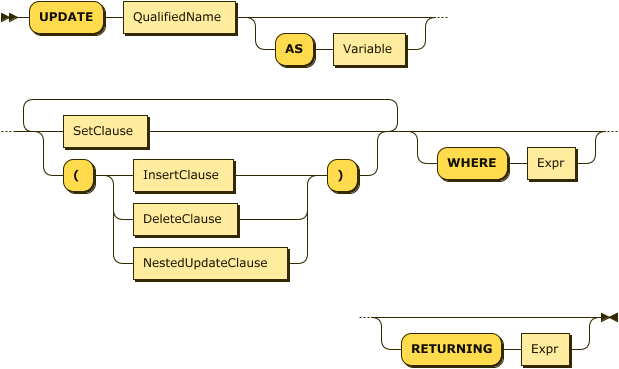
UpdateStatement EBNF
UpdateStatement ::= "UPDATE" QualifiedName ( "AS" Variable)? (SetClause | ( "( " (InsertClause | DeleteClause | NestedUpdateClause) ") "))+ ('WHERE' Expr)? ('RETURNING' Expr)?UpdateStatement Diagram
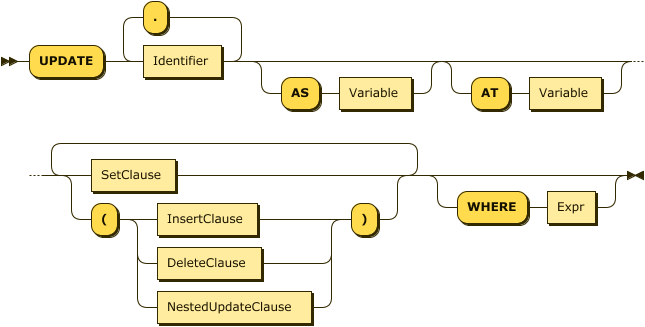
NestedUpdateClause EBNF
NestedUpdateClause ::= "UPDATE" (((Identifier ("." Identifier)*) ("AS" Variable)?) ("AT" Variable)?) (SetClause | ("(" (InsertClause | DeleteClause | NestedUpdateClause) ")"))+ ("WHERE" Expr)?NestedUpdateClause Diagram
SetClause EBNF
SetClause ::= "SET" Identifier "'=" Expr ( "," Identifier "=" Expr)*SetClause Diagram

InsertClause EBNF
InsertClause ::= "INSERT INTO " Identifier ( "AS" Variable)? ( "AT" Expr)? "(" Expr ")"InsertClause Diagram

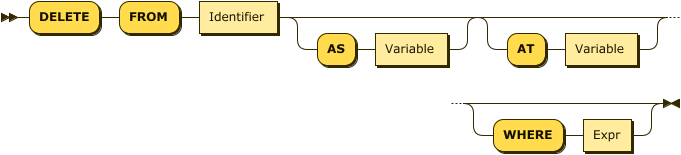
DeleteClause EBNF
DeleteClause ::= "DELETE" "FROM" Identifier ( "AS" Variable )? ( "AT" Variable )?( "WHERE" Expr )?DeleteClause Diagram
Examples
The following example uses an UPDATE statement to modify the value of the field ship_date for the order with orderno equal to 1010 in the sampleAnalytics.Commerce.orders collection.
UPDATE sampleAnalytics.Commerce.orders
SET ship_date="2020-11-08"
WHERE orderno= 1010 ;
After you use the UPDATE statement, you can run ANALYZE COLLECTION on the collection to update the data sample used by cost-based optimization (CBO).
For more information, see Cost-Based Optimizer for Enterprise Analytics Services.
Show an additional example
The following examples modify different fields in the objects in the sampleAnalytics.Commerce.orders collection.
For this example, use the following order in the collection:
{
      "orderno": 1010,
      "custid": "C51",
      "user_info": {
        "first_name": "John",
        "family_name": "Doe"
      },
      "order_date": "2020-11-04",
      "ship_date": "2020-11-08",
      "items": [
        {
          "itemno": 410,
          "qty": 120,
          "price": 88.16
        },
        {
          "itemno": 590,
          "qty": 6,
          "price": 217.75
        }
      ]
    }
Some of the possible updates are as follows:
UPDATE sampleAnalytics.Commerce.orders
SET user_info.first_name = "Jane"
WHERE orderno = 1010;
In the preceding example, the first name of the user is updated to Jane.
UPDATE sampleAnalytics.Commerce.orders
(UPDATE items AS i
SET i.price = 330, i.addiotionalInfo="fragile"
WHERE i.itemno= 410)
WHERE orderno= 1010 ;
In the preceding example, the price of the item with itemno 410 for the order with orderno 1010 is updated.
UPDATE sampleAnalytics.Commerce.orders
(INSERT INTO items AT 2([
       {
           "itemno": 460,
           "qty": 240,
           "price": 99.98
        }]))
WHERE orderno= 1010;
In the preceding example, a new item is added to the order’s item list as the second item.
UPDATE sampleAnalytics.Commerce.orders as u
(DELETE from u.items at  number WHERE number IN [0,1])
 SET u.status="changed"
WHERE u.orderno= 1010;
In the preceding example, an item is deleted from the order’s list of items.
Arguments
- RETURNING
-
Adding an optional
RETURNINGclause causes the statement to return a result for each object updated, identified by theOutputAliasor the collection name. The clause can contain subqueries, although they cannot refer to any collections in theirFROMclauses, making them object-local in nature.