Architecture Overview
- concept
Learn the key concepts and architecture of Operational Insights: how it stores JSON data and how it processes queries.
Operational Insights is a near-real-time analytical database service with JSON as its core data model. Use it to run complex analytical queries, such as ad hoc joins and aggregations, over large collections of JSON documents.
Your data can come from Couchbase and non-Couchbase sources. Operational Insights can store and manage the data for you, or the data can stay in external object storage, and Operational Insights reads it on demand at query time. From a query author’s point of view, externally stored data looks the same as data that Operational Insights manages.
Because the data model is JSON, you do not need to flatten incoming data through ETL before you can analyze it.
You analyze data in its natural form.
Your data can also evolve at its source without ALTER TABLE operations or changes to ETL scripts.
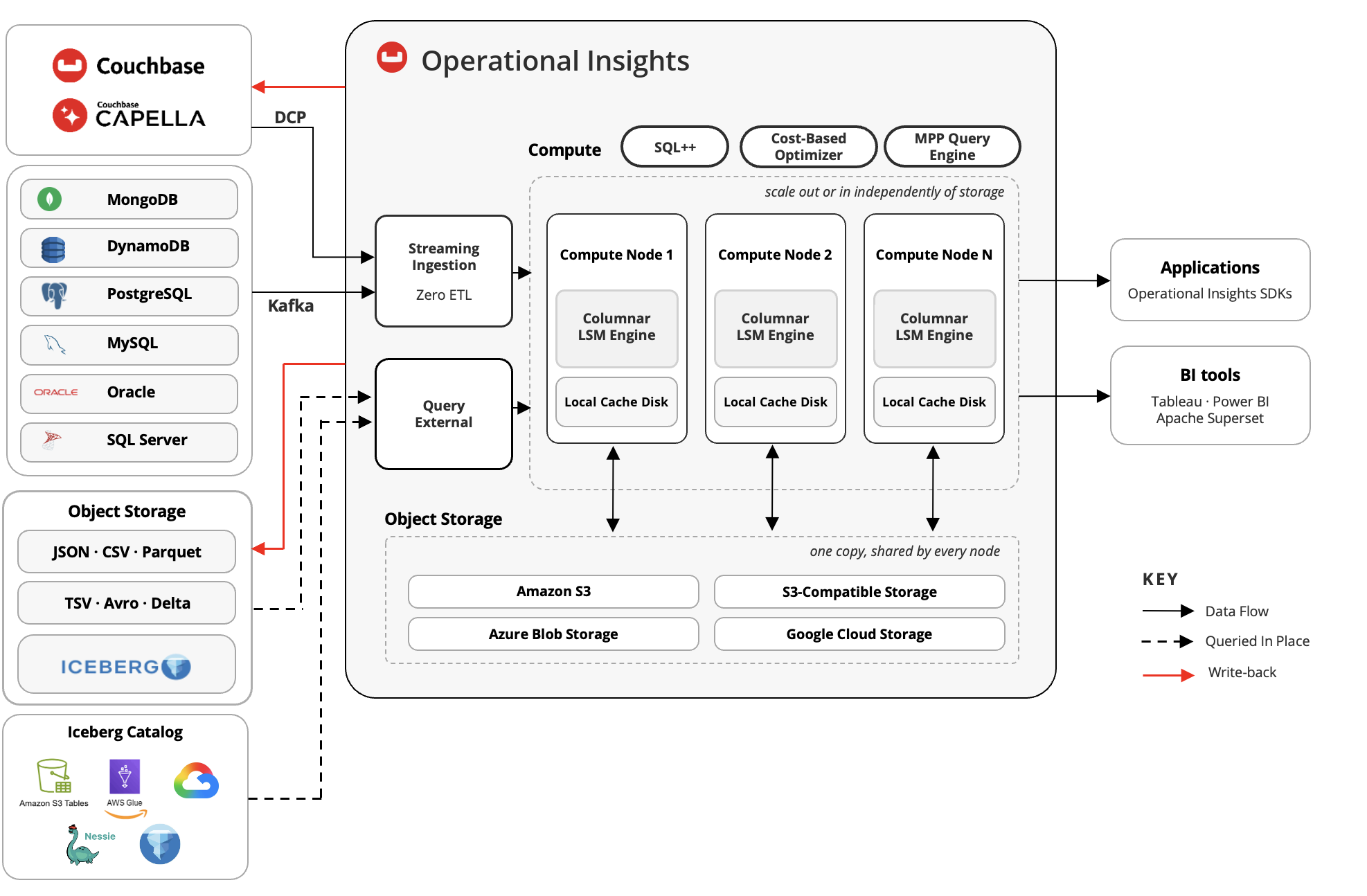
Operational Insights Architecture
Operational Insights has a shared-nothing compute and shared-object storage architecture. This design separates compute from storage. Compute scales independently of storage, object storage provides virtually unlimited capacity, and clusters can scale up or down quickly: a rebalance reassigns ownership of storage partitions without copying any data between nodes.
Operational Insights consists of 3 layers:
-
Data storage
-
Compute
-
Query processing
Data Storage
When data arrives in Operational Insights, the service reorganizes it into an internal, compressed, column-oriented format for JSON. Column stores group values from the same field together, which makes analytical queries faster. Operational Insights brings this approach to JSON while preserving JSON’s flexibility: you do not need to define a schema before you load data.
Column-Oriented Storage for JSON
Operational Insights uses a Log-Structured Merge (LSM) tree for its storage engine. Data flows through the engine as follows:
-
JSON documents are first inserted into an in-memory component (memtable).
-
When the in-memory component fills, it’s flushed to disk.
-
During the flush, the column transformer infers the schema of the documents and extracts their values into columns, in a single pass.
-
The column transformer writes the result as an immutable on-disk component in a compact binary column-oriented format, and persists the inferred schema separately, in the component’s metadata page.
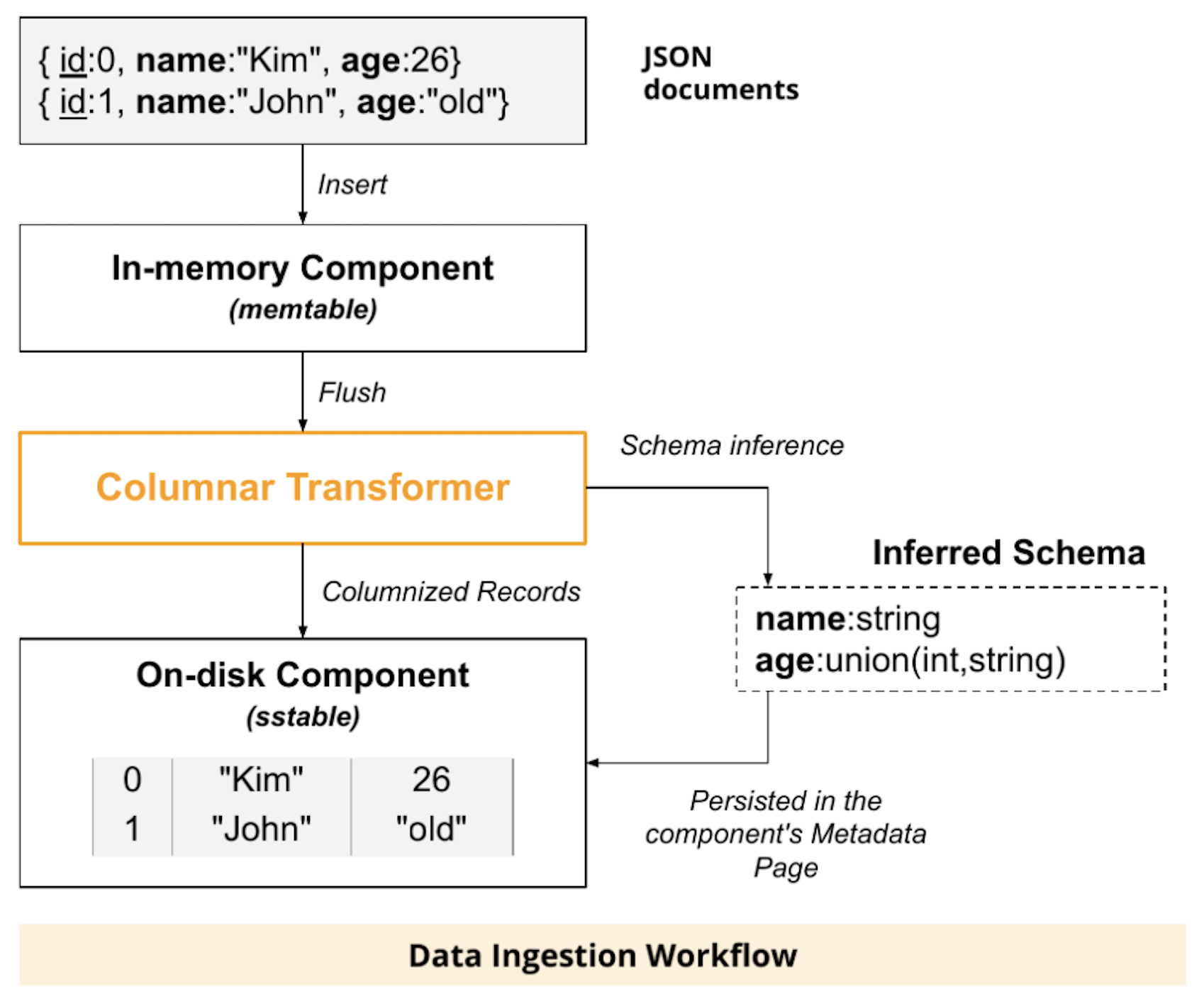
Because each LSM component stores its data columns and its inferred schema separately, the schema is not repeated in every document, which reduces storage size. Data does not need to fit in memory. The column-oriented format is a custom format that’s more flexible than Apache Parquet, which requires you to declare a schema up front.
Each physical column holds values of a single type, so Operational Insights can compress and encode columns to reduce I/O. It uses encoding schemes like those in Apache Parquet. It does not currently use dictionary encoding.
How the Inferred Schema Handles JSON Flexibility
Operational Insights infers and evolves the schema automatically as data arrives. The following table describes how it handles the common ways that JSON documents vary.
| If your documents have… | Operational Insights… |
|---|---|
Optional or missing fields |
Records that the value is missing. Operational Insights does not store placeholder values. |
New fields that appear over time |
Adds the field to the inferred schema as a new column. Leaves earlier documents unaffected and reconstructs them without loss of information. |
Nested objects |
Stores each nested path, such as |
Arrays, including arrays of objects |
Stores array elements in columns with delimiters that mark array boundaries, so it can reassemble elements correctly. |
A field with different types in different documents |
Represents the field as a union type, with a separate column for each type.
For example, if |
Partitioning and Indexing
Operational Insights uses hash partitioning. By default, it divides each collection into 128 storage partitions and assigns each document to a partition by hashing its primary key. This spreads the data evenly for parallel processing and load balancing.
The data for each partition resides in a set of related LSM indexes:
-
The primary index contains the documents themselves. Bloom filters on the primary index minimize unsuccessful primary key lookups.
-
Optional secondary indexes map the values of other fields to the primary key, which speeds up selective queries.
Operational Insights flushes the in-memory components of all a collection’s indexes at the same time. Updates and deletes do not modify data in place. Instead, it records a delete as a special entry (an antimatter entry) that cancels older versions of the document.
Object Storage and Local Caching
Data at rest resides in object storage, which gives Operational Insights virtually unlimited storage capacity. To minimize latency between compute nodes and object storage, each compute node has a local disk that acts as a cache:
-
Compute nodes cache active collections and indexes locally. Cold data stays in object storage.
-
Caching is lazy: compute nodes load data into the cache only when it’s accessed.
-
When the cache nears capacity, a column-oriented eviction policy evicts infrequently accessed columns first, keeping the columns your workload uses most.
-
If the cache has no space for hot data, reads and writes go directly to object storage. Frequently accessed data is re-cached the next time it’s read after space becomes available.
Compute
The compute layer provides the clusters and compute nodes that scale independently of storage and parallelize execution across the partitions they’re responsible for.
Clusters and Compute Nodes
An Operational Insights cluster is a dedicated instance of the service. The cluster is where your data lives, and where your queries run. Provisioning the first node creates a 1-node cluster. You add nodes afterwards and rebalance, based on your workload and performance needs.
Each compute node provides CPU cores, memory, and local disk storage for caching. Operational Insights divides a node’s memory into:
-
Buffer cache — holds pages of on-disk components.
-
Ingestion memory — holds pages of new in-memory components. When usage exceeds a set percentage, Operational Insights schedules LSM flushes to reclaim pages.
-
Working memory — provides scratch space for query operators such as joins.
Scaling
Each compute node owns a set of storage partitions. When you add or remove nodes, you run a rebalance, which reassigns partition ownership across the new set of nodes. Because the data lives in object storage rather than on the nodes, the rebalance moves no data, so its duration does not grow with the amount of data you hold. After a rebalance, a node that takes over a partition fetches that partition’s data from object storage on first access, so the first queries against it can run more slowly while its local cache warms.
Query performance scales with the number of compute nodes. With the default of 128 storage partitions, a 2-node cluster gives each node 64 partitions. Doubling to 4 nodes cuts that to 32. Work that runs within a partition, such as scans, filters, and local aggregation, speeds up roughly in proportion to the node count. Work that moves data between nodes, such as joins and repartitioning for grouping or sorting, gains less, so the speedup for a given query depends on its plan.
MPP (massively parallel processing)
Operational Insights executes queries using partitioned parallelism, also known as massively parallel processing (MPP). All compute nodes take part in each query, and each node processes the data in the partitions assigned to it. Projections, selections, joins, sorting, grouped aggregation, and windowing all run in parallel. Local algorithms spill to disk when needed, so queries can process data sets larger than memory.
Query Processing
Operational Insights processes your queries using SQL++, a cost-based optimizer that chooses an efficient plan, and storage-aware optimizations that minimize how much data it reads, whether that data lives in Operational Insights or in external object storage.
SQL++
You query Operational Insights with SQL, an extension of SQL for JSON. If you know SQL, you can start querying right away. SQL adds support for nested objects, arrays, and missing or variant fields.
In addition to queries, SQL++ supports INSERT, UPSERT, DELETE, and UPDATE operations on the collections you manage.
UPDATE works on nested objects and nested array-valued fields, so you can make small changes without replacing whole documents.
Cost-Based Optimization
The cost-based optimizer (CBO) generates an efficient execution plan for each query. Instead of relying on histograms, the CBO uses samples:
-
You periodically run the
ANALYZEstatement on a collection. This creates or refreshes a small, fixed-size random sample of the collection and records the collection’s cardinality. -
At query planning time, the optimizer runs the query’s predicates against the samples to estimate how many documents satisfy them, and scales the results up to the full collection.
-
The optimizer uses these estimates to choose which index to use, the best join order and join method, and how to group data efficiently.
Because it uses samples, the CBO can estimate cardinalities for predicates that are otherwise hard to estimate, such as LIKE predicates, expressions and function calls, and predicates on nested data.
Column-Oriented Query Optimizations
The query engine takes advantage of the column-oriented storage format to read only what a query needs:
- Column pruning
-
A query reads only the columns it references and skips all other columns.
- Predicate pushdown
-
The engine evaluates
WHERE-clause predicates in the storage layer. It first reads only the columns needed to evaluate a filter, then reads the remaining columns and assembles full documents only for the documents that match. - Array-aware filtering
-
Predicates on array elements are also pushed down.
- Data skipping
-
The engine uses each leaf node’s stored minimum and maximum values to skip data that cannot match a filter.
Querying External Storage
When data stays in object storage, Operational Insights reads it at query time and uses the following techniques to keep these queries fast:
-
If you define a path pattern for the collection, the engine matches the query’s predicates against the path to avoid reading files in folders that cannot contain matching data.
-
The engine assigns the remaining files to partitions on all nodes, balancing by file size, and reads them in parallel.
-
The engine applies scan optimizations available for each data format.