User Roles and Privileges
Learn how to manage user access through the role-based security system in Operational Insights, with predefined roles and granular privileges.
Operational Insights uses Role-Based Access Control (RBAC) to secure your data and operations. Use predefined roles for quick setup or assign specific privileges to create custom access patterns that match your organization’s security requirements.
Operational Insights provides predefined roles and privileges to manage user access control effectively.
RBAC metadata for Operational Insights is stored in the Metadata.Role, Metadata.AssignedRole, and Metadata.Privilege collections.
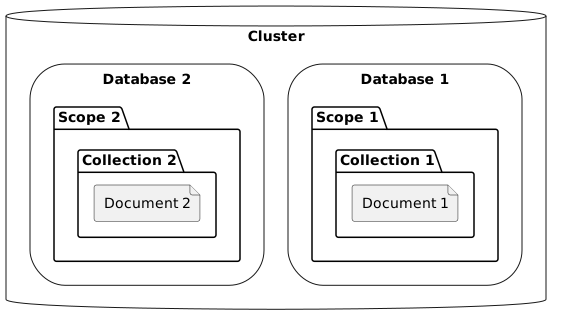
Privileges can be applied at different levels to control access granularity:
-
Database Level
-
Scope Level
-
Collection Level
Available Roles
Operational Insights provides predefined roles categorized into administrative and non-administrative types to streamline user access management. Choose administrative roles for cluster management tasks or non-administrative roles for standard data access and operations.
Administrative Roles
The following administrative roles are available in Operational Insights:
| Role | Capabilities |
|---|---|
Full Admin |
Can manage all cluster features (including security). |
Read-Only Admin |
Can view all cluster statistics. |
Security Admin |
Can view all cluster statistics, manage certificates, and manage security related settings. |
Local User Admin |
Can view all cluster statistics and manage local user roles, but not grant Full Admin or Security Admin roles to other users or itself. |
Local User Admin |
Can view all cluster statistics and manage local user roles, but not grant Full Admin or Security Admin roles to other users or itself. |
External User Admin |
Can view all cluster statistics and manage external user roles, but not grant Full Admin or Security Admin roles to other users or itself. |
Cluster Admin |
Can manage all cluster features except security and users. |
External Stats Reader |
Access to /metrics endpoint for Prometheus integration. |
Operational Insights Admin |
Can access Operational Insights service administrative APIs (i.e. <host>:8095/api/v1/*). |
Non-Administrative Roles
The following non-administrative roles are available in Operational Insights:
| Role | Capabilities |
|---|---|
Operational Insights Access |
Provides access to Operational Insights metadata required to use the service. |
Target Object Privileges
| Target Object | Privileges |
|---|---|
Database |
create, drop |
Scope |
create, drop |
Collection |
select, insert, upsert, delete, analyze, create, drop |
View |
select, create, drop |
Index |
create, drop |
Function |
execute, create, drop |
Link |
connect, disconnect, copy to, copy from, create, drop, alter, describe |
Role |
create, drop |
Synonym |
create, drop |
Users Function
The users() function is a SQL++ built-in function that returns a list the cluster’s current users.
Example:
If a user named user1 has been created and granted the analytics_access role, you can retrieve user information using the users() function as follows:
select * from `users()` u;
The output:
[
  {
    "u": {
      "id": "user1",
      "domain": "local",
      "roles": [
        {
          "role": "analytics_access",
          "origins": [
            {
              "type": "user"
            }
          ]
        }
      ],
      "groups": [],
      "external_groups": [],
      "name": "",
      "uuid": "1b480a02-68d9-4fff-96bd-d87fd5ea5a1f",
      "password_change_date": "2025-08-06T21:32:11+05:30",
      "locked": false,
      "temporary_password": false
    }
  }
]
See Also
-
System Defined Roles — pre-built roles with fixed privilege sets that require no custom configuration.
-
Owner Concept — the implicit privileges a user automatically receives on an object they create.