Cost-Based Optimizer
- reference
The cost-based optimizer for Operational Insights uses samples to choose the optimal plan to execute a query.
Operational Insights uses rule-based optimization to query your collections until you run an ANALYZE COLLECTION statement on each collection involved in a query.
The ANALYZE statement samples the data in a collection so that cost-based optimization (CBO) can be applied.
As the data in a collection changes, you can run ANALYZE COLLECTION periodically to update the information used for CBO.
| You cannot use the cost-based optimizer with external collections. To make queries on external data stores more efficient, when you create an external collection you specify a location path that is as specific as possible. See External Storage Data Organization. |
About the Cost-Based Optimizer
The execution plan for a query involves many possible operations: scan, join, filter, and so on. When planning for a query’s execution, there are usually several possible choices for each operation, including the use of different indexes or different join methods. Some of the choices will be faster and more efficient than others. The cost-based optimizer (CBO) aims to choose the most efficient option for each.
When generating an execution plan, the cost-based optimizer does the following:
-
Index selection: the optimizer selects the optimal set of indexes for the query.
-
Join method: the optimizer chooses between nested-loop joins, hash joins, and hash broadcast joins. For hash joins, the optimizer chooses which side of the join should be the build side or the probe side.
-
Join enumeration: the optimizer considers different join orders, and generates the optimal join order for query execution.
The cost-based optimizer for Operational Insights services uses a random sample of the data taken from each collection. At query planning time, the optimizer queries the samples based on the query’s single-collection predicates to estimate the number of qualifying objects in each base collection for the query.
The optimizer uses these results to estimate the cardinality of each predicate. It uses these cardinalities to compute the cost of different access paths, then compares the estimated cost of the alternatives to generate a query execution plan with the lowest cost.
Turning the Cost-Based Optimizer On or Off
The cost-based optimizer is on by default.
To turn it off or on, use the compiler.cbo configuration parameter.
In general, the SET statement only sets configuration parameters for the current query.
It does not enable you to turn off the cost-based optimizer and leave it off permanently.
|
For more details, see Cost-Based Optimizer Parameters.
Cost-Based Optimizer Samples
Before you can use the cost-based optimizer for a query, you must first gather the samples that it needs.
You must gather a sample from each collection that the query specifies. You can only gather an optimizer sample from a collection, not from a view.
You must periodically refresh the sample for each collection, based on the collection’s rate of change and how frequently you need to query each collection.
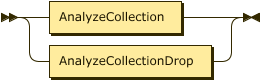
The query language provides ANALYZE statements which enable you to manage cost-based optimizer samples.
AnalyzeStmnt
Collecting Samples
The ANALYZE COLLECTION statement creates a sample of randomly selected objects from the specified collection, for both row-based and column-based collections.
If no sample exists, executing this statement creates one. If one does exist, this statement re-samples the target collection and replaces the previous sample.
By default, Operational Insights gathers a sample using a random sampling method that estimates cardinality from a data sketch and reads only a subset of the collection, so it does not require a full scan of the data. If Operational Insights detects that a component of the collection is missing the metadata that random sampling needs, it automatically falls back to a full scan for that component to ensure the sample remains accurate.
AnalyzeCollection
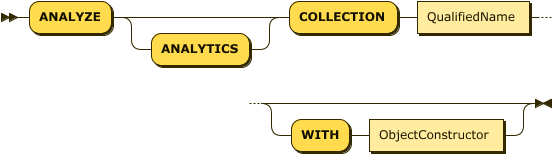
The QualifiedName identifies the collection from which the samples are gathered.
For information about how Operational Insights organizes entities into a database.scope.database_object hierarchy and resolves names, see Entities.
The optional WITH clause enables you to specify parameters for the creation of the optimizer samples.
The ObjectConstructor represents an object containing key-value pairs, one for each parameter.
The following parameters are available.
| Name | Description | Schema |
|---|---|---|
sample |
Determines the target size of the sample.
May be one of the following string values: |
enum (low, medium, high), or integer |
sample-method |
Determines how Operational Insights gathers the sample.
May be one of the following string values: |
enum (random, full-scan) |
sample-seed |
A number used to specify the initial seed for the random sampling process.
This parameter applies only when |
number |
The following example gathers optimizer statistics for the standalone collection called sampleAnalytics.Commerce.customers.
ANALYZE COLLECTION sampleAnalytics.Commerce.customers;The following example also gathers optimizer statistics for the customers collection.
In this case, you set the size of the sample to medium, and the initial seed for the random sampling process to 42.
ANALYZE COLLECTION sampleAnalytics.Commerce.customers WITH {"sample": "medium", "sample-seed": 42};The following example forces an exact sample by scanning the entire customers collection, and sets a seed so the sample is reproducible.
ANALYZE COLLECTION sampleAnalytics.Commerce.customers WITH {"sample-method": "full-scan", "sample-seed": 42};
A sample that Operational Insights created before this release did not record a sample-method.
Operational Insights treats such a sample as full-scan, and continues to use it for query planning as before.
When you next run ANALYZE COLLECTION on that collection, Operational Insights gathers the new sample using random.
If the collection was created in a previous release and does not yet have the necessary underlying statistics for random sampling, the system automatically defaults to full-scan.
|
Dropping Samples
The ANALYZE COLLECTION … DROP STATISTICS statement drops samples for a named collection.
AnalyzeCollectionDrop

The QualifiedName identifies the collection from which the samples were gathered.
For information about how Operational Insights organizes entities into a database.scope.database_object hierarchy and resolves names, see Entities.
The following example drops optimizer statistics for the customers collection.
ANALYZE COLLECTION sampleAnalytics.Commerce.customers DROP STATISTICS;Sample Metadata for CBO
You can find metadata for the cost-based optimizer samples (for historical reasons) in the System.Metadata.`Index` collection, identified by IndexStructure = "SAMPLE".
The Index catalog entry for a cost-based optimizer sample contains the following extra fields specific to samples:
-
SampleSeed: The sample’s seed.
-
SampleCardinalityTarget: The sample’s size.
-
SourceCardinality: The total number of objects in the collection when it was sampled.
-
SourceAvgItemSize: The average object size (in bytes) in the collection when it was sampled.
The cost-based optimizer uses the last two attributes to estimate the costs of various query operators based on their input cardinalities and sizes.
Cost-Based Optimizer Query Plans
When you run a query, the cost-based optimizer adds extra information to the query plan.
For each operator, the plan includes an operator-estimates section, containing the following fields:
-
cardinality: The estimated output cardinality of the operator.
-
op-cost: The estimated cost of the operator.
-
total-cost: The estimated total cost of the query plan up to the current operator.
For hash joins and hash broadcast joins, the plan includes the following field:
-
build-side: Indicates the build side of the join. Always has the value
0to indicate that the first (or left) input is the build side.
The operator-estimates section and the build-side field are also included in the visual query plan.
In the visual query plan, for hash joins and hash broadcast joins, the build side displays on the left side of the join and the probe side on the right, assuming that the plan direction is upward.
Cost-Based Optimizer Parameters and Hints
Operational Insights provides several compiler parameters which enable you to change the behavior of the cost-based optimizer, as well as turning it on or off. See Cost-Based Optimizer Parameters.
You can also supply hints to the optimizer within a specially formatted hint comment. These enable you to change the behavior of the cost-based optimizer within individual queries. See Cost-Based Optimizer Hints.