User-Defined Functions
- reference
In SQL++, user-defined functions enable you to name and reuse complex or repetitive expressions, including subqueries, in order to simplify your queries.
Each user-defined function belongs to a scope. Within a scope, a function is uniquely identified by its function signature: that is, its name and the number of parameters it takes. You can create more than one function with the same name in the same scope, as long as each function has a different number of parameters.
You can query the Function collection within the System.Metadata scope to get metadata about all existing user-defined functions.
FUNCTION is a reserved keyword, so you need to delimit the identifier for the Function collection with backticks (``).
|
Creating a Function
CreateFunction
The CREATE FUNCTION command enables you to create a user-defined function.
Operational Insights supports 2 kinds of user-defined function:
-
Internal Functions, which use a SQL++ expression as the function body.
-
External Functions, which bind the function to code deployed in an external language, such as Python.
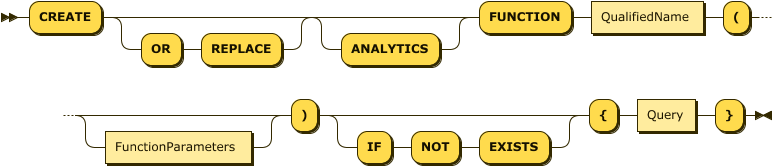
This syntax enables you to create an internal user-defined function. You can think of this kind of SQL++ user-defined function as being a parameterized view.
Function Name
QualifiedName

DatabaseAndScopeName
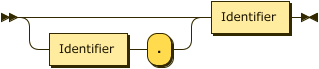
The QualifiedName specifies the name of the function to create.
For information about how Operational Insights organizes entities into a database.scope.database_object hierarchy and resolves names, see Entities.
Parameter List
FunctionParameters
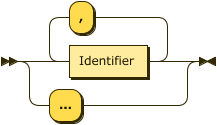
The parameter list specifies parameters for the function.
You delimit the list with parentheses ().
You can specify named parameters for the function using a comma-separated list of identifiers.
If you specify named parameters for the function, then you must call the function with exactly the same number of arguments in your queries. If you specify no parameters, then you must call the function with no arguments.
To create a variadic function, that’s, a function that you can call with any number of arguments or none, specify ... as the only parameter.
Function Body
Query
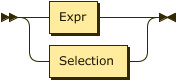
The function body defines the function.
You delimit the function body with braces {}.
It can contain any valid expression or subquery.
If you specified named parameters for the function, you can use them in the function body to represent arguments passed to the function at execution time.
If the function is variadic, an array named args holds any arguments passed to the function at execution time.
The function body can refer to other collections or views, or to other functions in the same or other scopes. If a scope name was explicitly specified when creating the function, then that scope is the default scope for function calls or collection references within the function body.
Recursive function invocation is not permitted. The function body cannot refer to itself or to another user-defined function that calls this function indirectly.
Checking for an Existing Function and Replacing a Function
The optional IF NOT EXISTS keywords enable you to verify whether a user-defined function exists before creating it, and the optional OR REPLACE keywords enable you to redefine the function.
If a function with the same signature already exists within the specified scope, then:
-
If the
OR REPLACEkeywords are present, replace the existing function. -
If the
OR REPLACEkeywords are not present, then:-
If the
IF NOT EXISTSkeywords are present, the statement does nothing and completes without error. -
If the
IF NOT EXISTSkeywords are not present, generate an error.
-
If the statement contains both the OR REPLACE keywords and the IF NOT EXISTS keywords, an error results.
Internal Function Examples
For simplicity, none of these examples implement any data validation.
Example 1: Function with expression body
This statement creates a function called rstr, which returns the specified number of characters from the right of a string.
The function expects two named arguments: vString, which is the string to work with, and vLen, which is the number of characters to return.
The body of the function is an expression based on the two arguments.
  CREATE FUNCTION rstr(vString, vLen)
     { substr(vString, length(vString) - vLen, vLen) };
Test
rstr("Couchbase", 4);Result
[
  "base"
]
Example 2: Function with subquery body
This statement creates a function called total_spending based on the Commerce intro:connecting-to-data-sources.adoc#install-the-commerce-dataset-in-standalone-collections.
The function takes one parameter, a customer id.
Using a subquery, the function returns the total spending of all orders placed by that customer.
  CREATE FUNCTION total_spending(id)
     { SELECT VALUE SUM(i.qty * i.price)
       FROM orders AS o UNNEST o.items AS i
       WHERE o.custid = id
     };
Test
total_spending("C13");Result
[
  13036.8
]
Example 3: Variadic function with expression body
This statement creates a function that can take any number of arguments. Using an expression, the function returns the number of arguments that are passed to it.
  CREATE FUNCTION count_my_args( ... )
     { array_count(args) };
Test
count_my_args("Hello", "Goodbye");Result
[
  2
]
Example 4: Variadic function containing a subquery
The body of this function is an expression that contains a subquery. The function takes a variable number of strings and returns the total length of all the strings.
  CREATE FUNCTION total_length(...)
     { array_sum(
         (SELECT VALUE length(a) FROM args AS a)
       )
     };
Test
total_length("Hello", "Goodbye");Result
[
  12
]
Example 5: Function with no parameters
This statement creates a function which returns the mathematical constant φ. The function takes no arguments.
CREATE FUNCTION phi() { 2 * sin(radians(54)) }; phi();[ 1.618033988749895 ]
Example 6: Replace a function
The following statement redefines the function so that it calculates φ using a different method.
CREATE OR REPLACE FUNCTION phi() { (1 + sqrt(5)) / 2 }; phi();[ 1.618033988749895 ]
Creating an External Function
CreateExternalFunction
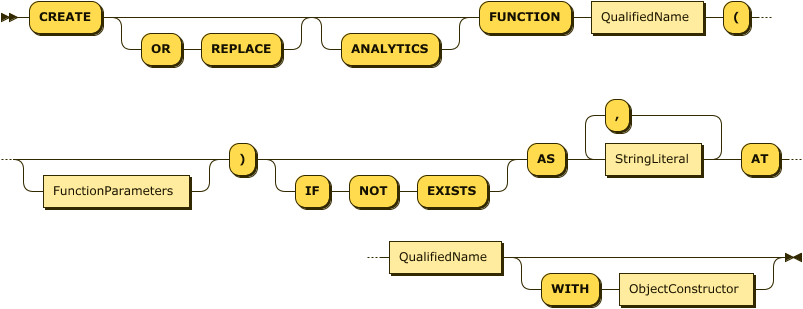
An External Function binds a SQL++ function signature to code deployed in an external language, such as Python, instead of a SQL++ expression. Operational Insights runs the external code inside an isolated sandbox. For information about the sandbox, the supported Python type mappings, and how to package and deploy a Python library, see Python User-Defined Functions.
The QualifiedName, FunctionParameters, IF NOT EXISTS, and OR REPLACE clauses behave the same as they do for the expression-bodied CREATE FUNCTION statement described earlier on this page.
AS Clause
The AS clause identifies the external code to bind to the function, as a comma-separated list of string literals.
For a Python function, supply exactly 2 strings: the module name, and either a module-level function name or a Class.method.
AT Clause
The AT clause specifies the library that contains the deployed code.
A library is a package of external code, and any dependencies it needs, that an administrator uploads to Operational Insights ahead of time.
For information about packaging and uploading a Python library, see Packaging a Python Library.
WITH Clause
The optional WITH clause configures the function using an object of key-value pairs.
You can define the following parameters.
| Name | Description | Schema |
|---|---|---|
deterministic |
Whether the function returns the same result every time you call it with the same arguments. Operational Insights treats every External Function as deterministic by default, which allows the query optimizer to apply additional optimizations, such as caching the function’s result within a query. Set this parameter to |
Boolean |
null-call |
Whether Operational Insights calls the function when an argument is Set this parameter to |
Boolean |
External Function Examples
Example 7: External Function with default settings
Given a Python module named myfns.py that contains:
class MyFns:
    def roundtrip(self, arg):
        return arg
the following statement binds the roundtrip method to a SQL++ function of the same name, in a library named mylib.
CREATE FUNCTION roundtrip(x) AS "myfns", "MyFns.roundtrip" AT mylib; roundtrip("Couchbase");[ "Couchbase" ]
Example 8: External Function with a WITH clause
The following statement binds a Python function named sentiment, in the module sentiment_mod and the class sent_model, to a SQL++ function of the same name.
This particular function always returns the same result for the same input, but the statement declares it as non-deterministic anyway, to show the WITH clause syntax you’d use for a function whose result can vary between calls, such as one that depends on random values or an external, frequently retrained model.
 CREATE FUNCTION sentiment(text)
    AS "sentiment_mod", "sent_model.sentiment" AT pylib
WITH { "deterministic": false }; sentiment("I bought spam and eggs");[ "great" ]
Calling a Function
OrdinaryFunctionCall

You can invoke a user-defined function in the same way as any other ordinary function. You can optionally prefix the name of the function with the names of the database and scope containing the function.
For information about how Operational Insights organizes entities into a database.scope.database_object hierarchy and resolves names, see Entities.
After determining the database and scope, Operational Insights tries to find a user-defined function with the same function signature within that scope. If a user-defined function cannot be found, Operational Insights tries to find a built-in function with the same function name. If Operational Insights cannot find a built-in function, the function call fails.
Examples
The examples in this section assume that you’re using the database and scope sampleAnalytics.Commerce.
See Quick Start Tutorial to install the Commerce dataset.
You can use USE Statements to set the default scope for the statement that follows it.
USE sampleAnalytics.Commerce;If you’re using the Operational Insights UI, you can alternatively use the query editor’s Query Context lists to set the database and scope.

Select sampleAnalytics as the database and Commerce as the scope for the following examples.
Example 9: Function with subquery
The following statement creates a function called nameSearch, which selects the customer name from all documents with the specified ID in the customers collection.
 CREATE FUNCTION nameSearch(customerId) {
   (SELECT VALUE c.name
   FROM customers AS c
   WHERE c.custid = customerId)[0]
}; SELECT VALUE nameSearch("C25");[ "M. Sinclair" ]
Example 10: Call a user-defined function
The following query uses the nameSearch function as a projection expression in a SELECT query.
Compare this with example Q3.29 in the section on Subqueries.
 SELECT o.orderno, o.custid,
       nameSearch(o.custid) AS name
 FROM orders AS o, o.items AS i
WHERE i.itemno = 120;[
{
"orderno": 1003,
"custid": "C31",
"name": "B. Pruitt"
},
{
"orderno": 1006,
"custid": "C41",
"name": "R. Dodge"
}
]
Dropping a Function
DropFunction
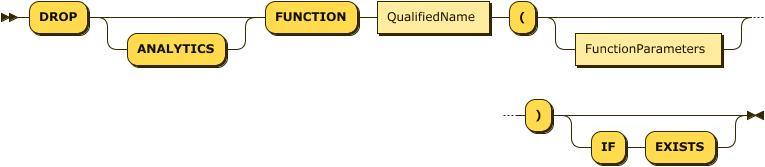
The DROP FUNCTION statement enables you to delete a user-defined function.
This works the same way whether the function is an Internal Function or an External Function.
You cannot delete a user-defined function if there are any other user-defined functions that call this function, in this scope or any other scope.
Function Name
QualifiedName
DatabaseAndScopeName
The QualifiedName specifies the name of the function to delete.
For information about how Operational Insights organizes entities into a database.scope.database_object hierarchy and resolves names, see Entities.
Parameter List
FunctionParameters
When you drop a function, you must specify the same number of parameters that you specified when you created the function.
When dropping a variadic function, specify ....
Checking for an Existing Function
The optional IF EXISTS keywords enable you to verify whether the specified function or scope exists before dropping it.
-
If you include these keywords, and the function name or scope is not found, the statement does nothing and completes without error.
-
If you do not include these keywords, and the function name or scope is not found, Operational Insights generates an error.
Examples
The examples that follow assume that you have set sampleAnalytics.Commerce as the default database and scope.
Example 11: Drop a Function
This statement drops the function named nameSearch, if it exists.
DROP FUNCTION nameSearch(customerId) IF EXISTS;Run the following query to verify the availability of a function:
SELECT * FROM Metadata.`Function`;