CREATE BUCKET
- Capella Operational
- reference
- Couchbase Server 8.0
The CREATE BUCKET statement enables you to create a bucket.
Purpose
Use the CREATE BUCKET statement to create a new bucket in your Couchbase cluster. A bucket is a top-level data container, similar to a database in relational database management systems. It stores documents and provides a logical grouping for data.
When you create a new bucket, a _default scope and a _default collection are automatically created within it, providing a basic structure for your data right away.
The name of the bucket must be unique within the cluster and you cannot change it once you create the bucket.
You can have a maximum of 30 buckets per cluster.
Prerequisites
To execute this statement in the Capella UI, you must have one of the following roles:
| You cannot execute this statement using cluster access credentials. |
Syntax
create-bucket ::= 'CREATE' ( 'BUCKET' | 'DATABASE' ) ( 'IF' 'NOT' 'EXISTS' )? name
                  ( 'WITH' with-fields )?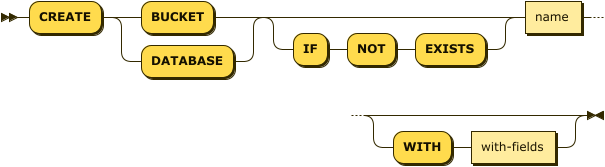
The BUCKET and DATABASE keywords are synonyms.
You can use either of them.
| name |
(Required) An identifier that represents the name of the bucket that you want to create. It must be unique within the cluster and cannot be longer than 100 characters. Acceptable characters are A-Z, a-z, 0-9, and the special characters underscore, period, dash, and percent. |
IF NOT EXISTS Clause
The optional IF NOT EXISTS clause enables the statement to complete successfully when the specified bucket already exists.
If a bucket with the same name already exists, then:
-
If this clause is not present, an error is generated.
-
If this clause is present, the statement does nothing and completes without error.
WITH Clause
Use the optional WITH clause to specify additional options for the bucket.
| with-fields |
A JSON object containing a list of name-value pairs that define the additional options. For a list of valid fields names and values, see Bucket Parameter Groups in the REST API documentation. If you do not include |
|
When using
|
Examples
student-records with default settingsCREATE BUCKET `student-records`;custom-bucket with custom settingsThe bucket has a memory quota of 512 MiB, bucket type as couchbase, and storage backend as magma.
CREATE BUCKET `custom-bucket` WITH {
    "ramQuota": 512,
    "bucketType": "couchbase",
    "storageBackend": "magma"
};data-sample if it does not already existCREATE BUCKET IF NOT EXISTS `data-sample`;Related Links
-
For an overview of buckets, see Buckets.
-
For step-by-step procedures for bucket management, see Manage Buckets.
-
For managing buckets with the REST API, see Buckets API.