UPSERT
- Capella Operational
- reference
UPSERT is used to insert a new record or update an existing one. If the document doesn’t exist it will be created. UPSERT is a combination of INSERT and UPDATE.
Please note that the examples on this page will alter the data in your sample buckets.
To restore your sample data, remove and reinstall the travel-sample bucket.
Refer to Import Sample Data for details.
|
Prerequisites
o execute this statement, your client must have necessary privileges on the keyspace.
The required privileges depend on your cluster access credential type and whether the statement includes a SELECT or RETURNING clause.
| Credential Type | Privilege for UPSERT | Privilege for SELECT / RETURNING |
|---|---|---|
Basic |
|
|
Advanced |
|
A user with the Data Manage privilege may set documents to expire.
When the document expires, the Data Service deletes the document, even though the user may not have the Query Delete privilege.
|
RBAC Examples
For this example, set the query context to the inventory scope in the travel sample dataset.
For more information, see Query Context.
To execute the following statement, your client must have either the Write or both the Query Update and Query Insert privileges on hotel.
UPSERT INTO hotel (KEY, VALUE)
VALUES ("key1", { "type" : "hotel", "name" : "new hotel" });
To execute the following statement, your client must have:
-
Writeor bothQuery UpdateandQuery Insertprivileges onhotel -
ReadorQuery Readprivilege onhotel
UPSERT INTO hotel (KEY, VALUE)
VALUES ("key1", { "type" : "hotel", "name" : "new hotel" })
RETURNING *;[
{
"hotel": {
"name": "new hotel",
"type": "hotel"
}
}
]To execute the following statement, your client must have:
-
Writeor bothQuery UpdateandQuery Insertprivileges onlandmark -
ReadorQuery Readprivilege onbeer-sample
UPSERT INTO landmark (KEY foo, VALUE bar)
SELECT META(doc).id AS foo, doc AS bar FROM `beer-sample` AS doc WHERE type = "brewery";
Syntax
upsert ::= 'UPSERT' 'INTO' target-keyspace ( insert-values | insert-select )
            returning-clause?
| target-keyspace | |
| insert-values | |
| insert-select | |
| returning-clause |
Insert Target
target-keyspace ::= keyspace-ref ( 'AS'? alias )?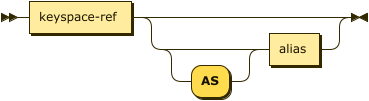
Specifies the keyspace into which to upsert documents.
| keyspace-ref | |
| alias |
Keyspace Reference
keyspace-ref ::= keyspace-path | keyspace-partial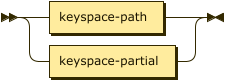
keyspace-path ::= ( namespace ':' )? bucket ( '.' scope '.' collection )?
keyspace-partial ::= collection
Keyspace reference for the insert target. For more details, refer to Keyspace Reference.
AS Alias
Assigns another name to the keyspace reference. For details, refer to AS Clause.
Assigning an alias to the keyspace reference is optional.
If you assign an alias to the keyspace reference, the AS keyword may be omitted.
Insert Values
insert-values ::= ( '(' 'PRIMARY'? 'KEY' ',' 'VALUE' ( ',' 'OPTIONS' )? ')' )? values-clause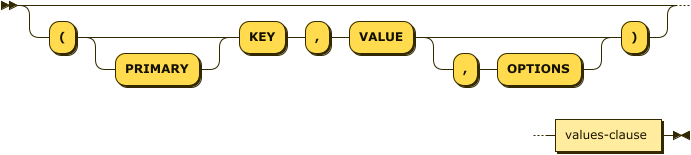
Specifies one or more documents to be upserted using the VALUES clause. For details, refer to Insert Values.
| values-clause |
VALUES Clause
values-clause ::= 'VALUES'  '(' key ',' value ( ',' options )? ')'
            ( ',' 'VALUES'? '(' key ',' value ( ',' options )? ')' )*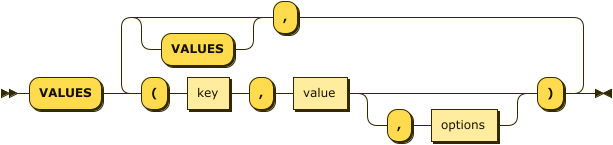
Specify the values as well-formed JSON. Also enables you to set the expiration of the upserted documents. For details, refer to VALUES Clause.
|
Insert Select
insert-select ::= '(' 'PRIMARY'? 'KEY' key ( ',' 'VALUE' value )?
                   ( ',' 'OPTIONS' options )? ')' select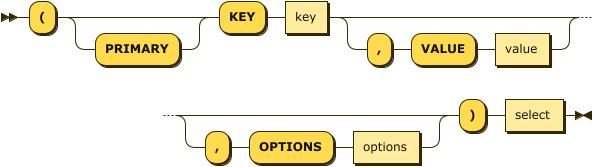
Specifies the documents to be upserted as a SELECT statement. Also enables you to set the expiration of the upserted documents. For details, refer to Insert Select.
|
RETURNING Clause
returning-clause ::= 'RETURNING' (result-expr (',' result-expr)* |
                    ('RAW' | 'ELEMENT' | 'VALUE') expr)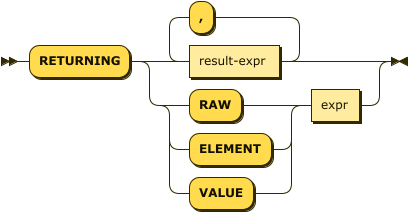
Specifies the fields that must be returned as part of the results object.
| result-expr |
Result Expression
result-expr ::= ( path '.' )? '*' | expr ( 'AS'? alias )?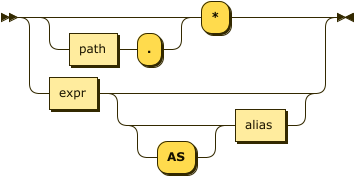
Specifies an expression on the data you upserted, to be returned as output. For details, refer to Result Expression.
Example
To try the examples in this section, set the query context to the inventory scope in the travel sample dataset.
For more information, see Query Context.
The following statement upserts documents with type landmark-pub into the landmark keyspace.
UPSERT INTO landmark (KEY, VALUE)
VALUES ("upsert-1", { "name": "The Minster Inn", "type": "landmark-pub"}),
("upsert-2", {"name": "The Black Swan", "type": "landmark-pub"})
RETURNING VALUE name;[
"The Minster Inn",
"The Black Swan"
]