Streamable HTTP Transport Mode
Run the Couchbase MCP Server in Streamable HTTP transport mode to allow multiple clients to connect over HTTP.
Run the server in Streamable HTTP transport mode to allow multiple clients to connect to the same server instance via HTTP.
| When you expose the server over HTTP, any client that can reach the endpoint can call its tools. To secure it, see OAuth. |
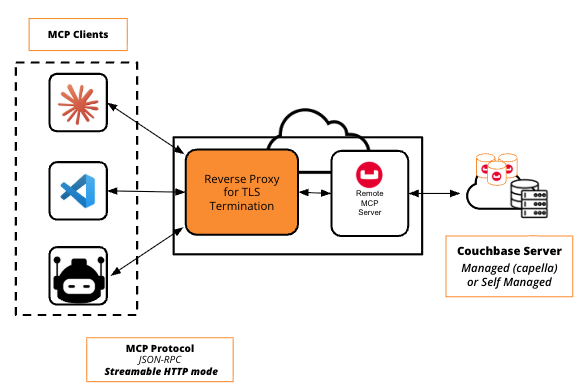
| The server serves plain HTTP and does not terminate TLS. For any non-local or production deployment, run it behind a reverse proxy that terminates TLS, so TLS encrypts traffic in transit. See Securing the Endpoint with TLS. |
-
uvx
-
Docker
Start the server:
uvx couchbase-mcp-server operational-insights \
  --connection-string='https://your-oi-endpoint' \
  --username='your-username' \
  --password='your-password' \
  --read-only-mode=true \
  --transport=http
The server is available at http://localhost:8001/mcp by default.
MCP client configuration:
{
  "mcpServers": {
    "couchbase-oi-http": {
      "url": "http://localhost:8001/mcp"
    }
  }
}
Set CB_MCP_PORT or --port to use a different port.
Set CB_MCP_HOST=0.0.0.0 or --host=0.0.0.0 to allow external connections.
Run the MCP server as an independent container:
docker run --rm -i \
  -e CB_OPERATIONAL_INSIGHTS_CONNECTION_STRING='<operational_insights_connection_string>' \
  -e CB_OPERATIONAL_INSIGHTS_USERNAME='<database_user>' \
  -e CB_OPERATIONAL_INSIGHTS_PASSWORD='<database_password>' \
  -e CB_MCP_TRANSPORT='http' \
  -e CB_MCP_READ_ONLY_MODE='true' \
  -e CB_MCP_HOST=0.0.0.0 \
  -e CB_MCP_PORT=9001 \
  -p 9001:9001 \
  couchbase/mcp-server operational-insights
Setting CB_MCP_HOST=0.0.0.0 exposes the MCP server to anyone who can reach the container.
For production use cases, make sure you configure Docker networking to secure it.
|
You can specify the container’s networking with --network=<your_network>.
The default is bridge.
See Docker network drivers.
|
MCP client configuration:
{
  "mcpServers": {
    "couchbase-oi-http": {
      "url": "http://localhost:9001/mcp"
    }
  }
}
Stateless Mode and Workers
The Operational Insights server accepts --stateless-http or CB_MCP_STATELESS_HTTP with a single worker.
Stateless mode removes the need for sticky sessions for the MCP session, but not for the async query tools.
Those tools keep query handles in the memory of one server, so route all requests for a handle to the same server.
See Async Query Issues.
The Operational Insights server does not support multiple workers.
It refuses to start when you set --workers or CB_MCP_WORKERS to more than 1.
Health Check
In Streamable HTTP mode, the server exposes GET /health for liveness probes, such as a Kubernetes liveness probe.
curl http://localhost:8001/healthThe endpoint returns a JSON object:
{"status": "ok", "server": "<server-id>"}The endpoint reports process liveness only. It never contacts the Operational Insights cluster, so a credential or cluster fault does not cause a restart loop. It needs no authentication, even when you enable OAuth.
Securing the Endpoint with TLS
The server serves plain HTTP and does not terminate TLS itself.
Over plain HTTP, anyone on the network can read or intercept all request and response data, including OAuth bearer tokens in the Authorization header when you enable OAuth.
For any non-local or production deployment, run the server behind a reverse proxy that terminates TLS (for example, nginx).
The proxy forwards traffic to the server’s HTTP port.
Clients then connect to the proxy’s https:// URL.