Streamable HTTP Transport Mode
Run the Couchbase MCP Server in Streamable HTTP transport mode to allow multiple clients to connect over HTTP.
Run the server in Streamable HTTP transport mode to allow multiple clients to connect to the same server instance via HTTP.
| When you expose the server over HTTP, any client that can reach the endpoint can call its tools. To secure it, see OAuth. |
The commands on this page start the operational server, which is the default.
Adding operational to the command, as in uvx couchbase-mcp-server operational, gives the same result.
|
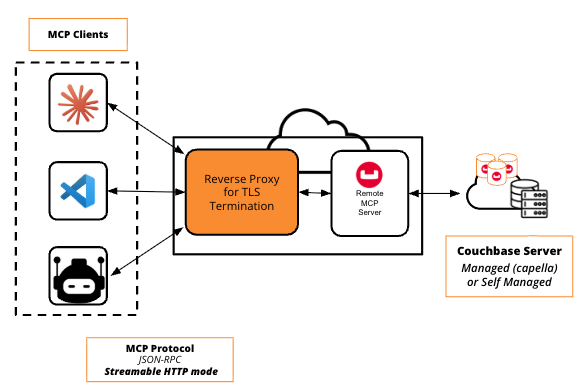
| The server serves plain HTTP and does not terminate TLS. For any non-local or production deployment, run it behind a reverse proxy that terminates TLS, so TLS encrypts traffic in transit. See Securing the Endpoint with TLS. |
-
uvx
-
Docker
Start the server:
uvx couchbase-mcp-server \
  --connection-string='couchbases://your-connection-string' \
  --username='your-username' \
  --password='your-password' \
  --read-only-mode=true \
  --transport=http
The server is available at http://localhost:8000/mcp by default.
MCP client configuration:
{
  "mcpServers": {
    "couchbase-http": {
      "url": "http://localhost:8000/mcp"
    }
  }
}
Set CB_MCP_PORT or --port to use a different port.
Set CB_MCP_HOST=0.0.0.0 or --host=0.0.0.0 to allow external connections.
Run the MCP server as an independent container:
docker run --rm -i \
  -e CB_CONNECTION_STRING='<couchbase_connection_string>' \
  -e CB_USERNAME='<database_user>' \
  -e CB_PASSWORD='<database_password>' \
  -e CB_MCP_TRANSPORT='http' \
  -e CB_MCP_READ_ONLY_MODE='true' \
  -e CB_MCP_HOST=0.0.0.0 \
  -e CB_MCP_PORT=9001 \
  -p 9001:9001 \
  couchbase/mcp-server
Setting CB_MCP_HOST=0.0.0.0 exposes the MCP server to anyone who can reach the container.
For production use cases, make sure you configure Docker networking to secure it.
|
You can specify the container’s networking with --network=<your_network>.
The default is bridge.
See Docker network drivers.
|
MCP client configuration:
{
  "mcpServers": {
    "couchbase-http": {
      "url": "http://localhost:9001/mcp"
    }
  }
}
Scaling with Workers
By default, the server runs as one process, which uses about one CPU core.
To use more cores on one machine, set CB_MCP_WORKERS or --workers to the number of worker processes.
The default is 1.
uvx couchbase-mcp-server \
  --connection-string='couchbases://your-connection-string' \
  --username='your-username' \
  --password='your-password' \
  --transport=http \
  --workers=4
Uvicorn runs the workers on one shared socket. The first process checks the whole configuration once before it starts the workers.
Workers use stateless mode, which keeps no session state in the server process.
Set CB_MCP_STATELESS_HTTP or --stateless-http to control it.
If you do not set it, stateless mode turns on when the worker count is greater than 1.
You can also turn it on with a single worker, for replicas behind a load balancer without sticky sessions.
The server rejects these settings at startup:
-
More than one worker on any transport other than
http. -
More than one worker with
--stateless-http=false. -
Stateless mode on the
ssetransport. -
Stateless mode together with
--confirmation-required-tools. Stateless mode has no session to show a confirmation prompt through, so those tools would run without asking.
The server ignores stateless mode on the stdio transport and logs a warning.
With more than one worker, each process writes its own log files, named mcp_server.<host>.<pid>.info.log for each level.
Health Check
In Streamable HTTP mode, the server exposes GET /health for liveness probes, such as a Kubernetes liveness probe.
curl http://localhost:8000/healthThe endpoint returns a JSON object:
{"status": "ok", "server": "<server-id>"}The endpoint reports process liveness only. It never contacts the Couchbase cluster, so a credential or cluster fault does not cause a restart loop. It needs no authentication, even when you enable OAuth.
Securing the Endpoint with TLS
The server serves plain HTTP and does not terminate TLS itself.
Over plain HTTP, anyone on the network can read or intercept all request and response data, including OAuth bearer tokens in the Authorization header when you enable OAuth.
For any non-local or production deployment, run the server behind a reverse proxy that terminates TLS (for example, nginx).
The proxy forwards traffic to the server’s HTTP port.
Clients then connect to the proxy’s https:// URL.