Architecture
- concept
How the Couchbase MCP Server package is built, and what the Couchbase Server and Operational Insights servers share.
The Couchbase MCP Server is an implementation of the Model Context Protocol that lets MCP-compatible clients, such as Claude Desktop, Cursor, and custom LLM agents, work with Couchbase.
One package ships two MCP servers.
Each server is a subcommand of the same couchbase-mcp-server command.
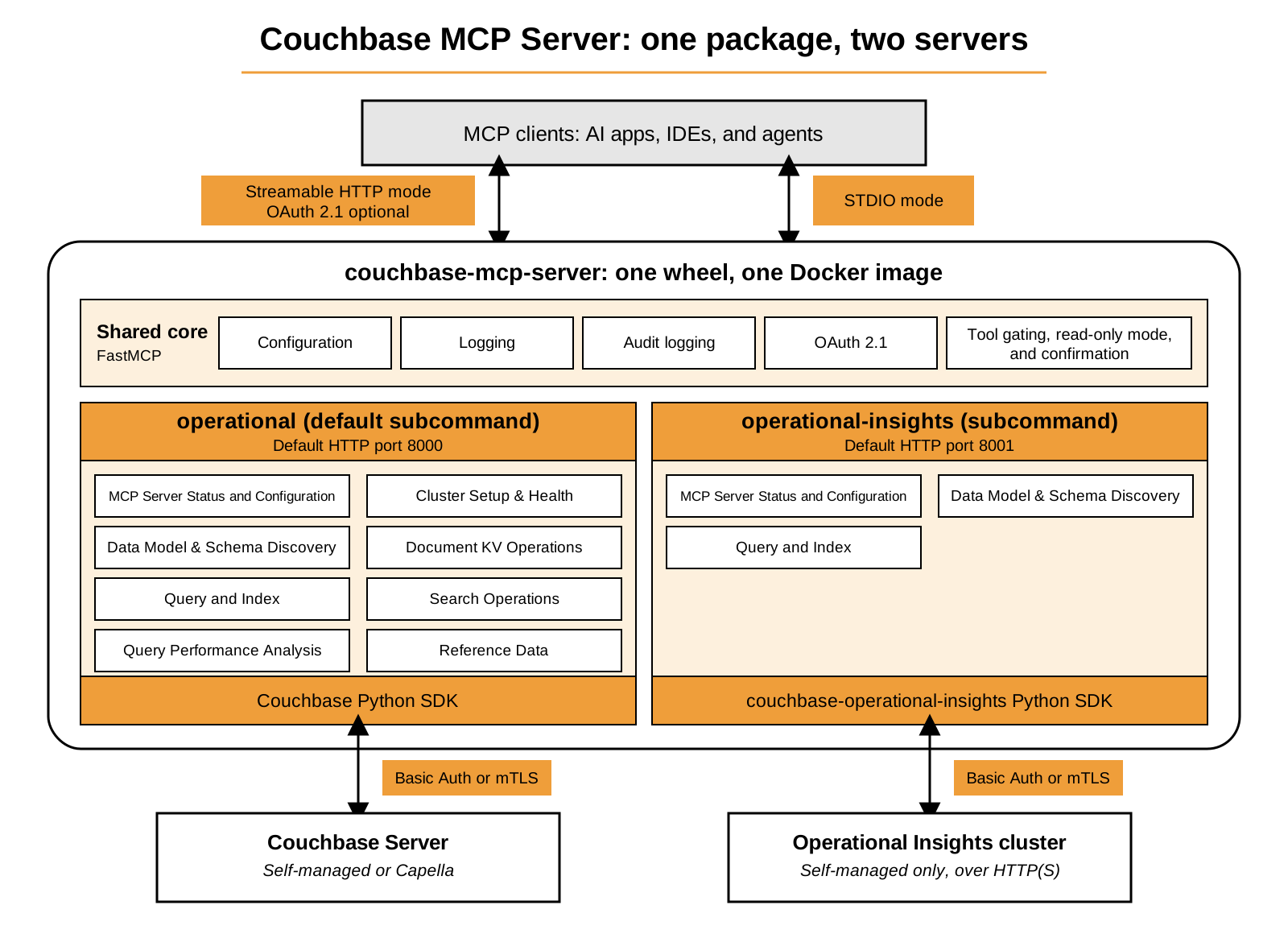
One Package, Two Servers
| Subcommand | Target | SDK | Default HTTP Port |
|---|---|---|---|
|
A Couchbase Server cluster, on Capella or self-managed |
Couchbase Python SDK |
8000 |
|
A self-managed Couchbase Operational Insights cluster |
couchbase-operational-insights Python SDK |
8001 |
Each process loads only the SDK for its own subcommand.
The operational subcommand is the default, so existing configurations keep working without changes.
Each server exposes its own set of tools, grouped in categories:
-
The Couchbase Server tools cover cluster health, schema discovery, key-value operations, queries and indexes, Search, and query performance. See Couchbase Server Tools.
-
The Operational Insights tools cover database and schema discovery, and SQL++ queries and indexes. See Operational Insights Tools.
For the component breakdown and request flow of each server, see Couchbase Server Architecture and Operational Insights Architecture.
Shared Components
Both servers use the same core for the following components. Each server adds only its own tools and its own SDK connection.
| Component | What It Does | Learn More |
|---|---|---|
FastMCP core |
Hosts the server, registers the tools, and handles the MCP protocol. |
|
Configuration |
Reads settings from command-line arguments and environment variables. |
|
Logging |
Writes operational logs to |
|
Audit logging |
Records tool calls, authorization denials, and guardrail blocks in a separate audit log. |
|
OAuth 2.1 |
Verifies JWT bearer tokens on the Streamable HTTP transport, and enforces read and write scopes on every tool call. |
|
Tool gating |
Controls which tools load. Read-only mode, turned-off tools, and confirmation prompts all use it. |
Code Composition
A single codebase powers both servers, which ship together in one wheel and one container image.
Each server is a service package that pairs a ServerSpec with a provider.
The ServerSpec defines the tool set, the scopes, the default port, and the logging target.
The provider manages the connection to the SDK.
At startup, the shared cb_mcp core assembles these into a FastMCP instance.
The core builds the infrastructure features once and both servers use them. These features are tool gating, OAuth authentication, human confirmation, logging, and audit logging. Because the entry point loads only the spec and provider for the selected subcommand, a running process imports only the SDK it needs. Adding another server in the future needs only a new spec and provider, and the shared core does not change.
Shared Security Model
Both servers follow the same security defaults:
-
Read-only by default:
CB_MCP_READ_ONLY_MODEdefaults totrue. Tools that modify data or structure are not registered in that mode. -
Optional OAuth for the HTTP transport: when configured, the server validates JWT bearer tokens from an external identity provider and enforces read and write scopes on every tool call. Both servers use the same scope labels, so one token works across both.
-
Credential isolation: credentials live only in process memory and are never persisted.
-
Tool gating: operators can hide tools entirely with
--disabled-tools, or require human confirmation with--confirmation-required-tools. -
Couchbase RBAC is the final control: every call runs with the privileges of the configured credentials, regardless of read-only mode.
For the full security reference of each server, see Couchbase Server Security and Operational Insights Security.
Shared Observability
Both servers write logs and audit records the same way. For the settings of each server, use the following pages:
-
Logging: both servers log to
stderrby default, with an optionalfilesink for rotating per-level log files. See Couchbase Server Logging and Operational Insights Logging. -
Audit logging: both servers can record an audit trail in a separate log. See Couchbase Server Audit Logging and Operational Insights Audit Logging.
Distribution
The server ships through several channels:
-
PyPI package:
pip install couchbase-mcp-server. MCP clients typically run it as a localstdiosubprocess withuvx. It supports Python 3.11 to 3.14. -
Docker image (
couchbase/mcp-server): published for tagged releases. It runs as a non-root user, defaults to read-only mode and thestdiotransport, and exposes port 8000 (operational) and port 8001 (operational-insights) for the HTTP transport. -
MCP Registry: one
server.jsonentry lists packages for both subcommands.