UPDATE Statements
- reference
This topic describes how you useUPDATEstatements to modify objects in a collection. Use theUPDATEstatement to target 1 or more objects, and add, delete, or update fields.
The UPDATE statement enables modifications to both top-level (flat) and nested (non-flat) fields within a record.
For nested fields, you can specify a subfield path to assign a new value or replace the entire object.
To update specific elements within an array, you must use nested statements to iterate through the array.
A record’s primary key cannot be modified and must remain unchanged.
Refer to the Examples section for detailed usage.
Syntax
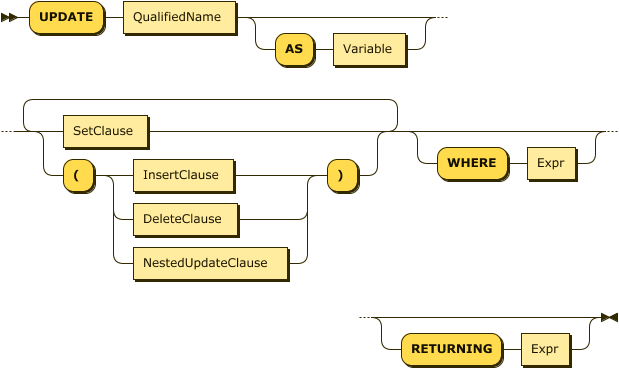
UpdateStatement EBNF
UpdateStatement ::= "UPDATE" QualifiedName ( "AS" Variable)? (SetClause | ( "( " (InsertClause | DeleteClause | NestedUpdateClause) ") "))+ ('WHERE' Expr)? ('RETURNING' Expr)?UpdateStatement Diagram
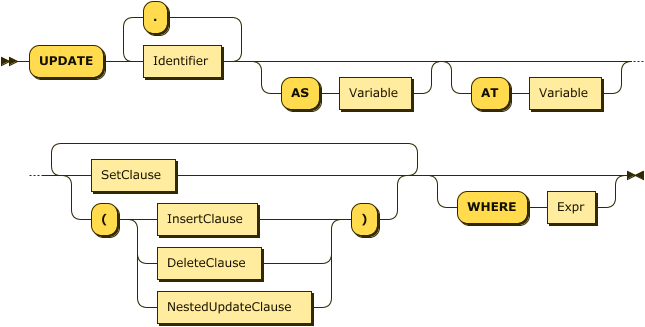
NestedUpdateClause EBNF
NestedUpdateClause ::= "UPDATE" (((Identifier ("." Identifier)*) ("AS" Variable)?) ("AT" Variable)?) (SetClause | ("(" (InsertClause | DeleteClause | NestedUpdateClause) ")"))+ ("WHERE" Expr)?NestedUpdateClause Diagram
SetClause EBNF
SetClause ::= "SET" Identifier "'=" Expr ( "," Identifier "=" Expr)*SetClause Diagram

InsertClause EBNF
InsertClause ::= "INSERT INTO " Identifier ( "AS" Variable)? ( "AT" Expr)? "(" Expr ")"InsertClause Diagram

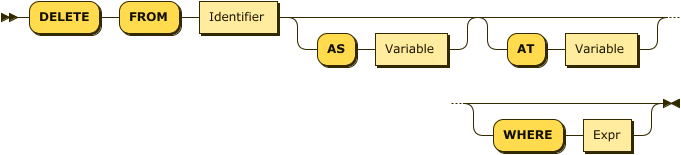
DeleteClause EBNF
DeleteClause ::= "DELETE" "FROM" Identifier ( "AS" Variable )? ( "AT" Variable )?( "WHERE" Expr )?DeleteClause Diagram
Examples
The following example uses an UPDATE statement to modify the value of the field ship_date for the order with orderno equal to 1010 in the sampleAnalytics.Commerce.orders collection.
UPDATE sampleAnalytics.Commerce.orders
SET ship_date="2020-11-08"
WHERE orderno= 1010 ;
After you use the UPDATE statement, you can run ANALYZE COLLECTION on the collection to update the data sample used by cost-based optimization (CBO).
For more information, see Cost-Based Optimizer.
Show an additional example
The following examples modify different fields in the objects in the sampleAnalytics.Commerce.orders collection.
For this example, use the following order in the collection:
{
      "orderno": 1010,
      "custid": "C51",
      "user_info": {
        "first_name": "John",
        "family_name": "Doe"
      },
      "order_date": "2020-11-04",
      "ship_date": "2020-11-08",
      "items": [
        {
          "itemno": 410,
          "qty": 120,
          "price": 88.16
        },
        {
          "itemno": 590,
          "qty": 6,
          "price": 217.75
        }
      ]
    }
Some of the possible updates are as follows:
UPDATE sampleAnalytics.Commerce.orders
SET user_info.first_name = "Jane"
WHERE orderno = 1010;
In the preceding example, the first name of the user is updated to Jane.
UPDATE sampleAnalytics.Commerce.orders
(UPDATE items AS i
SET i.price = 330, i.addiotionalInfo="fragile"
WHERE i.itemno= 410)
WHERE orderno= 1010 ;
In the preceding example, the price of the item with itemno 410 for the order with orderno 1010 is updated.
UPDATE sampleAnalytics.Commerce.orders
(INSERT INTO items AT 2([
       {
           "itemno": 460,
           "qty": 240,
           "price": 99.98
        }]))
WHERE orderno= 1010;
In the preceding example, a new item is added to the order’s item list as the second item.
UPDATE sampleAnalytics.Commerce.orders as u
(DELETE from u.items at  number WHERE number IN [0,1])
 SET u.status="changed"
WHERE u.orderno= 1010;
In the preceding example, an item is deleted from the order’s list of items.
Arguments
- RETURNING
-
Adding an optional
RETURNINGclause causes the statement to return a result for each object updated, identified by theOutputAliasor the collection name. The clause can contain subqueries, although they cannot refer to any collections in theirFROMclauses, making them object-local in nature.