ALTER GROUP
- Capella Operational
- reference
- Couchbase Server 8.0
The ALTER GROUP statement enables you to update an existing group.
Purpose
Use the ALTER GROUP statement to modify an existing group within the Couchbase Server Role-Based Access Control (RBAC) system. You can update the group’s description and its roles. You can either add new roles or remove all the existing ones. When you update a role for a group, all users in the group inherit the updated permissions automatically.
| When you add new roles to a group, the ALTER GROUP statement replaces the group’s existing role assignments with the new ones you provide. It updates the entire role list, so any existing roles not included in the new list will be removed. If you want to add or remove specific roles without affecting the others, use the GRANT and REVOKE statements instead. |
Prerequisites
To execute this statement in the Capella UI, you must have one of the following roles:
| You cannot execute this statement using cluster access credentials. |
Syntax
alter-group ::= 'ALTER' 'GROUP' name ( 'WITH' description )?
                ( 'ROLE' rbac-role | 'ROLES' rbac-role (',' rbac-role )* | 'NO' 'ROLES' )?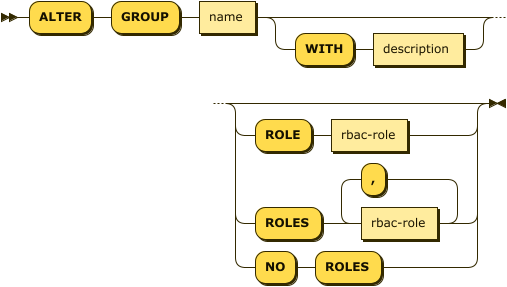
| name |
(Required) The unique identifier of the group you want to update. |
| description |
(Optional) A quoted string containing the updated description for the group. |
| rbac-role |
(Optional) Update Roles |
|
When altering a group, you can update its roles using one of the following options:
|
Update Roles
rbac-role ::= role ( 'ON' keyspace-ref )?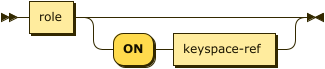
| role |
One of the RBAC role names predefined by Couchbase Server. The following roles have short forms that can be used as well:
|
| keyspace-ref |
Keyspace Reference
keyspace-ref ::= keyspace-path | keyspace-partial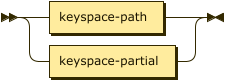
keyspace-path ::= ( namespace ':' )? bucket ( '.' scope '.' collection )?
keyspace-partial ::= collection
Use keyspace reference to specify the target for the update. For more information about each element, see the Keyspace Reference section in the FROM clause.
Examples
ALTER GROUP support WITH "Support team for customer queries";ALTER GROUP support
ROLES
query_select ON `travel-sample`.`inventory`.`airline`,
query_insert ON `travel-sample`.`inventory`.`airline`;ALTER GROUP support NO ROLES WITH "Currently unused group";Related Links
-
To create a group, see CREATE GROUP.
-
To delete a group, see ALTER GROUP.
-
To create a new user, see CREATE USER.