Developer Tutorial: Student Record System
Learn how to create and deploy a student records database on Capella Operational and connect it to your application, using the Go SDK.
Couchbase is a schema-less JSON document database designed for high performance, scalability, and fast development. This tutorial teaches you about the key concepts behind Couchbase and how they differ from traditional SQL database systems like MySQL and Oracle.
| This tutorial is designed for use with Capella Operational cloud services. If you wish to use a standalone or Docker installation of Couchbase, see the Server Developer Tutorial. |
Prerequisites
-
Before starting this tutorial, you must have a Couchbase Capella account. If you do not have one already, Create an Account.
-
Install Go (version 1.24 or later).
Data Model
The model consists of three record types:
| student |
Information about individual students, like name and date of birth. |
| course |
Courses the students can take. Includes course name, faculty, and the number of credit points associated with the course. Students can take more than one course at a time. |
| enrollment |
Information related to courses the students are taking. In a relational database, this is usually a link record that creates a relationship between a student and a course. |
Relational Model
In a relational model, the database contains a list of students and a list of courses. Each student can enroll in multiple courses.
A student’s enrollment record is stored in a separate table called enrollment, which links that record to the courses they are enrolling in.
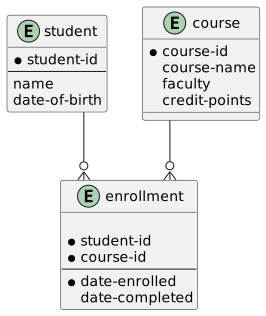
The enrollment table highlights a challenge with the relational model, each table is based on a fixed schema that only supports a single data object type, which means you cannot store a student in the same table as their enrollment record.
Document Model
Couchbase uses a document model that stores each record as a JSON document. The document model:
-
Contains simple scalar types and complex types, like nested records and arrays
-
Lets you store complex types without decomposing them to a second table
In this tutorial, the document model stores the list of enrollment records with the student records. Each enrollment record contains a reference to the course that it relates to.
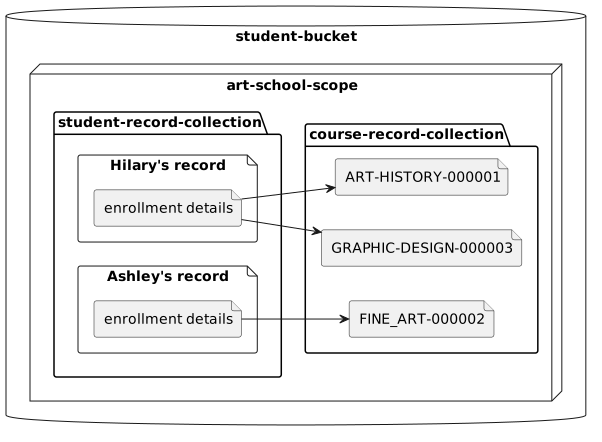
With JSON, you can change the structure of the document without having to rebuild schemas. For example, you can add a new field to store students' email addresses without migrating existing data to a new schema.
In a document database, a student’s record and their course records can look similar to this:
{
  "student-id": "000001",
  "name": "Hilary Smith",
  "date-of-birth": "21-12-1980",
  "enrollments": [
    {
      "course-id": "ART-HISTORY-00003",
      "date-enrolled": "07-9-2021"
    },
    {
      "course-id": "GRAPHIC-DESIGN-00001",
      "date-enrolled": "15-9-2021"
    }
  ]
}{
"course-id": "ART-HISTORY-00003",
"course-name": "art history",
"faculty": "fine art",
"credit-points" : 100
}{
"course-id": "GRAPHIC-DESIGN-00001",
"course-name": "graphic design",
"faculty": "media and communication",
"credit-points" : 200
}Hilary’s enrollment is stored in the same document as her student details, which means child information is stored with its parent. This structure lets you access and retrieve all of Hilary’s details with one search and without the need for complex table joins.
You should not store a student with their course record as it can lead to data duplication and make it difficult to maintain your data.
For example, you would need to access every single student record in your cluster to change the credit-points.
|
Create and Deploy a Cluster
Every Capella account includes one free tier operational cluster. In this tutorial, you will use the free tier cluster to create and manage student records.
To create and deploy a cluster:
-
Sign in to Couchbase Capella.
-
On the Operational Clusters page, click Create Cluster.
-
Select My First Project as the project for your cluster. (If you’ve already created a project, you can select that instead.)
-
Under Cluster Option, select Free.
-
In the Cluster Name field, enter student-cluster.
-
(Optional) Provide a description of your cluster.
-
Select one of the available cloud service providers.
-
Select an available geographic region for your cluster.
If you are unsure which cloud provider and region to choose, select the default options, for example AWS and US East. -
Accept the default CIDR Block for your cluster.
-
Click Create Cluster to deploy the cluster.
The cluster may take a few minutes to deploy. When the cluster is deployed, you can implement a data model.
Buckets, Scopes, and Collections
To organize and manage your data in Couchbase, you can create buckets, scopes, and collections inside your cluster.
A bucket is equivalent to a database in a relational database management system, while scopes and collections are used to provide separation between documents of different types.
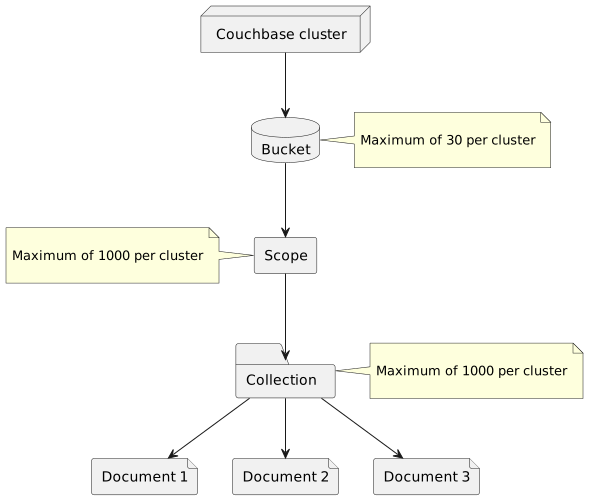
| bucket |
Stores and retrieves data in the server. |
| scope |
Stores collections. When you create a new bucket, Couchbase provides you with a default scope called |
| collection |
Contains a set of documents. Couchbase provides you with a default collection called |
For more information, see Buckets, Scopes, and Collections.
Create a Bucket, Scope, and Collection
To continue this tutorial, you must create a bucket to hold all student data, a scope to narrow down the data into only data related to an art school, and two collections to narrow it down further into art school students and art school courses.
To create the data model from the Capella UI:
-
On the Operational tab, select student-cluster.
-
Click the Data Tools tab.
-
In the left pane, click + Create.
-
Under Bucket, select New and enter the name
student-bucket. Keep the default 100 MiB memory quota. -
Under Scope, enter the name
art-school-scope. -
Under Collection, enter the name
student-record-collectionfor your first collection. -
Click Create.
To create the second collection, follow the above steps but use the existing student-bucket and art-school-scope, and then create a collection with the name course-record-collection.
The two collections allow you to use the relational model and the document model at the same time to achieve the best design and performance possible.
The student-record-collection contains student records, and each student record contains a list of that student’s enrollments.
Unlike the standard relational model decomposition where a link table is created between students and courses, a document model stores the enrollments as part of the student records.
The course-record-collection, on the other hand, uses the relational model to link the enrollment records to the course records they apply to.
This allows you to retrieve other details like the full title of the course or the number of credits students receive upon completing the course.
|
Scopes and Schools
For this tutorial we have a single scope, |
Connecting the Go SDK
After implementing the data model, you can set up a Couchbase SDK and connect it to your cluster to write your first application. For more information about the Go SDK installation, see the full installation page, or review the Getting Started page.
Configure the Cluster Connection
Before you can establish a connection to your cluster, you must obtain the connection string, add an allowed IP address, and configure the cluster access credentials.
To configure the connection:
-
On the Operational Clusters page, select student-cluster.
-
Go to .
-
Make a note of the Public Connection String. You will need this to connect to the cluster.
-
Add an allowed IP address.
-
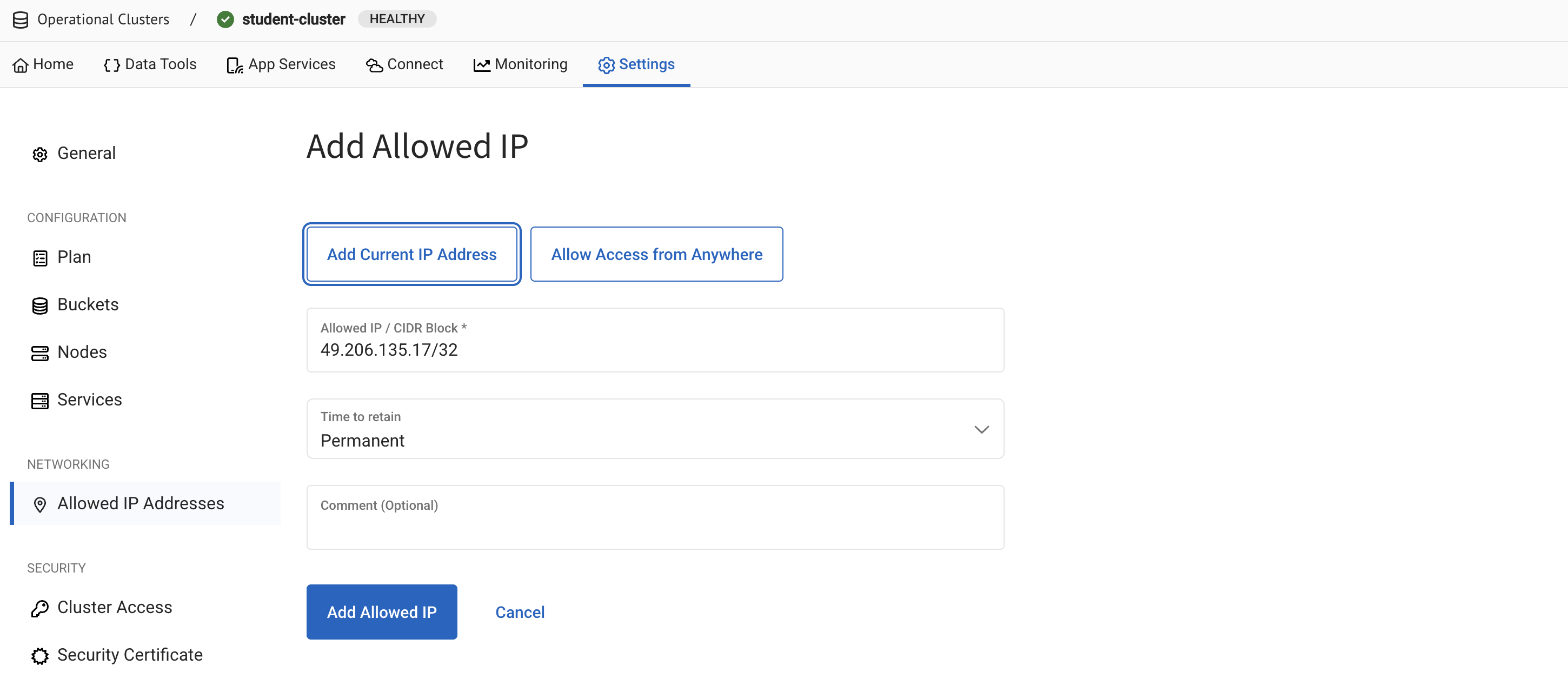
From , click the Allowed IP Addresses link to go to the Allowed IP Addresses page.
-
Click Add Allowed IP.
-
On the Add Allowed IP page, select Add Current IP Address to automatically populate your public IP address.
-
Click Add Allowed IP.
-
-
Create new cluster access credentials.
-
From , click the Cluster Access link to go to the Cluster Access page.
-
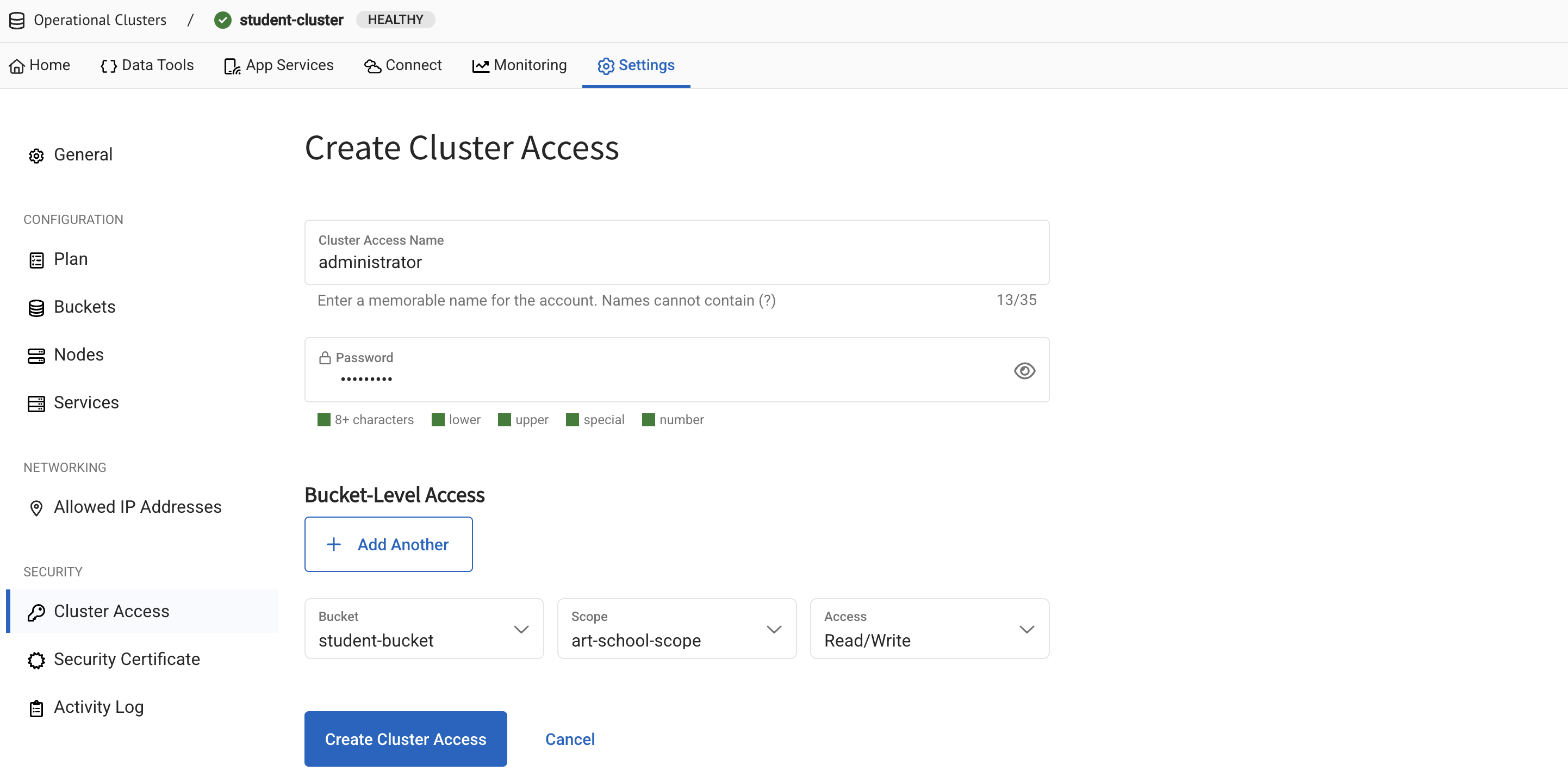
Click Create Cluster Access.
-
Enter an access name, for example
administrator, and make a note of it for later. -
Enter a password, for example
Admin@123, and again make a note of it for later. -
Under Bucket-Level Access, select student-bucket and art-school-scope, and set the access to Read/Write.
-
Click Create Cluster Access.
-
You can now set up a Couchbase Go SDK and connect it to your cluster.
Set Up the Go SDK
To set up the Go SDK:
-
Create a new directory for your project on your computer:
📂 ~ (your home directory)
  📂 student-record
-
Open a terminal window, navigate to your
student-recorddirectory, and initialize a new Go module:go mod init student-record -
Add the Couchbase Go SDK as a dependency:
go get github.com/couchbase/gocb/v2
Next, connect your Go SDK to your cluster.
Set Up Logging
Before we connect to the cluster we want a way to see the output of the SDK and any errors that may occur.
-
In your
student-recorddirectory, create a new directoryinternalcontaining a file calledlogger.go.📂 ~ (your home directory) 📂 student-record 📃 go.mod 📂 internal 📃 logger.go ⬅ here! -
Paste the following code block into your
internal/logger.gofile:package internal import ( "os" "github.com/couchbase/gocb/v2" "github.com/sirupsen/logrus" ) type Logger struct { wrapped *logrus.Logger } func NewLogger(level logrus.Level) *Logger { logger := logrus.New() logger.SetOutput(os.Stdout) logger.SetLevel(level) return &Logger{ wrapped: logger, } } // The logrus Log function doesn't match the gocb Log function so we need to do a bit of marshalling. func (logger *Logger) Log(level gocb.LogLevel, offset int, format string, v ...interface{}) error { // We need to do some conversion between gocb and logrus levels as they don't match up. var logrusLevel logrus.Level switch level { case gocb.LogError: logrusLevel = logrus.ErrorLevel case gocb.LogWarn: logrusLevel = logrus.WarnLevel case gocb.LogInfo: logrusLevel = logrus.InfoLevel case gocb.LogDebug: logrusLevel = logrus.DebugLevel case gocb.LogTrace: logrusLevel = logrus.TraceLevel case gocb.LogSched: logrusLevel = logrus.TraceLevel case gocb.LogMaxVerbosity: logrusLevel = logrus.TraceLevel } // Send the data to the logrus Logf function to make sure that it gets formatted correctly. logger.wrapped.Logf(logrusLevel, format, v...) return nil }
Connect the SDK to Your Cluster
To connect to the cluster:
-
In your
student-recorddirectory, create a new directory calledconnect_studentcontaining amain.gofile.📂 ~ (your home directory) 📂 student-record 📃 go.mod 📂 internal 📃 logger.go 📂 connect_student 📃 main.go ⬅ here! -
Paste the following code block into your
connect_student/main.gofile:package main import ( "fmt" "log" "time" "github.com/couchbase/gocb/v2" "github.com/sirupsen/logrus" "student-record/internal" ) func main() { connectionString := "<<connection-string>>" // Replace this with Connection String username := "<<username>>" // Replace this with username from cluster access credentials password := "<<password>>" // Replace this with password from cluster access credentials // Setup info level logging. gocb.SetLogger(internal.NewLogger(logrus.InfoLevel)) // Connecting to the cluster options := gocb.ClusterOptions{ Authenticator: gocb.PasswordAuthenticator{ Username: username, Password: password, }, } // Use the pre-configured profile below to avoid latency issues with your connection. if err := options.ApplyProfile(gocb.ClusterConfigProfileWanDevelopment); err != nil { log.Fatal(err) } cluster, err := gocb.Connect("couchbases://"+connectionString, options) if err != nil { log.Fatal(err) } // The `cluster.Bucket` retrieves the bucket you set up for the student cluster. bucket := cluster.Bucket("student-bucket") // Forces the application to wait until the bucket is ready. err = bucket.WaitUntilReady(10*time.Second, nil) if err != nil { log.Fatal(err) } // The `bucket.Scope` retrieves the `art-school-scope` from the bucket. scope := bucket.Scope("art-school-scope") // The `scope.Collection` retrieves the student collection from the scope. studentRecords := scope.Collection("student-record-collection") // A check to make sure the collection is connected and retrieved when you run the application. fmt.Println("The name of this collection is", studentRecords.Name()) // Like with all database systems, it's good practice to disconnect from the Couchbase cluster after you have finished working with it. err = cluster.Close(nil) if err != nil { log.Fatal(err) } } -
In the
connect_student/main.gofile, replace the<<connection-string>>,<<username>>, and<<password>>placeholders with the connection string, username, and password that you noted when configuring the cluster connection. -
Open a terminal window and navigate to your
student-recorddirectory. -
Run the following command to check that the connection works:
go run ./connect_studentIf the connection is successful, the collection name outputs in the console log.
time="2026-03-31T11:19:30+01:00" level=info msg="SDK Version: gocbcore/v10.9.1"
time="2026-03-31T11:19:30+01:00" level=info msg="Creating new agent group: &{AgentConfig:{BucketName: UserAgent:gocb/v2.12.1 SeedConfig:{HTTPAddrs:[] MemdAddrs:[svc-dqi-node-003.kkiwizkmakejiw1p.customsubdomain.nonprod-project-avengers.com:11207 svc-dqi-node-002.kkiwizkmakejiw1p.customsubdomain.nonprod-project-avengers.com:11207 svc-dqi-node-001.kkiwizkmakejiw1p.customsubdomain.nonprod-project-avengers.com:11207] SRVRecord:0x140001c17a0} SecurityConfig:{UseTLS:true TLSRootCAProvider:0x103596190 NoTLSSeedNode:false Auth:0x140001175e0 AuthMechanisms:[]} CompressionConfig:{Enabled:true DisableDecompression:false MinSize:0 MinRatio:0} ConfigPollerConfig:{HTTPRedialPeriod:0s HTTPRetryDelay:0s HTTPMaxWait:0s CccpMaxWait:0s CccpPollPeriod:0s} IoConfig:{NetworkType: UseMutationTokens:true UseDurations:true UseOutOfOrderResponses:true DisableXErrorHello:false DisableJSONHello:false DisableSyncReplicationHello:false EnablePITRHello:false UseCollections:true UseClusterMapNotifications:true} KVConfig:{ConnectTimeout:20s ServerWaitBackoff:0s PoolSize:0 MaxQueueSize:0 ConnectionBufferSize:0} HTTPConfig:{MaxIdleConns:0 MaxIdleConnsPerHost:0 MaxConnsPerHost:0 ConnectTimeout:0s IdleConnectionTimeout:0s} DefaultRetryStrategy:0x140001173f0 CircuitBreakerConfig:{Enabled:true VolumeThreshold:0 ErrorThresholdPercentage:0 SleepWindow:0s RollingWindow:0s CompletionCallback:<nil> CanaryTimeout:0s} OrphanReporterConfig:{Enabled:true ReportInterval:0s SampleSize:0} TracerConfig:{Tracer:0x14000117450 NoRootTraceSpans:true} MeterConfig:{Meter:<nil>} ObservabilityConfig:{SemanticConventionOptIn:[]} TelemetryConfig:{TelemetryReporter:0x14000128cc0} InternalConfig:{EnableResourceUnitsTrackingHello:false AllowEnterpriseAnalytics:false}}}"
time="2026-03-31T11:19:30+01:00" level=info msg="SDK Version: gocbcore/v10.9.1"
time="2026-03-31T11:19:30+01:00" level=info msg="Creating new agent: &{BucketName: UserAgent:gocb/v2.12.1 SeedConfig:{HTTPAddrs:[] MemdAddrs:[svc-dqi-node-003.kkiwizkmakejiw1p.customsubdomain.nonprod-project-avengers.com:11207 svc-dqi-node-002.kkiwizkmakejiw1p.customsubdomain.nonprod-project-avengers.com:11207 svc-dqi-node-001.kkiwizkmakejiw1p.customsubdomain.nonprod-project-avengers.com:11207] SRVRecord:0x140001c17a0} SecurityConfig:{UseTLS:true TLSRootCAProvider:0x103596190 NoTLSSeedNode:false Auth:0x140001175e0 AuthMechanisms:[]} CompressionConfig:{Enabled:true DisableDecompression:false MinSize:0 MinRatio:0} ConfigPollerConfig:{HTTPRedialPeriod:0s HTTPRetryDelay:0s HTTPMaxWait:0s CccpMaxWait:0s CccpPollPeriod:0s} IoConfig:{NetworkType: UseMutationTokens:true UseDurations:true UseOutOfOrderResponses:true DisableXErrorHello:false DisableJSONHello:false DisableSyncReplicationHello:false EnablePITRHello:false UseCollections:true UseClusterMapNotifications:true} KVConfig:{ConnectTimeout:20s ServerWaitBackoff:0s PoolSize:0 MaxQueueSize:0 ConnectionBufferSize:0} HTTPConfig:{MaxIdleConns:0 MaxIdleConnsPerHost:0 MaxConnsPerHost:0 ConnectTimeout:0s IdleConnectionTimeout:0s} DefaultRetryStrategy:0x140001173f0 CircuitBreakerConfig:{Enabled:true VolumeThreshold:0 ErrorThresholdPercentage:0 SleepWindow:0s RollingWindow:0s CompletionCallback:<nil> CanaryTimeout:0s} OrphanReporterConfig:{Enabled:true ReportInterval:0s SampleSize:0} TracerConfig:{Tracer:0x14000117450 NoRootTraceSpans:true} MeterConfig:{Meter:<nil>} ObservabilityConfig:{SemanticConventionOptIn:[]} TelemetryConfig:{TelemetryReporter:0x14000128cc0} InternalConfig:{EnableResourceUnitsTrackingHello:false AllowEnterpriseAnalytics:false}}"
time="2026-03-31T11:19:30+01:00" level=info msg="Initializing transactions: CustomATRLocation: ExpirationTime:0s DurabilityLevel:MAJORITY KeyValueTimeout:20s CleanupWindow:0s CleanupClientAttempts:true CleanupLostAttempts:true CleanupQueueSize:0 BucketAgentProvider:0x10363ddf0 LostCleanupATRLocationProvider:0x10363de70 Internal:{EnableNonFatalGets:false EnableParallelUnstaging:true EnableExplicitATRs:false NumATRs:0 UnstagingParallelismLimit:1000}"
time="2026-03-31T11:19:30+01:00" level=info msg="SDK Version: gocbcore/v10.9.1"
time="2026-03-31T11:19:30+01:00" level=info msg="Creating new agent: &{BucketName:student-bucket UserAgent:gocb/v2.12.1 SeedConfig:{HTTPAddrs:[] MemdAddrs:[svc-dqi-node-003.kkiwizkmakejiw1p.customsubdomain.nonprod-project-avengers.com:11207 svc-dqi-node-002.kkiwizkmakejiw1p.customsubdomain.nonprod-project-avengers.com:11207 svc-dqi-node-001.kkiwizkmakejiw1p.customsubdomain.nonprod-project-avengers.com:11207] SRVRecord:0x140001c17a0} SecurityConfig:{UseTLS:true TLSRootCAProvider:0x103596190 NoTLSSeedNode:false Auth:0x140001175e0 AuthMechanisms:[]} CompressionConfig:{Enabled:true DisableDecompression:false MinSize:0 MinRatio:0} ConfigPollerConfig:{HTTPRedialPeriod:0s HTTPRetryDelay:0s HTTPMaxWait:0s CccpMaxWait:0s CccpPollPeriod:0s} IoConfig:{NetworkType: UseMutationTokens:true UseDurations:true UseOutOfOrderResponses:true DisableXErrorHello:false DisableJSONHello:false DisableSyncReplicationHello:false EnablePITRHello:false UseCollections:true UseClusterMapNotifications:true} KVConfig:{ConnectTimeout:20s ServerWaitBackoff:0s PoolSize:0 MaxQueueSize:0 ConnectionBufferSize:0} HTTPConfig:{MaxIdleConns:0 MaxIdleConnsPerHost:0 MaxConnsPerHost:0 ConnectTimeout:0s IdleConnectionTimeout:0s} DefaultRetryStrategy:0x140001173f0 CircuitBreakerConfig:{Enabled:true VolumeThreshold:0 ErrorThresholdPercentage:0 SleepWindow:0s RollingWindow:0s CompletionCallback:<nil> CanaryTimeout:0s} OrphanReporterConfig:{Enabled:true ReportInterval:0s SampleSize:0} TracerConfig:{Tracer:0x14000117450 NoRootTraceSpans:true} MeterConfig:{Meter:<nil>} ObservabilityConfig:{SemanticConventionOptIn:[]} TelemetryConfig:{TelemetryReporter:0x14000128cc0} InternalConfig:{EnableResourceUnitsTrackingHello:false AllowEnterpriseAnalytics:false}}"
time="2026-03-31T11:19:30+01:00" level=info msg="Starting poller controller loop"
time="2026-03-31T11:19:30+01:00" level=info msg="CCCP Looper starting."
time="2026-03-31T11:19:30+01:00" level=info msg="Starting poller controller loop"
time="2026-03-31T11:19:30+01:00" level=info msg="CCCP Looper starting."
time="2026-03-31T11:19:30+01:00" level=info msg="Agent closing"
time="2026-03-31T11:19:30+01:00" level=info msg="Stopping poller controller"
time="2026-03-31T11:19:30+01:00" level=info msg="CCCP Looper stopping"
time="2026-03-31T11:19:30+01:00" level=info msg="CCCP Looper stopped"
time="2026-03-31T11:19:30+01:00" level=info msg="Starting poller controller loop"
time="2026-03-31T11:19:30+01:00" level=info msg="Poller controller stopped, exiting"
time="2026-03-31T11:19:30+01:00" level=info msg="KV Mux closing"
time="2026-03-31T11:19:30+01:00" level=info msg="KV Mux closed"
time="2026-03-31T11:19:30+01:00" level=info msg="Agent close complete"
The name of this collection is student-record-collection
time="2026-03-31T11:19:31+01:00" level=info msg="Agent closing"
time="2026-03-31T11:19:31+01:00" level=info msg="Stopping poller controller"
time="2026-03-31T11:19:31+01:00" level=info msg="CCCP Looper stopping"
time="2026-03-31T11:19:31+01:00" level=info msg="CCCP Looper stopped"
time="2026-03-31T11:19:31+01:00" level=info msg="Config seen but CCCP poller exited, restarting CCCP poller."
time="2026-03-31T11:19:31+01:00" level=info msg="Starting poller controller loop"
time="2026-03-31T11:19:31+01:00" level=info msg="Poller controller stopped, exiting"
time="2026-03-31T11:19:31+01:00" level=info msg="KV Mux closing"
time="2026-03-31T11:19:31+01:00" level=info msg="KV Mux closed"
time="2026-03-31T11:19:31+01:00" level=info msg="Agent close complete"
If you come across errors in your console, see the troubleshooting section.
Create a Student Record
After connecting to the cluster, you can create a student record in the form of a JSON document inserted into the student-record-collection.
To create a student record:
-
In your
student-recorddirectory, create a new directory calledinsert_studentcontaining amain.gofile. -
Paste the following code block into your
insert_student/main.gofile:package main import ( "log" "time" "github.com/couchbase/gocb/v2" "github.com/sirupsen/logrus" "student-record/internal" ) func main() { connectionString := "<<connection-string>>" // Replace this with Connection String username := "<<username>>" // Replace this with username from cluster access credentials password := "<<password>>" // Replace this with password from cluster access credentials // Setup info level logging. gocb.SetLogger(internal.NewLogger(logrus.InfoLevel)) options := gocb.ClusterOptions{ Authenticator: gocb.PasswordAuthenticator{ Username: username, Password: password, }, } if err := options.ApplyProfile(gocb.ClusterConfigProfileWanDevelopment); err != nil { log.Fatal(err) } cluster, err := gocb.Connect("couchbases://"+connectionString, options) if err != nil { log.Fatal(err) } bucket := cluster.Bucket("student-bucket") err = bucket.WaitUntilReady(10*time.Second, nil) if err != nil { log.Fatal(err) } scope := bucket.Scope("art-school-scope") studentRecords := scope.Collection("student-record-collection") // Create and populate the student record. hilary := map[string]interface{}{ "name": "Hilary Smith", "date-of-birth": "1980-12-21", } // The `Upsert` function inserts or updates documents in a collection. // The first parameter is a unique ID for the document, similar to a primary key used in a relational database system. // If the `Upsert` call finds a document with a matching ID in the collection, it updates the document. // If there is no matching ID, it creates a new document. _, err = studentRecords.Upsert("000001", hilary, nil) if err != nil { log.Fatal(err) } err = cluster.Close(nil) if err != nil { log.Fatal(err) } } -
In the
insert_student/main.gofile, replace the<<connection-string>>,<<username>>, and<<password>>placeholders with the connection string, username, and password that you noted when configuring the cluster connection. -
Open a terminal window and navigate to your
student-recorddirectory. -
Run the following command to insert the student record into the collection:
go run ./insert_student -
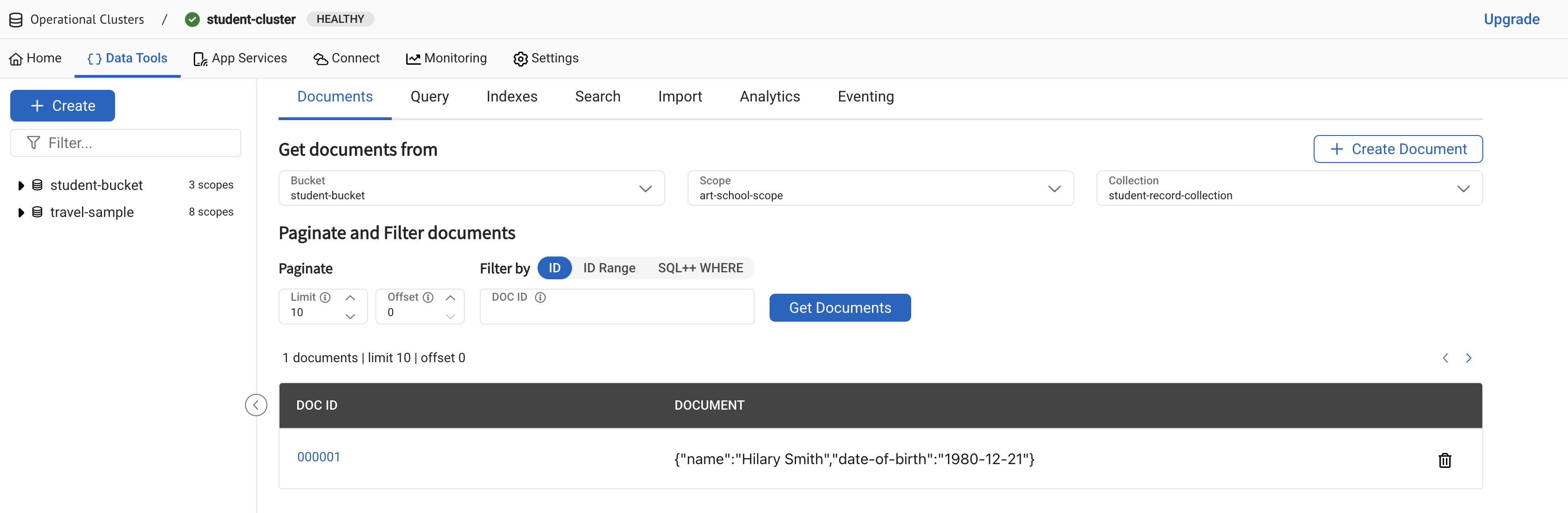
From the Capella UI, go to your student cluster and check the
student-record-collectionfor the new student record you just added:-
Go to .
-
Under Get documents from, select
student-bucket,art-school-scope, andstudent-record-collection. -
Click Get Documents.
-
Create Course Records
Creating course records is similar to creating student records. To create course records:
-
In your
student-recorddirectory, create a new directory calledinsert_coursescontaining amain.gofile. -
Paste the following code block into your
insert_courses/main.gofile:package main import ( "log" "time" "github.com/couchbase/gocb/v2" "github.com/sirupsen/logrus" "student-record/internal" ) func main() { connectionString := "<<connection-string>>" // Replace this with Connection String username := "<<username>>" // Replace this with username from cluster access credentials password := "<<password>>" // Replace this with password from cluster access credentials // Setup info level logging. gocb.SetLogger(internal.NewLogger(logrus.InfoLevel)) options := gocb.ClusterOptions{ Authenticator: gocb.PasswordAuthenticator{ Username: username, Password: password, }, } if err := options.ApplyProfile(gocb.ClusterConfigProfileWanDevelopment); err != nil { log.Fatal(err) } cluster, err := gocb.Connect("couchbases://"+connectionString, options) if err != nil { log.Fatal(err) } bucket := cluster.Bucket("student-bucket") err = bucket.WaitUntilReady(10*time.Second, nil) if err != nil { log.Fatal(err) } scope := bucket.Scope("art-school-scope") // The code here is similar to creating a student record, but it writes to a different collection. courseRecords := scope.Collection("course-record-collection") addCourse(courseRecords, "ART-HISTORY-000001", "art history", "fine art", 100) addCourse(courseRecords, "FINE-ART-000002", "fine art", "fine art", 50) addCourse(courseRecords, "GRAPHIC-DESIGN-000003", "graphic design", "media and communication", 200) err = cluster.Close(nil) if err != nil { log.Fatal(err) } } func addCourse(collection *gocb.Collection, id, name, faculty string, creditPoints int) { course := map[string]interface{}{ "course-name": name, "faculty": faculty, "credit-points": creditPoints, } _, err := collection.Upsert(id, course, nil) if err != nil { log.Fatal(err) } } -
In the
insert_courses/main.gofile, replace the<<connection-string>>,<<username>>, and<<password>>placeholders with the connection string, username, and password that you noted when configuring the cluster connection. -
Open a terminal window and navigate to your
student-recorddirectory. -
Run the following command to insert the course records into the collection:
go run ./insert_courses -
From the Capella UI, go to your student cluster and check the
course-record-collectionfor the new course records you just added.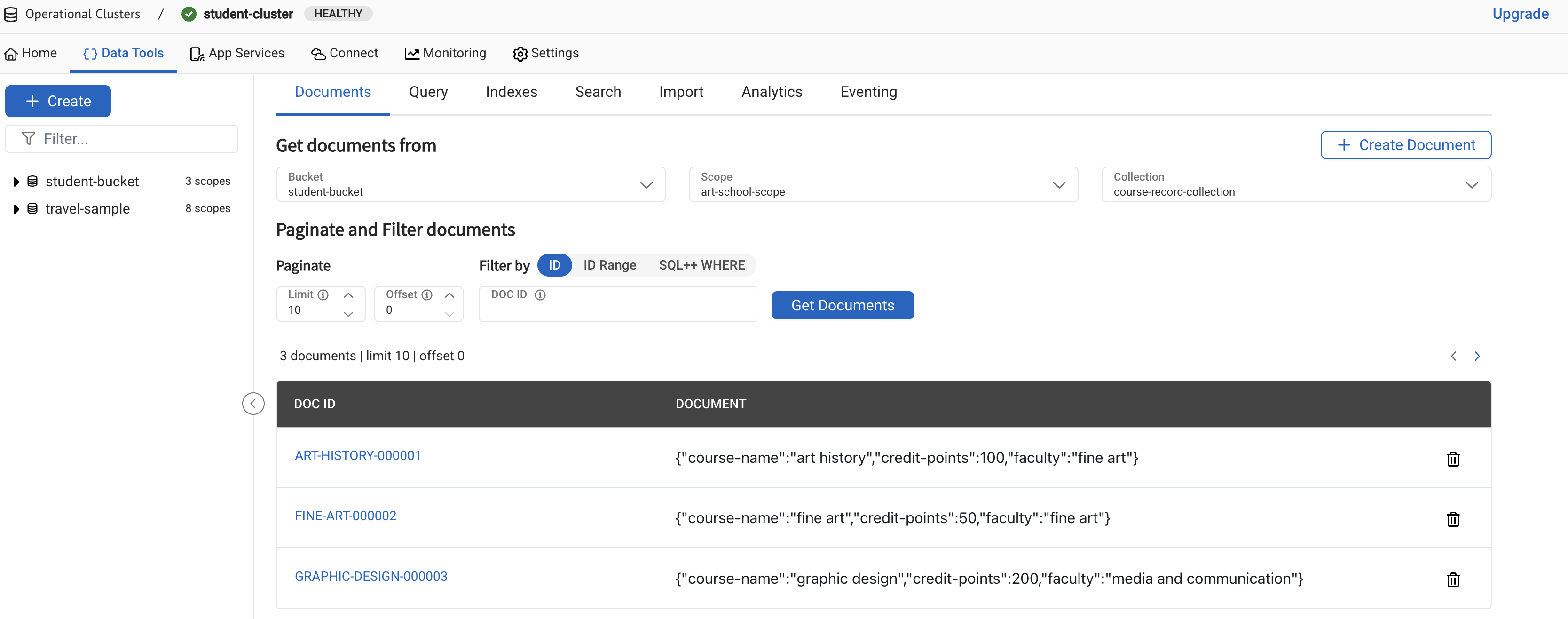
If you come across errors in your console, see the troubleshooting section.
Retrieve Records
You can retrieve your records using the query editor or the SDK.
Retrieving Records with the Query Editor
To retrieve the records with the Query Editor, you must first define an index.
Define an Index
Before you can retrieve your records with the query editor, you must first define an index in your bucket. The index helps your cluster find specific data when you run a query.
To define an index:
-
On the Operational Clusters page, select student-cluster.
-
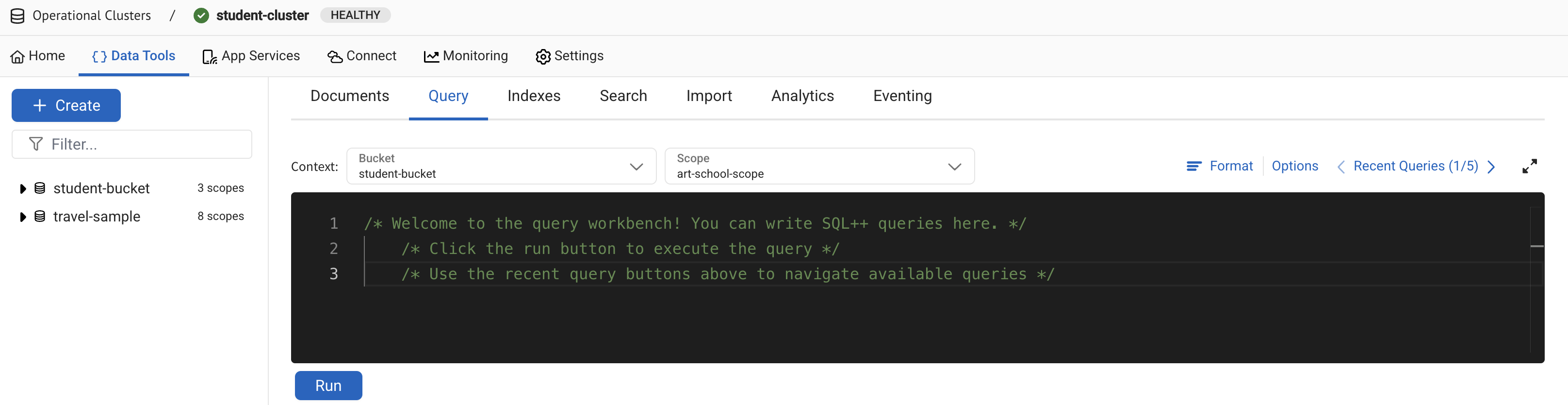
Go to .
-
Select student-bucket and art-school-scope in the Context drop-down.
Using these filters, you can narrow down the scope of your queries. You do not need to add the names of your bucket and scope to your queries.
-
Enter the following query into your query editor:
CREATE PRIMARY INDEX course_idx ON `course-record-collection` -
Click Run to create a single index called
course_idxin yourcourse-record-collection.
Retrieve Your Records
You can use the Query Editor to retrieve all course records at once, or narrow your search down to retrieve records based on specific criteria.
Retrieve All Course Records
To retrieve all of your course records using the query editor:
-
Enter the following query into your query editor:
SELECT crc.* FROM `course-record-collection` crc -
Click Run to retrieve all course records.
[
  {
    "course-name": "art history",
    "credit-points": 100,
    "faculty": "fine art"
  },
  {
    "course-name": "fine art",
    "credit-points": 50,
    "faculty": "fine art"
  },
  {
    "course-name": "graphic design",
    "credit-points": 200,
    "faculty": "media and communication"
  }
]
Retrieve Course Records with Less than 200 Credits
You can expand your query to narrow your search down further.
To retrieve only courses with less than 200 credit-points using the query editor:
-
Enter the following query into your query editor:
SELECT crc.* FROM `course-record-collection` crc WHERE crc.`credit-points` < 200 -
Click Run to retrieve all courses with less than 200 credits.
[
  {
    "course-name": "art history",
    "credit-points": 100,
    "faculty": "fine art"
  },
  {
    "course-name": "fine art",
    "credit-points": 50,
    "faculty": "fine art"
  }
]
Retrieve Record IDs
The id field is not automatically returned when you retrieve all of your course information.
The id is part of a document’s meta structure, and to retrieve it you must adjust your SQL++ query and run it again:
-
Enter the following query into your query editor:
SELECT META().id, crc.* FROM `course-record-collection` crc WHERE crc.`credit-points` < 200The
META()function call returns any property contained inside the document’s metadata, including the ID. -
Click Run to retrieve course records and their IDs.
[
  {
    "course-name": "art history",
    "credit-points": 100,
    "faculty": "fine art",
    "id": "ART-HISTORY-000001"
  },
  {
    "course-name": "fine art",
    "credit-points": 50,
    "faculty": "fine art",
    "id": "FINE-ART-000002"
  }
]
Retrieving Records with the SDK
You can also use SQL++ queries to retrieve your records with the SDK. Unlike the query editor, you must include the name of the bucket and the scope to fully qualify the name of the collection in the SQL++ statement in your application. For example:
SELECT crc.* FROM `student-bucket`.`art-school-scope`.`course-record-collection` crcRetrieve Your Records
You can use the SDK to retrieve all course records at once, or narrow your search down to retrieve records based on specific criteria.
Retrieve All Course Records
To retrieve all of your course records using the Go SDK:
-
In your
student-recorddirectory, create a new directory calledart_school_retriever_allcontaining amain.gofile. -
Paste the following code block into your
art_school_retriever_all/main.gofile:package main import ( "fmt" "log" "github.com/couchbase/gocb/v2" "github.com/sirupsen/logrus" "student-record/internal" ) func main() { connectionString := "<<connection-string>>" // Replace this with Connection String username := "<<username>>" // Replace this with username from cluster access credentials password := "<<password>>" // Replace this with password from cluster access credentials // Setup info level logging. gocb.SetLogger(internal.NewLogger(logrus.InfoLevel)) options := gocb.ClusterOptions{ Authenticator: gocb.PasswordAuthenticator{ Username: username, Password: password, }, } if err := options.ApplyProfile(gocb.ClusterConfigProfileWanDevelopment); err != nil { log.Fatal(err) } cluster, err := gocb.Connect("couchbases://"+connectionString, options) if err != nil { log.Fatal(err) } retrieveCourses(cluster) err = cluster.Close(nil) if err != nil { log.Fatal(err) } } func retrieveCourses(cluster *gocb.Cluster) { queryResult, err := cluster.Query( "SELECT crc.* FROM `student-bucket`.`art-school-scope`.`course-record-collection` crc", &gocb.QueryOptions{}, ) if err != nil { log.Fatal(err) } for queryResult.Next() { var row interface{} err := queryResult.Row(&row) if err != nil { log.Fatal(err) } fmt.Println("Found row:", row) } if err := queryResult.Err(); err != nil { log.Fatal(err) } } -
In the
art_school_retriever_all/main.gofile, replace the<<connection-string>>,<<username>>, and<<password>>placeholders with the connection string, username, and password that you noted when configuring the cluster connection. -
Open a terminal window and navigate to your
student-recorddirectory. -
Run the following command to retrieve all course records:
go run ./art_school_retriever_allIf the retrieval is successful, the course information outputs in the console log.
time="2026-03-31T12:02:57+01:00" level=info msg="SDK Version: gocbcore/v10.9.1"
time="2026-03-31T12:02:57+01:00" level=info msg="Creating new agent group: &{AgentConfig:{BucketName: UserAgent:gocb/v2.12.1 SeedConfig:{HTTPAddrs:[] MemdAddrs:[svc-dqi-node-002.7j-ujozl9gn8rsid.customsubdomain.nonprod-project-avengers.com:11207 svc-dqi-node-003.7j-ujozl9gn8rsid.customsubdomain.nonprod-project-avengers.com:11207 svc-dqi-node-001.7j-ujozl9gn8rsid.customsubdomain.nonprod-project-avengers.com:11207] SRVRecord:0x140001997a0} SecurityConfig:{UseTLS:true TLSRootCAProvider:0x104c57480 NoTLSSeedNode:false Auth:0x14000031610 AuthMechanisms:[]} CompressionConfig:{Enabled:true DisableDecompression:false MinSize:0 MinRatio:0} ConfigPollerConfig:{HTTPRedialPeriod:0s HTTPRetryDelay:0s HTTPMaxWait:0s CccpMaxWait:0s CccpPollPeriod:0s} IoConfig:{NetworkType: UseMutationTokens:true UseDurations:true UseOutOfOrderResponses:true DisableXErrorHello:false DisableJSONHello:false DisableSyncReplicationHello:false EnablePITRHello:false UseCollections:true UseClusterMapNotifications:true} KVConfig:{ConnectTimeout:20s ServerWaitBackoff:0s PoolSize:0 MaxQueueSize:0 ConnectionBufferSize:0} HTTPConfig:{MaxIdleConns:0 MaxIdleConnsPerHost:0 MaxConnsPerHost:0 ConnectTimeout:0s IdleConnectionTimeout:0s} DefaultRetryStrategy:0x14000031420 CircuitBreakerConfig:{Enabled:true VolumeThreshold:0 ErrorThresholdPercentage:0 SleepWindow:0s RollingWindow:0s CompletionCallback:<nil> CanaryTimeout:0s} OrphanReporterConfig:{Enabled:true ReportInterval:0s SampleSize:0} TracerConfig:{Tracer:0x14000031480 NoRootTraceSpans:true} MeterConfig:{Meter:<nil>} ObservabilityConfig:{SemanticConventionOptIn:[]} TelemetryConfig:{TelemetryReporter:0x14000116cc0} InternalConfig:{EnableResourceUnitsTrackingHello:false AllowEnterpriseAnalytics:false}}}"
time="2026-03-31T12:02:57+01:00" level=info msg="SDK Version: gocbcore/v10.9.1"
time="2026-03-31T12:02:57+01:00" level=info msg="Creating new agent: &{BucketName: UserAgent:gocb/v2.12.1 SeedConfig:{HTTPAddrs:[] MemdAddrs:[svc-dqi-node-002.7j-ujozl9gn8rsid.customsubdomain.nonprod-project-avengers.com:11207 svc-dqi-node-003.7j-ujozl9gn8rsid.customsubdomain.nonprod-project-avengers.com:11207 svc-dqi-node-001.7j-ujozl9gn8rsid.customsubdomain.nonprod-project-avengers.com:11207] SRVRecord:0x140001997a0} SecurityConfig:{UseTLS:true TLSRootCAProvider:0x104c57480 NoTLSSeedNode:false Auth:0x14000031610 AuthMechanisms:[]} CompressionConfig:{Enabled:true DisableDecompression:false MinSize:0 MinRatio:0} ConfigPollerConfig:{HTTPRedialPeriod:0s HTTPRetryDelay:0s HTTPMaxWait:0s CccpMaxWait:0s CccpPollPeriod:0s} IoConfig:{NetworkType: UseMutationTokens:true UseDurations:true UseOutOfOrderResponses:true DisableXErrorHello:false DisableJSONHello:false DisableSyncReplicationHello:false EnablePITRHello:false UseCollections:true UseClusterMapNotifications:true} KVConfig:{ConnectTimeout:20s ServerWaitBackoff:0s PoolSize:0 MaxQueueSize:0 ConnectionBufferSize:0} HTTPConfig:{MaxIdleConns:0 MaxIdleConnsPerHost:0 MaxConnsPerHost:0 ConnectTimeout:0s IdleConnectionTimeout:0s} DefaultRetryStrategy:0x14000031420 CircuitBreakerConfig:{Enabled:true VolumeThreshold:0 ErrorThresholdPercentage:0 SleepWindow:0s RollingWindow:0s CompletionCallback:<nil> CanaryTimeout:0s} OrphanReporterConfig:{Enabled:true ReportInterval:0s SampleSize:0} TracerConfig:{Tracer:0x14000031480 NoRootTraceSpans:true} MeterConfig:{Meter:<nil>} ObservabilityConfig:{SemanticConventionOptIn:[]} TelemetryConfig:{TelemetryReporter:0x14000116cc0} InternalConfig:{EnableResourceUnitsTrackingHello:false AllowEnterpriseAnalytics:false}}"
time="2026-03-31T12:02:57+01:00" level=info msg="Initializing transactions: CustomATRLocation: ExpirationTime:0s DurabilityLevel:MAJORITY KeyValueTimeout:20s CleanupWindow:0s CleanupClientAttempts:true CleanupLostAttempts:true CleanupQueueSize:0 BucketAgentProvider:0x104cff0e0 LostCleanupATRLocationProvider:0x104cff160 Internal:{EnableNonFatalGets:false EnableParallelUnstaging:true EnableExplicitATRs:false NumATRs:0 UnstagingParallelismLimit:1000}"
time="2026-03-31T12:02:57+01:00" level=info msg="Starting poller controller loop"
time="2026-03-31T12:02:57+01:00" level=info msg="CCCP Looper starting."
Found row: map[course-name:art history credit-points:100 faculty:fine art]
Found row: map[course-name:fine art credit-points:50 faculty:fine art]
Found row: map[course-name:graphic design credit-points:200 faculty:media and communication]
time="2026-03-31T12:02:59+01:00" level=info msg="Agent closing"
time="2026-03-31T12:02:59+01:00" level=info msg="Stopping poller controller"
time="2026-03-31T12:02:59+01:00" level=info msg="CCCP Looper stopping"
time="2026-03-31T12:02:59+01:00" level=info msg="CCCP Looper stopped"
time="2026-03-31T12:02:59+01:00" level=info msg="Starting poller controller loop"
time="2026-03-31T12:02:59+01:00" level=info msg="Poller controller stopped, exiting"
time="2026-03-31T12:02:59+01:00" level=info msg="KV Mux closing"
time="2026-03-31T12:02:59+01:00" level=info msg="KV Mux closed"
time="2026-03-31T12:02:59+01:00" level=info msg="Agent close complete"
Retrieve Course Records with Less than 200 Credits
You can set parameters in your code to narrow your search down further.
To retrieve only courses with less than 200 credit-points using the Go SDK:
-
In your
student-recorddirectory, create a new directory calledart_school_retrievercontaining amain.gofile. -
Paste the following code block into your
art_school_retriever/main.gofile:package main import ( "fmt" "log" "github.com/couchbase/gocb/v2" "github.com/sirupsen/logrus" "student-record/internal" ) func main() { connectionString := "<<connection-string>>" // Replace this with Connection String username := "<<username>>" // Replace this with username from cluster access credentials password := "<<password>>" // Replace this with password from cluster access credentials // Setup info level logging. gocb.SetLogger(internal.NewLogger(logrus.InfoLevel)) options := gocb.ClusterOptions{ Authenticator: gocb.PasswordAuthenticator{ Username: username, Password: password, }, } if err := options.ApplyProfile(gocb.ClusterConfigProfileWanDevelopment); err != nil { log.Fatal(err) } cluster, err := gocb.Connect("couchbases://"+connectionString, options) if err != nil { log.Fatal(err) } retrieveCoursesWithParameters(cluster) err = cluster.Close(nil) if err != nil { log.Fatal(err) } } func retrieveCoursesWithParameters(cluster *gocb.Cluster) { queryResult, err := cluster.Query( "SELECT crc.* FROM `student-bucket`.`art-school-scope`.`course-record-collection` crc WHERE crc.`credit-points` < $credits", &gocb.QueryOptions{ NamedParameters: map[string]interface{}{ "credits": 200, }, }, ) if err != nil { log.Fatal(err) } for queryResult.Next() { var row interface{} err := queryResult.Row(&row) if err != nil { log.Fatal(err) } fmt.Println("Found row:", row) } if err := queryResult.Err(); err != nil { log.Fatal(err) } } -
In the
art_school_retriever/main.gofile, replace the<<connection-string>>,<<username>>, and<<password>>placeholders with the connection string, username, and password that you noted when configuring the cluster connection. -
Open a terminal window and navigate to your
student-recorddirectory. -
Run the following command to retrieve course records with parameters:
go run ./art_school_retrieverIf the retrieval is successful, the course information with your parameters outputs in the console log.
time="2026-03-31T12:04:10+01:00" level=info msg="SDK Version: gocbcore/v10.9.1"
time="2026-03-31T12:04:10+01:00" level=info msg="Creating new agent group: &{AgentConfig:{BucketName: UserAgent:gocb/v2.12.1 SeedConfig:{HTTPAddrs:[] MemdAddrs:[svc-dqi-node-001.7j-ujozl9gn8rsid.customsubdomain.nonprod-project-avengers.com:11207 svc-dqi-node-002.7j-ujozl9gn8rsid.customsubdomain.nonprod-project-avengers.com:11207 svc-dqi-node-003.7j-ujozl9gn8rsid.customsubdomain.nonprod-project-avengers.com:11207] SRVRecord:0x140001597a0} SecurityConfig:{UseTLS:true TLSRootCAProvider:0x102b97480 NoTLSSeedNode:false Auth:0x140000a7610 AuthMechanisms:[]} CompressionConfig:{Enabled:true DisableDecompression:false MinSize:0 MinRatio:0} ConfigPollerConfig:{HTTPRedialPeriod:0s HTTPRetryDelay:0s HTTPMaxWait:0s CccpMaxWait:0s CccpPollPeriod:0s} IoConfig:{NetworkType: UseMutationTokens:true UseDurations:true UseOutOfOrderResponses:true DisableXErrorHello:false DisableJSONHello:false DisableSyncReplicationHello:false EnablePITRHello:false UseCollections:true UseClusterMapNotifications:true} KVConfig:{ConnectTimeout:20s ServerWaitBackoff:0s PoolSize:0 MaxQueueSize:0 ConnectionBufferSize:0} HTTPConfig:{MaxIdleConns:0 MaxIdleConnsPerHost:0 MaxConnsPerHost:0 ConnectTimeout:0s IdleConnectionTimeout:0s} DefaultRetryStrategy:0x140000a7420 CircuitBreakerConfig:{Enabled:true VolumeThreshold:0 ErrorThresholdPercentage:0 SleepWindow:0s RollingWindow:0s CompletionCallback:<nil> CanaryTimeout:0s} OrphanReporterConfig:{Enabled:true ReportInterval:0s SampleSize:0} TracerConfig:{Tracer:0x140000a7480 NoRootTraceSpans:true} MeterConfig:{Meter:<nil>} ObservabilityConfig:{SemanticConventionOptIn:[]} TelemetryConfig:{TelemetryReporter:0x140000aace0} InternalConfig:{EnableResourceUnitsTrackingHello:false AllowEnterpriseAnalytics:false}}}"
time="2026-03-31T12:04:10+01:00" level=info msg="SDK Version: gocbcore/v10.9.1"
time="2026-03-31T12:04:10+01:00" level=info msg="Creating new agent: &{BucketName: UserAgent:gocb/v2.12.1 SeedConfig:{HTTPAddrs:[] MemdAddrs:[svc-dqi-node-001.7j-ujozl9gn8rsid.customsubdomain.nonprod-project-avengers.com:11207 svc-dqi-node-002.7j-ujozl9gn8rsid.customsubdomain.nonprod-project-avengers.com:11207 svc-dqi-node-003.7j-ujozl9gn8rsid.customsubdomain.nonprod-project-avengers.com:11207] SRVRecord:0x140001597a0} SecurityConfig:{UseTLS:true TLSRootCAProvider:0x102b97480 NoTLSSeedNode:false Auth:0x140000a7610 AuthMechanisms:[]} CompressionConfig:{Enabled:true DisableDecompression:false MinSize:0 MinRatio:0} ConfigPollerConfig:{HTTPRedialPeriod:0s HTTPRetryDelay:0s HTTPMaxWait:0s CccpMaxWait:0s CccpPollPeriod:0s} IoConfig:{NetworkType: UseMutationTokens:true UseDurations:true UseOutOfOrderResponses:true DisableXErrorHello:false DisableJSONHello:false DisableSyncReplicationHello:false EnablePITRHello:false UseCollections:true UseClusterMapNotifications:true} KVConfig:{ConnectTimeout:20s ServerWaitBackoff:0s PoolSize:0 MaxQueueSize:0 ConnectionBufferSize:0} HTTPConfig:{MaxIdleConns:0 MaxIdleConnsPerHost:0 MaxConnsPerHost:0 ConnectTimeout:0s IdleConnectionTimeout:0s} DefaultRetryStrategy:0x140000a7420 CircuitBreakerConfig:{Enabled:true VolumeThreshold:0 ErrorThresholdPercentage:0 SleepWindow:0s RollingWindow:0s CompletionCallback:<nil> CanaryTimeout:0s} OrphanReporterConfig:{Enabled:true ReportInterval:0s SampleSize:0} TracerConfig:{Tracer:0x140000a7480 NoRootTraceSpans:true} MeterConfig:{Meter:<nil>} ObservabilityConfig:{SemanticConventionOptIn:[]} TelemetryConfig:{TelemetryReporter:0x140000aace0} InternalConfig:{EnableResourceUnitsTrackingHello:false AllowEnterpriseAnalytics:false}}"
time="2026-03-31T12:04:10+01:00" level=info msg="Initializing transactions: CustomATRLocation: ExpirationTime:0s DurabilityLevel:MAJORITY KeyValueTimeout:20s CleanupWindow:0s CleanupClientAttempts:true CleanupLostAttempts:true CleanupQueueSize:0 BucketAgentProvider:0x102c3f0e0 LostCleanupATRLocationProvider:0x102c3f160 Internal:{EnableNonFatalGets:false EnableParallelUnstaging:true EnableExplicitATRs:false NumATRs:0 UnstagingParallelismLimit:1000}"
time="2026-03-31T12:04:10+01:00" level=info msg="Starting poller controller loop"
time="2026-03-31T12:04:10+01:00" level=info msg="CCCP Looper starting."
Found row: map[course-name:art history credit-points:100 faculty:fine art]
Found row: map[course-name:fine art credit-points:50 faculty:fine art]
time="2026-03-31T12:04:12+01:00" level=info msg="Agent closing"
time="2026-03-31T12:04:12+01:00" level=info msg="Stopping poller controller"
time="2026-03-31T12:04:12+01:00" level=info msg="CCCP Looper stopping"
time="2026-03-31T12:04:12+01:00" level=info msg="CCCP Looper stopped"
time="2026-03-31T12:04:12+01:00" level=info msg="Starting poller controller loop"
time="2026-03-31T12:04:12+01:00" level=info msg="Poller controller stopped, exiting"
time="2026-03-31T12:04:12+01:00" level=info msg="KV Mux closing"
time="2026-03-31T12:04:12+01:00" level=info msg="KV Mux closed"
time="2026-03-31T12:04:12+01:00" level=info msg="Agent close complete"
If you come across errors in your console, see the troubleshooting section.
Add Course Enrollments
After retrieving student and course records, you can add enrollment details to the student records using the SDK.
Add Enrollment Details
To add enrollment details to a student record:
-
In your
student-recorddirectory, create a new directory calledadd_enrollmentscontaining amain.gofile. -
Paste the following code block into your
add_enrollments/main.gofile:package main import ( "log" "time" "github.com/couchbase/gocb/v2" "github.com/sirupsen/logrus" "student-record/internal" ) func main() { connectionString := "<<connection-string>>" // Replace this with Connection String username := "<<username>>" // Replace this with username from cluster access credentials password := "<<password>>" // Replace this with password from cluster access credentials // Setup info level logging. gocb.SetLogger(internal.NewLogger(logrus.InfoLevel)) options := gocb.ClusterOptions{ Authenticator: gocb.PasswordAuthenticator{ Username: username, Password: password, }, } if err := options.ApplyProfile(gocb.ClusterConfigProfileWanDevelopment); err != nil { log.Fatal(err) } cluster, err := gocb.Connect("couchbases://"+connectionString, options) if err != nil { log.Fatal(err) } // Retrieves the student bucket you set up. bucket := cluster.Bucket("student-bucket") // Forces the application to wait until the bucket is ready. err = bucket.WaitUntilReady(10*time.Second, nil) if err != nil { log.Fatal(err) } // Retrieves the `art-school-scope` collection from the scope. scope := bucket.Scope("art-school-scope") studentRecords := scope.Collection("student-record-collection") // Retrieves Hilary's student record, the `graphic design` course record, and the `art history` course record. // Each method uses a SQL++ call to retrieve a single record from each collection. hilary := retrieveStudent(cluster, "Hilary Smith") graphicDesign := retrieveCourse(cluster, "graphic design") artHistory := retrieveCourse(cluster, "art history") // Couchbase does not have a native date type, so the common practice is to store dates as strings. currentDate := time.Now().Format("2006-01-02") // Stores the `enrollments` inside the student record as an array. enrollments := []map[string]interface{}{ { "course-id": graphicDesign["id"], "date-enrolled": currentDate, }, { "course-id": artHistory["id"], "date-enrolled": currentDate, }, } // Adds the `enrollments` array to Hilary's student record. hilary["enrollments"] = enrollments // Commits the changes to the collection. // The `Upsert` function call takes the key of the record you want to insert or update and the record itself as parameters. // If the `Upsert` call finds a document with a matching ID in the collection, it updates the document. // If there is no matching ID, it creates a new document. studentID, ok := hilary["id"].(string) if !ok { log.Fatal("student record missing id field") } delete(hilary, "id") _, err = studentRecords.Upsert(studentID, hilary, nil) if err != nil { log.Fatal(err) } err = cluster.Close(nil) if err != nil { log.Fatal(err) } } func retrieveStudent(cluster *gocb.Cluster, name string) map[string]interface{} { queryResult, err := cluster.Query( "SELECT META().id, src.* FROM `student-bucket`.`art-school-scope`.`student-record-collection` src WHERE src.`name` = $name", &gocb.QueryOptions{ NamedParameters: map[string]interface{}{ "name": name, }, ScanConsistency: gocb.QueryScanConsistencyRequestPlus, }, ) if err != nil { log.Fatal(err) } var row map[string]interface{} if queryResult.Next() { err = queryResult.Row(&row) if err != nil { log.Fatal(err) } } if err := queryResult.Err(); err != nil { log.Fatal(err) } return row } func retrieveCourse(cluster *gocb.Cluster, course string) map[string]interface{} { queryResult, err := cluster.Query( "SELECT META().id, crc.* FROM `student-bucket`.`art-school-scope`.`course-record-collection` crc WHERE crc.`course-name` = $courseName", &gocb.QueryOptions{ NamedParameters: map[string]interface{}{ "courseName": course, }, ScanConsistency: gocb.QueryScanConsistencyRequestPlus, }, ) if err != nil { log.Fatal(err) } var row map[string]interface{} if queryResult.Next() { err = queryResult.Row(&row) if err != nil { log.Fatal(err) } } if err := queryResult.Err(); err != nil { log.Fatal(err) } return row }Because this is a tutorial, you do not need to add an error check to make sure that your collection has returned an item. In a live application, error checks must be made to prevent errors and keep the application running. -
In the
add_enrollments/main.gofile, replace the<<connection-string>>,<<username>>, and<<password>>placeholders with the connection string, username, and password that you noted when configuring the cluster connection. -
Open a terminal window and navigate to your
student-recorddirectory. -
Run the following command to add the enrollment details to the student record:
go run ./add_enrollments -
From the Capella UI, go to your student cluster.
-
Go to the
student-record-collectionand click the document ID to see the new information you just added to Hilary’s student record.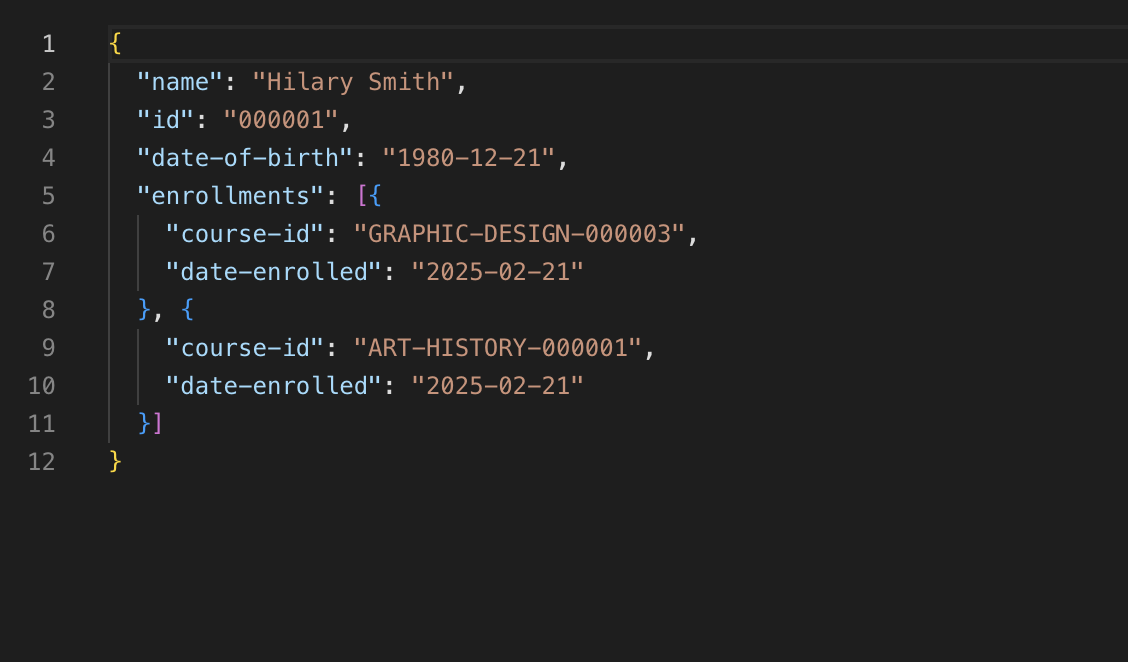
If you come across errors in your console, see the troubleshooting section.
Next Steps
Now that you have finished following the Student Record System tutorial, you can explore more of Capella Operational by checking out the rest of the developer documentation, or look at working with the Data Service or SQL++ Queries from the SDK.
Troubleshooting
Below are some tutorial-specific tips for troubleshooting — you can find more detailed troubleshooting for connecting to Capella in our Troubleshooting Cloud Connections page.
Authentication Error
If you get an authentication error when running your application, confirm that the username and password in your Go file matches the username and password you used when setting up the Capella Operational cluster in your browser.
If they do not match, you can edit the Go file to add the correct username or password and try running the command again.