ALTER USER
- Capella Operational
- reference
- Couchbase Server 8.0
The ALTER USER statement enables you to alter the details of an existing user.
Purpose
Use the ALTER USER statement to update a local user’s attributes, such as their password, full name, and group. You can add the user to new groups or remove them from all existing groups.
This statement helps manage access control and keeps user information up to date within Couchbase Server.
| When you add new groups to a user, the ALTER USER statement replaces the user’s existing group assignments with the new ones you provide. It updates the entire group list, so any existing groups not included in the new list will be removed. |
Prerequisites
To execute this statement in the Capella UI, you must have one of the following roles:
| You cannot execute this statement using cluster access credentials. |
Syntax
alter-user ::= 'ALTER' 'USER' username ( 'PASSWORD' password )?
                ( 'WITH' name )?
                ( 'GROUP' group | 'GROUPS' group ( ',' group )* | 'NO' 'GROUPS' )?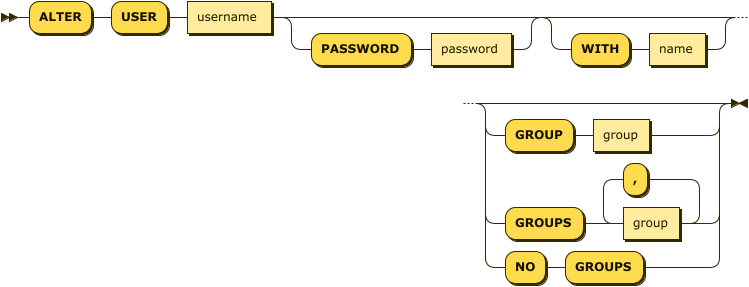
| username |
(Required) The unique identifier of the local user. |
| password |
(Optional) A quoted string containing the user’s new password. It must be at least 6 characters long. |
| name |
(Optional) A quoted string containing the user’s updated name. |
| group |
(Optional) The group you want to assign the user to. |
|
When altering a user, you can update their group using one of the following options:
|
Examples
ALTER USER Hilary PASSWORD "newpassword" WITH "Hilary Chloe";ALTER USER Alice GROUP support;ALTER USER Bob NO GROUPS;Related Links
-
To create a new user, see CREATE USER.
-
To delete a user, see DROP USER.
-
To create a new group, see CREATE GROUP.