Upgrade
To upgrade a Couchbase-Server cluster means to upgrade the version of Couchbase Server that’s running on every node.
|
Upgrading from Versions 7.1 or 7.2 to Versions 7.6.0 or 7.6.1
If there are index service nodes running in your cluster, you must use the swap rebalance method when upgrading from Couchbase Server 7.1 or 7.2 to Server 7.6.0 or 7.6.1. See Swap Rebalance for more information about the swap rebalance method. |
Before You Upgrade
Before upgrading, consider the following version compatibility concerns.
New Default Storage Backend in Couchbase Server Version 8.0
After you fully upgrade to Couchbase Server 8.0.x or later, the default storage backend for buckets is Magma with 128 vBuckets. Previous versions of Couchbase Server used Couchstore with 1024 vBuckets as the default storage backend.
This new default results in 2 behavior changes from previous versions:
-
If you create a bucket and do not specify the storage backend, your bucket uses the Magma storage backend instead of the Couchstore backend.
-
If you specify Magma as the storage backend but do not set the new
numVBucketsparameter, the bucket has 128 vBuckets instead of the prior default of 1024 vBuckets. Magma buckets with 128 vBuckets are a new feature in Couchbase Server 8.0 and later.
These behavior changes could cause issues if you rely on the prior behavior and you use deployment scripts. If you have deployment scripts that create buckets, review them to determine if you need to make changes.
For example, suppose your deployment script does not specify the storage backend when it creates a bucket that you intend to use with the views feature. On versions prior to Couchbase Server 8.0, your script created a Couchstore bucket with 1024 vBuckets, In version 8.0, due to change in the default backend, your script creates a bucket with the Magma storage backend with 128 vBuckets. Attempting to use MapReduce Views with this bucket results in errors because Magma buckets do not support this feature.
| Views are deprecated in Couchbase Server 7.0 and later versions. Views support in Couchbase Server will be removed in a future release. Instead of views, use indexes and queries using the Index Service (GSI) and the Query Service (SQL++). Views will not run on the newer Magma storage engine. |
Another concern is that versions of Couchbase Server earlier than 8.0 do not support XDCR replication between buckets with different numbers of vBuckets. Therefore, you cannot replicate to a bucket you create with the new default backend setting from buckets on an earlier server version. To replicate from a bucket on an earlier version of Couchbase Server, explicitly set the new bucket’s storage backend to Couchstore or to Magma with 1024 vBuckets during creation.
For more information about storage backends, see Storage Engines.
x86 AVX2 Requirement for Couchbase Server Version 8.0 and Later
When running on x86-64 processors, Couchbase Server 8.0 and later requires that the CPU support the AVX2 instruction set. Most Intel processors manufactured since 2013 and AMD processors manufactured since 2015 support AVX2. If you attempt to run Couchbase Server 8.0 or later on a CPU that does not support AVX2, the server exits with an error. See Instruction Set Requirements for x86 Processors for more information.
Client-Certificate Authentication with Node-to-Node Encryption in Couchbase Server Version 8.0 and Later
Full mutual TLS support for the Index Service was introduced in Couchbase Server 8.0. It is not supported on 7.6 clusters or on mixed-version clusters, even though it can be enabled on them.
During a rolling upgrade of a cluster that has both node-to-node encryption and client-certificate authentication enabled, an upgraded Index Service node enforces client-certificate verification on its internal ports, which nodes still running 7.6 cannot satisfy. The rebalance that brings the first upgraded Index Service node into the cluster then fails.
Before starting the upgrade, disable client-certificate authentication:
$ couchbase-cli ssl-manage -c <cluster-url> -u <username> -p <password> --set-client-auth-state disabledRe-enable it once every node, and in particular every Index Service node, is running 8.0 or later.
Memcached Buckets Have Been Removed in Couchbase Server Version 8.0 and Later
Memcached buckets have been removed in Couchbase Server 8.0 and later. The upgrade process exits with an error if you attempt to upgrade a cluster with Memcached buckets. If your cluster has Memcached buckets, you must replace them with ephemeral buckets before upgrading. See Bucket Capabilities in the Version 6.6 documentation for a summary of the differences between Memcached and ephemeral buckets.
Upgrading to Version 7.x With Earlier Versions of .NET SDK
When upgrading from Couchbase 6.5 or 6.6 to 7.0 or later, determine if both of the following are true:
-
You use a version of the .NET SDK prior to 3.2.9.
-
Your cluster is in mixed mode networking where some nodes use IPv4 addressing and others use IPv6. See Changing Address Family for steps to determine if your cluster is running in this mode.
Using a version of the .NET SDK prior to 3.2.9 with mixed mode network addressing can cause issues with write operations. Before upgrading, resolve the mixed-mode networking issue.
Upgrading from Pre-7.1 Versions of Couchbase Server
You cannot upgrade directly from a version of Couchbase Server earlier than 7.1 to version 7.2.4 or later.
For example, you can directly upgrade from version 6.6 to version 7.2.3.
You cannot directly upgrade from version 6.6 to version 7.2.4. A compatibility issue with the Erlang version used by these earlier server versions prevents a direct upgrade to later versions of the server. To upgrade from server versions 6.5, 6.6, or 7.0 to version 7.6 or later, first upgrade to a version between 7.1 and 7.2.3. Then upgrade to version 7.6 or later.
Understanding Upgrade
To upgrade a Couchbase-Server cluster means to upgrade the version of the server that’s running on every node.
For example, modifying a cluster where all of its nodes are running Couchbase Server Enterprise Edition Version 6.6,
so that each of its nodes subsequently runs Couchbase Server Enterprise Edition Version 7.6.x.
An upgrade procedure involves both preparation routines and specific upgrade commands that you perform on each node.
To upgrade a cluster, you must individually upgrade each node in turn.
You must select the upgrade procedure for the cluster depending on whether the cluster needs to continue or cease serving data during the cluster-upgrade.
A review of the factors that determine the appropriateness of an upgrade-procedure is provided in Upgrade Procedure-Selection.
A cluster running more than one version of Couchbase Server is in mixed mode. Mixed mode is supported only while an upgrade is in progress. Running a cluster in mixed mode outside of an upgrade is not supported.
Couchbase Server Version Numbers
When upgrading, you need to consider the version numbers of the server that you’re upgrading from and to. Not all versions of Couchbase Server can be directly upgraded to all later versions. Also, the version numbers indicate under what conditions you can downgrade a version upgrade should you encounter problems. See Downgrade for more information about downgrading an upgrade.
Couchbase Server uses a 3-number version scheme:

-
The first number is the major version number.
-
The second number is the minor version number.
-
The third number is the maintenance or patch version number. The terms patch version and maintenance version are interchangeable.
Upgrade Paths
An upgrade path declares that Couchbase Server supports upgrading from one version to another. The tables in the following subsections list upgrade paths for Enterprise Edition and for Couchbase Server Community Edition, respectively. Each instance of the `→` sign declares support for the upgrade of the server-version on the left of the sign to the server-version on the right.
You can perform all supported upgrades with the cluster either offline or online.
| As far as is possible, you should aim to keep your cluster up to date with the latest version of Couchbase Server. |
Enterprise Edition Upgrade Paths
| Starting Version | Path to Current Version |
|---|---|
5.x |
Any 5.0.x / 5.1.x / 5.5.x → 6.6 → 7.2.3 → latest 7.2.x → 8.0.1 |
6.x |
Any 6.0.x / 6.5.x → 6.6 → 7.2.3 → latest 7.2.x → 8.0.1 |
7.x |
Any 7.0.x / 7.1.x → 7.2.3 → latest 7.2.x → 8.0.1 |
Community Edition Upgrade Paths
| Starting Version | Path to Current Version |
|---|---|
5.x |
Any 5.0.x / 5.1.x / 5.5.x → 6.6 → 7.2.3 → latest 7.2.x → 8.0.1 |
6.x |
Any 6.0.x / 6.5.x → 6.6 → 7.2.3 → latest 7.2.x → 8.0.1 |
7.x |
Any 7.0.x / 7.1.x → 7.2.3 → latest 7.2.x → 8.0.1 |
|
Important note when upgrading from 7.0.4 to 7.2.x on Windows 2019
Upgrading from version 7.0.4 → 7.2x on Windows Server 2019 may result in a missing java executable files error.
The problem is caused by the way Windows handles upgrades when dealing with older files, resulting in files being removed from the Couchbase installation without being replaced.
|
You can fix the server by invoking the Windows Repair operation on the Couchbase installation. This restores the missing files.
How to Upgrade Your Cluster
If you’re upgrading several nodes at once, then you must keep the version of the software on each node in step throughout the upgrade process.
For example, if you upgrade 3 enterprise nodes (Node 1, Node 2 and Node 3) from version 5.1x to 7.6.x, then you would use the following sequence:
| Step | Description | Upgrades |
|---|---|---|
1 |
Upgrade all nodes from 6.6.x to 7.2.3 |
|
2 |
Upgrade all nodes from 7.2.3 to 8.0.x |
|
|
Upgrading between non-adjacent version numbers is not supported.
To upgrade from 5.1.x to 7.2.4, 3 upgrades must be performed (as shown in Example 1):first, from 5.1.x to 6.6, then, from 6.6 to 7.2.3 and from 7.2.3 to 7.6.x. |
Upgrade from Community Edition to Enterprise
If you’re operating a Couchbase Server cluster on Community Edition, you can upgrade it to Enterprise Edition by way of a rolling online upgrade. This involves switching out the Community Edition nodes with fresh, net-new Enterprise Edition nodes. Both swap rebalance and remove and rebalance methods are supported. Delta Recovery is not supported since the new nodes must be fresh Enterprise Edition installations without any pre-existing Community Edition data remaining on them.
| Rolling upgrades from CE to EE are not supported if there are index service nodes running in the cluster. |
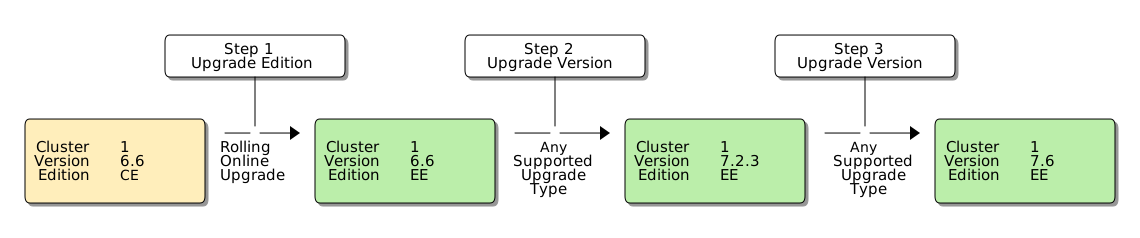
The Enterprise Edition nodes must be running the same version number of Couchbase Server as the Community Edition nodes that they’re replacing, otherwise the upgrade may fail. This means you cannot upgrade to a later version of Couchbase Server while also upgrading to Enterprise Edition during the same rolling upgrade.
If you want to upgrade from an earlier version of Community Edition to a later version of Enterprise Edition, you need to perform 2 separate upgrade procedures:
-
Upgrade the entire cluster to Enterprise Edition via a rolling online upgrade
-
Upgrade to the desired version number of Couchbase Server using any supported type of upgrade
For example, if you wanted to upgrade from Couchbase Server 6.6 Community Edition to Couchbase Server 7.6 Enterprise Edition, the process would look like the following:
-
Couchbase Server clusters must be run either entirely on Enterprise Edition nodes or entirely on Community Edition nodes.
Once you have upgraded 1 node to Enterprise Edition, you must upgrade all the other nodes before the cluster is considered as being in a steady, supportable state. -
CE does not support index service rebalancing. When the cluster is running with 1 or more CE nodes, then the indexes hosted on nodes being removed may be lost.
Users can create equivalent indexes (the same index with a different name) on different nodes to avoid loss of index capability. -
If a rolling online upgrade to Enterprise Edition is not possible in your environment, contact Couchbase for assistance.
|
Remember that Enterprise Edition is not free to run in production. If you’re interested in upgrading to Couchbase Server Enterprise Edition, check out the editions page. |
See Upgrade Procedure-Selection for a list of procedures
that can be used when upgrading from Community Edition to Enterprise.
Graceful Failover for Data Service nodes, with Delta Recovery, is not supported for such upgrades: instead you should use removal, addition, and swap rebalance for all nodes.
Node-Naming and Upgrade
In Couchbase Enterprise Server Version 7.2 or later, the node-name must be identified in the node-certificate as a Subject Alternative Name. If the node-name is not correctly identified, failure may occur during upgrade. For information, see Node-Certificate Validation.
Downgrade
If you have issues with an upgrade, you may want to downgrade to the earlier version of Couchbase Server. Your ability to downgrade depends on whether the upgrade was between major or minor version numbers or a maintenance version. See Couchbase Server Version Numbers for an explanation of Couchbase Server’s version numbering scheme.
Downgrading an Upgrade Between Major or Minor Versions
A major or minor version upgrade is an upgrade between versions that have a different first or second digit in their version numbers. Examples of a major or minor version upgrade include:
-
Upgrading from version 6.6.0 to version 7.2.3 is a major upgrade.
-
Upgrading from version 7.2.3 to version 7.6.10 is a minor upgrade.
See Couchbase Server Version Numbers for more information about version numbers.
When you’re upgrading between major or minor versions of Couchbase Server, you can downgrade at any time before you finalize your upgrade. Finalizing an upgrade means that all nodes in the cluster are running the new version of Couchbase Server. To learn how to prevent finalization until you’re ready, see Preventing Finalization.
When you finalize an upgrade, Couchbase Server updates metadata, objects, and structures to enable new features. As long as the cluster is running in mixed mode (at least 1 node running a different version), it cannot make these changes.
Use the online downgrade process to downgrade a major or minor upgrade before you have finalized it. See Perform an Online Downgrade to learn how to perform an online downgrade.
Once you finalize your major or minor upgrade, you cannot roll it back. Couchbase Server cannot revert the metadata, objects, and structures to their earlier formats. If your applications have issues with the new version after finalization, you can only revert to the earlier version by:
-
Creating a new cluster.
-
Installing the earlier version of Couchbase Server.
-
Migrating your data to the new cluster.
Because finalization increases the difficulty in rolling back an upgrade, it’s vital to test the new version with your applications before you finalize it. See the next section for tips on preventing finalization until you’re ready to finalize your upgrade.
| If you do need to roll back a finalized upgrade and you have a disaster recovery cluster running the previous version synced via XDCR, consider switching to it. Then you can create a new cluster running the prior version and either use it as the disaster recovery cluster or switch back to it after it has synced all data. |
Preventing Finalization
You should verify that your applications perform well when using the new version of Couchbase Server before you finalize your upgrade. Fully testing your applications may require you to upgrade all nodes in the cluster. However, Couchbase Server finalizes your installation when you upgrade the last node to the new version of Couchbase Server.
A workaround is to add a small arbiter node running the earlier version of Couchbase Server to your cluster before completing your upgrade. An arbiter node does not host any services, including the data service, so you can allocate minimal resources to it.
| Couchbase Server introduced arbiter nodes in version 7.6. Therefore, you can only use this method if you’re upgrading from 7.6.0 or later. See Adding Arbiter Nodes for more about arbiter nodes. |
The presence of the arbiter node prevents Couchbase Server from finalizing the upgrade because the cluster is running in mixed mode. You can upgrade all other nodes in the cluster to test your applications with the new version of Couchbase Server.
The arbiter node also prevents you from using any of the new features in the new version of Couchbase Server.
To add an arbiter node, follow the steps in Join a Cluster and Rebalance and deselect all services before adding the node to the cluster.
Once you have verified that the new version of Couchbase Server works well for your applications, remove the arbiter node to finalize the upgrade.
If you find that the new version of Couchbase Server does not work well for your applications, keep the arbiter node in place. Then downgrade the other nodes to the earlier version of Couchbase Server. Once you have finished updating the nodes, remove the arbiter node to complete the downgrade. See Perform an Online Downgrade for the steps to take to perform the downgrade.
Downgrading an Upgrade Between Maintenance or Patch Versions
If you’re upgrading between maintenance versions of Couchbase Server, you can downgrade at any time, even after you finalize the upgrade. A maintenance or patch version upgrade is an upgrade between versions that have the same major and minor version numbers but different maintenance version numbers. For example, an upgrade from version 8.0.0 to version 8.0.1 is a maintenance version upgrade. You can downgrade a finalized maintenance version upgrade because they do not make changes to metadata, objects, and structures that would prevent downgrading.
|
If you have enabled a special maintenance version or a diagnostic feature supplied by Couchbase Support or another Couchbase team, contact Couchbase Support for assistance before attempting to downgrade your cluster. If you have enabled new features using the Developer Preview Mode, you cannot downgrade your cluster. |
You downgrade a maintenance version upgrade by performing an online downgrade. See Perform an Online Downgrade for more the steps to take.
Perform an Online Downgrade
You can perform an online downgrade when:
-
You’re downgrading an upgrade between maintenance or patch versions of Couchbase Server. See Downgrading an Upgrade Between Maintenance or Patch Versions for more information.
-
You’re downgrading an upgrade between major or minor versions of Couchbase Server and you have not finalized the upgrade. See Downgrading an Upgrade Between Major or Minor Versions for more information.
The online downgrade method is similar to an online upgrade procedure. You perform the same swap rebalance procedure where you remove a node, install Couchbase Server, and then add it back to the cluster before rebalancing. The difference is that instead of installing a later version of Couchbase Server on the node, you install an earlier version of Couchbase Server.
To perform an online downgrade:
-
Perform a rebalance to complete the removal.
-
On the node you removed, install the earlier version of Couchbase Server.
-
Perform a rebalance to complete the addition.
-
Repeat steps 1–5 for each node in the cluster until all nodes are running the earlier version of Couchbase Server.
-
If you added an arbiter node to prevent finalization, remove the arbiter node and perform a rebalance to complete the downgrade. See Preventing Finalization for more information about using an arbiter node to prevent finalization.
| You cannot use an offline downgrade to roll back an upgrade. An offline downgrade is similar to an offline upgrade, except that you install an earlier version of Couchbase Server instead of a later version. See Upgrade with Cluster Offline for more information about online upgrades. You also cannot use a graceful failover followed by a full recovery to perform a downgrade. |